TL;DR — What You Need to Do
- Build an opt-in page with two separate, unchecked checkboxes (one for SMS consent, one for T&C/Privacy Policy), plus all required disclosures (message purpose, frequency, data rates, STOP, HELP). Phone number field must be optional.
- Publish a privacy policy page that includes: "We do not share your data with third parties for marketing purposes."
- Publish a terms and conditions page with your program name, description, opt-out instructions in bold, HELP instructions, carrier liability disclaimer, frequency, data rates, and a link to your privacy policy.
- Submit your campaign registration with a clear Campaign Description and a detailed Message Flow that includes all four URLs: opt-in page, opt-in screenshot, privacy policy, and terms of service.
- Set up automatic messages for opt-in confirmation (under 160 characters), opt-out confirmation, and HELP response.
All three pages must be live, public web pages — not PDFs, not behind a login. Every link must work. Scroll down for the full details on each step.
Most A2P 10DLC campaign rejections happen for the same handful of reasons — and almost all of them are preventable. While approval is ultimately determined by the carriers and no one can guarantee a specific outcome, a complete and compliant submission gives you the strongest possible foundation.
This guide covers everything: what A2P 10DLC registration is, what you need before you start, how to build each required page, what to write in every field, and the specific mistakes that get campaigns rejected. Whether you are registering for the first time or resubmitting after a rejection, this is the only guide you need.
What Is A2P 10DLC Registration (and Why Do You Need It)?
A2P stands for "Application-to-Person." It means a business is sending text messages to a customer (as opposed to two people texting each other). 10DLC stands for "10-Digit Long Code" — that is just a standard 10-digit phone number used for business texting.
Before you can send any SMS or MMS messages to customers through Aloware, mobile carriers like AT&T, T-Mobile, and Verizon require you to register your messaging campaign. This process is called A2P 10DLC registration.
Think of it like getting a license before you drive. The carriers want to know who you are, what messages you plan to send, and that you have proper permission from the people receiving those messages. Without an approved registration, your messages will either be blocked or heavily filtered by the carriers.
What You Need Before You Start
You need three web pages live and publicly accessible before you begin registration. These cannot be PDFs. They cannot be behind a login. They must be real web pages that anyone can visit by clicking a link.
Here are the three pages:
1. An opt-in page — This is a signup form where customers enter their contact information and agree to receive text messages from your business.
2. A privacy policy page — This explains how you collect, use, and protect customer data.
3. A terms and conditions page — This covers your legal terms of service for your messaging program.
All three pages must be on your website and accessible to the public. If a reviewer clicks your link and gets a login screen, a 404 error, or a PDF download, your campaign will be rejected.

Step 1: Build a Compliant Opt-In Page
Your opt-in page is where customers agree to receive your text messages. This is the single most scrutinized part of your registration. Reviewers will actually visit your page, read every word, and click every link. If anything is missing or unclear, you will be rejected.
What Your Opt-In Page Must Include
Your opt-in page needs all of the following elements:
A clear messaging purpose. Tell customers exactly what kinds of texts they will receive. Do not be vague. Say something like "appointment reminders and promotions" — not just "messages from our company."
Opt-out instructions. The page must say: "Reply STOP to unsubscribe."
Support instructions. The page must say: "Reply HELP for support."
Message frequency disclosure. Tell customers how often they will hear from you. If you do not know the exact number, you can say "Message frequency varies."
Data rates disclosure. The page must say: "Message and data rates may apply."
The phone number field must be optional. Do not put an asterisk (*) next to the phone number field. Do not make it a required field. If customers are forced to give their phone number to complete a signup or purchase, your campaign will be rejected. Consent must always be voluntary.
Your Form Needs Two Separate Checkboxes
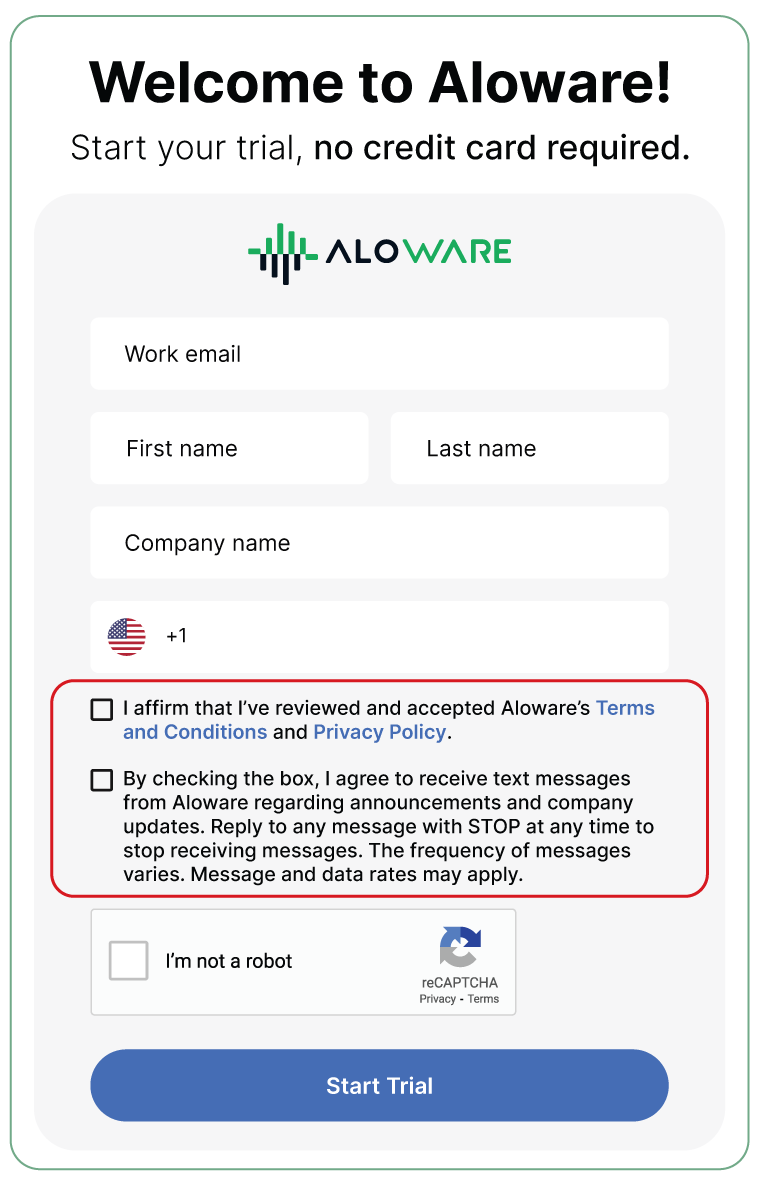
This is critical. You need two distinct, unchecked checkboxes on your form. Do not combine them into one.
Checkbox 1 — SMS Consent:
"By checking this box, I agree to receive SMS messages from [Your Company Name], including appointment reminders and notifications. Message frequency varies. Message and data rates may apply. Reply STOP to unsubscribe. Reply HELP for help. Consent is not a condition of purchase."
Checkbox 2 — Terms and Conditions + Privacy Policy:
"I have reviewed and accept [Your Company Name]'s Terms and Conditions and Privacy Policy."
Make sure "Terms and Conditions" and "Privacy Policy" are clickable links that go to the actual pages.
Why Two Checkboxes?
SMS consent and agreement to your terms of service are two different things. Carriers require them to be separate so that a customer is making a clear, informed choice about each one. Combining them into one checkbox is a common reason for rejection.
No Pre-Checked Boxes
Both checkboxes must be unchecked by default. The customer must actively check each box themselves. Pre-checking a box counts as forced consent and will get your campaign rejected.
Step 2: Set Up Your Privacy Policy Page
Your privacy policy explains what data you collect, how you use it, and how you protect it. For A2P 10DLC compliance, there is one statement that your privacy policy absolutely must include:
"We do not share your data with third parties for marketing purposes."
This is a CTIA requirement. If your privacy policy is missing this statement, your campaign will be rejected.
If Your Privacy Policy Mentions Third-Party Sharing
Some businesses do share certain data with third parties for non-marketing reasons (like a payment processor or customer support vendor). That is fine, but you need to add a specific carve-out for SMS data. Add this language to the section of your privacy policy that discusses data sharing:
"All the above categories exclude text messaging originator opt-in data and consent; this information will not be shared with any third parties, excluding aggregators and providers of the Text Message services."
In simple terms: you can share other types of business data as needed, but SMS opt-in information is always off-limits for sharing.
A Practical Tip
Consider creating a separate, messaging-specific privacy policy instead of trying to work all these requirements into your main company privacy policy. A dedicated messaging privacy policy is easier to keep up to date if requirements change, and it is less likely to have conflicting language from other parts of your business.
Step 3: Set Up Your Terms and Conditions Page
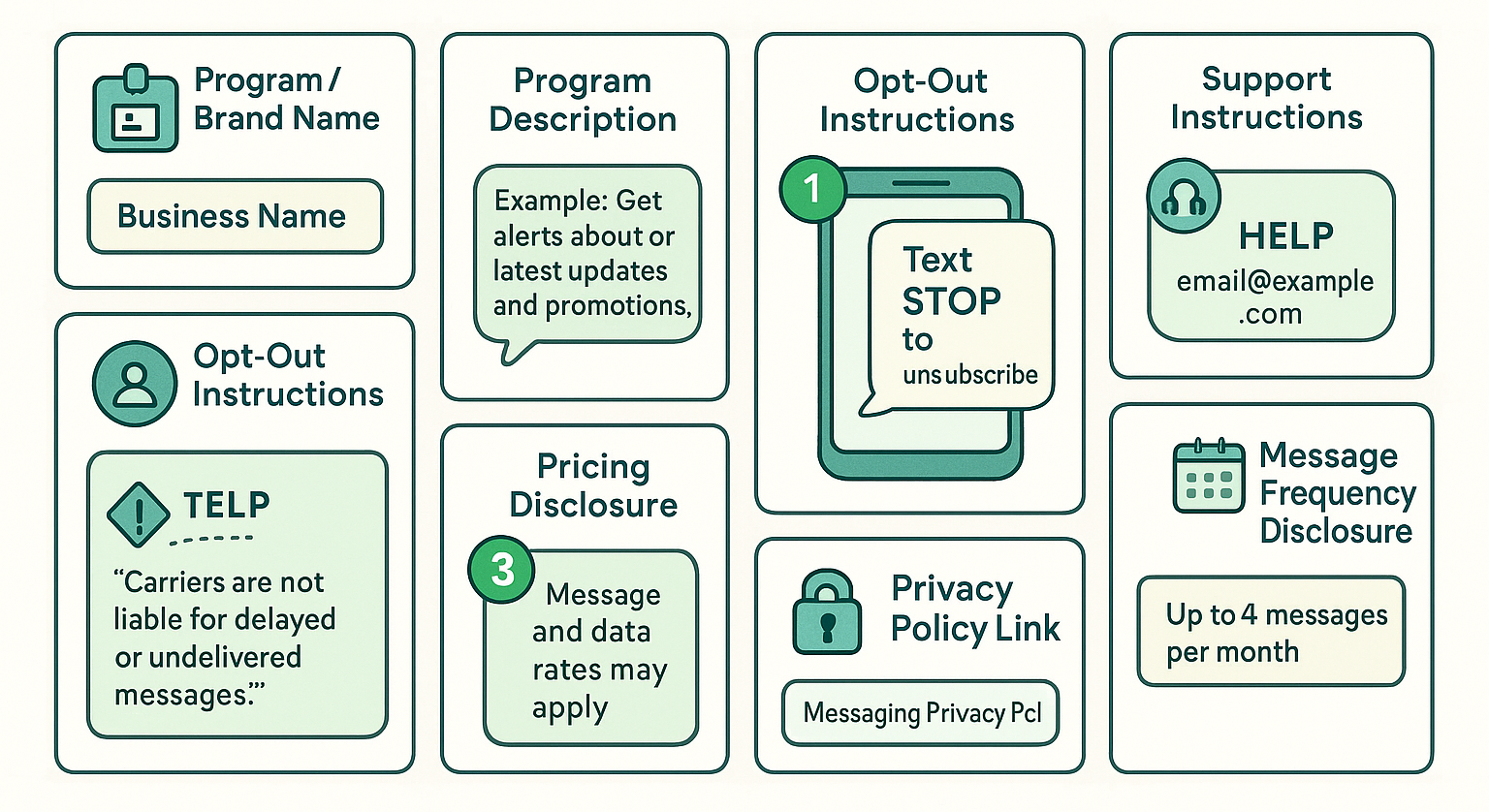
Your terms and conditions page must include specific information about your messaging program. Here is what it needs:
Your program or brand name. The name of the business sending the messages.
A program description. A brief explanation of what kinds of messages customers will receive when they opt in.
Opt-out instructions. Explain that customers can text STOP at any time to stop receiving messages. After they text STOP, confirm they will no longer receive messages. If they want to rejoin, they can sign up again. These opt-out instructions must be displayed in bold.
Support instructions. Explain that customers can text HELP for assistance, and provide an email address or phone number for direct support.
A carrier liability disclaimer. Include this exact statement: "Carriers are not liable for delayed or undelivered messages."
Pricing disclosure. Include: "Message and data rates may apply."
Message frequency disclosure. State how often messages will be sent (for example, "Message frequency varies" or "Up to 4 messages per month").
A link to your privacy policy. Link directly to your messaging privacy policy page.
Boilerplate Terms Template
If you are starting from scratch, here is a template you can customize. Replace the bracketed items with your own information:
[Your Business Name] SMS Terms of Service
[Your Business Name] offers SMS messaging to provide [describe your message types — for example: appointment reminders, order updates, and promotional offers].
You can cancel the SMS service at any time. Just text STOP. After you send the SMS message "STOP" to us, we will send you an SMS message to confirm that you have been unsubscribed. After this, you will no longer receive SMS messages from us. If you want to join again, just sign up as you did the first time, and we will start sending SMS messages to you again.
If you are experiencing issues with the messaging program, you can reply with the keyword HELP for more assistance, or you can get help directly at [your support email or phone number].
Carriers are not liable for delayed or undelivered messages.
As always, message and data rates may apply for any messages sent to you from us and to us from you. [Message frequency — for example: "Message frequency varies"]. If you have any questions about your text plan or data plan, it is best to contact your wireless provider.
If you have any questions regarding privacy, please read our privacy policy: [link to your privacy policy].
We recommend having your legal counsel review your terms before publishing.
Step 4: Submit Your Campaign Registration
Once your opt-in page, privacy policy, and terms and conditions are all live and publicly accessible, you are ready to submit your campaign for approval. During registration, you will need to fill out two key fields.
Field 1: Campaign Description
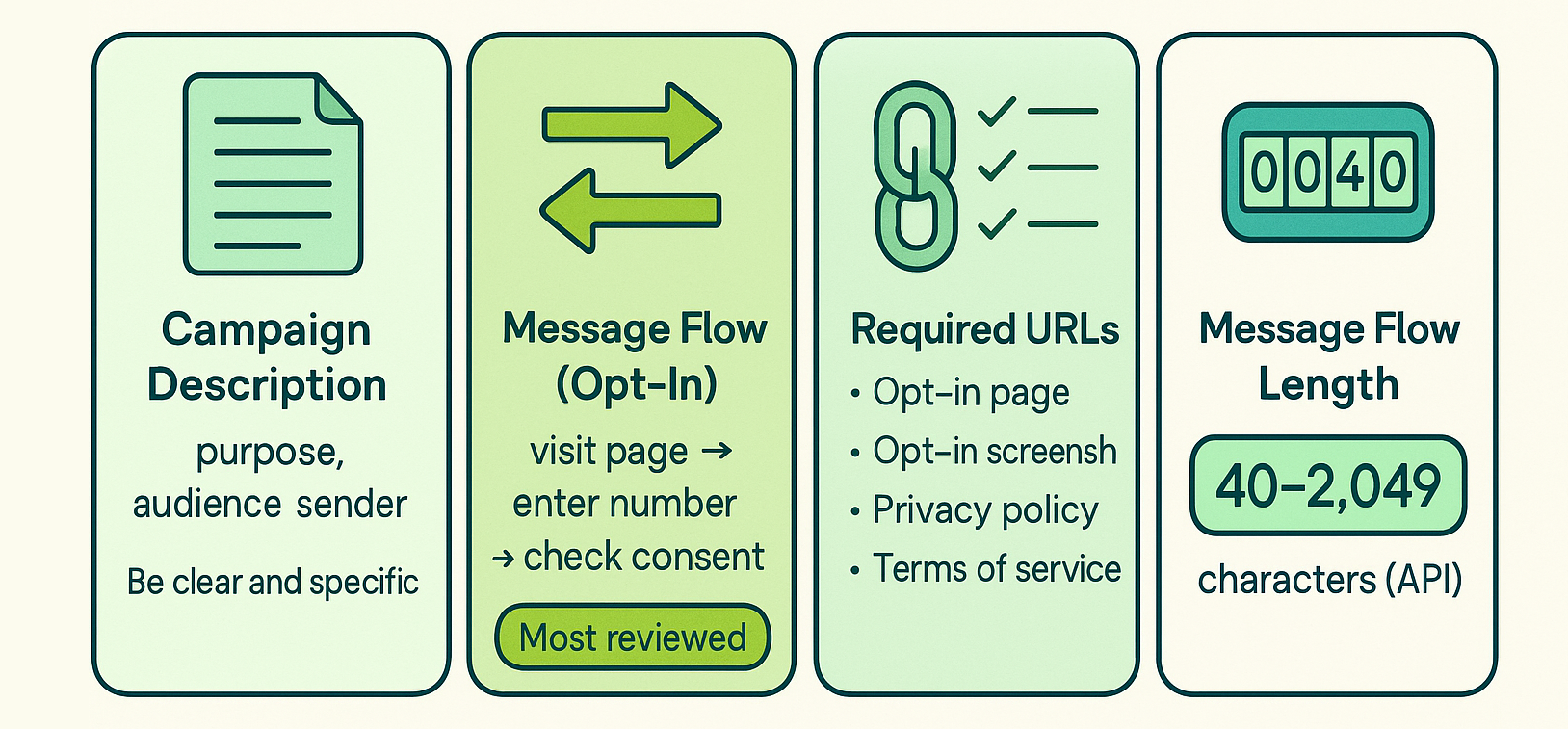
This field describes what you will use this campaign for. Write the purpose of your campaign, who the audience is, and who is sending the messages.
Example:
"Provide assistance to our current customers, mainly conversational communication."
Keep it clear and specific. Do not write something vague like "General business messages." Explain the actual purpose.
Field 2: Message Flow (How Users Opt In)
This is where you explain exactly how customers give their consent to receive messages from you. This is the field that gets the most scrutiny from reviewers. You need to describe the full opt-in process and include your URLs.
Example:
"End users opt in by visiting www.yourwebsite.com/signup and adding their phone number. They check a box agreeing to receive text messages from [Your Brand]. The opt-in page displays SMS consent language including message frequency, data rates disclosure, and opt-out instructions. Privacy Policy: www.yourwebsite.com/privacy. Terms: www.yourwebsite.com/terms."
URLs You Must Include
When registering your campaign, include all of these URLs in the Campaign Description or Message Flow field:
- Your opt-in page URL (the signup form)
- An opt-in image or screenshot URL (showing your form with all the required elements visible)
- Your privacy policy URL
- Your terms of service URL
Important: If your opt-in form is behind a login or has not been published yet, take a screenshot of the form, upload it to Google Drive or OneDrive, set the sharing permissions to "anyone with the link can view," and include that public link in your registration.
Message Flow Length
If you are submitting via the API, your message flow must be between 40 and 2,049 characters. Make sure you are detailed enough to meet the minimum, but do not pad it with unnecessary filler.
How Consent Works (and Why It Matters)
Getting customer consent right is fundamental to your campaign approval. The rules here are straightforward, but getting them wrong will get you rejected.
Transactional Messages vs. Marketing Messages
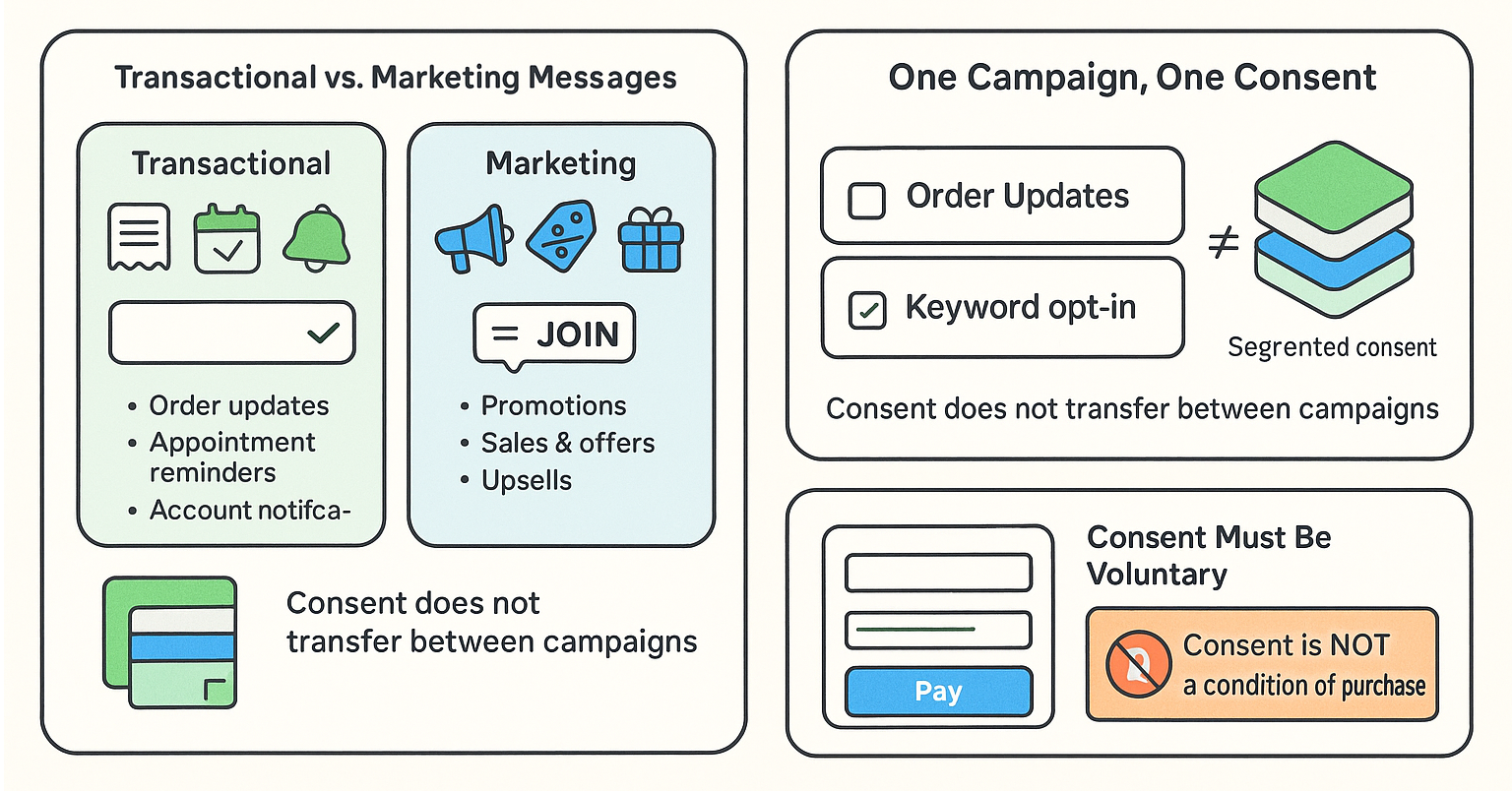
Transactional messages are things like order confirmations, appointment reminders, shipping updates, and account notifications. For these, you need basic permission — for example, a customer provides their phone number at checkout or verbally agrees to receive updates over the phone.
Marketing messages are things like promotions, sales announcements, discount codes, and upsell offers. For these, you need documented proof of consent — like a checkbox on a form, a signed paper form, or a keyword opt-in (where the customer texts a word like "JOIN" to your number).
One Campaign, One Consent
Consent applies to each campaign separately. If a customer signs up for order updates, that does not mean they agreed to receive promotional messages. You need separate opt-ins for each type of message. Combined consent is not allowed.
Consent Must Be Voluntary
If customers have to opt in to SMS messaging just to complete a purchase, create an account, or access your service, your registration will be rejected. Consent must always be optional. That is why your opt-in checkbox language should include "Consent is not a condition of purchase."
Different Opt-In Methods and How to Document Each One
Not every business collects consent through a website form. Here is how to document your opt-in process based on how you actually collect consent.
Website Form
Provide the direct URL to your signup page. Make sure every required element is visible on the page.
Example: https://www.yourbusiness.com/signup
Form Behind a Login or Paywall
Take a screenshot of the opt-in form showing all required elements. Upload the screenshot to Google Drive or OneDrive. Set sharing to "anyone with the link can view." Include the public link in your Message Flow field.
Verbal or Phone Opt-In
Write out the full script of what your agent says and how the customer confirms consent. The script must include all required disclosures (company name, message types, frequency, data rates, STOP/HELP instructions, and links to your terms and privacy policy).
Example script:
Agent: "As part of our service, we can send you automated text alerts regarding your account activity. We will send approximately two messages per month. Message and data rates may apply, depending on your mobile phone service plan. At any time you can get more help by replying HELP, or you can opt out completely by replying STOP. Our Terms of Service are available at [URL] and our Privacy Policy can be found at [URL]. Would you like to sign up for text alerts?"
Customer: "Yes please."
Agent: "Great, we will send you a confirmation text shortly."
Paper Form
Scan or photograph the paper form showing all required disclosures and the area where the customer provides their phone number. Upload the image publicly and include the link.
Text Keyword Opt-In
Screenshot the marketing materials that promote the keyword (like a flyer, poster, ad, or in-store signage). The materials must display all required disclosures: message frequency, data rates, STOP/HELP instructions, and links to your terms and privacy policy. Upload the screenshot publicly and include the link.
Set Up Your Automatic Messages
Once your campaign is approved, certain automated messages need to be in place. These are messages your system sends automatically in response to customer actions.
Opt-In Confirmation Message
This is the first text a customer receives after they sign up. Keep it under 160 characters and include:
- Your company or program name
- Message frequency (must match what your opt-in page and terms say)
- "Msg & data rates may apply"
- "Reply HELP for help"
- "Reply STOP to cancel"
Example:
"[Your Company]: Thanks for signing up for updates! Msg frequency varies. Msg & data rates may apply. Reply HELP for help, STOP to cancel."
Opt-Out Confirmation Message
When a customer texts STOP, they must receive a confirmation that they have been unsubscribed and will not receive any more messages.
Example:
"[Your Company]: You have successfully been unsubscribed. You will not receive any more messages from this number."
HELP Response Message
When a customer texts HELP, they must receive a message with a way to get support.
Example:
"[Your Company]: For help, please email support@yourcompany.com or call us at (555) 123-4567."
What Will Get Your Campaign Rejected
Here is a summary of the most common reasons campaigns get rejected. Review this list before you submit.
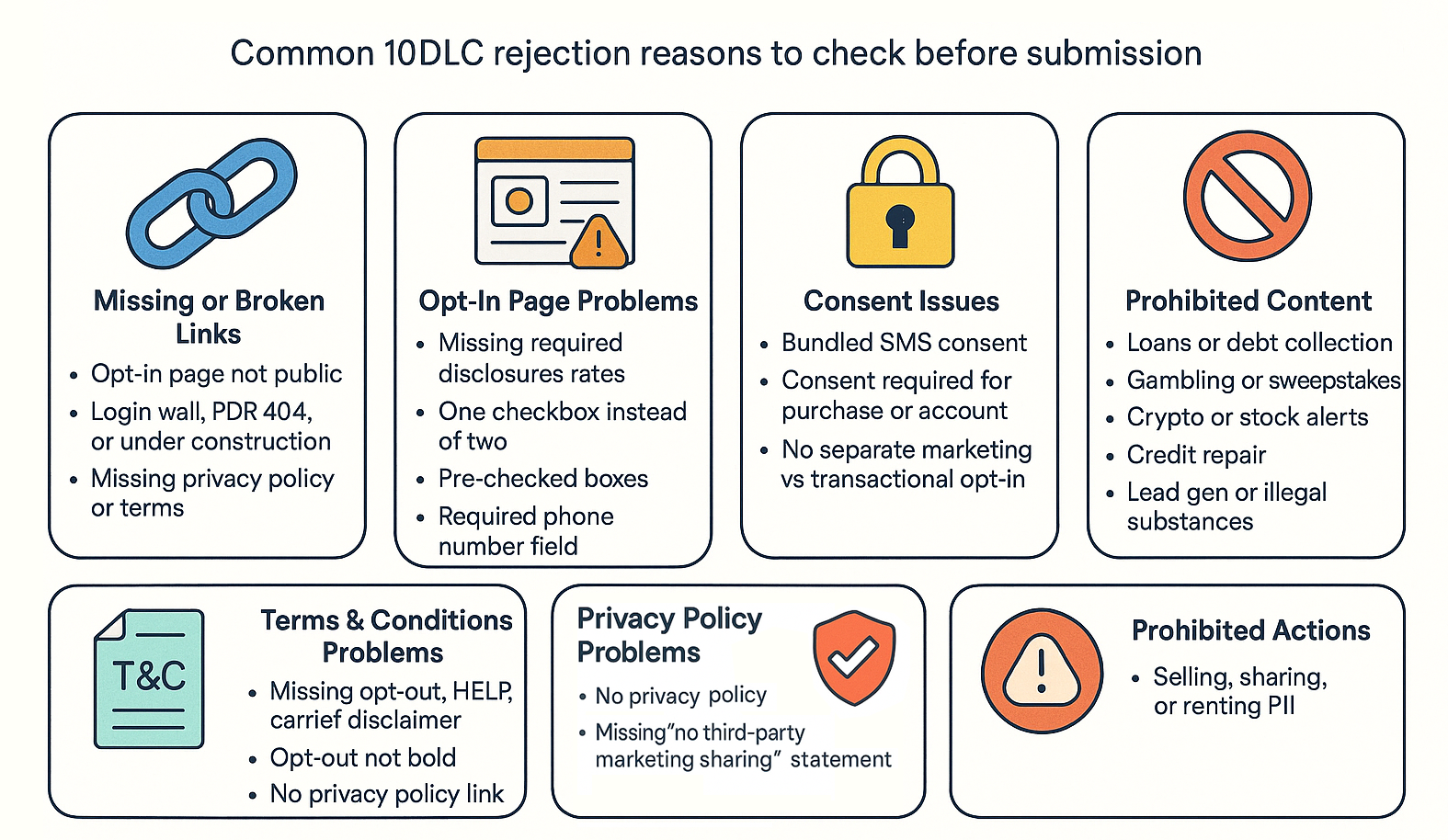
Missing or Broken Links
- Your opt-in page, privacy policy, or terms and conditions are not publicly accessible
- Links lead to a login wall, a PDF, a 404 error, or a page under construction
Opt-In Page Problems
- Missing any of the required elements (messaging purpose, STOP, HELP, frequency, data rates)
- Only one checkbox instead of two separate ones
- Checkboxes are pre-checked
- Phone number field is marked as required (with an asterisk)
Consent Issues
- SMS consent is bundled with other consent (like agreeing to terms of service)
- Consent is required to complete a purchase or create an account
- No separate opt-in for marketing messages vs. transactional messages
Privacy Policy Problems
- Missing the required statement about not sharing data with third parties for marketing
- No privacy policy page at all
- Privacy policy mentions third-party sharing but does not include the SMS data carve-out
Terms and Conditions Problems
- Missing required elements (opt-out instructions, HELP instructions, carrier liability disclaimer, frequency, data rates)
- Opt-out instructions not in bold
- No link to the privacy policy
Prohibited Content
The following industries and content types are not allowed on 10DLC and will be automatically rejected:
- Loan marketing or debt collection
- Gambling or sweepstakes
- Stock or cryptocurrency alerts
- Credit repair
- Third-party lead generation
- Illegal substances
Prohibited Actions
Selling, sharing, or renting personal information (PII) to third parties is strictly prohibited and will result in rejection.
Quick Reference Checklist
Use this checklist to make sure everything is in place before you submit.
Opt-In Page
- [ ] Clear messaging purpose (what texts the customer will receive)
- [ ] "Reply STOP to unsubscribe"
- [ ] "Reply HELP for support"
- [ ] Message frequency disclosure
- [ ] "Message and data rates may apply"
- [ ] Phone number field is optional (no asterisk)
- [ ] Two separate, unchecked checkboxes (SMS consent and T&C/Privacy)
- [ ] "Consent is not a condition of purchase"
- [ ] Links to privacy policy and terms and conditions
Privacy Policy Page
- [ ] Explains what data you collect and how it is used
- [ ] Includes: "We do not share your data with third parties for marketing purposes"
- [ ] If third-party sharing is mentioned, includes the SMS data carve-out disclaimer
- [ ] Publicly accessible (no login required)
Terms and Conditions Page
- [ ] Program or brand name
- [ ] Program description
- [ ] Opt-out instructions in bold (STOP)
- [ ] Support instructions (HELP + contact info)
- [ ] "Carriers are not liable for delayed or undelivered messages"
- [ ] "Message and data rates may apply"
- [ ] Message frequency disclosure
- [ ] Link to privacy policy
- [ ] Publicly accessible (no login required)
Campaign Registration Fields
- [ ] Campaign Description: purpose, audience, sender
- [ ] Message Flow: full opt-in process with URLs
- [ ] Opt-in page URL included
- [ ] Opt-in screenshot URL included
- [ ] Privacy policy URL included
- [ ] Terms of service URL included
- [ ] All links are publicly accessible and working
Automatic Messages
- [ ] Opt-in confirmation message (under 160 characters)
- [ ] Opt-out confirmation message
- [ ] HELP response message
Frequently Asked Questions
What does A2P 10DLC mean? A2P stands for Application-to-Person, meaning a business is sending text messages to a customer. 10DLC stands for 10-Digit Long Code, which is a standard phone number format used for business texting. A2P 10DLC registration is the process of getting your business messaging campaign approved by mobile carriers before you can start sending texts.
How long does approval take? Approval times vary depending on the carrier and the completeness of your submission. A clean, fully compliant registration has the best chance of fast approval. Incomplete submissions will be rejected and need to be resubmitted, which adds significant delays.
Can I use one checkbox instead of two? No. You must have two separate checkboxes — one for SMS consent and one for accepting your terms and conditions and privacy policy. Combining them will result in rejection.
Can I pre-check the SMS consent box? No. Pre-checked boxes are considered forced consent and are not compliant. Both checkboxes must be unchecked by default.
Does my customer have to provide their phone number to sign up? The phone number field should be optional on your form. Customers should not be required to give a phone number to complete a purchase, create an account, or access your service. SMS consent must always be voluntary.
What if my opt-in form is behind a login? Take a screenshot of the form, upload it to Google Drive or OneDrive with public sharing enabled, and include that link in your Message Flow field.
What if my disclosures are not in English? Include a translated English version alongside the original language version.
What is the SMS data carve-out disclaimer? If your privacy policy mentions sharing data with third parties in any capacity, you must add a statement that explicitly excludes SMS opt-in data from being shared. The standard language is: "All the above categories exclude text messaging originator opt-in data and consent; this information will not be shared with any third parties, excluding aggregators and providers of the Text Message services."
Can someone who opted in for order updates automatically receive promotions? No. Consent applies to each campaign type separately. You need a separate opt-in for marketing messages and a separate opt-in for transactional messages.
Resources and Further Reading
Aloware Resources
[Download: Aloware SMS Campaign Compliance Checklist (PDF)] — Our one-page visual checklist with sample checkbox language, a compliant opt-in page example, and a quick-reference list of everything you need before you submit. Keep this next to you while you build your pages.
TCPA and FCC Resources
Your A2P 10DLC registration is one part of a larger compliance picture. The Telephone Consumer Protection Act (TCPA) is the federal law that governs how businesses can send text messages to consumers. Staying TCPA-compliant protects your business from fines ranging from $500 to $1,500 per violation.
Key TCPA rules to know:
- Prior express written consent is required before sending any marketing text messages. This means a signed or electronic agreement (like a checkbox on a form) — not just a verbal "yes."
- The 1:1 consent rule (effective January 2025) requires consent to be specific to one business. You cannot obtain blanket consent for multiple companies through a single form.
- Opt-out requests must be honored within 10 business days. Consumers can revoke consent by replying STOP, or by any other reasonable method.
- Do Not Call Registry rules apply to text messages. You cannot send marketing texts to numbers on the National Do Not Call Registry unless the consumer has given you prior express written consent.
For the full text of the regulations:
- FCC — Telephone Consumer Protection Act (TCPA)
- FCC Report FCC 23-107 — Targeting and Eliminating Unlawful Text Messages
- Federal Register — TCPA Rule Amendments (2024)
Twilio and Carrier Resources
Since Aloware uses Twilio as a messaging infrastructure provider, these Twilio resources provide additional detail on the registration process and carrier-specific requirements:
- Twilio — A2P 10DLC Overview
- Twilio — A2P 10DLC Campaign Approval Requirements
- Twilio — Improving Your Chances of A2P 10DLC Registration Approval
- Twilio — Gather the Required Business Information
- Twilio — A2P 10DLC Campaign Vetting FAQ
- Twilio — Forbidden Message Categories (US and Canada)
Need Help?
If you have questions about your specific registration or need help getting your campaign approved, contact your Aloware account manager. We are here to help you through the process.
This guide is a reference for A2P 10DLC campaign registration best practices and is not a guarantee of campaign approval. Approval decisions are made by the carriers and The Campaign Registry (TCR), and vetting criteria may change over time. We recommend consulting with your legal counsel to ensure your privacy policy, terms and conditions, and consent practices are compliant with all applicable laws, including the TCPA and any state-level regulations.
.png)

Ruby Kootval is Head of Product Marketing at Aloware. She has 12 years in digital marketing, including 8 in B2B SaaS and 5 in telecom, and writes about AI voice agents, dialers, CRM integrations, and contact center operations.