TL;DR
If your outbound calls land as “Scam Likely,” “Spam Likely,” or “Potential Spam” on the prospect's lockscreen, the cause is mechanical — not your script. Carrier AI (Verizon Call Filter, T-Mobile Scam Shield, AT&T Call Protect) and analytics partners (Hiya, First Orion, TNS) score your number on call velocity, area-code match, STIR/SHAKEN attestation level, CNAM data, and consumer complaints. Fix the inputs and the label drops. The fix lives at the carrier layer, not in your opening line.
Why it matters in 2026:
- 80% of Americans say they generally don't answer their cellphone when an unknown number calls (Pew Research).
- 92% of consumers believe unidentified calls are fraudulent, and 46% of unidentified calls go unanswered (Hiya 2024 State of the Call).
- More than 28% of the 46.75 billion unknown calls Hiya analyzed were spam or fraud — which is why carrier AI treats an unrecognized number as guilty until proven legitimate.
Why your calls get flagged (and why your script can't fix it)
Your call goes out, the lockscreen reads “Scam Likely,” the prospect declines, and your dashboard logs another unanswered dial. Your script is fine. Your list is fine. The problem happens between your dialer and the prospect's phone, in a layer you can't see — the carrier scoring layer.
In 2026 that layer is more aggressive. Verizon, T-Mobile, and AT&T run AI spam detection that scores numbers in real time on a dozen signals, and independent analytics partners (Hiya, First Orion, TNS) layer their own scoring on top. The result: even legitimate B2B teams show up as “Scam Likely” within the first week of a new number going live. When 92% of people already assume an unknown call is fraud, a flagged number doesn't stand a chance.
Key takeaway: “Scam Likely” is a carrier-layer scoring problem, not a messaging problem. You fix it by engineering the inputs the score depends on.
What is a “Scam Likely” / “Spam Likely” call?
A “Scam Likely” or “Spam Likely” call is an outbound call where the recipient's carrier has flagged the originating number as a probable scam, robocall, or unwanted commercial call — and shows a warning label on the lockscreen before the person answers. Common labels: “Scam Likely,” “Spam Likely,” “Potential Spam,” “Telemarketer,” “Suspected Spam.”
The label comes from carrier AI working with third-party analytics partners. Verizon uses Call Filter (powered in part by Hiya). T-Mobile uses Scam Shield. AT&T uses Call Protect. Each scores numbers on velocity, STIR/SHAKEN attestation, area-code match, CNAM data, and consumer reports — and refreshes that scoring every few hours. For the deeper carrier mechanics — spoofing, neighbor spoofing, the legal framework — see why legitimate sales calls get flagged as spam.
This isn't a one-time mistake. Once a number is scored suspicious, the label compounds: people see “Scam Likely,” they decline, carrier AI logs the rejection as more evidence, the score worsens. A burned number can stay burned for weeks unless you actively remediate.
Key takeaway: The label is generated outside your dialer, refreshes every few hours, and compounds as people decline. Your script does not move it.
The six signals carrier AI scores
Most outbound teams trip at least three of these without knowing it.
1. Call velocity from a fresh, unwarmed number
A brand-new number that jumps from zero to hundreds of dials in a day looks exactly like a scammer spinning up a fresh line. Warm new numbers up — a low daily volume in week one, ramping over the next two weeks — or pull from a pool with established reputation.
2. STIR/SHAKEN attestation level
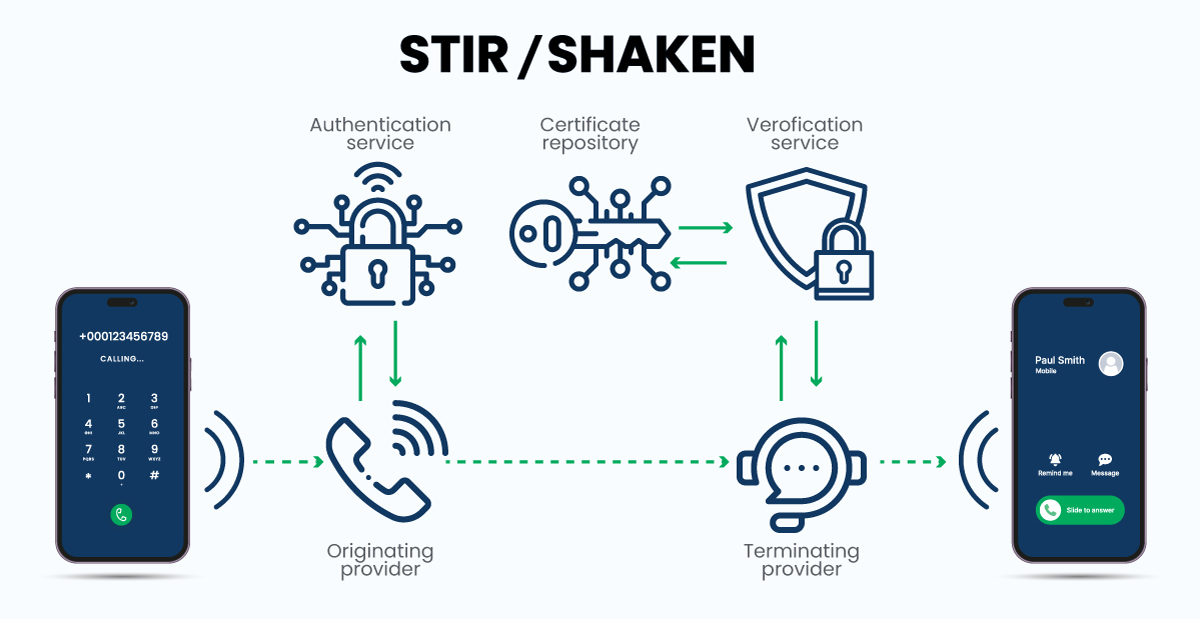
STIR/SHAKEN is the FCC-mandated framework that signs outbound calls with a trust attestation:
- A-Level (Full): the originating carrier verifies you own the number AND have the right to use it. This is what verified business calls earn.
- B-Level (Partial): the carrier confirms you possess the number but not your right to use it for this call.
- C-Level (Gateway): the carrier only knows the call passed through its gateway.
Calls signed B- or C-Level get penalized. A provider with proper carrier relationships signs A-Level; a cheap unverified VoIP line signs C-Level. If you don't know your level, ask your provider — they have to tell you.
3. Area-code mismatch
A 415 number calling a 305 area code with no relationship history is a classic robocaller pattern. Local Presence — matching the outgoing area code to the prospect's — removes that mismatch signal.
4. Missing or stale CNAM record
CNAM is the lookup that tells carriers what name to display. Blank or stale CNAM shows “Wireless Caller” or a generic city. Branded Calling registers your business name (and logo) so the prospect sees a recognized identity instead of an anonymous 10-digit number.
5. Consumer reports and analytics-partner scoring
Hiya, First Orion, and TNS aggregate complaints and hangups into their own spam scores, which carriers consume. Register with the Free Caller Registry (which distributes business data to those partners) and monitor for new flags daily.
6. Silence gap from predictive dialers
Predictive dialers call several numbers at once and connect a rep only after someone says “Hello,” creating a 1–3 second silence gap. Carrier AI knows that signature — it's one of the easiest robocaller patterns to detect. A 1:1 power dialer has the rep on the line when the prospect picks up: no gap, no signature.
Key takeaway: Velocity, attestation, area-code match, CNAM, consumer reports, and the predictive silence-gap. Most teams trip at least three. The fix is at the carrier layer.
The Pickup Stack: the layered fix for “Scam Likely”
Single-tactic fixes — register CNAM and hope, switch carriers and hope, rotate numbers and hope — work briefly and then collapse, because each only addresses part of the scoring model. The fix that holds is a three-layer stack working on every dial. At Aloware we call it the Pickup Stack: NumberGuard + Branded Calling + Local Presence.
Important: the Pickup Stack layers are add-on services, sold separately from your seat. They aren't bundled into the base plan by default — but if your answer rate depends on getting past carrier flagging (and for outbound teams, it does), they're the mandatory layer, not the optional one.
Layer 1: NumberGuard — reputation monitoring + remediation
NumberGuard scans your numbers daily across carrier partners, the Free Caller Registry, Hiya, First Orion, and TNS, and flags any number starting to be scored as spam before the connect-rate damage compounds. Most teams don't notice until their connect rate drops — a week-late warning. When a flag lands, NumberGuard files the registration corrections and re-attestation requests automatically.
Layer 2: Branded Calling — identity at the lockscreen
Branded Calling registers your business name and logo with carrier partners so a recognized identity appears before the prospect answers, instead of a random number. The carrier sees a registered, identified caller; the prospect sees a business they recognize. For the answer-rate proof behind this, see our branded calling guide.
Layer 3: Local Presence — area-code matching at scale
Local Presence matches your outgoing area code to the prospect's, so the carrier doesn't see the mismatch pattern and the prospect doesn't bounce on the out-of-area instinct. Area-code matching tends to lift pickup rates — but only when paired with clean number reputation, which is why it's a layer of the stack, not a standalone trick. Use dedicated (private) numbers, not a shared pool where other teams' behavior damages your reputation.
Key takeaway: NumberGuard for reputation, Branded Calling for identity, Local Presence for area-code match — bought as add-ons, run together. Single-tactic fixes collapse; the composed stack holds.

The 7-step fix checklist
- Audit your STIR/SHAKEN attestation level. If you're signing B- or C-Level, move to a provider that signs A-Level. Non-negotiable.
- Register with the Free Caller Registry. Free. It pushes your business identity to Hiya, First Orion, and TNS.
- Register CNAM for every number. Get your business name on the caller ID display.
- Stop using predictive dialers. Switch to a 1:1 power dialer to kill the silence-gap signature.
- Warm up new numbers before high-volume use; rotate, don't burn.
- Use private Local Presence, not shared pools.
- Monitor daily with NumberGuard or equivalent — find out the day you're flagged, not the week after.
If you can only do three: attestation, CNAM, and monitoring (steps 1, 3, 7) cover the largest share of the scoring model.
How Aloware fixes “Scam Likely” calls
Aloware runs the Pickup Stack as a connected system rather than seven vendors stitched together. Every outbound call signs STIR/SHAKEN A-Level by default; NumberGuard monitors and remediates daily; Branded Calling registers your identity at the lockscreen; private Local Presence matches area codes — and because the dialer, carrier layer, identity registration, and monitoring run in one platform, a flag caught by NumberGuard triggers remediation across the whole stack in one motion. The Voice Integrity Wizard walks new accounts through 10DLC, CNAM, A2P, and Free Caller Registry setup in one flow.
Real cons to know: the Pickup Stack layers are add-ons priced separately from the seat. Local Presence is US numbers only. Advanced workflow customization has a learning curve — though onboarding includes a free webinar, and teams under 25 users can add paid training sessions (3+ sessions are free above that).
Bottom line
“Scam Likely” is a carrier-layer scoring problem with six mechanical inputs — velocity, attestation, area-code match, CNAM, consumer reports, and the predictive silence-gap. Fix the inputs and the label drops. For a mid-market team running real outbound volume, the question isn't whether to engineer your pickup rate — it's whether you build it from separate vendors and a Zapier diagram, or run it in one system alongside your dialer.
See the Pickup Stack on your own numbers
Book a 20-minute demo — we'll show NumberGuard, Branded Calling, and Local Presence running on a live call against your own number reputation.

Frequently Asked Questions
Why my business phone number is showing as spam?
Your business phone number may be showing up as spam for several reasons, such as sending unsolicited messages to a large number of people, failing to provide an option for recipients to opt-out of future messages, sending messages too frequently or in large volumes can lead to high numbers of opt-outs and complaints, and violating laws such as the Telephone Consumer Protection Act (TCPA).
Why do carriers verify calls?
Carriers verify calls to protect customers from unwanted and potentially harmful calls, such as spam, fraud, and telemarketing. Call verification helps ensure that the caller's identity is legitimate and that the call is not from a spoofed or fake number.
.png)

Ruby Kootval is Head of Product Marketing at Aloware. She has 12 years in digital marketing, including 8 in B2B SaaS and 5 in telecom, and writes about AI voice agents, dialers, CRM integrations, and contact center operations.

.webp)