.webp)
TL;DR
A CRM dialer connects your phone system directly to HubSpot, Salesforce, or your CRM — so reps call, log, and follow up from inside contact records without switching tabs. For mid-market sales teams running real outbound volume, it's the difference between a phone system that records activity and a calling system that drives the outbound workflow.
Key facts for mid-market sales operators:
- A CRM dialer eliminates the two biggest time drains in outbound sales: manual dialing and manual logging — sales reps spend 21% of their workday on data entry without one
- Power dialers (1:1) are the default for compliance-conscious B2B sales teams — predictive dialers can trigger TCPA exposure at scale
- The difference between a "CRM integration" and a true CRM dialer is depth: native entity-level sync to HubSpot, Salesforce, Pipedrive, Zoho, or GoHighLevel — not just a one-way activity log
- Teams using native CRM dialers report 25% higher connection rates and 15% more time on live conversations vs. tab-flip workflows
- In 2026, the best CRM dialers also include AI voice agents that handle inbound and outbound calls when reps aren't available — at $0.10/minute for AI Voice Agent calls (Aloware), separate from the per-seat unlimited agent calling included with every plan
Most "what is a CRM dialer" guides are written for a solo founder picking their first dialer. This one is written for the mid-market sales operator who's already past that — a real CRM stack, an outbound motion that breaks every SMB-grade tool you try. We'll walk through what a CRM dialer is, the four types, how it differs from a phone-system-with-an-integration, and what mid-market teams should evaluate when picking one. See the 8 best sales dialers in 2026 if you're ready to start shortlisting — and read why your calls land in spam if you're seeing connection rates drop alongside dial volume.
Key takeaway: Leads are 21x more likely to convert if contacted within 5 minutes of a form submission. At mid-market volume (hundreds of inbound leads per day), no human-only workflow holds that SLA — CRM-native calling plus AI voice agents is what makes it possible.
What Is a CRM Dialer?
A CRM dialer is software that integrates calling functionality directly into your customer relationship management (CRM) system. Instead of using a separate phone app and manually updating records after each call, reps call directly from contact or lead records — and the system automatically logs the outcome, duration, recording, and next steps.
The key distinction from a standard business phone system: a CRM dialer is workflow-first. It's designed around the sales process, not just the phone call. It surfaces the right contact data at the right moment, enforces call dispositions, advances through prioritized lead lists, and triggers follow-up actions — all from inside the CRM your team already uses.
Think of it this way: a phone system makes calls. A CRM dialer runs outbound sales campaigns from inside your CRM.
Key takeaway: A CRM dialer isn't just calling software that syncs to your CRM — it's a calling system built specifically to drive your CRM workflow. The difference shows up in how much time reps spend on actual conversations vs. administrative tasks.
How a CRM Dialer Works
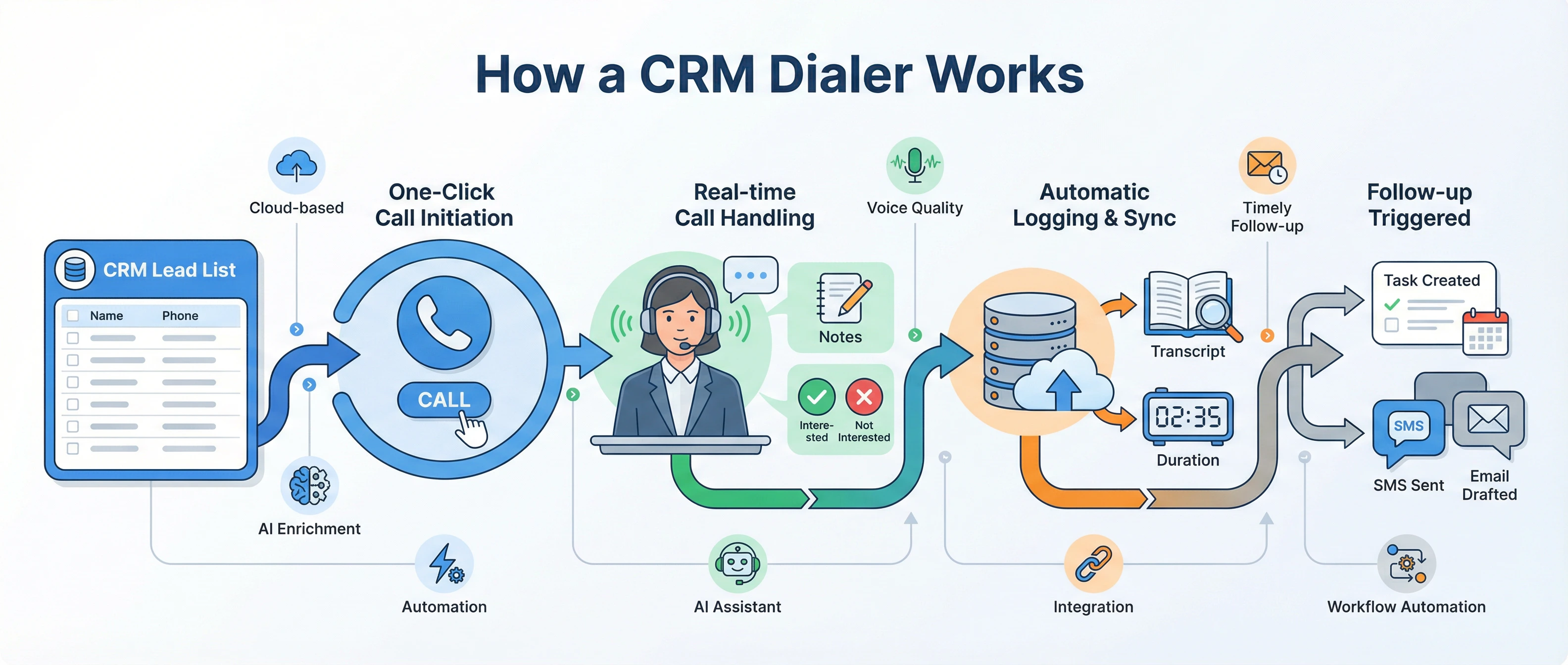
When a rep is ready to run their call queue, a CRM dialer typically works like this:
- Lead list pulled from CRM — the dialer imports contacts from a saved CRM view, filter, or workflow trigger. In Aloware, this happens automatically when you start a power dialer session from a HubSpot list or Salesforce report.
- Call initiates with one click — the rep clicks "Start" and the system dials. No manual number entry. No copy-pasting. Full contact context — deal stage, previous calls, last SMS, open tasks — loads on screen the moment the call connects.
- Call handled in real time — the rep talks, takes notes, and selects a disposition (Interested, Callback, Not Qualified, etc.). If no answer, the system drops a pre-recorded voicemail and immediately dials the next number.
- Outcome logged automatically — the moment the call ends, the recording, transcript, call duration, and disposition sync to the contact record in your CRM. No after-call work. No manual entry. The rep is already on the next call.
- Follow-up triggered — based on the disposition, the dialer can automatically fire the next step: send an SMS, enroll the lead in a sequence, change the deal stage, or notify the account owner.
This full loop — from CRM list to call to logged outcome to follow-up — is what separates a true CRM dialer from just "calling with a sync."
Key takeaway: The workflow loop is the value. A CRM dialer turns a disconnected sequence of tasks (find lead → dial → wait → log → follow up) into a single uninterrupted flow that reps complete in seconds per call.
Types of CRM Dialers
Not all CRM dialers work the same way. The type you choose determines your compliance exposure, call quality, and how your team experiences the tool day-to-day.
Power Dialer (1:1)
The most common type for sales teams. A power dialer calls one contact at a time, dials the next number only when the rep is ready, and ensures every answered call connects to a live agent immediately — no delay, no robotic pause.
Best for: Outbound sales teams running personalized campaigns, SDR teams, account-based outreach, any high-volume team that cares about call quality and compliance.
Aloware's power dialer allows reps to make 500+ calls per day while staying fully personalized — each call surfaces the lead's CRM history, deal stage, and prior notes on screen before the conversation starts.
Predictive Dialer
Calls multiple numbers simultaneously and uses an algorithm to predict when an agent will be free. When more people answer than expected, calls get abandoned — meaning a real person picks up and hears silence or a disconnect.
The problem: Abandoned calls violate TCPA regulations and destroy caller reputation. Most compliance-conscious teams avoid predictive dialers for this reason. The FCC's TCPA rules cap abandoned call rates at 3% — nearly impossible to maintain at scale with a true predictive dialer.
Progressive Dialer
Calls the next number automatically when the current call ends — but only one at a time, and only when a rep is free. Sits between power and predictive: more automated than power, more compliant than predictive.
Click-to-Dial
The simplest form. Any phone number displayed in the CRM becomes clickable — one click places the call. No auto-advance, no sequence management, just faster dialing from anywhere in the CRM interface. Aloware's click-to-dial works across every phone number field in HubSpot, Salesforce, and Pipedrive.
AI Voice Agent Dialer
The newest category. An AI voice agent makes outbound calls autonomously — without a human rep on the line — qualifying leads, gathering information, and routing hot prospects to human reps. On the inbound side, call routing software decides which rep or queue picks up, using the same CRM data. Triggered directly by CRM events (form submission, deal stage change, lead score threshold). This is what Aloware's Form2Call feature does: a new inbound lead triggers an immediate AI outbound call, often within seconds of form submission.
Key takeaway: For most sales teams, a power dialer is the right choice — it gives maximum speed while keeping every call intentional and compliant. Predictive dialers create compliance risk that outweighs their speed advantage.
CRM Dialer vs. Regular Phone System: What's the Difference?
This is where many teams get confused when evaluating tools.
A regular VoIP phone system makes calls. A CRM dialer drives your outbound sales motion from inside your CRM. The difference compounds: teams using CRM dialers spend 28% more time on live conversations because they eliminate the manual work between calls.
Why Your Team Needs a CRM Dialer in 2026
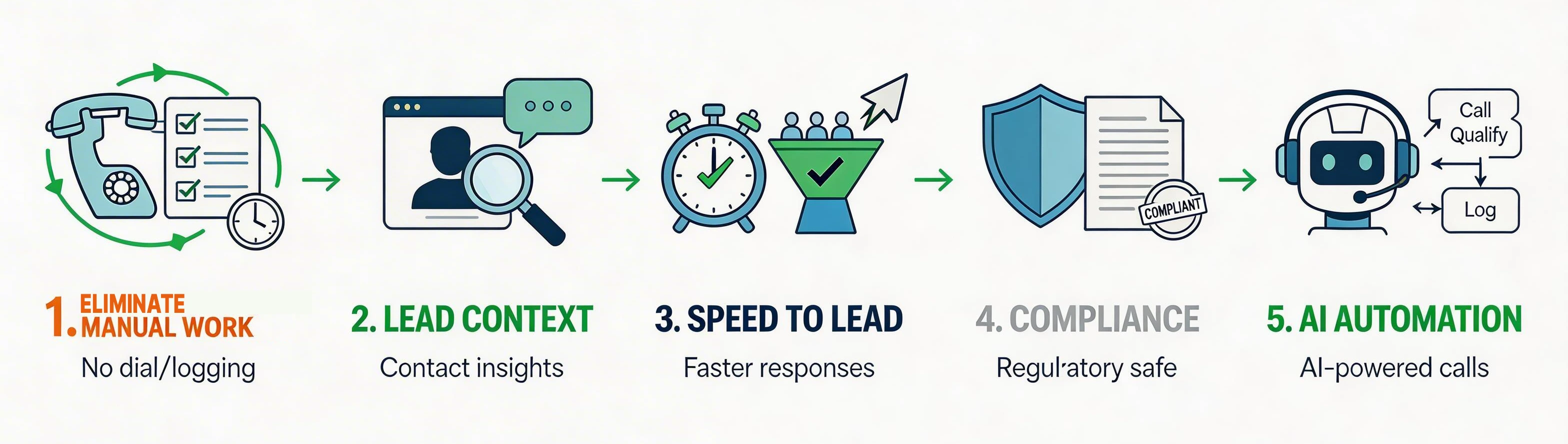
1. Manual dialing is gone — so is manual logging
The average sales rep spends 21% of their workday on data entry. Every call they make manually — dialing, waiting, logging outcome, copying notes to the CRM — costs 3–5 minutes of administrative work per call. At 80 calls per day, that's 4–6 hours of non-selling time per rep, per day.
A CRM dialer eliminates both steps simultaneously. The system dials. The system logs. The rep focuses on the conversation.
2. Lead context is everything
Calling a contact without knowing their deal stage, what they talked about last time, or whether they opened the last email is called going in cold. A CRM dialer surfaces everything — deal stage, last interaction, sentiment from prior calls, open tasks, SMS history — the moment the call connects. Reps sound prepared. Customers feel remembered.
3. Speed to lead determines who wins
Leads are 21x more likely to convert if contacted within 5 minutes of a form submission. A CRM dialer that integrates with your marketing automation can trigger immediate outreach the moment a lead shows interest — at 2am on a Saturday the same as 2pm on a Tuesday. Aloware's Form2Call does this automatically: form submission → AI voice agent outbound call → qualified lead routed to a rep.
4. Compliance is non-negotiable
TCPA violations start at $500 per call and go up to $1,500 for willful violations. A CRM dialer with built-in DNC list management, TCPA-compliant calling windows, STIR/SHAKEN caller ID authentication, and A2P 10DLC SMS registration keeps your team protected automatically. Aloware's TCPA compliance tools handle all of this natively — no separate compliance stack required.
5. AI is changing what "dialer" means
In 2026, the best CRM dialers don't just help reps call faster — they call for them when needed. AI voice agents integrated into your CRM dialer can handle initial lead qualification calls, post-purchase follow-ups, renewal reminders, and appointment confirmation calls autonomously, then hand off to human reps the moment a prospect is ready to engage. For a full breakdown: Can AI Agents Make Outbound Calls?
Key takeaway: A CRM dialer in 2026 is not just about making more calls faster — it's about ensuring every call has context, every outcome is logged, compliance is automatic, and AI handles the volume your team can't.
How to Choose the Right CRM Dialer
Match the dialer type to your compliance requirements
If you're calling mobile numbers in the US, you need a 1:1 power dialer — not a predictive dialer. Abandoned calls trigger TCPA liability. The extra speed of predictive dialing is not worth the regulatory exposure.
Require native CRM integration — not just a sync
"Integration" means different things. Ask every vendor specifically: does your dialer work from inside my CRM interface, or does it open a separate app? Does it sync one-way or bidirectionally? Can I trigger the dialer from a CRM list view or workflow? Can CRM field changes update the dialer in real time?
Aloware embeds directly inside the HubSpot and Salesforce interface — reps never leave their CRM to make a call, log a note, or start a sequence.
Check the total cost — not just the seat price
Most CRM dialer vendors charge per minute or per call on top of their base subscription. At 500 calls per day per rep, per-minute pricing adds up quickly. Aloware's plans include unlimited agent-to-customer calling minutes — no per-minute charges, no overages on human-to-human calls. AI Voice Agent calls (where AI handles the call without a human rep) are priced separately starting at $0.10/minute.
Verify the AI capabilities
Does the dialer include AI voice agents for outbound automation? Can AI calls be triggered by CRM events? Does it transcribe and summarize calls automatically? These are no longer premium add-ons — they're baseline expectations for a modern CRM dialer platform.
Aloware's CRM Dialer: Built for HubSpot, Salesforce, and Beyond
Aloware is a CRM-native contact center platform with a power dialer, AI voice agents, SMS automation, and conversation intelligence — all working from inside the CRMs your team already uses.
What makes it different from standalone dialers:
- Native HubSpot integration (certified HubSpot partner) — dial from any contact, company, or deal record; trigger power dialer sequences from HubSpot workflows; sync call recordings, transcripts, and AI summaries automatically
- Native Salesforce integration — embedded in the Salesforce utility bar; dial from list views, reports, and account records; entity-level sync (not just activity log)
- Power dialer with AI — 500+ calls per day per rep with full contact context on every call; AI voice agents handle the calls your reps can't
- Unlimited agent calling — no per-minute charges for agent-to-customer (human-to-human) calls; all plans include unlimited inbound and outbound agent minutes. AI Voice Agent calls (where AI runs the call) are priced separately from $0.10/minute
SOC 2 certified — all call data encrypted, full audit trail, TCPA and A2P 10DLC compliance built in
All plans include unlimited agent calling minutes and SMS. The minutes column above is the AI Voice Analytics bundle (call transcription and conversation intelligence). AI Voice Agent calls (autonomous outbound or inbound handled by AI with no human rep on the line) are priced separately starting at $0.10/minute.
Ready to Add a CRM Dialer to Your Sales Stack?
Aloware's power dialer + AI voice agents + unlimited agent calling gives your team everything they need to run a high-volume outbound motion from inside HubSpot or Salesforce — without separate tools, per-minute fees on agent-to-customer calls, or compliance headaches.
Book a demo → and see the CRM dialer running live inside your CRM in under 20 minutes.
Aloware is SOC 2 certified. All call data is encrypted with full audit trail support. TCPA compliance tools, DNC management, and A2P 10DLC registration included on all plans.
Frequently Asked Questions
What is a CRM dialer?
A CRM dialer is calling software that integrates directly with your CRM, letting sales reps call contacts from inside their CRM records, automatically log every call outcome, and trigger follow-up actions, without manual data entry or switching between apps.
What's the difference between a power dialer and a predictive dialer?
A power dialer calls one contact at a time and only dials when a rep is ready, which ensures every answered call connects to a live agent immediately. A predictive dialer calls multiple numbers simultaneously to maximize efficiency, but when more people answer than expected, calls get abandoned. Abandoned calls violate TCPA regulations, making predictive dialers a compliance risk for most outbound teams.
What is the best CRM with a built-in dialer?
Aloware is the best CRM dialer for teams using HubSpot or Salesforce. It embeds natively into both platforms, includes unlimited calling, and adds AI voice agents, SMS automation, and conversation intelligence. For a full comparison of options, see our best sales dialers guide.
How does a CRM dialer help with compliance?
A CRM dialer with built-in compliance tools checks every dial against your internal DNC list, enforces TCPA calling time windows, authenticates caller ID via STIR/SHAKEN, and manages A2P 10DLC registration for SMS. This keeps your outbound program protected without a separate compliance stack.
Do CRM dialers work with HubSpot?
Yes. Aloware is a HubSpot-certified partner with native bidirectional integration. You can trigger power dialer sessions directly from HubSpot contact lists, log call recordings and AI summaries to contact records automatically, and fire SMS follow-ups from HubSpot workflows, all without leaving HubSpot.
Can an AI voice agent replace a CRM dialer?
Not replace. Augment. AI voice agents handle the outbound calls your reps can't: after-hours follow-ups, lead qualification at scale, appointment reminders, renewal calls. When a prospect is ready to engage, the AI hands off to a human rep with full context already logged in the CRM. The best CRM dialer platforms include both. See: Can AI Agents Make Outbound Calls?
What does a CRM dialer cost?
CRM dialer pricing varies significantly. Per-minute models ($0.05–$0.15/minute) look cheap per call but become expensive at scale. Subscription models ($30–$100/user/month) provide cost predictability. Aloware starts at $30 per user per month on the quarterly plan, $40 month to month, and includes unlimited agent calling minutes, with no per-minute charges for outbound agent calls.
.png)

Ruby Kootval is Head of Product Marketing at Aloware. She has 12 years in digital marketing, including 8 in B2B SaaS and 5 in telecom, and writes about AI voice agents, dialers, CRM integrations, and contact center operations.

.webp)