TL;DR: Contact Center AI in 2026
Contact center AI is software that interprets a conversation while it is happening and acts on it: routing the call, coaching the agent, scoring the interaction, and writing the outcome back to the CRM. Legacy platforms bolt AI on after the call ends. Native AI platforms apply it during the call, which is what makes live assistance and real automation possible.
- What it actually does: real-time agent assist, automated QA on 100% of calls instead of a 2% sample, sentiment-based churn detection, intent-based routing, and after-hours lead capture.
- What it returns:McKinsey research shows organizations deploying GenAI for customer service saw a 14% increase in issue resolution per hour and a 9% reduction in handle time.
- Why it fails:approximately 80% of AI projects fail, and the cause is almost always scope, data quality, or change management rather than the model itself.
- How to start: silent observation, then post-call automation, then live assistance. Narrow the scope first and expand once the edge cases are known.
- What to evaluate: whether the intelligence runs during the interaction or only after it, and how deep the CRM write-back goes. Those two answers predict everything else.
Introduction: From Headcount to Intelligence
The era of solving contact center scale problems by hiring more people is coming to an end.
For years, the default response to rising call volume was to add headcount. In 2025, that approach is increasingly misaligned with economic reality, customer expectations, and operational efficiency.
Modern operations leaders are no longer shopping for "call center software." They are designing intelligence architectures.
They are asking harder questions:
- Why are humans still handling password resets and basic account updates?
- Why do supervisors review less than 2% of total call volume?
- Why is CRM data incomplete despite thousands of customer conversations?
Contact Center AI (CCAI) exists to answer these questions, not through automation hype, but through applied intelligence. At its core, CCAI uses large language models (LLMs) and natural language understanding (NLU) to transform unstructured conversations into structured, operational data.
Part 1: What Is Contact Center AI? (A Technical Definition)
Contact Center AI (CCAI) is an intelligence layer embedded directly into voice and messaging infrastructure. It combines natural language processing (NLP), generative AI, and machine learning to interpret intent, sentiment, and context in real time.
Traditional VoIP systems focus on transmission: moving audio from one endpoint to another.
CCAI systems focus on comprehension: understanding what is being said, why it is being said, and what should happen next.
This distinction is foundational. When intelligence is applied during the interaction, not after, it enables automation, agent assistance, and analytics at a fundamentally different level.
Legacy AI vs. Native AI Architecture
Most legacy contact center platforms treat AI as an add-on. Conversations happen first; intelligence is applied later, typically in the form of post-call summaries or sentiment reports.
Native AI platforms invert this model. Intelligence lives inside the call flow itself.
| Feature | Legacy VoIP (Bolt-On AI) | Native AI Contact Center |
|---|---|---|
| Capability | Legacy VoIP platform with AI added as a bolt-on. | Built natively as an AI-first contact center. |
| Data visibility | Managers manually review fewer than 2% of calls. | 100% of calls are automatically transcribed and analyzed. |
| Agent support | Reactive knowledge lookup. | Proactive, real-time guidance during conversations. |
| After-call work | Manual notes (3–6 minutes per call). | Automated summaries generated in seconds. |
| Routing logic | Static IVR menus. | Predictive, context-aware routing. |
In practice, organizations rarely move from zero to full automation overnight. According to industry benchmarks, most begin with partial automation (often 85–90%) and progressively refine edge cases. The architectural shift, not immediate perfection, is what drives sustained ROI.
Part 2: Core Use Cases (How CCAI Works in Practice)
The value of Contact Center AI is best understood at the mechanism level. Below are the most common high-impact use cases and the systems behind them.
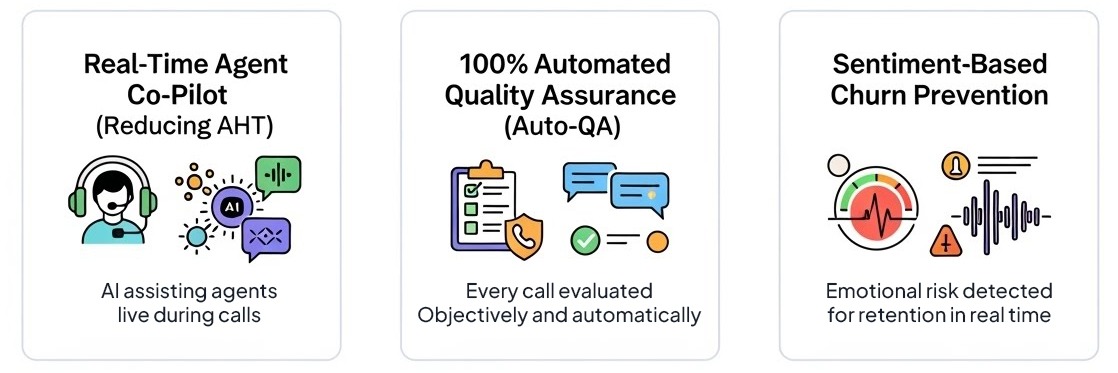
Use Case 1: Real-Time Agent Co-Pilot (Reducing AHT)
The problem:
High Average Handle Time (AHT) is rarely caused by slow agents. It is caused by slow access to information, particularly for newer agents handling complex or unfamiliar scenarios.
How the AI works:
- Live Audio Ingestion: Dual-channel processing separates agent and customer speech
- Intent Detection: NLU identifies the underlying issue (e.g., billing dispute, API failure)
- Knowledge Retrieval: Queries internal sources such as Notion, Confluence, or documentation
- On-Screen Guidance: Generates suggested responses in real time
Outcome:
Reduced dead air, fewer holds, and faster resolutions.
Operational impact:
Research from McKinsey shows that organizations implementing GenAI for customer service saw a 14% increase in issue resolution per hour and a 9% reduction in handle time. New-hire ramp time typically decreases by approximately 40%, as agents no longer rely on memorizing large knowledge bases.
Use Case 2: 100% Automated Quality Assurance (Auto-QA)
The problem:
Traditional QA programs sample a small number of calls per agent per month, an approach that is both statistically insignificant and operationally biased.
How the AI works:
- A semantic scoring engine evaluates every interaction
- Teams define pass/fail criteria such as:
- Identity verification
- Empathy signals
- Required disclosures or promotions
Outcome:
Objective, consistent quality evaluation across 100% of interactions.
Operational impact:
Many organizations see a 50–60% reduction in compliance and policy violations within the first 90 days.
Use Case 3: Sentiment-Based Churn Prevention
The problem:
Most teams discover customer dissatisfaction after churn has already occurred.
How the AI works:
- Monitors acoustic markers such as interruptions, pitch, and volume
- Analyzes linguistic sentiment and phrasing
- Produces a live sentiment score (e.g., -100 to +100)
- Triggers alerts when risk thresholds are crossed
Outcome:
Supervisors can intervene during live interactions rather than after the fact.
Operational impact:
Retention rates among high-risk calls often improve by 20–25% in early deployments.
Use Case 4: Intent-Based Routing and Self-Service Deflection
The problem:
A touch-tone menu routes on the button the caller pressed, not on the problem the caller has. Callers guess, guess wrong, land in the wrong queue, and repeat their story to a second agent. Every misroute costs a transfer, a re-explanation, and a measurable share of the customer's patience.
How the AI works:
The system classifies intent from the caller's own words in the opening seconds, then acts on it:
- Route on intent, not on keypad input. A billing dispute and a cancellation request reach different skills without the caller navigating a tree.
- Deflect the repeatable. Order status, appointment changes, balance checks, and hours-of-operation questions resolve without an agent, which is what actually reduces queue volume.
- Escalate with context attached. When the AI hands off, the transcript, the detected intent, and the CRM record travel with the call, so the human opens with the situation instead of asking for the account number a third time.
- Handle the caller's language. Intent detection and voice synthesis operate across multiple languages, so a Spanish-speaking caller is understood and answered rather than queued for a bilingual agent who may not be on shift.
❌ The old model: "Press 1 for billing." The caller presses 1, describes a cancellation, and gets transferred.
✅ The new model: the caller says "I want to cancel," and the retention queue answers with the account already on screen.
Operational impact:
Deflection reduces the volume reaching agents, and accurate routing reduces transfers. Both compound: the calls that do reach a human arrive at the right human, with context.
Key takeaway: Routing is the cheapest AI win in the contact center. It requires no agent behavior change, and it pays out on the first misroute it prevents.
Part 3: The Financial Case for Contact Center AI
Enterprise adoption of CCAI is driven by measurable outcomes, not theory. Recent 2024–2025 benchmarks indicate:
- Cost per Interaction: AI-handled voice interactions average ~$0.20 versus ~$5.50 for human-only calls
- First Contact Resolution: Agent assist tools increase FCR by ~14%
- Revenue Enablement: Real-time objection handling improves close rates by ~30%
- Agent Retention: AI-supported teams report ~25% lower burnout rates
- Average ROI: Organizations report $3.50 return for every $1 invested in AI, with top performers achieving up to 8x returns
Real-World ROI Example
A multinational bank with 25M+ customers deployed an AI-powered support system in 2024. Within 6 months, they achieved:
- 94% reduction in wait times for common banking questions
- 37% decrease in escalations to specialized teams
- 23% improvement in Net Promoter Score (NPS)
Their success was rooted in a hybrid model: AI handled transactional inquiries, while human agents focused on complex financial advice. Notably, 92% of representatives reported higher job satisfaction post-AI adoption, citing fewer mundane tasks and more meaningful customer conversations.
Actual ROI varies based on call volume, complexity, and existing automation maturity, but the directional impact remains consistent across industries.

Part 4: Security, Privacy, and Compliance Considerations
As organizations rush to implement AI, data security and privacy have emerged as top concerns. Contact centers handle highly sensitive personal information, and AI systems introduce new risk vectors that must be actively managed.
Primary Security Risks
1. Data Privacy and PII Exposure
Studies show that 68% of consumers care deeply about how companies handle their personal information. AI systems that process conversations in real-time have access to names, account numbers, credit card details, and other personally identifiable information (PII).
2. Third-Party Model Risk
Many AI vendors integrate with external LLM providers (e.g., OpenAI, Anthropic). Organizations must understand:
- Where their data is being processed
- Whether interaction data is used to train external models
- How data is compartmentalized between different customers
3. Voice Cloning and Deepfake Threats
New voice cloning technology can replicate someone's voice from just 5 seconds of audio, enabling sophisticated voice phishing attacks that can bypass biometric authentication systems.
4. Prompt Injection Attacks
AI chatbots and virtual agents are vulnerable to adversarial attacks where users trick the system into performing prohibited tasks or accessing restricted information.
Essential Security Measures
When evaluating CCAI platforms, operations leaders should verify:
Compliance Certifications:
- GDPR, CCPA, and HIPAA compliance where applicable
- PCI DSS for payment card data
- SOC 2 Type II or ISO 27001 certification
Data Handling Practices:
- End-to-end encryption for data in transit and at rest
- PII sanitization before processing
- Explicit guarantees that customer data is not used to train AI models
- Clear data compartmentalization between tenants
Monitoring and Governance:
- Real-time monitoring for unusual activity
- Automated alerts for suspicious outputs
- Integration with Security Information and Event Management (SIEM) systems
- Regular security audits and bias detection
According to Gartner, organizations must also address regulatory compliance proactively, as legislation around AI use in customer service continues to evolve rapidly.
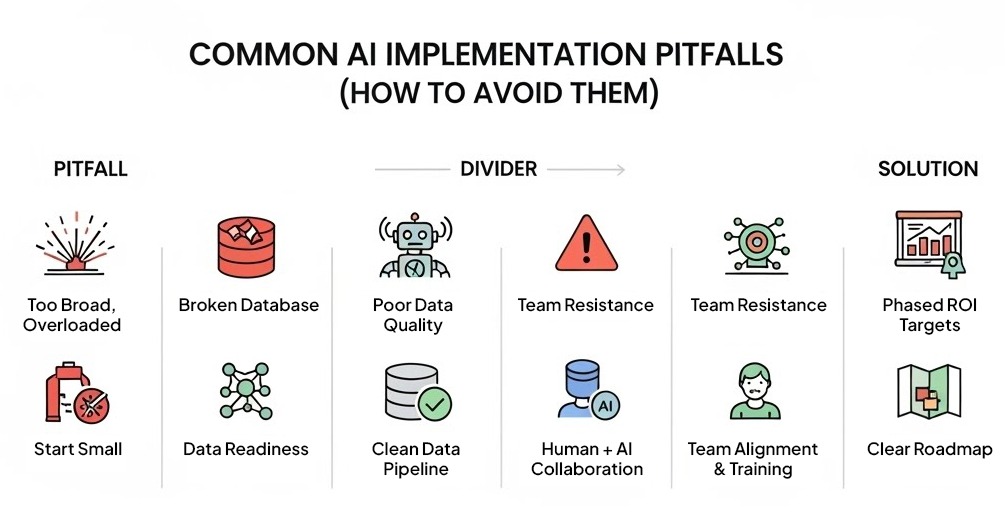
Part 5: Common Implementation Pitfalls (And How to Avoid Them)
Despite the promise, research indicates that approximately 80% of AI projects fail, nearly double the failure rate of most IT initiatives. Understanding where implementations go wrong is critical for success.
Pitfall #1: Deploying Too Broadly, Too Quickly
The Problem:
Organizations often try to implement AI across all use cases simultaneously, leading to overwhelming complexity and increased failure risk.
The Solution:
Start with one narrow, well-defined use case. For example, a telecommunications provider might launch AI solely to automate after-call summaries, with a clear goal to reduce wrap-up time by 15%. Run this as a pilot for 2-4 weeks, gather feedback, track results, and refine before expanding to other workflows.
A small, successful win proves the concept, lowers risk, and builds support for the next stage. Step-by-step beats "all or nothing."
Pitfall #2: Inadequate Data Quality and Governance
The Problem:
70% of high-performing AI organizations cite data challenges as a primary barrier, including insufficient training data, poor data governance processes, and inability to quickly integrate data into AI models.
The Solution:
Before deploying AI, audit your data infrastructure. Ensure:
- CRM data is clean and consistently formatted
- Historical conversation transcripts are available for training
- Knowledge bases are up-to-date and AI-optimized
- Clear processes exist for data governance and quality control
Pitfall #3: Over-Reliance on Automation
The Problem:
Excessive focus on automation can lead to insufficient human oversight, resulting in errors during customer interactions or failure to provide empathy when needed. McKinsey research suggests that the most successful implementations use AI to augment human agents, not replace them.
The Solution:
Design AI systems as tools that enhance agent capabilities. Maintain clear escalation paths to human agents for complex issues. Monitor customer satisfaction scores closely and be prepared to adjust automation levels based on feedback.
Pitfall #4: Ignoring Change Management
The Problem:
Agent resistance and organizational change management issues are frequently underestimated. Agents may fear job loss or feel threatened by AI systems, leading to poor adoption and utilization.
The Solution:
Involve agents early in the selection and design process. Clearly communicate that AI is designed to eliminate tedious tasks, not jobs. Provide comprehensive training on new tools. Celebrate early wins and share success stories to build momentum.
Pitfall #5: Executive Pressure for Fast Returns
The Problem:
85% of customer service leaders report feeling pressure from executive leadership to implement GenAI quickly. This rush often leads to poorly planned implementations that don't address core operational challenges.
The Solution:
Set realistic expectations with leadership. Frame AI adoption as a strategic, multi-phase journey rather than a quick fix. Focus on delivering measurable outcomes in the first 90 days (e.g., reduced handle time, improved CSAT) to demonstrate progress while building toward larger transformations.
Part 6: A Practical Implementation Path
Successful CCAI adoption does not happen all at once. It progresses in deliberate phases.
Phase 1: Silent Observation (Weeks 1-4)
Enable transcription and analytics without changing agent workflows. Use 30 days of data to identify real bottlenecks:
- Which call types take longest?
- Where do agents struggle most?
- What knowledge gaps exist?
- Which compliance issues appear most frequently?
This data-driven foundation prevents guesswork and ensures subsequent phases address actual problems, not perceived ones.
Phase 2: Post-Call Automation (Weeks 5-8)
Activate generative summaries and automated CRM updates. This phase delivers immediate time savings (typically 3-5 minutes per call) and strong agent buy-in, as it eliminates the most tedious part of their workflow.
Phase 3: Live Assistance (Weeks 9-16)
Deploy real-time co-pilots for tier-1 agents once the AI has learned common intents and workflows. Start with "suggestion mode" where agents can accept or reject AI recommendations, building confidence before moving to more automated approaches.
Phase 4: Continuous Refinement (Ongoing)
According to Five9's SVP of Compliance and Privacy, "AI can learn and shift quickly, so you want automated checks that flag when outputs approach unacceptable tolerance levels." Implement ongoing monitoring, regular QA reviews, and feedback loops to continuously improve system performance.
Part 7: Evaluating Contact Center AI Platforms
When evaluating CCAI vendors, the question for most teams is no longer whether to adopt Contact Center AI, but how deeply it should be embedded into existing systems and which architectural approach best serves their needs.
Key Evaluation Criteria
1. Native vs. Bolt-On Architecture
Some platforms approach AI as an enhancement layer, useful primarily after the interaction has ended. Others embed intelligence directly into the call flow itself. Platforms with native AI architecture can process information during the conversation, enabling real-time routing, live agent assistance, and immediate action, not just post-call analysis.
2. CRM Integration Depth
Evaluate whether the platform can write structured data directly to your CRM or simply dumps raw transcripts. True integration means updating specific fields, creating tasks, and triggering workflows based on conversation content.
3. Data Sovereignty and Security
Verify where data is processed and stored. Understand whether the vendor uses your data to train their models. Confirm compliance certifications match your industry requirements.
4. Gradual Adoption Support
The best platforms support incremental implementation without disrupting existing workflows. Organizations that start small and expand systematically achieve significantly higher success rates than those attempting "big bang" deployments.
5. Vendor Expertise and Track Record
Not all AI vendors have the same level of expertise. Years of experience in the contact center vertical, understanding of industry-specific compliance requirements, and a track record of successful implementations all matter significantly.
Part 8: Aloware's Native AI Architecture in Practice
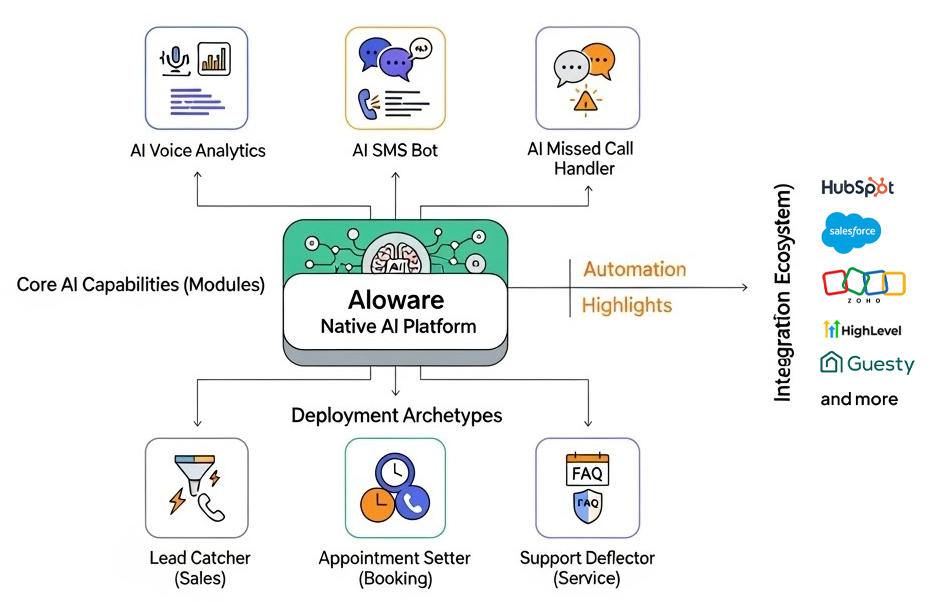
Among native AI contact center platforms, Aloware represents a fully integrated approach where AI capabilities are embedded at the infrastructure level rather than added as supplementary features. This architectural philosophy manifests in several distinct ways across the platform.
Core AI Capabilities
1. AI Voice Analytics
Aloware's AI Voice Analytics transforms every customer call into structured, actionable intelligence. The system provides:
- AI-Powered Call Transcription: High-accuracy, speaker-labeled transcriptions that teams can skim and search, eliminating the need to replay entire calls
- Real-Time Sentiment Analysis: Detects emotional signals throughout conversations, from trust-building moments to frustration indicators, enabling supervisors to intervene during live interactions
- Topic & Keyword Detection: Automatically surfaces recurring themes, competitor mentions, pricing objections, and other strategic insights across all calls
- Instant Call Summaries: Generates concise AI summaries highlighting key points from rep-customer interactions, boosting agent productivity by approximately 30%
- Team Performance Dashboards: Provides bird's-eye views of rep activity, script adherence, call outcomes, and coaching opportunities
- Talk Time Analysis: Monitors whether agents are talking more than listening, a critical metric for quality coaching
This comprehensive analytics suite enables managers to understand every conversation without manually reviewing recordings, a capability that scales from startups to enterprise operations.
2. AI SMS Bot for Conversational Engagement
Aloware's AI SMS Bot delivers intelligent text-based automation that feels naturally human. Key capabilities include:
- 24/7 Lead Response: Instantly understands and replies to text messages, ensuring continuous engagement with prospects and customers
- Lead Nurturing & Qualification: Uses natural language processing to skillfully nurture leads and qualify prospects through conversational text exchanges
- Appointment Scheduling & Call Transfers: Autonomously schedules meetings and transfers calls to representatives at optimal times
- 98% Open Rates: Leverages SMS's unmatched engagement rates to ensure messages are actually read
- 67% Higher Connection Rate: The AI's human-like conversational approach drives significantly higher engagement compared to traditional SMS blasts
- Cold Lead Reactivation: Expertly re-engages dormant prospects with well-timed, relevant messages that feel personal rather than automated
The SMS Bot integrates natively with CRMs including HubSpot, Salesforce, Zoho, and Pipedrive, automatically syncing conversation data and lead intelligence.
3. AI Missed Call Handler (Zero Missed Calls)
Perhaps the most innovative component is Aloware's AI Missed Call Handler, designed to address a critical gap: 85% of calls go unanswered during peak hours and after business hours. This "Call Rescue Agent" provides:
- Zero-Config Setup: Activates with a single toggle, automatically inheriting business hours and contact settings, with no complex flow builders required
- Intelligent Call Interception: Automatically picks up calls when lines are busy or the office is closed, ensuring no lead is lost to voicemail
- Multilingual Native Support: Detects and speaks fluent English and Spanish based on the caller's preference
- Real-Time Lead Qualification: Engages callers instantly, asks qualifying questions (budget, timeline, needs), and captures critical details before they hang up
- Autonomous Appointment Booking: Checks team availability in real-time and books appointments directly, handling lead overflow during peak hours and capturing inquiries after hours
- CRM Data Enrichment: Doesn't just record audio. It actively listens for First Name, Email, Company Name, and other details, automatically updating contact records in Aloware, HubSpot, and Salesforce
- FAQ Automation: Answers common questions instantly, deflecting routine inquiries from human agents
The business impact is substantial: organizations report 90% lower operating costs compared to staffing for extended coverage, 3x more qualified leads captured (leads that would have otherwise gone to voicemail), and zero wait times regardless of call volume.
Three Deployment Archetypes
Aloware's AI Missed Call Handler supports three distinct use cases, each optimized for different operational priorities:
The Lead Catcher (Sales Focus)
Designed for high-volume sales teams where inbound leads have a 5-minute shelf life. The AI picks up instantly when humans can't, qualifies leads by asking budget and timeline questions, and syncs answers to HubSpot/Salesforce, preventing leads from calling competitors after hitting voicemail.
The Appointment Setter (Booking Focus)
Optimized for Real Estate, Healthcare, and Service businesses where phone tag wastes hours of team time. The AI checks real-time availability and books appointments directly, handling overflow during peak hours and capturing inquiries after hours with no double-booking.
The Support Deflector (Service Focus)
Built for Customer Support and Operations teams bogged down by repetitive FAQs. The AI answers common questions instantly and executes admin tasks (like updating email addresses or verifying account details) completely autonomously, freeing agents for complex issues.
Integration Ecosystem
Aloware maintains deep, native integrations with leading CRM and business platforms:
- HubSpot: Beyond call and text logging, includes power dialer for lists, SMS support in workflows, and rep activity in reports
- Salesforce: Full contact center functionality accessible directly within Salesforce, with automatic data logging and workflow triggers
- Zoho: Automated data logging for calls and texts, with power dialer and SMS sequence triggers from Zoho actions
- GoHighLevel: Centralized communications with automated outreach to contacts and performance analytics
- Pipedrive, Guesty, Slack, Gong, Zapier: Additional integrations ensure Aloware fits seamlessly into existing tech stacks
These integrations are bi-directional, meaning Aloware both writes data to CRMs (call summaries, sentiment scores, transcripts) and reads data from them (contact information, deal stages, custom fields) to provide context-aware assistance.
Architectural Advantages
What distinguishes Aloware's approach is that these AI capabilities aren't separate tools. They're unified components of a single platform architecture. This design enables:
- Unified Data Flow: A single call can trigger voice analytics, generate a summary, update CRM fields, and create follow-up tasks, all automatically, without manual handoffs
- Consistent User Experience: Agents, managers, and administrators work within one interface rather than toggling between multiple AI tools
- Incremental Adoption: Organizations can activate AI features one at a time (e.g., start with post-call summaries, then add real-time co-pilot, then enable missed call handling) without disrupting existing workflows
- Centralized Analytics: All AI-generated insights, from voice analytics to SMS conversations to missed call interactions, feed into unified dashboards for holistic performance visibility
For teams evaluating CCAI, these architectural distinctions tend to matter more over time than individual features, particularly as scale, compliance, and data complexity increase. Organizations should compare multiple vendors, request detailed security documentation, and conduct thorough pilots before committing to enterprise-wide deployments.
Pricing & Accessibility:
Aloware's pricing starts at $30 per agent per month for core contact center functionality, with AI features available as add-ons across iPro, uPro, and xPro tiers. The platform offers a 7-day free trial with no credit card required, and maintains detailed documentation at support.aloware.com for technical implementation guidance.
Conclusion: The Path Forward
Every customer conversation contains insight about product gaps, competitive pressure, and revenue risk. Most organizations simply lack the systems to capture it.
Contact Center AI turns conversations into data, and data into decisions.
According to McKinsey's 2025 research, 92% of executives plan to increase AI investment over the next three years, with 55% expecting significant investment growth specifically in customer support applications. The transformation is not a matter of if, but when and how.
The platforms that will win in 2025 and beyond share three characteristics:
- Native AI Architecture: Intelligence embedded at the infrastructure level, not bolted on as afterthoughts
- Comprehensive Coverage: Solutions that span voice, messaging, analytics, and autonomous handling across the entire customer journey
- Gradual Adoption Paths: Systems that support incremental implementation, allowing organizations to start narrow and expand systematically
Organizations that move deliberately, starting with clear use cases, addressing security and governance proactively, and scaling systematically, will capture sustainable competitive advantage. Those that rush implementation or ignore the human dimension will join the 80% of failed AI projects.
The choice is not between humans and machines. It is between operating with visibility and operating blind.
For operations leaders ready to take the next step, the recommended approach is:
- Start with a pilot focused on one specific pain point (e.g., after-call documentation or missed call handling)
- Measure impact rigorously over 60-90 days
- Expand to adjacent use cases only after proving value
- Maintain continuous feedback loops with agents and customers throughout
The future of contact centers is not AI replacing humans. It's AI amplifying human capability at scale.

Frequently Asked Questions
What is Contact Center AI?
Contact Center AI (CCAI) is an intelligence layer embedded into voice and messaging systems that uses natural language processing, machine learning, and generative AI to understand customer intent, sentiment, and context in real time. Unlike traditional call center software, CCAI actively interprets conversations and automates actions during the interaction—not just after it ends.
How is Contact Center AI different from traditional VoIP systems?
Traditional VoIP systems focus on transmitting audio between callers and agents. Contact Center AI systems focus on understanding conversations as they happen. This enables real-time agent assistance, automated quality assurance, predictive routing, and full interaction analytics across 100% of calls.
What are the main use cases of Contact Center AI?
The most common use cases include real-time agent co-pilots to reduce handle time, automated quality assurance across all calls, sentiment-based churn detection, post-call automation for CRM updates, and intelligent call routing based on context and customer history.
Does Contact Center AI replace human agents?
No. Research consistently shows that AI performs best when augmenting human agents rather than replacing them. AI systems handle repetitive tasks, surface relevant information in real time, and automate documentation—allowing agents to focus on complex problem-solving and customer relationships that require empathy and judgment.
How long does it take to implement Contact Center AI?
Most organizations implement Contact Center AI in phases. Initial transcription and analytics can be deployed within days. Post-call automation typically follows within weeks, while real-time agent assistance is enabled after sufficient data is collected to train intent models accurately—usually 8-12 weeks for a complete phased rollout.
What security and compliance considerations should I be aware of?
Key considerations include data privacy regulations (GDPR, CCPA, HIPAA), PCI DSS compliance for payment data, ensuring customer data is not used to train AI models, implementing end-to-end encryption, and verifying third-party vendor security practices. Organizations should also address emerging threats like voice cloning and prompt injection attacks.
What ROI can companies expect from Contact Center AI?
ROI varies by call volume and complexity, but common outcomes include lower cost per interaction ($0.20 vs $5.50 for human-only calls), higher first contact resolution (+14%), reduced compliance risk (50-60% fewer violations), improved agent retention (25% lower burnout), and increased revenue through faster and more accurate responses. Average ROI is $3.50 for every $1 invested, with top performers achieving up to 8x returns.
Why do so many AI projects fail, and how can I avoid it?
Approximately 80% of AI projects fail due to deploying too broadly too quickly, inadequate data quality, over-reliance on automation without human oversight, poor change management, and executive pressure for unrealistic fast returns. Success requires starting with narrow, well-defined use cases, ensuring data quality, maintaining human oversight, involving agents early, and setting realistic expectations with leadership.
What should companies look for when evaluating Contact Center AI platforms?
Teams should evaluate whether AI is embedded natively into the call flow or added as a post-call feature, how well the platform integrates with CRM systems, the accuracy of transcription and intent detection, security and compliance certifications, whether the system supports gradual adoption without disrupting existing workflows, and the vendor's track record and expertise in the contact center industry.
.png)

Ruby Kootval is Head of Product Marketing at Aloware. She has 12 years in digital marketing, including 8 in B2B SaaS and 5 in telecom, and writes about AI voice agents, dialers, CRM integrations, and contact center operations.