Quick Answer
HubSpot’s native SMS is a marketing add-on that costs $75/month for 1,000 message segments and requires Marketing Hub Professional or Enterprise. It cannot be used for sales outreach, does not support two-way conversations in Sales Hub, and is restricted to US-based numbers. Aloware provides unlimited two-way SMS for sales teams natively inside HubSpot starting at $30/user/month, with workflow automation, conversation threading on contact records, and full A2P 10DLC compliance.
Your sales reps need to text leads from HubSpot. Simple request, right? But when you look at HubSpot’s native SMS, you hit a wall: it’s built for marketing, not sales.
HubSpot’s SMS add-on requires Marketing Hub Professional ($800/month minimum) or Enterprise ($3,600/month). It costs an additional $75/month for just 1,000 message segments. Contacts must opt in to marketing communications before you can text them. And the messages are one-directional by design — built for promotions and event reminders, not sales conversations.
If you’re a sales team trying to follow up with leads, send quick appointment confirmations, or run SMS sequences tied to deal stages, HubSpot’s native tool simply wasn’t designed for your workflow.

vThis guide compares HubSpot’s native SMS with Aloware’s HubSpot SMS integration across the features that actually matter for sales teams: two-way messaging, workflow automation, pricing at scale, compliance, and CRM data logging. By the end, you’ll know exactly which option fits your team.
What Does HubSpot’s Native SMS Actually Include?
HubSpot launched its SMS feature as a paid add-on built on Twilio’s infrastructure. Here’s what you get and, more importantly, what you don’t.
What’s Included
- Send one-way SMS and MMS messages to opted-in marketing contacts
- Use personalization tokens from contact properties
- Trigger SMS sends through marketing workflows
- Basic analytics: delivery rates, opt-outs, and message performance
- Quiet hours based on recipient time zone
What’s Missing for Sales Teams
- No two-way conversation threading for sales reps
- No SMS from Sales Hub, Service Hub, or the CRM sidebar
- Cannot text contacts who haven’t opted into marketing communications
- No SMS actions in sales sequences or deal-stage workflows
- No shared team inbox for SMS conversations
- No power dialer integration (call + text from the same interface)
- US-based numbers only — no international SMS
- Both inbound and outbound messages count against your 1,000-segment cap
Why This Matters
A single MMS message counts as 3–5 segments. An inbound reply from a contact counts against your cap too. A 10-person sales team running 50 texts per rep per day would burn through 1,000 segments in two days — before counting any inbound replies.
How Aloware SMS Works Inside HubSpot
Aloware is a HubSpot-certified partner that embeds calling and SMS directly into the HubSpot interface. Unlike HubSpot’s marketing-focused SMS, Aloware was purpose-built for sales and support teams running high-velocity outreach.
Two-Way SMS on Every HubSpot Object
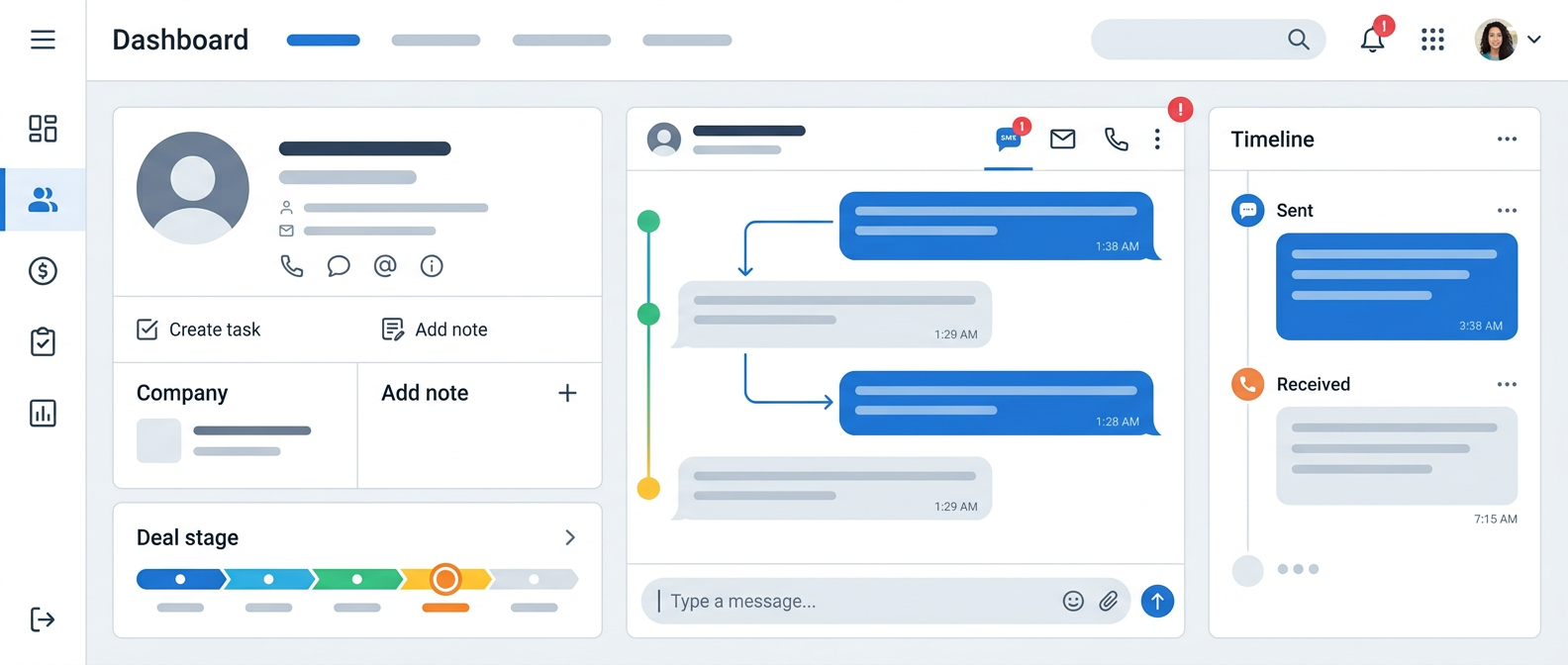
Reps can send and receive text messages directly from contact, company, deal, and ticket records in HubSpot. Every conversation is threaded and logged automatically to the contact timeline. There’s no tab-switching, no manual copy-pasting, and no separate app to manage.
SMS Workflow Automation
Aloware adds native SMS actions to HubSpot workflows. You can trigger a text message when a form is submitted, a deal moves to a new stage, a lifecycle stage changes, or any custom HubSpot event fires. This means your sales process can include automated SMS follow-ups without requiring the contact to opt into marketing communications.
Unlimited Agent-Initiated SMS
Aloware’s plans include unlimited agent-to-customer SMS to the US and Canada. There’s no per-message cap and no segment counting. Your reps text as much as they need without worrying about overage charges. Bulk and automated messages are billed at $0.015–$0.02 per segment depending on your plan, which is still significantly cheaper than HubSpot’s effective per-segment cost.
Shared SMS Inbox
SMS conversations live alongside your other channels in HubSpot’s native inbox. Managers can see all team conversations, reassign threads, and ensure no lead falls through the cracks. Aloware also integrates with HubSpot’s conversations inbox so SMS threads appear right next to email and chat.
Combined Calling + SMS
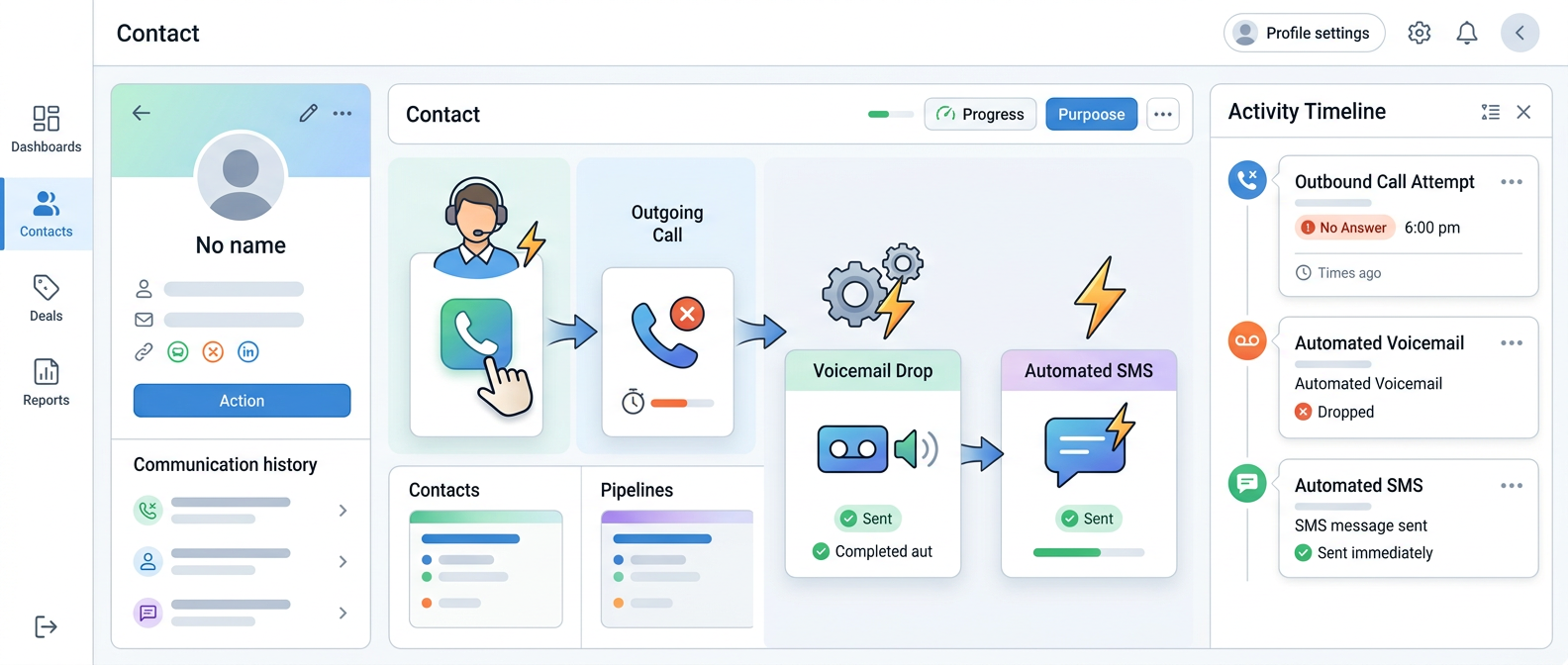
This is where the real leverage is. With Aloware, your reps can call a lead, and if they don’t pick up, immediately drop a voicemail and fire off a follow-up text — all from the same interface, all logged to the same HubSpot record. The power dialer supports automated SMS follow-ups between calls, which means your outbound motion includes text as a native channel, not an afterthought.
HubSpot SMS vs. Aloware SMS: Feature-by-Feature Comparison
Pricing Breakdown: What SMS Actually Costs
Let’s make this concrete. Here’s what a 10-person sales team pays for SMS over 12 months.
The Hidden Cost of HubSpot SMS
HubSpot’s SMS pricing is deceptive for sales teams. The $75/month sounds reasonable, but you need Marketing Hub Professional just to unlock it — that’s $800/month. And 1,000 segments disappear fast when every inbound reply eats into your cap. A team sending 500 texts per week (modest for outbound sales) would need to purchase additional segment packs within the first month. With Aloware, agent-initiated SMS is unlimited — your team texts freely without watching a meter.
5 Sales SMS Use Cases That HubSpot’s Native Tool Can’t Handle
1. Speed-to-Lead: Auto-Text New Form Submissions
When a lead fills out your demo request form, response time determines conversion. Research shows that contacting a lead within 5 minutes makes you 4x more likely to connect compared to waiting even 10 minutes. With Aloware, you set up a HubSpot workflow that instantly sends a personalized text: “Hi {first_name}, thanks for requesting a demo! I’m {owner_name}, your account rep. What time works best for a quick call?” The lead gets a text within seconds. The conversation is logged. The rep is notified.
With HubSpot’s native SMS: This workflow is impossible. The lead would need to be a marketing contact who has opted into SMS communications before you can text them. A brand-new form submission doesn’t meet that criteria.
2. Deal-Stage Follow-Up: Text When a Proposal Is Sent
You send a proposal. Two days pass with no response. Your workflow detects the deal has been in “Proposal Sent” for 48 hours and fires off: “Hi {first_name}, just checking in — did you get a chance to review the proposal? Happy to walk through any questions.” This nudge gets a 45% higher response rate than email follow-ups.
With HubSpot’s native SMS: Not possible. HubSpot SMS cannot be triggered from deal-stage changes in Sales Hub. It only exists in Marketing Hub workflows.
3. Missed Call Recovery: Voicemail + Instant Text
A rep calls a lead who doesn’t answer. Aloware drops a pre-recorded voicemail and immediately fires a follow-up text: “Hi {first_name}, just tried to reach you. If now isn’t a good time, you can book a call here: {meeting_link}.” This call-text combo increases callback rates by 2–3x compared to voicemail alone.
With HubSpot’s native SMS: There’s no connection between HubSpot’s dialer and SMS. Even if a rep could send a follow-up text, it would require switching to the Marketing Hub, finding the contact, and manually creating a message — assuming the contact is an opted-in marketing contact.
4. Appointment Confirmation with Two-Way Reply
A meeting is booked. Your workflow sends: “You’re confirmed for a demo on {meeting_date} at {meeting_time}. Reply YES to confirm or let me know if you need to reschedule.” The lead replies “YES” and the rep sees the response logged on the contact timeline in HubSpot.
With HubSpot’s native SMS: You can send the confirmation, but the reply handling is limited. HubSpot’s marketing SMS supports two-way messaging in the conversations inbox, but it’s designed for marketing use cases, not sales rep workflows. The sales rep would need access to Marketing Hub to see and manage the replies.
5. Bulk Outreach: Text a List of 500 Cold Leads
You’ve got a list of 500 leads from a webinar. You want to send a personalized follow-up text to each one. With Aloware’s broadcast feature, you select the HubSpot list, write the message with personalization tokens, set quiet hours, and send. All replies route to the appropriate rep based on contact ownership.
With HubSpot’s native SMS: Those 500 texts consume at least 500 segments (more if the message exceeds 160 characters). That’s half your monthly cap gone in one send. And every reply from those contacts eats into your remaining segments.
What About Compliance? A2P 10DLC, TCPA, and Deliverability
Both platforms handle A2P 10DLC registration, which is required by US carriers for business-to-consumer texting. Here’s how they compare on the compliance side.
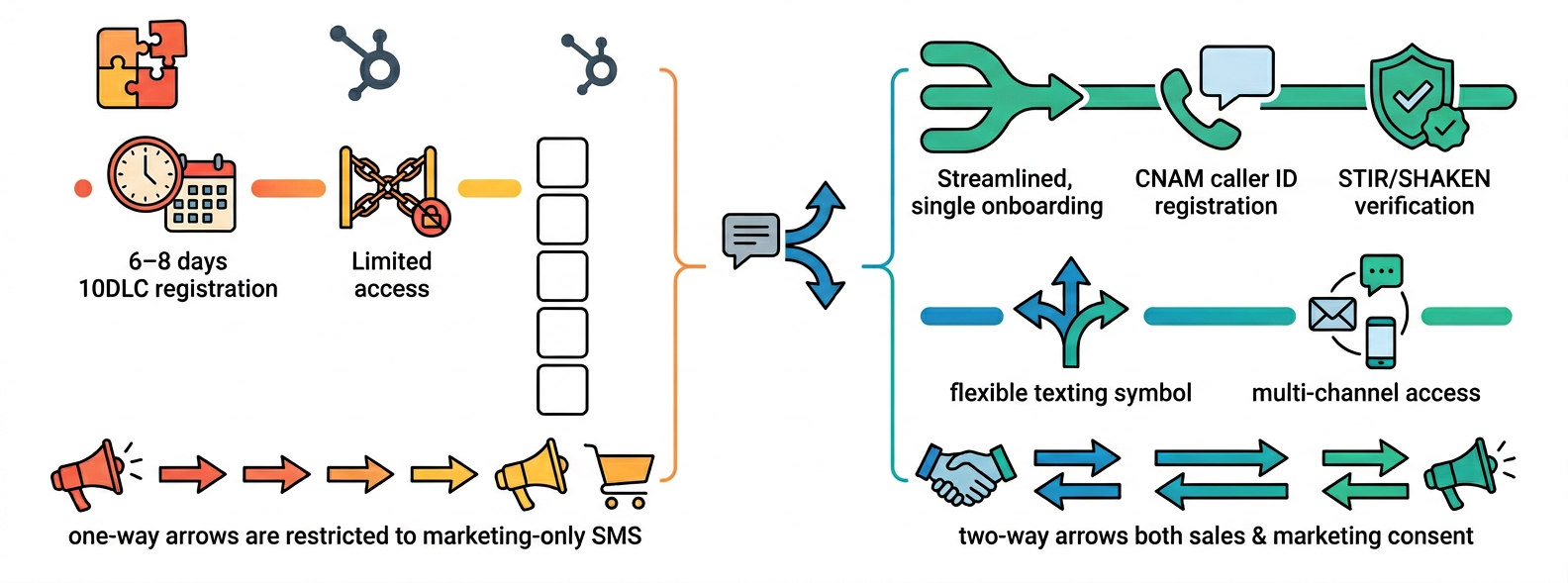
HubSpot SMS compliance: Registration is handled through HubSpot’s Twilio partnership. The process takes 6–8 business days for 10DLC and 8–12 weeks for short codes. Throughput limits depend on your brand’s trust score, which Twilio determines based on their independent reputation checks. HubSpot requires contacts to have explicit opt-in to marketing SMS before any message can be sent.
Aloware SMS compliance: Aloware manages A2P 10DLC registration, CNAM caller ID registration, and STIR/SHAKEN verification in a single onboarding process. Because Aloware is a sales-first platform, it supports TCPA-compliant consent for sales conversations (not just marketing opt-in), which means you can text leads who have given consent through forms, phone calls, or other legitimate business interactions — not only those who checked a marketing subscription box.
Key difference: HubSpot’s compliance model is built around marketing consent (opt-in subscriptions). Aloware’s compliance model supports both marketing and sales consent, giving your team more flexibility to reach leads through legitimate business interactions.
Who Should Use HubSpot Native SMS vs. Aloware?
Choose HubSpot’s native SMS if:
- You’re a marketing team sending promotional campaigns, event reminders, or product updates
- Your SMS volume is under 1,000 segments/month
- You already have Marketing Hub Professional or Enterprise
- You don’t need two-way sales conversations via text
- You’re only texting US-based marketing contacts
Choose Aloware if:
- Your sales reps need to text leads and prospects from HubSpot
- You want two-way SMS conversations logged to contact, deal, and ticket records
- You need SMS automation in sales workflows and sequences (not just marketing)
- You want calling and texting in one platform without per-minute or per-segment caps
- You need a shared team inbox where managers can see all SMS activity
- You want AI-powered features like SMS bots and auto-replies
- You’re texting internationally or at high volume
How to Set Up Aloware SMS in HubSpot (Step-by-Step)
Setup takes under 30 minutes. Here’s the process:
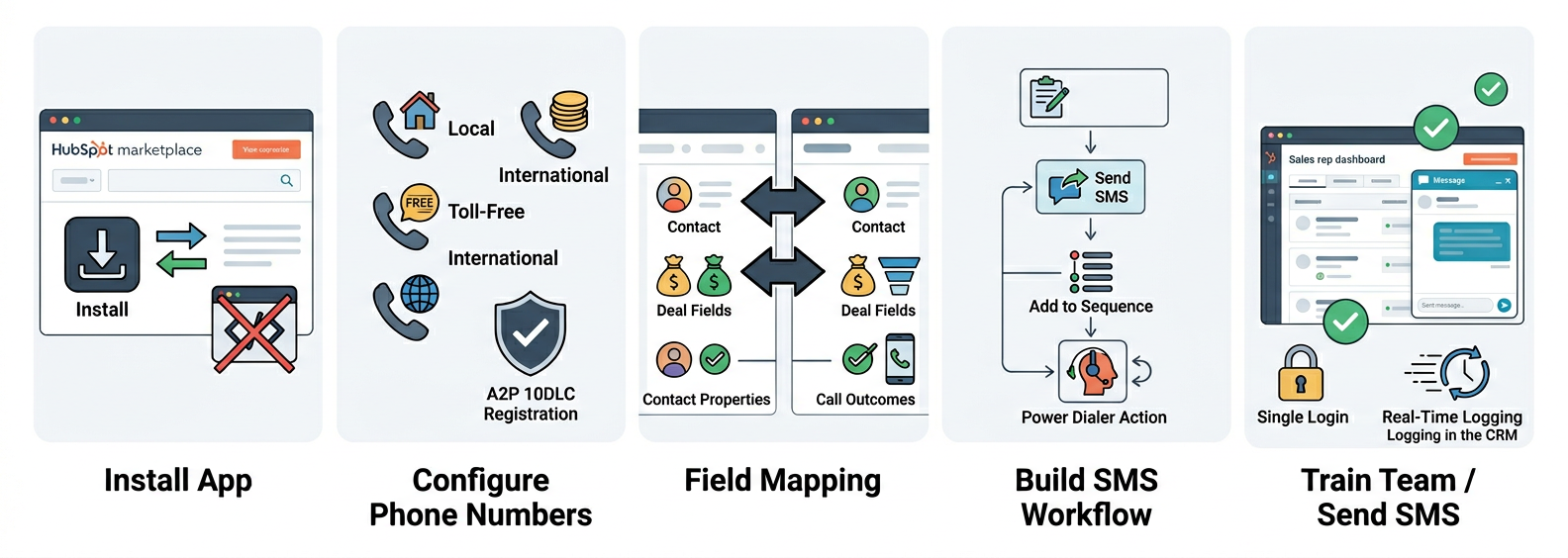
Step 1: Install from the HubSpot App Marketplace. Search for Aloware, click Install, and authorize the connection. No developer resources needed.
Step 2: Configure your phone numbers. Choose local, toll-free, or international numbers. Aloware handles A2P 10DLC registration automatically as part of onboarding.
Step 3: Set up field mapping. Configure bidirectional sync between Aloware and HubSpot. Map contact properties, call outcomes, and deal fields so data flows both ways in real time.
Step 4: Build your first SMS workflow. In HubSpot workflows, you’ll see new Aloware actions: Send SMS, Add to Sequence, Add to Power Dialer. Create a workflow that texts new leads within 60 seconds of form submission.
Step 5: Train your team. Reps can send texts directly from any HubSpot record using the Aloware widget. No new login, no separate app. They click the SMS icon, type a message (or select a template), and send.
Bring SMS into HubSpot Inbox with Aloware
The Bottom Line
HubSpot built a perfectly good SMS tool — for marketing teams. If you’re sending promotional blasts and event reminders to opted-in contacts, it does the job.
But if you’re a sales team, you need SMS that works where you work: inside deals, inside sequences, inside the power dialer, and inside every contact record. You need two-way conversations, not one-way broadcasts. You need unlimited texting, not a 1,000-segment meter. And you need it at a price that doesn’t require a Marketing Hub Enterprise subscription. That’s what Aloware was built for.
Ready to Add Sales SMS to HubSpot?
Start a free 7-day trial of Aloware. Get unlimited calling, two-way SMS, and AI-powered automation inside your HubSpot CRM — no credit card required. Or book a personalized demo to see Aloware SMS inside your own HubSpot account.
Frequently Asked Questions
Can HubSpot send SMS to sales leads?
HubSpot’s native SMS is designed for marketing communications, not sales outreach. It requires Marketing Hub Professional or Enterprise, the Marketing SMS Add-On ($75/month), and contacts must be opted-in marketing contacts. Sales teams that need to text leads as part of their outreach process typically use a third-party SMS integration like Aloware, which supports two-way sales SMS directly inside HubSpot on any plan.
How much does HubSpot SMS cost per message?
The Marketing SMS Add-On costs $75/month for 1,000 message segments. A standard text (under 160 characters) is one segment. Longer texts split into multiple segments, and MMS messages can count as 3–5 segments. Both outbound and inbound messages count against your cap. Additional segment packs are available at extra cost. When you factor in the Marketing Hub Professional requirement ($800/month), the effective cost for SMS access starts at $875/month before any overages.
Does Aloware work with HubSpot Free?
Yes, Aloware integrates with all HubSpot tiers including Free, Starter, Professional, and Enterprise.
Is SMS from Aloware TCPA compliant?
Aloware handles A2P 10DLC registration, CNAM caller ID management, and STIR/SHAKEN verification as part of its compliance infrastructure. Your team is responsible for obtaining proper consent before texting contacts, which Aloware supports through opt-in tracking and compliance tools. Aloware supports both marketing consent and sales consent models.
Can I use both HubSpot SMS and Aloware?
Yes, but most teams choose one. If you’re already using HubSpot’s SMS for marketing campaigns and want to add sales texting, Aloware handles the sales side without conflicting with your marketing SMS setup. Many teams consolidate to Aloware for both use cases to simplify their stack and reduce costs.
What’s the difference between HubSpot SMS segments and Aloware unlimited SMS?
HubSpot charges based on message segments (units of 160 characters for SMS, 1,600 characters for MMS). Every text you send and receive counts against a monthly cap. Aloware includes unlimited agent-initiated SMS in its per-user pricing — your reps text without counting segments. Automated and bulk messages are billed per segment at $0.015–$0.02, which is still significantly below HubSpot’s effective per-segment rate.
How long does it take to switch from HubSpot SMS to Aloware?
Aloware provides white-glove onboarding. Setup takes under 30 minutes for the HubSpot integration, and Aloware’s team handles number porting and 10DLC registration. Most teams are sending their first texts on the same day they install.
.png)

Ruby Kootval is Head of Product Marketing at Aloware. She has 12 years in digital marketing, including 8 in B2B SaaS and 5 in telecom, and writes about AI voice agents, dialers, CRM integrations, and contact center operations.