Talk to your
contact center
using the AI you're
already using.
Aloware now lives inside Claude and ChatGPT.
Call contacts, send texts, drop voicemails — and pull lists straight from your CRM. No dashboards. No tabs. Just ask.





.webp)


.webp)
.webp)
.webp)
.webp)
.webp)
.webp)
.webp)
.webp)
.webp)
.webp)
.webp)
.webp)
.webp)
.webp)
.webp)
.webp)
.webp)
.webp)
.webp)
.webp)
.webp)
.webp)
.webp)
.webp)
The power combo
Your CRM and contact center,
finally in one conversation.
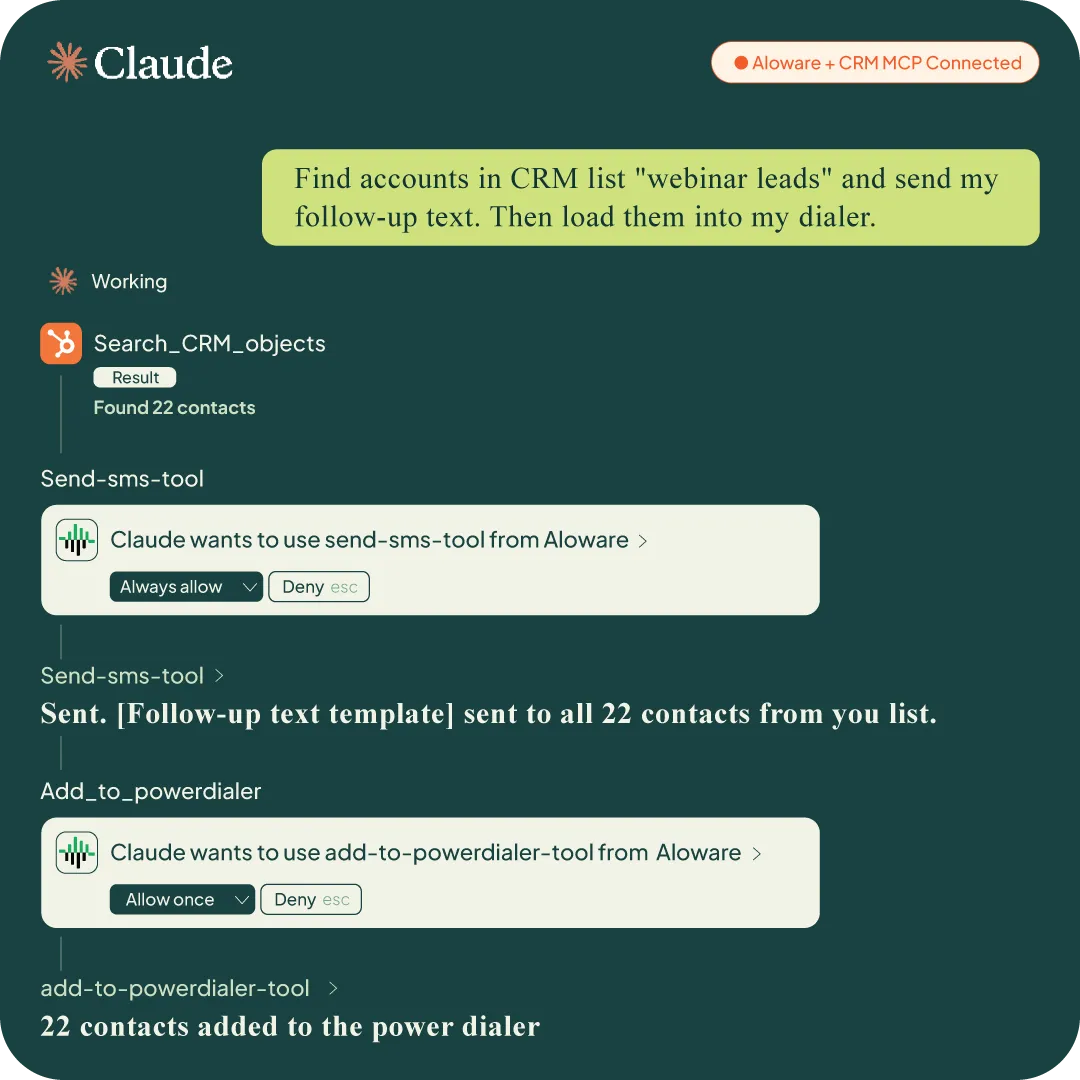
Connect Aloware MCP and your CRM MCP in the same Claude session. The AI bridges both systems — no exports, no imports, no tab switching.
Connect Aloware MCP
Add your Aloware MCP server in 60 seconds. Your lines, contacts, and calling capabilities are now available in every Claude or ChatGPT conversation.
Live nowAdd your CRM MCP
HubSpot, Salesforce, or any CRM with MCP support. Same Claude session, second connection. Now Claude can read your CRM and act in Aloware in one breath.
Works with any CRM MCPTell it what you want
No code. No setup wizards. No if/then rules. Type a sentence in plain English — Claude figures out which system handles it and runs across both.
Works todayUpload a CSV. Same result. Claude reads your contacts, Aloware does the rest — call, text, voicemail, done.
What you can say right now
Three sentences that
used to take a full day.
Text all my HubSpot webinar leads from this week and load them into my power dialer.
Call John Smith at Acme and connect me right now.
Drop my standard voicemail to everyone in my missed calls list this week.
14 tools, zero dashboards
Your contact center,
controlled by sentence.
Every action below runs inside Claude or ChatGPT. No new logins, no new software. You already know how to use it — you just type.
Reach out
/ 04 toolsCall, text, voicemail, or trigger an AI agent — from a single prompt.
Make a call
Bridge yourself to any contact through your Aloware line. Connect to yourself, a specific rep, or a ring group.
Call John at Acme and connect me now.
Send SMS or MMS
Send a text or media message from your Aloware line — to one contact or a list. Image attachments supported.
Text my no-shows from Tuesday's demo that I'll follow up today.
Drop a voicemail
Deliver a pre-recorded message straight to voicemail without ringing the phone. One-to-one or to hundreds.
Drop my follow-up voicemail to everyone I missed this week.
Trigger an AI agent call
Launch an AloAi voice agent to handle the call autonomously. Qualify, gather info, take action — no rep needed.
Have the AI agent follow up with all my cold leads from last month.
Manage contacts
/ 05 toolsCreate, look up, enroll, disenroll — without touching the platform.
Create a lead
Add a new contact with name, phone, email, and company in one prompt. No platform login required.
Create a lead for Sarah Chen at Globex, +1 310 555 0192.
Look up a contact
Find any contact by phone number — get their full record, history, and tags returned to the conversation.
Who is +1 818 555 0134? Pull up their record.
Enroll in a sequence
Drop any contact into an Aloware sequence. Pair with a CRM list to enroll an entire segment in one prompt.
Enroll all my webinar attendees in my 5-step follow-up sequence.
Remove from a sequence
Disenroll a contact from all active sequences instantly — when a deal closes, a contact replies, or outreach needs to stop.
Remove John from all sequences — he just booked a meeting.
Look up a phone number
Run a carrier lookup on any number. Returns line type (mobile, landline, VoIP), carrier name, and location.
Is +1 212 555 0198 mobile or landline before I text it?
Power dialer & team
/ 05 toolsManage power dialer lists and check who's on the floor.
Remove contact from dialer
Pull a single contact out of the Power Dialer instantly — when they book a meeting, ask to be removed, or close mid-campaign.
Remove Sarah from the dialer — she just booked a demo.
Clear a dialer list
Wipe every contact from a specific Power Dialer list. Clean slate before loading a new campaign — no clicks needed.
Clear the old leads from my Tuesday dialer list.
Clear a rep's dialer
Remove all Power Dialer contacts assigned to one rep. Built for reassignments, territory changes, or queue resets.
Clear Marcus's dialer — he's switching to enterprise today.
Check inbox availability
See whether a ring group has agents available right now. Know who's online before you bridge a live call.
Is the inbound sales team available right now?
See all users & status
Pull a live list of every Aloware user and their current status. Useful for routing, coverage checks, and manager oversight.
Who on the team is available to take calls right now?

Now give it a phone.
Aloware MCP is live. Connect to Claude or ChatGPT today
and run your contact center from wherever you already work.