


TL;DR: Quick Answer
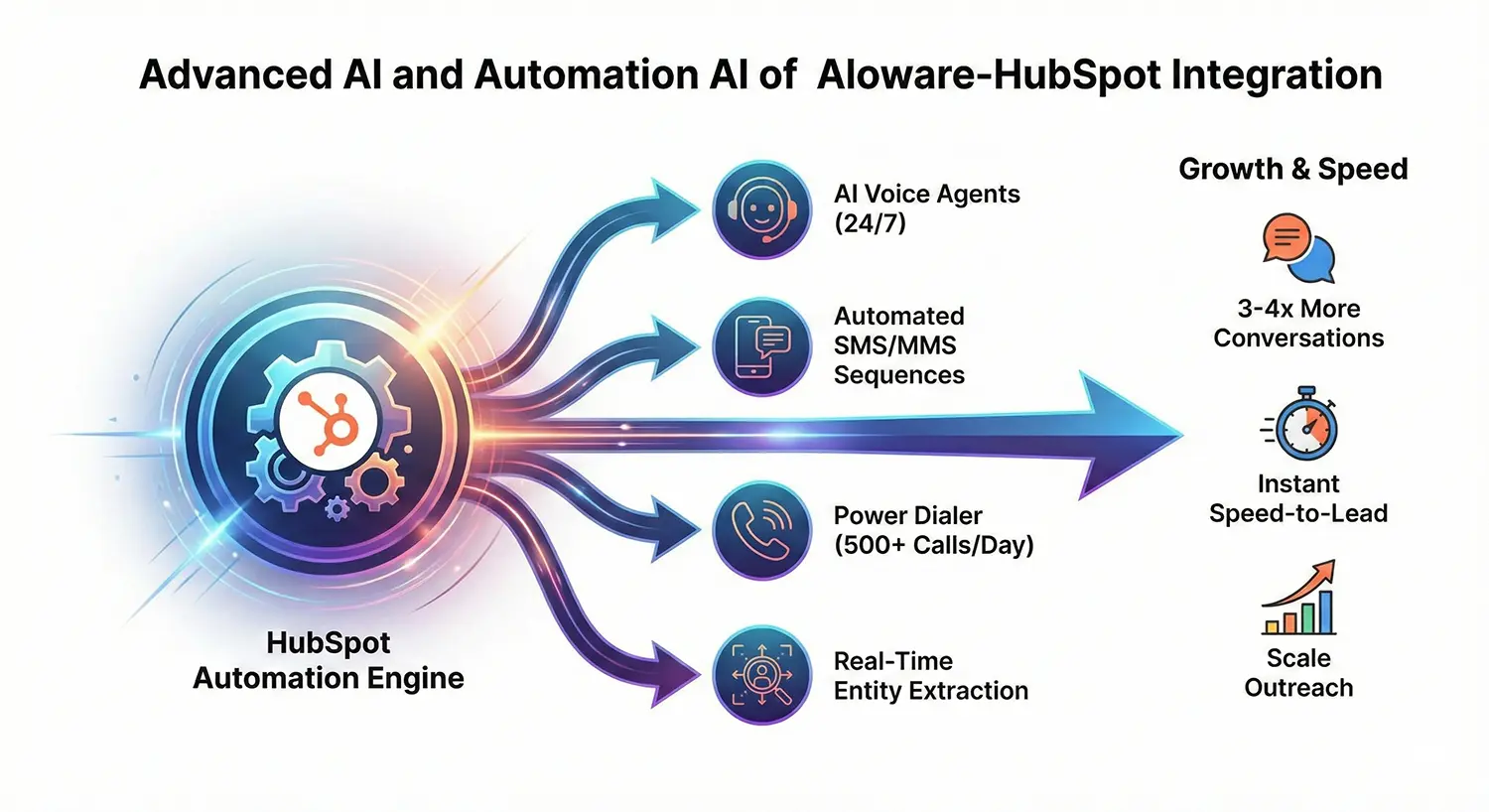
Aloware's HubSpot integration turns HubSpot into a complete AI-powered contact center without leaving your CRM. Make calls, send texts, deploy AI voice agents, and automate follow-ups directly in HubSpot while every interaction logs automatically. Key benefits: native calling/texting on all HubSpot objects, AI call summaries, automatic CRM enrichment from conversations, power dialer (500+ calls/day), SMS workflow automation, intelligent call routing, and managed compliance (A2P 10DLC, CNAM, STIR/SHAKEN). Pricing starts at $30/user/month. Setup takes 10-15 minutes via HubSpot App Marketplace.
Bottom line: If you use HubSpot and need to scale phone/SMS outreach while maintaining clean CRM data, Aloware eliminates tab-switching, manual logging, and compliance headaches—enabling 3-4x more customer conversations per rep.
.jpg)
What is Aloware's HubSpot integration?
Aloware's HubSpot integration is a native contact center solution that embeds AI-powered calling, texting, and automation directly inside HubSpot CRM. It enables teams to make calls, send SMS/MMS, automate follow-ups, and leverage AI voice agents without leaving HubSpot, while automatically logging all communications and enriching CRM data in real-time.
.jpg)
1. Make Calls & Send Texts Directly Inside HubSpot
What it does: Call and text from any HubSpot record (contacts, companies, deals, tickets) using Aloware's native dialer.
Key benefits:
- Chrome extension for one-click calling
- Embedded UI shows caller context instantly
- Works on contacts, companies, deals, AND tickets
- See contact owner, lifecycle stage, and deal status on inbound calls
- Mobile app available for agents outside HubSpot
Why it matters for 2026: 73% of buyers expect immediate responses. Native calling eliminates tab-switching and ensures every interaction is logged automatically.
2. Bidirectional Contact Sync in Real-Time
What it does: Automatically syncs contact data between Aloware and HubSpot with configurable field mapping.
Key sync capabilities:
- Real-time contact creation and updates
- Custom field mapping (lead status, contact owner, last call time, DNC status)
- HubSpot remains source of truth for core fields
- Aloware pushes engagement data back to HubSpot
- Lifecycle stage synchronization
Configuration options:
- Bidirectional sync (↔) or Inbound only (←)
- Prevent duplicate contact creation
- One-time push/pull for initial setup
Why it matters for 2026: Clean data drives AI accuracy. Bidirectional sync ensures your CRM always reflects current communication status for better segmentation and reporting.
3. AI-Powered Call Summaries Automatically Logged to HubSpot
What it does: Every call is transcribed, analyzed for sentiment, and summarized by AI, then synced directly to HubSpot records.
What gets logged:
- Full call transcription
- AI-generated summary with priority highlights
- Sentiment analysis (agent and contact)
- Keyword detection and counting
- Call disposition and outcome
- Call recordings
Time saved: Reps save 10-15 minutes per call on manual note-taking.
Why it matters for 2026: Managers can review call performance without listening to recordings. AI summaries enable faster coaching and better quality assurance at scale.
4. HubSpot-AVA Entity Sync: Automatic CRM Enrichment from Calls
What it does: Launched November 2024, this feature automatically extracts structured data from call transcriptions and syncs it to HubSpot custom fields in real-time.
Entities automatically captured:
- Organizations mentioned
- Job titles and occupations
- Locations and addresses
- Dates (deadlines, appointments, events)
- Money amounts (budgets, deal values)
- Person age demographics
- Vehicle IDs (VINs, license plates)
- Event types (case types, legal proceedings)
Real-world example: Auto dealership captures VIN, trade-in value, budget range, and delivery timeline from test drive call—automatically populating 5+ HubSpot fields without manual entry.
Why it matters for 2026: Eliminates 80% of post-call data entry. Ensures accurate pipeline reporting without relying on rep diligence.
5. Launch AI Voice Agents from HubSpot Workflows
What it does: Deploy AI voice agents for 24/7 call handling, triggered directly from HubSpot workflows.
Use cases:
- Answer inbound calls after hours
- Qualify leads before routing to reps
- Handle tier-1 support questions
- Make outbound qualification calls
- Schedule appointments automatically
Workflow example:
- Contact submits form → HubSpot workflow triggers
- AI voice agent calls contact within 30 seconds
- Agent qualifies interest and captures details
- Qualified leads route to rep's power dialer
- All interactions logged in HubSpot
Cost: AI voice agents cost $0.10/minute with no minimum commitment.
Why it matters for 2026: 67% of leads expect contact within 5 minutes. AI agents ensure instant follow-up even when reps are unavailable.
6. Power Dialer with One-Click HubSpot List Import
What it does: Import HubSpot lists directly into Aloware's power dialer with one click, enabling reps to make 500+ calls per day.
Power dialer features:
- Import lists, views, or saved filters from HubSpot
- Sort by timezone, custom fields, or engagement data
- Automatic voicemail drops (pre-recorded)
- Skip no-answers and busy signals
- Force call dispositions before moving to next call
- Warmup periods (5-60 seconds between calls)
Results: Reps achieve 3-4x more conversations per day compared to manual dialing.
Why it matters for 2026: With average connect rates under 10%, volume determines success. Power dialers maximize talk time and minimize dead air.
7. Automated SMS/MMS in HubSpot Workflows
What it does: Send personalized SMS and MMS messages triggered by HubSpot workflow events.
Workflow triggers:
- Form submission → instant SMS confirmation
- Deal stage change → automated follow-up
- Missed call → text with callback scheduling link
- Support ticket created → SMS status update
- Meeting scheduled → reminder text 1 hour before
Personalization: Use HubSpot contact tokens to insert name, company, deal details, and custom fields.
Compliance: Includes automatic opt-out management and DNC list syncing.
Why it matters for 2026: SMS has 98% open rates vs. 20% for email. Automated texting keeps leads engaged without manual effort.
8. Intelligent Call Routing Based on HubSpot Data
What it does: Route inbound calls automatically based on contact ownership, last engagement, or custom HubSpot properties.
Routing logic options:
- Contact owner gets call first
- Last engaged rep receives call
- Round-robin by team
- Skills-based routing using custom fields
- Time-zone aware routing
- VIP/priority routing by deal value
Fallback: If primary agent unavailable, AI routing directs to next best available agent instantly.
Average routing time: Under 2 seconds from ring to connection.
Why it matters for 2026: 78% of customers buy from the first company to respond. Smart routing ensures the right person answers every time.
.jpg)
9. Multi-Entity Management: Handle Duplicate Contacts Intelligently
What it does: When the same phone number exists on multiple HubSpot contacts, Aloware creates a "primary contact" structure and groups duplicates.
How it works:
- Primary contact = oldest HubSpot record by creation date
- Activities always log to primary contact
- Non-primary contacts linked in multi-entity view
- Prevents duplicate call/SMS logging
- "See all matches" indicator shows grouped contacts
Why it matters for 2026: 30% of B2B contacts have multiple HubSpot records. Multi-entity management prevents data fragmentation and ensures complete communication history.
10. Add Contacts to Power Dialer via HubSpot Workflows
What it does: Automate power dialer list building by adding contacts to specific users' queues based on workflow triggers.
Workflow action configuration:
- Assign to specific user's power dialer
- Choose top or bottom of queue
- Prevent duplicates (same phone number)
- Include/exclude international numbers
- Select phone number field (mobile vs. default)
Speed-to-lead example:
- Hot lead submits form
- HubSpot workflow adds them to top of sales rep's dialer
- Rep sees alert and calls within 60 seconds
- Connect rate increases 4x vs. calling within 5 minutes
Why it matters for 2026: Automated queue building ensures reps always have prioritized leads ready to call without manual list management.
11. Deal-Based & Ticket-Based Workflow Automation
What it does: Trigger Aloware actions from HubSpot deal stages and support ticket statuses.
Deal workflow example:
- Deal moves to "Demo Scheduled" → Send SMS reminder 1 hour before
- Deal stuck in "Proposal Sent" for 3 days → Add to power dialer for follow-up call
- Deal closes won → Enroll in customer onboarding sequence
Ticket workflow example:
- Ticket created → Send SMS confirmation with ticket number
- Ticket escalated → Route call to senior support agent
- Ticket resolved → Trigger CSAT survey via SMS
Why it matters for 2026: Automation ensures no opportunity falls through cracks. Every stage change triggers appropriate communication action.
12. Complete Activity Logging: Calls, Texts, Recordings on Every HubSpot Object
What it does: Automatically logs all communications to HubSpot records without manual data entry.
What gets logged:
- Inbound and outbound calls
- SMS and MMS messages with attachments
- Full call recordings
- Call transcriptions
- AI-generated call summaries
- Voicemail recordings
- Call dispositions and outcomes
Where it logs:
- Contact records
- Company records (even without matching contact)
- Deal records
- Ticket records
Native call object sync: Enables accurate call count and talk time reports using HubSpot's native reporting.
Why it matters for 2026: Complete activity logging provides 360° view of customer interactions. Managers can track team performance, identify coaching opportunities, and measure true sales velocity.
13. Compliant Calling with Automatic A2P 10DLC, CNAM & STIR/SHAKEN
What it does: Aloware manages compliance registrations and carrier verification to increase call pickup rates.
Included compliance services:
- A2P 10DLC campaign registration (required for SMS)
- CNAM (Caller ID Name) display setup
- STIR/SHAKEN attestation (carrier verification)
- NumberGuard spam label protection
- Local presence dialing (show local area codes)
Impact on pickup rates:
- Verified CNAM increases pickup by 30%
- Local presence increases pickup by 40%
- STIR/SHAKEN prevents "Spam Likely" labels
Why it matters for 2026: Carrier filters block 40% of unverified calls. Aloware's managed compliance ensures your calls get through.
14. Enroll Contacts in Aloware Sequences via HubSpot Workflows
What it does: Trigger multi-touch Aloware sequences (SMS + voice) from HubSpot workflows.
Sequence capabilities:
- Mix SMS, AI voice agent calls, and human calls
- Multi-day cadences (e.g., 7-touch over 10 days)
- Force enrollment (disenroll from old, enroll in new)
- Apply to first associated contact or all associated contacts
Example sequence:
- Day 1: SMS introduction + AI voice agent call
- Day 2: SMS follow-up with case study link
- Day 4: Human rep call from power dialer
- Day 7: Final SMS with special offer
- Day 10: AI voice agent re-engagement call
Why it matters for 2026: Multi-channel sequences increase response rates 3x vs. single-channel outreach. Automation ensures consistent execution at scale.
15. Real-Time Webhook Triggers for Advanced Automation
What it does: Aloware sends call and SMS events to HubSpot in real-time, enabling sophisticated workflow automation.
Available webhook events:
- Inbound call received
- Outbound call completed
- SMS received
- SMS sent
- Voicemail left
- Call disposition set
- Sequence step completed
- AI agent interaction completed
Advanced workflow example:
- Inbound call received → Check if contact exists → Create if new → Notify account owner via Slack
- SMS keyword detected ("DEMO") → Update deal stage → Add to demo scheduling calendar → Send confirmation text
Why it matters for 2026: Real-time event data enables proactive workflows that respond instantly to customer signals, reducing response time from hours to seconds.
How to Get Started with Aloware's HubSpot Integration
Installation steps:
- Install "Aloware Cloud Contact Center" from HubSpot App Marketplace
- Connect via Aloware admin panel (requires matching email addresses)
- Configure sync settings (bidirectional recommended)
- Map custom fields for your workflow needs
- Set up workflow actions for automated communication
- Train team on in-HubSpot dialing and texting
Requirements:
- HubSpot admin permissions
- Aloware admin access
- Matching email between platforms
Pricing: Starting at $30/user/month for contact center features. AI voice agents cost $0.10/minute.
Key Takeaways
Aloware's HubSpot integration transforms HubSpot into a complete AI-powered contact center by:
- Eliminating manual work through automatic call logging, AI summaries, and entity extraction
- Increasing speed-to-lead with AI voice agents, power dialers, and instant SMS automation
- Improving data quality with bidirectional sync, multi-entity management, and real-time enrichment
- Scaling communication through workflow automation across calls, texts, and sequences
- Boosting compliance with managed A2P 10DLC, CNAM, and STIR/SHAKEN verification
For teams using HubSpot as their CRM, Aloware delivers the contact center capabilities, AI automation, and compliance features needed to compete effectively in 2026's speed-driven B2B market.

Frequently Asked Questions
Does Aloware work with HubSpot Free?
Yes, Aloware integrates with all HubSpot tiers including Free, Starter, Professional, and Enterprise.
Can I use HubSpot workflows to send SMS?
Yes, Aloware adds SMS/MMS actions to HubSpot workflows. You can trigger texts based on any HubSpot event.
Are call recordings automatically saved in HubSpot?
Yes, call recordings, transcriptions, and AI summaries sync directly to HubSpot contact, deal, and ticket records.
Does this replace HubSpot's native calling?
Aloware complements and extends HubSpot's native calling with a power dialer that works on any paid HubSpot plan, AI agents, SMS, compliance features, and advanced automation.
What happens if I delete a contact in HubSpot?
The contact is removed from Aloware within minutes. Communication history remains logged in HubSpot timeline.
Can I use this for customer support?
Yes, Aloware works with HubSpot Service Hub for ticket-based workflows, support queues, and customer communication.
How long does setup take?
Initial connection takes 10-15 minutes. Full workflow configuration typically takes 2-3 hours depending on complexity.
.png)

Ruby Kootval is Head of Product Marketing at Aloware. She has 12 years in digital marketing, including 8 in B2B SaaS and 5 in telecom, and writes about AI voice agents, dialers, CRM integrations, and contact center operations.

.png)