TL;DR
Choosing a cloud contact center in 2026 entails prioritizing AI automation, native CRM integrations, and omnichannel support. Search for platforms that handle compliance (A2P 10DLC, STIR/SHAKEN) automatically, offer transparent pricing, and can scale with your business. Test 3-5 vendors hands-on, involve your agents in evaluation, and calculate total cost of ownership—not just per-seat pricing. The right platform responds to leads in under 5 minutes, syncs with your existing tools, and turns customer interactions into revenue. Expect to spend $30-$150 per agent monthly for quality solutions.
The cloud contact center market will hit $222.91 billion by 2034, growing at 21.73% annually from 2025 to 2034. Yet with thousands of vendors screaming for attention, picking the right one feels as though navigating a maze blindfolded.
Here’s what’s at stake: Responding to leads within 5 minutes increases conversions by up to 100x compared to waiting 30 minutes. And 78% of customers buy from whoever responds first. Your contact center choice isn’t just a tech decision—it’s a revenue decision.
This guide cuts through the noise. You’ll learn exactly what to look for, how to evaluate vendors without wasting weeks, and which features actually matter (hint: it’s not the ones vendors talk about most).
What Is a Cloud Contact Center?
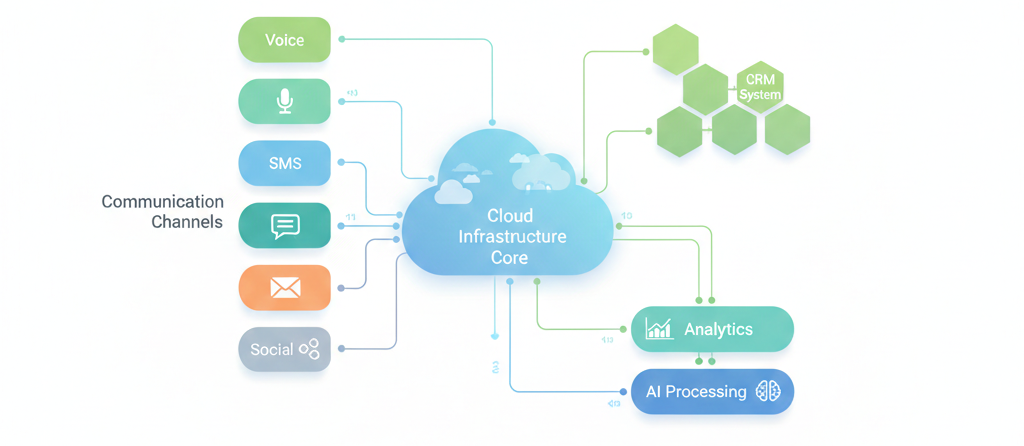
A cloud contact center is customer service software that lives on the internet instead of your server room. Your team logs in through a browser or app, handles customer conversations across multiple channels, and syncs everything with your CRM—all without touching a single piece of hardware.
Cloud Contact Center vs. Cloud Call Center
Here’s the difference that matters:
- Cloud call center: Voice calls only
- Cloud contact center: Voice, SMS, email, live chat, social media, video—everything
Most “call centers” in 2026 are actually contact centers. Why? Because your customers don’t just call anymore. They text at 11 PM, DM on Instagram, and expect answers on their preferred channel.
How Cloud Contact Centers Actually Work
Think of it like this:
- The platform lives in the cloud: A vendor (like RingCentral, NICE, or Aloware) hosts everything in secure data centers
- Your team connects via internet: Agents use any device with a browser—laptop, tablet, phone
- Customers reach you anywhere: Calls, texts, emails, and chats all flow through the same system
- Everything syncs in real-time: Customer data updates across your contact center, CRM, and other tools instantly
No servers. No IT headaches. No “the system’s down” excuses.
Why Your Business Can’t Ignore Cloud Contact Centers in 2026
Over 62% of enterprises globally have shifted at least some contact center operations to the cloud, and that number climbs daily. Here’s why the shift is accelerating:
1. Speed to Lead Isn’t Optional Anymore
Sales reps who contact leads within an hour are 60x more likely to qualify them than those who wait 24 hours. Yet the average response time across industries? 42 hours.
Cloud contact centers with AI routing and automation close this gap. Your AI voice agent answers at 2 AM. Your power dialer reaches 500 leads per day. Your automated SMS follows up instantly when someone fills a form.
Traditional systems can’t keep pace.
2. Remote Work Broke Traditional Call Centers
Remember when “work from home” meant VPNs, security nightmares, and degraded call quality? Cloud contact centers made that obsolete.
87% of contact center agents now work remotely at least part-time. With cloud platforms, your Boston agent and Manila agent have identical capabilities—same tools, same data access, same call quality.
3. Customers Expect Omnichannel Support
73% of organizations cite digital transformation and cloud migration as their top priority for contact centers. Why? Because customers won’t tolerate channel silos anymore.
They start on your website chat, continue via email, then call when they’re frustrated. If your agent can’t see that history, you’ve already lost them.
4. The Math Just Works Better
Here’s what traditional contact centers cost:
- $50K-$500K upfront for hardware and software licenses
- $80K-$120K annually for dedicated IT staff
- 3-6 months for implementation
- Another $30K-$50K every upgrade cycle
Cloud contact centers?
- $0 upfront (subscription model)
- No dedicated IT needed (vendor handles everything)
- 1-2 weeks to launch
- Continuous updates included
The North American cloud contact center market alone will reach $26.9 billion by 2029 because the ROI is undeniable.
Essential Features Every Cloud Contact Center Needs (No Exceptions)
Don't get distracted by flashy add-ons. These features are non-negotiable in 2026:
Omnichannel Communication That Actually Works
Your customers live on multiple channels. Your contact center better meet them there.
Must-haves:
- Voice calls with HD audio quality, automatic call recording, AI-powered voicemail transcription, and one-click callback
- SMS/MMS messaging with two-way conversations, media support (images, videos, files), and automated text sequences
- Real-time CRM sync that updates contact records, deal stages, and conversation history instantly—no manual logging required
- AI call transcription that captures every word, identifies speakers, and generates searchable text for every conversation
- AI call summaries that automatically extract key points, action items, and customer sentiment after each call
- Power dialer capabilities for high-volume outbound with local presence, voicemail drop, and smart lead prioritization
- IVR (Interactive Voice Response) with no-code builder for intelligent call routing based on business hours, agent availability, and caller intent
- Call analytics dashboard showing real-time metrics: calls in queue, average handle time, agent performance, and conversion rates
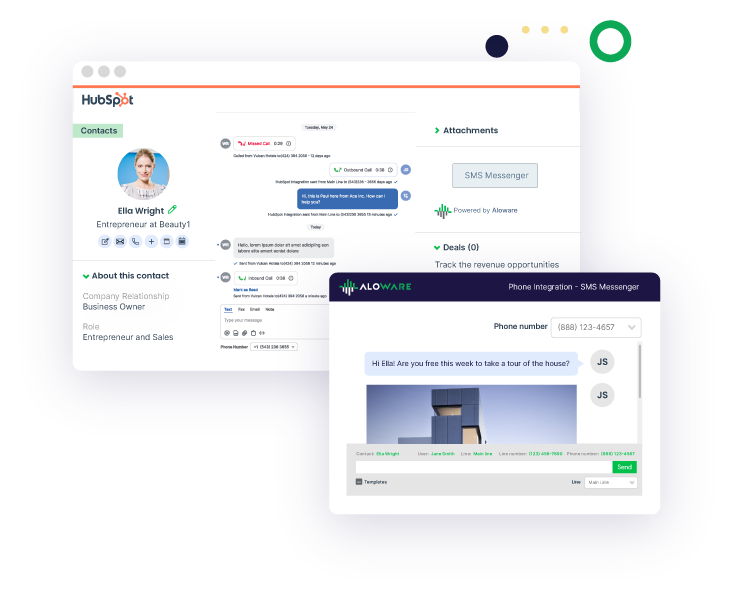
The critical part? Unified conversation history with real-time CRM sync. If a customer texts, then calls, then receives an AI voicemail transcription—your agent sees all three interactions in one timeline automatically logged to HubSpot, Salesforce, Pipedrive, or Zoho. No context switching. No asking customers to repeat themselves. No manual data entry.
Aloware delivers this with:
- Native CRM integration that works inside HubSpot and Salesforce—agents never leave their CRM
- Automatic conversation logging where every call, text, and AI interaction syncs to the contact record within seconds
- AI Voice Analytics that transcribes calls, detects sentiment, tracks keywords, and generates summaries automatically
- Two-way sync that pulls contact data from your CRM before calls and pushes conversation details back instantly
- Unified inbox where agents see complete communication history: calls, texts, voicemails, and AI bot conversations in chronological order
Companies with strong omnichannel engagement retain 89% of customers, compared to 33% for weak omnichannel. That's not a marginal improvement—it's the difference between thriving and dying.
The Aloware Advantage: While competitors require agents to toggle between phone system, CRM, and analytics dashboard, Aloware consolidates everything in a single interface with automatic AI transcription and real-time CRM sync. Your team works faster. Your data stays accurate. Your customers stay happy.
AI-Powered Automation (Not Optional in 2026)
64% of CCaaS users already deploy AI-driven self-service tools, and that number will hit 85%+ by end of 2026.
Essential AI features:
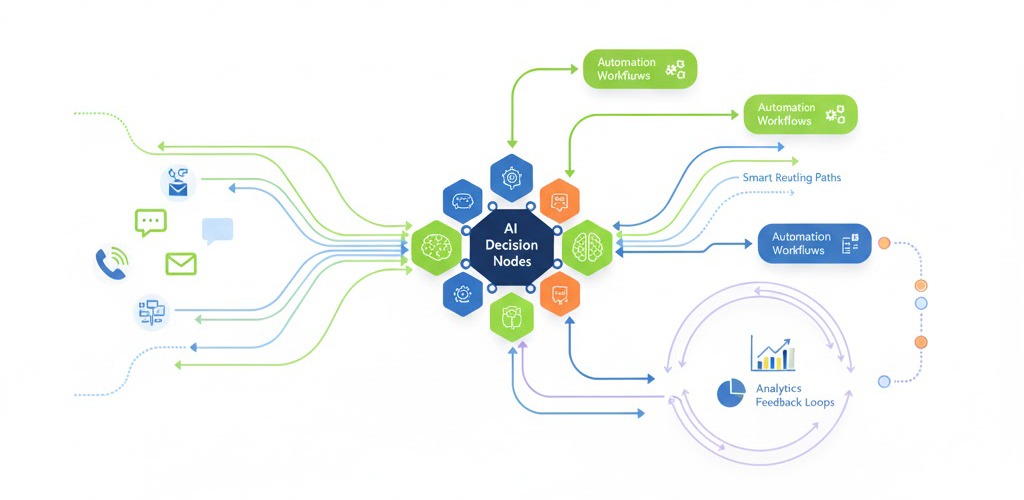
- AI voice agents that answer calls 24/7, qualify leads, book appointments, and route to humans when needed
- AI SMS chatbots that handle FAQs, send order updates, and collect information via text
- Automatic call summarization that generates notes after each conversation (no more manual note-taking)
- Sentiment analysis that flags frustrated customers for priority escalation
- Predictive routing that matches customers to the best-suited agent based on conversation history and outcomes
- Real-time agent assist that suggests responses during live conversations
AI doesn’t replace agents—it handles the repetitive stuff (password resets, order status, appointment scheduling) so humans tackle complex problems.
Real impact: Companies using AI in contact centers see 37% higher resolution rates and 25% shorter handle times.
Native CRM Integrations (Not Zapier Band-Aids)
Your contact center should plug directly into your CRM. Here’s what “direct integration” actually means:
- Two-way data sync that logs every call, text, email, and note automatically to CRM records
- Click-to-call/text from any contact or deal without leaving your CRM
- Screen pops that display customer information the second they contact you
- Workflow automation that triggers sequences based on call outcomes (e.g., “Call ended with ‘interested’ disposition → Add to nurture campaign”)
- Real-time updates that keep contact records current across both platforms with zero delay
Platforms like Aloware offer native integrations with HubSpot, Salesforce, Zoho, Pipedrive, and HighLevel. No middleware. No Zapier task limits. No “it should sync in 15 minutes.”
Why this matters: Salespeople spend 21% of their day entering data. Native integrations eliminate that waste.
Intelligent Call Routing (Because Random Distribution Doesn’t Work)
Smart routing ensures the right customer reaches the right agent every time:
- Skills-based routing: Route Spanish speakers to bilingual agents, technical issues to senior support
- Time-based routing: Handle calls differently during business hours vs. after hours
- VIP routing: Send high-value customers to your best agents
- Round-robin distribution: Balance workload across available agents
- IVR menus: Let customers self-select departments before reaching an agent
- AI-powered intent routing: Analyze what customers say and route based on predicted need
Advanced platforms use machine learning to continuously improve routing. If Agent A consistently closes deals from inbound calls about pricing, the system routes more pricing calls to Agent A.
Real-Time Analytics & Reporting That Drive Decisions
“What gets measured gets managed” isn’t a cliché—it’s survival.
Essential analytics:
- Live wallboards showing active calls, queue depth, wait times, and agent status
- Agent performance dashboards tracking talk time, conversion rates, customer satisfaction scores
- Call quality monitoring with AI-powered scoring and coaching recommendations
- Customer satisfaction metrics (CSAT, NPS, First Call Resolution) tracked automatically
- Conversation intelligence that identifies trends, keywords, objections, and compliance risks
- Custom reports you can build without a data analyst
The best platforms let managers see real-time data while agents stay focused on conversations.
Proof it matters: Organizations using contact center analytics improve customer satisfaction by 33% on average.

Compliance & Security (Non-Negotiable)
With 51% of companies pointing to data security/privacy as their primary concern, compliance features aren’t optional extras—they’re table stakes.
Must-haves:
- A2P 10DLC registration for SMS campaign approval (required as of 2023, strictly enforced in 2026)
- STIR/SHAKEN certification to prevent caller ID spoofing and avoid “Scam Likely” labels
- CNAM registration so your business name displays on caller ID instead of just a number
- DNC list management with automatic scrubbing to honor do-not-call preferences
- Call recording consent with proper disclosure and opt-out mechanisms
- TCPA compliance tools that track consent, time restrictions, and call attempt limits
- SOC 2 Type II certification verifying security controls and annual audits
Platforms like Aloware handle these registrations for you—A2P 10DLC, STIR/SHAKEN, and CNAM are included, not upsells. You fill out forms once, they handle the rest.
Why this matters beyond avoiding fines: Texts from properly registered numbers see 98% delivery rates vs. 60% for unregistered numbers. Compliance directly impacts whether your messages reach customers.
How to Evaluate Cloud Contact Center Vendors (Step-by-Step)
Follow this framework to avoid buyer’s remorse:
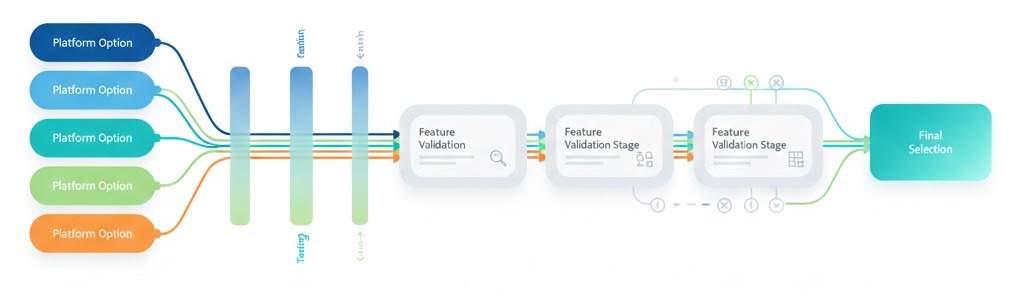
Step 1: Document Your Requirements (30 Minutes)
Grab a spreadsheet and answer these:
Current State:
- What’s broken in your existing setup? (Be specific: “Calls drop when transferring,” “Can’t see SMS history,” etc.)
- How many agents do you have today? In 6 months? In 2 years?
- Where do agents work? (Office, remote, hybrid, field)
- What’s your average daily call volume? Peak hours? Seasonal spikes?
Integration Needs:
- What CRM do you use? (HubSpot, Salesforce, Zoho, Pipedrive, HighLevel, custom)
- What other tools must integrate? (Zapier, Slack, calendars, help desk software)
- Do you need API access for custom integrations?
Communication Channels:
- Which channels do customers prefer? (Rank by volume)
- Do you do outbound calling/texting?
- Do you need international numbers?
Compliance Requirements:
- What industries are you in? (Healthcare, finance, insurance have special rules)
- Do you handle payment information?
- What call recording requirements do you have?
Budget:
- What can you spend per agent per month?
- What’s your total budget including setup, numbers, and usage?
- What’s the cost of your current solution (include hidden costs)?
This homework prevents vendors from steering you toward what they want to sell instead of what you need.
Step 2: Shortlist 3-5 Vendors and Request Demos
Don’t waste time on 10+ demos. Research online, read reviews, then shortlist based on:
- Do they support your must-have features? (If you need WhatsApp Business integration and they don’t offer it, they’re out)
- Do they integrate with your CRM? (Native integration only—Zapier doesn’t count)
- Do they serve businesses your size? (Enterprise platforms overwhelm 10-person teams; startup tools break at 100+ agents)
- Is pricing transparent? (If you can’t find pricing on their website, expect games during sales calls)
During demos, ask these questions:
Setup & Implementation:
- “How long from contract signature to first call?”
- “What data do you need from us to get started?”
- “Who handles number porting—us or you?”
- “What does the first week look like for our agents?”
Features & Functionality:
- “Show me how an agent handles a call while viewing the CRM record.”
- “How do we set up an AI voice agent? Can you do it live right now?”
- “Walk me through building a call routing rule.”
- “How do agents switch between channels during a conversation?”
Integration & Data:
- “Show me the CRM integration—make a test call and let me see it log.”
- “Can we export all our data if we leave? In what format?”
- “What happens if our CRM goes down—does your platform still work?”
Support & Reliability:
- “What’s your average response time for support tickets?”
- “What’s your uptime guarantee? What happens if you miss it?”
- “Do you have a status page we can monitor?”
Compliance:
- “How do you handle A2P 10DLC registration for us?”
- “Show me your STIR/SHAKEN attestation process.”
- “How do we manage DNC lists in your platform?”
Pricing:
- “What’s included in the base price per agent?”
- “What costs extra?” (Numbers, usage, features, support tiers)
- “What happens if we go over our plan limits?”
- “What’s the cancellation policy?”
Take notes on who gives straight answers vs. who dodges questions.
Step 3: Run Hands-On Trials (The Most Important Step)
Free trials tell you what demos can’t. Most reputable vendors offer 7-14 day trials.
Test these scenarios:
Day 1-2: Setup
- How long does it take to set up your first phone number?
- Can you import your contact list without formatting issues?
- Does the CRM integration actually work with your real data?
- How intuitive is the interface? (Would your least tech-savvy agent figure it out?)
Day 3-5: Core Functions
- Make 20+ outbound calls—how’s call quality?
- Send 100+ SMS messages—what’s the delivery rate?
- Set up basic call routing and test it
- Try the mobile app—does it work as well as desktop?
Day 6-7: Advanced Features
- Configure an AI voice agent (if offered)
- Build an automated sequence or workflow
- Create custom reports
- Test integrations with your other tools
Throughout: Involve Your Team
- Have 3-5 agents use it daily
- Ask them: “Would you want to use this every day?”
- Note what they struggle with—that reveals training needs
Red flags during trials:
- Choppy call quality (test from different locations/internet connections)
- Features that “aren’t available in trial” (means they don’t want you testing them)
- Data that doesn’t sync to CRM within 5 minutes
- Support that takes 24+ hours to respond
- The mobile app is clearly an afterthought
Step 4: Calculate Total Cost of Ownership (TCO)
Don’t fall for “just $X per agent!” marketing. Calculate actual costs:
Recurring Monthly Costs:
- Base platform fee: $X per agent × number of agents
- Phone numbers: $1-5 per number × how many you need
- Usage charges: Estimate based on call/SMS volume
- Add-on features: AI agents, advanced analytics, premium support
- CRM integration fees: Some vendors charge separately
One-Time Costs:
- Setup/implementation fee
- Number porting fees
- Data migration assistance
- Custom development (if needed)
- Initial training
Hidden Costs:
- Overages: What happens when you exceed plan limits?
- Contract break fees: Cost to leave early
- Upgrade fees: Costs to add features later
- Support: Is it included or tiered?
Example TCO calculation:
Company: 25 agents, 5,000 outbound calls/month, 10,000 SMS/month
Compare this to your current costs. If you’re spending $35K/year on a traditional system with worse features, the ROI is obvious.
Step 5: Check References (Don’t Skip This)
Ask vendors for 3 customer references. When you call them, ask:
About Implementation:
- “How long did it really take to go live?”
- “What surprised you during setup?”
- “What should we know that the vendor won’t tell us?”
About Daily Use:
- “How often does the system go down?”
- “How’s call quality compared to what you had before?”
- “Do agents actually like using it?”
About Support:
- “When you have a problem, how quickly do they respond?”
- “Have they ever blamed your internet instead of fixing their product?”
- “What’s the worst issue you’ve had and how did they handle it?”
About Value:
- “Is it worth what you’re paying?”
- “What features do you wish they had?”
- “Would you choose them again if starting over?”
Also check G2, Capterra, and Gartner Peer Insights for unfiltered reviews. Look for patterns in negative reviews—if 5+ people complain about the same thing, it’s a real issue.
.png)
Cloud Contact Center vs. Traditional On-Premise Systems (2026 Reality Check)
Still considering on-premise? Here’s the honest comparison:
The cloud-based contact center market grows at 25.43% CAGR from 2025-2030 while on-premise installations decline 8% annually. The shift isn’t slowing—it’s accelerating.
The only reasons to choose on-premise in 2026:
- Government/military with tight data sovereignty requirements
- You already own the infrastructure and it works perfectly
- Your internet connectivity is genuinely unreliable (rare in developed markets)
For everyone else, cloud makes more sense financially, operationally, and strategically.
Common Pitfalls That Cost Businesses Thousands (Avoid These)
Learn from others’ expensive mistakes:
Pitfall #1: Choosing Based on Price Alone
The mistake: “Vendor A costs $25/agent and Vendor B costs $55/agent. A wins!”
Why it backfires: The $25 platform lacks native CRM integration, so your agents spend 90 extra seconds per call manually logging data. At 50 calls/day per agent, that’s 75 hours of wasted time per month per agent.
The reality: A $30/agent price difference costs $360/year per agent. But 75 wasted hours at $25/hour costs $1,875/month ($22,500/year) per agent.
The lesson: Calculate cost per desired outcome (cost per qualified lead, cost per resolved ticket, cost per closed deal), not just cost per seat.
Pitfall #2: Ignoring Integration Quality
The mistake: “They integrate with Salesforce, so we’re good!”
Why it backfires: The “integration” is actually a third-party Zapier connection that:
- Delays data sync by 15 minutes
- Fails when Zapier has issues (happens monthly)
- Costs an extra $20/month per agent for enough Zap tasks
- Doesn’t support all the fields you need
The reality: Your agents open 3 tabs to see complete customer context. They miss information. Customer experience suffers.
The lesson: Test the actual integration during trials. Make a call and watch it log to your CRM in real-time. If it takes more than 30 seconds, it’s not a real integration.
Pitfall #3: Letting Only Managers Evaluate
The mistake: “I’m the director, I know what the team needs.”
Why it backfires: You choose a platform with 47 features you’ll never use but terrible call quality and a confusing interface. Your agents hate it. Adoption fails. You’re back to vendor shopping in 6 months.
The reality: Managers focus on reports and features. Agents care about: “Does it work?” and “Is it easy?” If they don’t like it, they won’t use it properly.
The lesson: Include 3-5 frontline agents in trials and demos. Their feedback matters more than yours.
Pitfall #4: Skipping Compliance Due Diligence
The mistake: “We’ll figure out A2P 10DLC later.”
Why it backfires: Carriers start blocking your texts 3 weeks after launch. Your delivery rate drops from 95% to 12%. Your campaigns fail. You scramble to register, which takes 4-6 weeks. Meanwhile, you’re bleeding revenue.
The reality: Unregistered texting campaigns see 60% delivery rates vs. 98% for registered campaigns. That’s the difference between winning and losing.
The lesson: If you do any SMS outreach, choose a vendor who handles compliance for you. It’s worth paying extra.
Pitfall #5: Ignoring Scalability
The mistake: “We’re only 10 agents today, so this startup-tier pricing works great!”
Why it backfires: You grow to 50 agents in 18 months. Suddenly:
- Features you need are only in the enterprise tier
- Migrating tiers requires rebuilding all your workflows
- The “upgrade price” is 3x what you’d pay as a new customer
- Support gets worse as you outgrow their sweet spot
The reality: Changing contact center platforms costs $50K-$100K in lost productivity, retraining, and migration work. You’re locked in even if you hate it.
The lesson: Review the vendor’s full pricing tiers. Can they support you at 5x your current size? Do they serve customers that big successfully?
Pitfall #6: Not Reading the Contract
The mistake: “It’s standard boilerplate, I’ll sign.”
Why it backfires: You’re locked into a 3-year contract with 50% early termination fees. You can’t export your data. Usage overages cost 10x the regular rate. Support SLAs are “best effort” (meaning nothing).
The reality: When you want to leave, the contract protects them, not you.
The lesson: Read (or have legal read) these sections:
- Contract length and auto-renewal terms
- Early termination fees
- Data ownership and export rights
- Usage overage charges
- Support SLA guarantees
- Price increase caps
If they won’t negotiate on deal-breakers, walk away.
How Aloware Solves the Biggest Cloud Contact Center Challenges
When you’re evaluating cloud contact centers, you’ll run into the same problems repeatedly: complicated AI setup, CRM integrations that don’t really work, compliance nightmares, and hidden costs. Aloware built its platform specifically to solve these pain points.
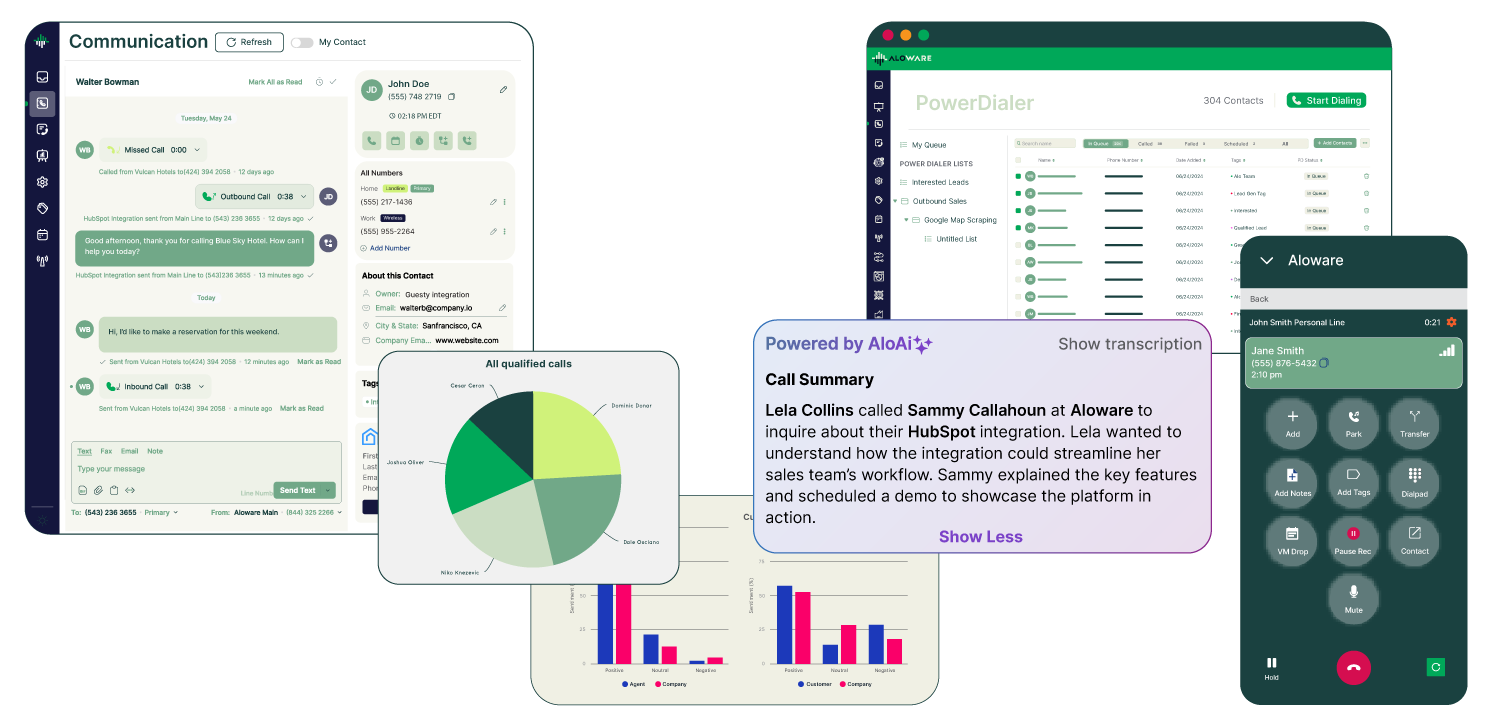
AI That Actually Works (Without a PhD)
Most platforms advertise “AI-powered” features, then require weeks of training, complex prompt engineering, or professional services to get working.
Aloware’s approach: AI voice agents and SMS bots deploy in under 10 minutes. Choose a template (lead qualification, appointment scheduling, support triage), customize the conversation flow with simple dropdowns, and launch. No coding. No AI expertise required.
Real example: A real estate company set up an AI voice agent to answer after-hours calls, qualify buyer interest, and book showings. Setup time: 12 minutes. Result: 47% of inbound leads converted to scheduled appointments vs. 8% when calls went to voicemail.
CRM Integration That’s Actually Native
“We integrate with HubSpot” could mean anything from a robust API connection to a janky Zapier hack.
Aloware’s difference: Native integrations with HubSpot, Salesforce, Zoho, Pipedrive, and HighLevel mean:
- Instant data sync: Calls log to CRM records in under 5 seconds
- Click-to-call from anywhere: Dial any contact without leaving your CRM
- Bi-directional updates: Changes in Aloware update the CRM and vice versa
- Workflow automation: Trigger Aloware sequences from CRM events
- No Zapier needed: No task limits, no delays, no extra costs
Proof it works: Aloware’s HubSpot integration is certified by HubSpot and rated 4.8/5 stars by users. The Salesforce connector supports custom fields, multiple phone fields, and advanced routing based on CRM data.
Compliance Handled for You (Seriously)
A2P 10DLC registration typically requires:
- Registering your business (1-2 weeks)
- Registering your brand (3-5 business days)
- Registering each campaign (another 3-5 business days)
- Dealing with rejections and resubmissions
- Monitoring carrier-specific requirements
Aloware’s solution: Built-in compliance management handles this for you:
- Fill out one form with your business information
- Aloware submits to all carriers
- You get notifications when approved (usually 5-7 business days)
- STIR/SHAKEN and CNAM registration included automatically
- Ongoing monitoring ensures you stay compliant
NumberGuard adds carrier-verified identity management so your calls never show “Scam Likely.”
Real impact: Aloware customers see 98% SMS delivery rates and 40% higher answer rates on calls compared to industry averages. That’s what proper compliance delivers.
Power Dialer Built for Scale
Most contact centers offer basic auto-dialers. Aloware’s power dialer is built for high-volume teams:
- 500+ calls per agent per day: Automatic dialing eliminates manual number entry
- Local presence: Match your outbound number to the prospect’s area code (increases answer rates 28%)
- Voicemail drop: Pre-record messages that leave instantly when you hit voicemail
- Forced dispositions: Agents must categorize calls before moving to the next one
- CRM-powered lists: Dial directly from HubSpot lists, Salesforce views, or Pipedrive filters
- Smart pacing: AI adjusts dial rate based on agent availability and answer rates
Sales teams using Aloware’s power dialer average 4.2x more conversations per day compared to manual dialing.
Pricing That Makes Sense
Aloware’s pricing starts at $30 per agent per month, including:
- Unlimited inbound calls and texts
- Native CRM integrations (not add-ons)
- A2P 10DLC compliance management
- STIR/SHAKEN and CNAM registration
- Basic AI features and automation
- Live support via chat and email
Advanced features (AI voice agents, conversation analytics, advanced routing) are available in higher tiers, but the core platform doesn’t nickel-and-dime you for essentials.
Compare Aloware’s pricing to competitors who charge separately for CRM integrations ($15-30/agent/month), compliance tools ($10-20/month), and AI features ($50-100/month). Aloware includes what others charge extra for.
The Future of Cloud Contact Centers: What’s Coming in 2026 and Beyond
Don’t choose a platform based only on what it does today. Evaluate its roadmap and ability to adopt emerging trends:
Agentic AI Will Handle Complete Workflows
Today’s AI answers questions and routes calls. Tomorrow’s AI will:
- Complete multi-step processes: “Book me a haircut next Tuesday” → checks your calendar, finds available slots at preferred salon, books appointment, sends confirmation
- Proactively solve problems: Detects a delayed shipment and reaches out to the customer before they call you
- Handle objections intelligently: Negotiates pricing, offers alternatives, escalates to humans only when necessary
Gartner predicts that by 2027, 40% of customer service interactions will be fully autonomous, completed by AI with zero human involvement.
Choose platforms investing heavily in AI development. Aloware’s AI roadmap includes agent-to-agent handoffs, multi-language support, and sentiment-based escalation—all launching in 2026.
Hyper-Personalization Will Be Table Stakes
Generic “Hi, how can I help you?” greetings will feel archaic. Future contact centers will use AI to:
- Analyze conversation history and predict why someone’s calling before they explain
- Recommend products based on browsing history, past purchases, and similar customers
- Adjust tone and complexity based on detected customer expertise and mood
- Surface relevant knowledge to agents in real-time during conversations
This isn’t science fiction—it’s being tested now. Salesforce reports that 65% of service teams already use AI to personalize interactions.
Voice Biometrics Will Replace Security Questions
“What’s your mother’s maiden name?” is dying. Voice biometrics will authenticate callers in seconds using vocal characteristics:
- Passive enrollment: System learns your voice from regular calls
- Instant verification: “Hi, I’m calling about my account” → verified in 2 seconds
- Fraud prevention: Detects when someone’s trying to impersonate a customer
- Better CX: No more answering 5 security questions to reset a password
Banks and financial institutions are already deploying this at scale, with contact centers following fast.
Predictive Engagement Will Shift Contact Centers from Reactive to Proactive
Instead of waiting for customers to contact you, AI will predict when to reach out:
- Churn prevention: “Customer X hasn’t logged in for 30 days, usage dropped 60%, and they visited competitor pricing pages” → trigger retention call
- Upsell timing: “Customer Y just completed onboarding, engagement is high, and they’re hitting plan limits” → schedule upgrade conversation
- Support anticipation: “Order Z is delayed, customer historically contacts us when this happens” → proactive outreach before they complain
Proactive contact centers see 34% higher customer satisfaction and 21% lower churn rates.
Key Takeaways: Your Cloud Contact Center Decision Checklist
Choosing a cloud contact center in 2026 comes down to these priorities:
1. AI automation must be simple, not complex
Look for platforms where AI voice agents and chatbots deploy in minutes, not weeks. You shouldn’t need a data science team to set up automation.
2. CRM integration must be native, not hacked together
Test the actual integration during trials. If data doesn’t sync in under 30 seconds, it’s not a real integration. Zapier doesn’t count.
3. Omnichannel means unified, not just “we support multiple channels”
Verify that conversation history follows customers across channels. If a customer texts, then calls, then emails—your agent should see all three in one thread.
4. Compliance should be handled for you, not dropped in your lap
A2P 10DLC, STIR/SHAKEN, and CNAM registration are complex. Choose platforms that manage this for you instead of giving you forms and saying “good luck.”
5. Scalability isn’t just about adding seats—it’s about growing without migrating
Review all pricing tiers. Can the platform support you at 5x your current size? Do they successfully serve customers that large?
6. Price per seat matters less than cost per outcome
A $25/seat platform that wastes agent time costs more than a $60/seat platform that boosts productivity. Calculate cost per qualified lead or cost per resolved ticket, not just monthly fee.
7. Your agents’ opinion matters more than yours
Include frontline agents in trials and demos. If they don’t like it, adoption fails and you’re back to shopping in 6 months.
8. Read the contract (especially termination clauses and data rights)
You need to be able to leave if it doesn’t work out. Verify early termination fees, data export rights, and whether usage overages are reasonable.
The cloud contact center you choose becomes your competitive advantage—or your bottleneck. Companies that respond to leads within 5 minutes convert 100x more than those who wait 30 minutes. Companies with AI handling tier-1 support resolve 37% more tickets. Companies with native CRM integration close deals 21% faster.
Your contact center choice isn’t about checking boxes on a feature list. It’s about transforming how your team works and how customers experience your brand.
Ready to Find Your Perfect Cloud Contact Center?
Aloware combines enterprise contact center power with startup simplicity:
✓ AI voice agents and SMS bots that deploy in under 10 minutes
✓ Native CRM integrations with HubSpot, Salesforce, Zoho, Pipedrive, HighLevel
✓ Built-in compliance management (A2P 10DLC, STIR/SHAKEN, CNAM)
✓ Power dialer for 500+ calls per day per agent
✓ Transparent pricing starting at $30/agent/month
✓ Free trial with no credit card required
Start your free trial — Set up your first AI voice agent in under 10 minutes. Make real calls and send actual texts. Test the CRM integration with your data. No commitment required.
Or book a demo to see how Aloware handles your specific use case. We’ll show you exactly how it works for businesses like yours.
Join thousands of sales and support teams who trust Aloware with their most important customer conversations.
Frequently Asked Questions
What’s the difference between cloud call center and cloud contact center?
A cloud call center handles voice calls only. A cloud contact center is omnichannel—it manages voice, SMS, email, chat, social media, and video from one platform. In 2026, virtually all “call centers” are actually contact centers because customers expect to reach businesses on multiple channels. Even if you primarily handle calls today, choosing a full contact center gives you flexibility as customer preferences evolve.
How long does it really take to implement a cloud contact center?
With modern platforms, go-live happens in 1-2 weeks for most businesses. Implementation includes provisioning phone numbers (1-2 days), importing contacts (hours), configuring CRM integrations (1-3 days), setting up call routing and IVR menus (2-3 days), and training agents (2-5 days). Traditional on-premise systems take 3-6 months because they require hardware installation, network configuration, and complex software setup. The time difference is enormous.
Can cloud contact centers handle high call volumes?
Yes—better than on-premise systems. Cloud platforms scale automatically to handle spikes. Need 50 extra agents for the holiday season? Add them in minutes. Black Friday traffic surge? The platform provisions more capacity instantly. With on-premise systems, you’re limited by physical hardware and need to over-provision (buy more capacity than you usually need) to handle peaks. Cloud contact centers handle volume spikes 15x faster than on-premise systems.
How much should I budget for a cloud contact center?
Expect to pay $30-$150 per agent per month depending on features. Budget breakdown for a typical 20-agent team:
- Platform subscription: $50/agent × 20 = $1,000/month
- Phone numbers: 8 numbers × $3 = $24/month
- Usage (calls/SMS): $200-400/month depending on volume
- AI add-ons (optional): $100-200/month
- Total: $1,324-$1,624/month or $15,888-$19,488/year
Also factor in one-time setup costs ($500-$2,000) and number porting fees ($5-10 per number). Compare this to on-premise systems costing $50K+ upfront plus $30K+ annually in maintenance.
Is a cloud contact center actually secure?
Reputable cloud contact centers are more secure than on-premise systems. They employ:
- End-to-end encryption for all communications
- Multi-factor authentication for agent access
- Role-based access controls limiting who sees sensitive data
- SOC 2 Type II compliance with annual third-party audits
- 24/7 security monitoring by dedicated teams
- Automated threat detection using AI
- Geo-redundant data storage in multiple secure facilities
Your on-premise system likely lacks most of these. 81% of data breaches involve on-premise systems, not cloud platforms.
Do I need to replace my existing phone system to use a cloud contact center?
No. Cloud contact centers work independently or alongside existing systems. Most businesses follow this path:
- Phase 1: Keep existing phones, add cloud contact center for specific teams (sales or support)
- Phase 2: Port some numbers to cloud platform, run hybrid setup
- Phase 3: Move entirely to cloud once comfortable
You can also keep your existing desk phones if agents prefer them—many cloud platforms support SIP phones and softphones simultaneously. Number porting typically takes 7-10 business days and the vendor handles the technical details.
Can my agents work remotely with a cloud contact center?
Yes—that’s one of the biggest advantages. Agents need only:
- Internet connection (10+ Mbps recommended)
- Computer (Windows, Mac, or Chromebook)
- Headset with microphone (USB or Bluetooth)
- Web browser (Chrome, Firefox, Safari, Edge)
The platform delivers identical functionality whether agents are in an office, at home, in a coffee shop, or traveling. 87% of contact center agents work remotely at least part-time, enabled by cloud platforms. Call quality, features, and data access remain consistent across locations.
How do cloud contact centers integrate with CRM systems?
Quality platforms offer native integrations through APIs. Once connected:
- Calls and texts log automatically to CRM contact/deal records (no manual entry)
- Customer data populates agent screens when someone contacts you (screen pop)
- Click-to-call/text works from any CRM record
- Workflows trigger based on call outcomes (e.g., “Call ended with ‘interested’ → add to nurture sequence”)
- Bi-directional sync keeps data current in both systems
Native integrations work in real-time (under 5 seconds). Zapier-based “integrations” introduce 5-15 minute delays and often fail. Aloware’s native CRM integrations support HubSpot, Salesforce, Zoho, Pipedrive, and HighLevel without middleware.
What happens if my internet goes down?
Cloud contact centers include failover options:
- Call forwarding: Automatically route calls to agent mobile phones
- Backup internet: Agents switch to mobile hotspots or backup connections
- Mobile apps: Agents use the platform’s mobile app on cellular data
- Voicemail: Calls go to voicemail with transcription/notification
Better solution: Use redundant internet (cable + 5G backup). Most agents experience zero downtime because internet reliability in developed countries exceeds 99.9%. When outages occur, they typically last 10-30 minutes—far shorter than on-premise system failures (average 4+ hours).
Can I test a cloud contact center before committing?
Yes. Reputable vendors offer free trials (7-14 days typically). During trials, you can:
- Make real outbound calls and send actual texts
- Import your contact list
- Connect your CRM and test the integration
- Set up call routing and automation
- Have agents use it for daily work
- Test the mobile app
- Generate reports
Never sign a contract without running a hands-on trial. If a vendor won’t offer one, that’s a red flag. Start Aloware’s free trial (no credit card required) to test all features with real calls and texts.
.png)

Ruby Kootval is Head of Product Marketing at Aloware. She has 12 years in digital marketing, including 8 in B2B SaaS and 5 in telecom, and writes about AI voice agents, dialers, CRM integrations, and contact center operations.