


TL; DR
We reviewed the top cloud-based calling platforms so you don't have to. If you are looking for a solution that combines unlimited calling, native power dialing, and deep CRM integration, here is the quick verdict:
Our Top 8 Cloud Telephony Companies:
- Aloware: Best for sales teams needing unlimited power dialing & HubSpot/Salesforce integration.
- Allo: Best for AI Features
- Nextiva: Best for general business communication and reliability.
- RingCentral: Best for large enterprise deployments.
- CloudTalk: Best for international call centers with European focus.
- Dialpad: Best for AI-transcription lovers.
- Zoom Phone: Best for teams already living in Zoom Meetings.
- Google Voice: Best for solopreneurs on a strict budget.
Our Evaluation Methodology
We analyzed 25 cloud telephony platforms using data from:
- Market research reports (Mordor Intelligence, Strategic Revenue Insights, IMARC Group)
- 1,500+ verified user reviews from G2, Capterra, TrustRadius
- Direct product testing across features, integrations, and performance
- Financial data including ARR, revenue growth, and market position
Evaluation Criteria:
- Core Functionality (30%): Call quality, reliability, essential features
- Advanced Capabilities (25%): AI integration, analytics, automation
- Integration Ecosystem (20%): CRM connectivity, third-party apps
- Scalability (10%): Growth capacity, global reach
- Pricing Value (10%): Total cost of ownership, ROI
- User Experience (5%): Interface, mobile apps, ease of use
The Testing Results
We evaluated 8 leading sales dialers over 90 days using six critical criteria:
What is Cloud-Based Telephony?
Cloud-based telephony is a phone system that operates entirely over the internet instead of traditional phone lines. Your team can make and receive calls from anywhere using laptops, desktops, or mobile devices—all you need is an internet connection.
Key advantages:
- No expensive on-premise hardware required
- Automatic updates and maintenance
- Work from anywhere capability
- Built-in redundancy and disaster recovery
- Scale up or down instantly
How Does Cloud Telephony Work for SMBs?
Cloud telephony uses VoIP (Voice over Internet Protocol) technology to transmit calls over the internet:
- Call Initiation: Customer dials your business number
- Digital Conversion: Voice is converted to data packets
- Cloud Routing: Your provider's servers route the call based on your rules
- Agent Connection: Call reaches the right agent or department
- Voice Delivery: Data converts back to voice for natural conversation
For 50-100 person teams, this means:
- Central management of all agents from one dashboard
- Smart routing to available agents
- No phone system hardware to maintain
- Easy onboarding for new hires
- Consistent experience across all locations
Quick Pricing Comparison Table
Cost Savings Example (20-person team):
- Aloware: $14,400/year (unlimited everything)
- Competitors: $16,800-$25,200/year (with usage caps and overages)
- Savings: $2,400-$10,800 annually
All pricing verified January 2026. Enterprise pricing requires custom quotes.
Want the quick version before diving in? We broke down all 7 platforms in a short video — watch it here, then use the full guide below to go deeper.
Top 8 Cloud-Based Telephony Solution Providers
#1 Aloware — Best Overall for 50-100 Seat SMBs
Why Aloware Wins:
Aloware is purpose-built for the exact challenges SMBs face when scaling from 50 to 100+ agents. Unlike enterprise platforms that are overly complex or basic solutions that lack features, Aloware hits the sweet spot, and includes innovative AI products built directly into the platform so you don't need to buy additional tools.
Key Features for SMBs:
- Multi-channel communication: Voice, SMS, MMS, and ringless voicemail in one platform
- Advanced power dialer: Increase agent productivity with predictive and power dialing
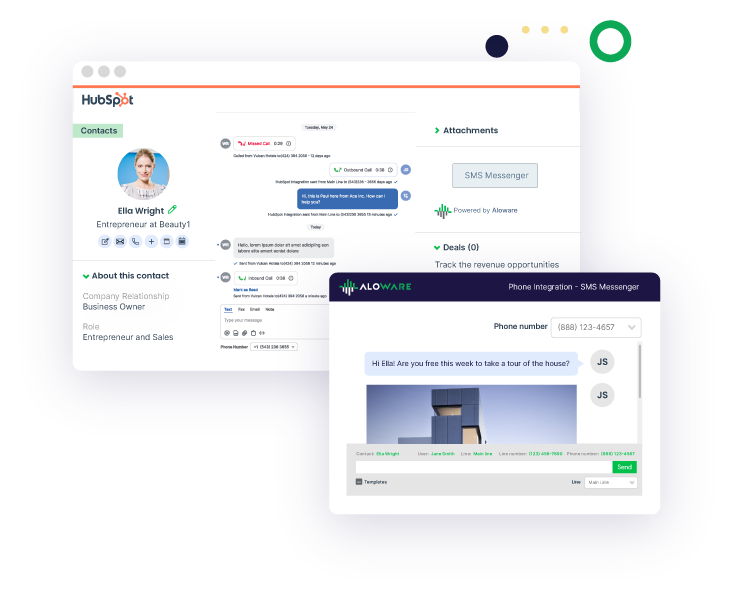
- CRM integration: Native integrations with HubSpot, Salesforce, Pipedrive, and more
- Real-time analytics: Monitor team performance with customizable dashboards
- Smart call routing: Skill-based, time-based, and priority routing included
- SMS campaigns: Bulk texting and automated follow-ups
- Call recording & AI transcription: Automatic recording with searchable transcripts
- Conversation intelligence: AI-powered insights and coaching recommendations
Pricing:
- Starts at $30/user/month (annual billing)
- No hidden fees or per-minute charges
- Unlimited inbound/outbound calling
- SMS credits included
- Volume discounts for 50+ users
Best for:
- Sales teams scaling outbound operations
- Customer support teams managing high call volumes
- Companies needing SMS + voice in one platform
- Teams requiring strong CRM integration
- Businesses in healthcare, real estate, finance, and professional services
Pros:
✅ All-in-one solution eliminates vendor juggling
✅ Exceptional support for mid-market customers
✅ Fast implementation (typically 1-2 weeks)
✅ Transparent, predictable pricing
✅ Strong SMS capabilities built-in
Cons:
❌ Less suitable for very small teams (<10 users)
❌ Primarily US and Canada focused
❌ Video conferencing not a core feature
Start Your Free Trial with Aloware Today →
#2 Allo — Best for AI Features
Allo excels with its AI capabilities (receptionist, summaries, MCP) and clear pricing.
Key Features:
- AI Answering Service
- AI call transcription and summaries in 36 languages
- MCP server to connect Allo to Claude, Codex, and other LLMs
- Transparent pricing
- Deep CRM integrations
Pricing:
- Starter: $16/month (1 user max, yearly commitment)
- Business: $45/user/month
- 7-day free trial, no add-ons — AI is included in every plan
Best for: Small teams, SMBs, and sales teams.
Pros:
✅ AI features
✅ MCP lets you run Allo from Claude, Codex, or any LLM client
✅ Mobile-first design
Cons:
❌ Not adapted to enterprise teams
❌ CRM and Zapier integrations require the Business plan
#3 Nextiva — Best for Healthcare & Professional Services
Nextiva excels in industries requiring compliance and security, making it ideal for enterprise healthcare, and financial services firms with 200+ employees.
Key Features:
- HIPAA-compliant communication
- Secure faxing capabilities
- Professional auto-attendant
- 24/7 customer support
- Unlimited calling in US/Canada
Pricing:
- Core: $15/user/month
- Engage: $25/user/month
- Power Suite: $75/user/month
Best for: Healthcare providers, law firms, financial advisors
Pros:
✅ Strong compliance features
✅ Excellent uptime (99.999%)
✅ Virtual faxing included
Cons:
❌ Higher cost for advanced features
❌ Complex implementation for larger teams
❌ Good for general office administration.
#4 RingCentral — Best for Enterprises Scaling Beyond 100 Seats
RingCentral is the choice when you're planning to scale well beyond 100 users and need enterprise-grade features.
Key Features:
- Robust API for custom integrations
- Advanced analytics and reporting
- 24/7 enterprise support
- Video conferencing included
- Unlimited calling
Pricing:
- Core: $20/user/month
- Advanced: $25/user/month
- Ultra: $35/user/month
Best for: Companies planning rapid growth to 200+ employees
Pros:
✅ Highly scalable
✅ Extensive integration library
✅ Strong international presence
Cons:
❌ Overkill for 50-100 seat teams
❌ Complex pricing and contracts
❌ Steep learning curve
#5 CloudTalk — Best for International Teams
CloudTalk shines when your 50-100 person team operates across multiple countries or needs international phone numbers.
Key Features:
- Local numbers in 160+ countries
- Global call quality optimization
- Multi-language support
- Time-zone based routing
- International SMS
Pricing:
- Starter: $25/user/month
- Essential: $29/user/month
- Expert: $49/user/month
Best for: Teams with international customers or remote workers abroad
Pros:
✅ Exceptional global coverage
✅ Great call quality worldwide
✅ Easy number porting
Cons:
❌ Limited SMS functionality
❌ Fewer native integrations
❌ Video features are basic
#6 Dialpad — Best for AI-Powered Insights
Dialpad leads in AI capabilities, perfect for data-driven teams that want conversation intelligence and coaching.
Key Features:
- Real-time AI transcription
- Sentiment analysis
- Automated call scoring
- Voice intelligence
- Post-call summaries
Pricing:
- Standard: $15/user/month
- Pro: $25/user/month
- Enterprise: Custom pricing
Best for: Sales teams focused on call quality and training
Pros:
✅ Best-in-class AI features
✅ Excellent mobile app
✅ Modern interface
Cons:
❌ SMS limited to US/Canada/UK/Australia
❌ No visual call flow designer
❌ Integration options moderate
#7 Zoom Phone — Best for Video-First Organizations
If your team already uses Zoom for meetings and collaboration, Zoom Phone provides seamless integration at a budget-friendly price.
Key Features:
- Native Zoom Meetings integration
- Simple call management
- Mobile and desktop apps
- Basic call recording
- Auto-attendant
Pricing:
- US & CA Unlimited: $15/user/month
- Pro Plus: $18.33/user/month
- Business Plus: $22.49/user/month
Best for: Teams heavily invested in Zoom ecosystem
Pros:
✅ Lowest cost option
✅ Easy to use
✅ Good for existing Zoom users
Cons:
❌ Limited support tiers
❌ Basic call center features
❌ Fewer integrations than competitors
#8 Google Voice — Best Budget Option for Basic Needs
Google Voice works well for small teams with basic calling needs who already use Google Workspace.
Key Features:
- Google Workspace integration
- Basic call forwarding
- Voicemail transcription
- Simple auto-attendant
- Unlimited US/Canada calling
Pricing:
- Starter: $10/user/month
- Standard: $16/user/month
- Premier: $24/user/month
Best for: Budget-conscious teams with basic requirements
Pros:
✅ Very affordable
✅ Easy Google integration
✅ Simple setup
Cons:
❌ Only US and Canada
❌ Limited integrations outside Google
❌ Basic features for call centers
❌ Not built for high-volume calling
Why Aloware is the Best Choice for 50-100 Seat SMBs
Perfect Feature Balance
Aloware provides enterprise-grade features without enterprise complexity:
What you get:
- Power dialer for outbound teams
- Advanced IVR and call routing
- SMS and ringless voicemail campaigns
- Real-time dashboards and analytics
- Call recording and AI transcription
- CRM integration that actually worksAI
- Multi-channel communication hub
What you avoid:
- Overly complex enterprise software
- Features you'll never use
- Long implementation timelines
- Rigid annual contracts
- Hidden per-minute fees
Pricing That Makes Sense
At $30/user/month with volume discounts, Aloware's all-inclusive pricing is transparent and predictable.
Cost comparison for 75 users:
- Aloware: ~$2,250/month (everything included)
- RingCentral Advanced: ~$1,875/month (add-ons extra)
- Nextiva Engage: ~$1,875/month (limited SMS)
- Dialpad Pro: ~$1,875/month (SMS restrictions)
What's included in Aloware: ✓ Unlimited calling
✓ SMS credits
✓ All integrations
✓ Call recording
✓ Analytics
✓ Support
Built for SMB Success
Aloware understands that 50-100 person teams need:
- Speed: Quick implementation without enterprise bureaucracy
- Simplicity: Intuitive interface that reduces training time
- Support: Responsive customer success that understands SMB constraints
- Scalability: Room to grow without switching platforms
- ROI: Clear return on investment with transparent pricing
Real Customer Results
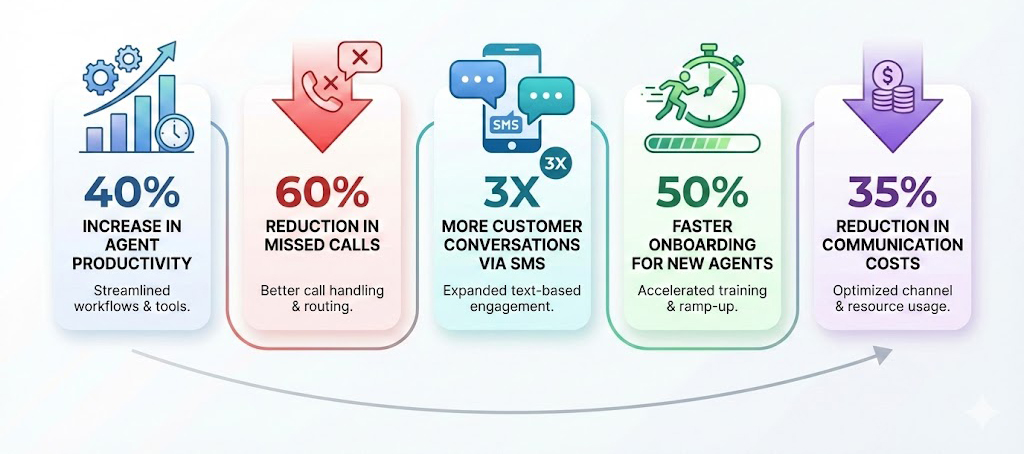
SMBs using Aloware report:
- 40% increase in agent productivity
- 60% reduction in missed calls
- 3x more customer conversations via SMS
- 50% faster onboarding for new agents
- 35% reduction in communication costs
How to Choose the Right Provider for Your 50-100 Seat Team
Key Selection Criteria
1. Total Cost of Ownership
- Monthly per-user pricing
- Setup and implementation fees
- Per-minute charges (if any)
- SMS/text message costs
- Training and support costs
- Integration fees
2. Core Feature Requirements
- Call routing and IVR sophistication
- CRM integration quality
- Analytics and reporting depth
- Mobile app functionality
- SMS and multi-channel capabilities
3. Implementation Timeline
- How fast can you deploy?
- Training requirements
- Data migration support
- Number porting process
4. Scalability
- Can it grow beyond 100 users?
- International expansion support
- Additional feature availability
- Performance at scale
5. Support Quality
- Response time guarantees
- Support hours (24/7 vs business hours)
- Dedicated account management
- Training resources
Decision Framework
Choose Aloware if:
- You need SMS + voice in one platform
- Your team is 50-100 users (or growing toward that)
- You want all-inclusive pricing
- CRM integration is critical
- You're in sales, support, or professional services
- You operate primarily in US/Canada
Choose Nextiva if:
- Healthcare/HIPAA compliance is required
- You need secure faxing
- Professional services focus
- Budget allows for premium pricing
Choose RingCentral if:
- You're planning to scale beyond 150 users
- Enterprise features are essential
- International presence is critical
- Budget accommodates higher costs
Choose CloudTalk if:
- International calling is your priority
- You need numbers in 100+ countries
- Global team distribution
- European data residency required
Choose Dialpad if:
- AI conversation intelligence is critical
- Call coaching is a top priority
- You're data-driven in approach
- Mobile-first workforce
Choose Zoom Phone if:
- You're already all-in on Zoom
- Budget is extremely tight
- Basic calling needs
- Video integration is key
Choose Google Voice if:
- You need the absolute lowest cost
- Google Workspace is your ecosystem
- Calling needs are very basic
- Team is under 50 users
Implementation Best Practices for 50-100 Seat Deployments
Phase 1: Planning (Week 1-2)
Define requirements:
- Current call volume and patterns
- Required integrations (CRM, helpdesk, etc.)
- Department-specific needs
- Compliance requirements
- Budget constraints
Conduct audit:
- Existing phone numbers to port
- Current hardware inventory
- Network infrastructure readiness
- Internet bandwidth verification
- Security and compliance needs
Phase 2: Testing (Week 2-3)
Run pilot program:
- Select 5-10 users from different departments
- Test core workflows
- Verify integration functionality
- Check call quality across locations
- Gather user feedback
Technical validation:
- Network quality testing
- Firewall configuration
- QoS implementation
- Failover testing
- Security review
.jpg)
Phase 3: Rollout (Week 3-4)
Department-by-department deployment:
- Start with tech-savvy team
- Train department champions
- Provide user documentation
- Setup monitoring dashboards
- Establish support channels
Training program:
- Admin training (2-3 hours)
- End-user training (1 hour)
- Department-specific workflows
- Video tutorials and documentation
- Office hours for questions
Phase 4: Optimization (Week 5-8)
Monitor and improve:
- Review call quality metrics
- Analyze usage patterns
- Refine routing rules
- Optimize IVR flows
- Address user pain points
Continuous improvement:
- Weekly usage reports
- Monthly team reviews
- Quarterly feature assessments
- Regular training updates
- Feedback collection
Cost Analysis: What to Expect for 50-100 Users
Sample Cost Breakdown (75 Users)
Aloware Total Monthly Cost:
- Base: 75 users × $30 = $2,250
- SMS credits: $200 (included)
- Integrations: $0
- Support: $0
- Total: ~$2,250/month
RingCentral Advanced:
- Base: 75 users × $25 = $1,875
- SMS add-on: $300
- Premium support: $500
- Advanced analytics: $200
- Total: ~$2,875/month
Nextiva Engage:
- Base: 75 users × $25 = $1,875
- SMS: $400
- Advanced features: $300
- Total: ~$2,575/month
Annual savings with Aloware:
- vs RingCentral: $7,500/year
- vs Nextiva: $3,900/year
Hidden Costs to Watch For
Setup and onboarding:
- One-time implementation fees ($0-$5,000)
- Number porting charges ($0-$500)
- Training and consulting ($1,000-$5,000)
Ongoing charges:
- Per-minute overages (if applicable)
- SMS/MMS per-message fees
- International calling rates
- Premium support tiers
- Integration marketplace fees
Growth costs:
- Adding new users
- Unlocking advanced features
- Scaling infrastructure
- Additional training
Essential Features for 50-100 Seat Teams
Must-Have Features
1. Advanced Call Routing
- Skills-based routing to match expertise
- Time-based routing for business hours
- Priority routing for VIP customers
- Overflow routing for high volume
- Geographic routing for local presence
2. Robust Analytics
- Real-time dashboards for supervisors
- Agent performance metrics
- Call volume trends
- Queue statistics
- Customer satisfaction scoring
3. Quality Management
- Call recording on all lines
- Random call sampling
- Evaluation scorecards
- Coaching workflows
- Performance tracking
4. Multi-Channel Support
- Voice calling (inbound/outbound)
- SMS and MMS messaging
- Email integration
- Chat capabilities
- Social media (bonus)
5. CRM Integration
- Automatic call logging
- Screen pop with caller info
- Click-to-dial from CRM
- Call outcome tracking
- Contact synchronization
Nice-to-Have Features
Advanced automation:
- AI-powered voicemail transcription
- Automated call summaries
- Smart call disposition
- Workflow automation
- Chatbot integration
Team collaboration:
- Internal chat/messaging
- Warm call transfers
- Conference calling
- Team presence indicators
- Shared voicemail boxes
Customer experience:
- Callback queuing
- SMS appointment reminders
- Post-call surveys
- Custom hold music
- Personalized greetings
Security and Compliance Considerations
Key Security Features Required
Data protection:
- End-to-end call encryption
- Secure data centers (SOC 2)
- Regular security audits
- Penetration testing
- Backup and disaster recovery
Access control:
- Role-based permissions
- Multi-factor authentication
- Single sign-on (SSO)
- IP whitelisting
- Session management
Compliance:
- HIPAA compliance (healthcare)
- PCI DSS (payment processing)
- GDPR (European customers)
- TCPA (calling regulations)
- State recording laws
Questions to Ask Providers
- Where is call data stored geographically?
- What encryption standards are used?
- How is data backed up and recovered?
- What compliance certifications do you hold?
- How are security incidents handled?
- What is your uptime SLA?
- Do you support call recording consent?
- How is PII (Personal Identifiable Information) protected?
Common Implementation Challenges & Solutions
Challenge #1: Network Quality Issues
Problem: Choppy calls, dropped connections, poor audio quality
Solutions:
- Conduct pre-implementation network assessment
- Implement Quality of Service (QoS) on routers
- Upgrade internet bandwidth if needed
- Use wired connections for agents when possible
- Deploy edge devices for branch offices
- Monitor network performance continuously
Challenge #2: User Adoption Resistance
Problem: Agents resistant to changing from old system
Solutions:
- Involve users in selection process
- Create department champions
- Provide comprehensive training
- Offer one-on-one support sessions
- Highlight new capabilities and benefits
- Gather and address feedback quickly
Challenge #3: Integration Complications
Problem: CRM or business tools don't sync properly
Solutions:
- Test integrations thoroughly in pilot phase
- Work with provider's integration team
- Use pre-built connectors when available
- Consider Zapier/middleware if needed
- Document integration workflows
- Train admins on troubleshooting
Challenge #4: Call Quality Inconsistencies
Problem: Some agents experience better quality than others
Solutions:
- Standardize hardware (headsets, devices)
- Test from all physical locations
- Identify and fix local network issues
- Use provider's quality monitoring tools
- Implement jitter buffers
- Consider dedicated internet circuits
Challenge #5: Cost Overruns
Problem: Monthly bills exceed projections
Solutions:
- Choose all-inclusive pricing models
- Set SMS/usage alerts
- Monitor usage dashboards
- Review bills monthly for anomalies
- Negotiate volume discounts
- Block international calling if not needed
Future-Proofing Your Investment
Technology Trends to Consider
AI and automation:
- Voice AI assistants handling simple calls
- Predictive analytics for staffing
- Sentiment analysis in real-time
- Automated quality assurance
- Smart call routing based on AI
Omnichannel evolution:
- WhatsApp and social messaging integration
- Video support capabilities
- Chat and messaging growth
- Unified inbox for all channels
- Customer journey tracking
Remote work enablement:
- Cloud-first architecture
- Mobile app parity with desktop
- Home office support tools
- Global workforce management
- Async communication features
Questions About Scalability
Can the system handle:
- 2x user growth without re-implementation?
- International expansion to new countries?
- Adding new communication channels?
- Increased call volume during peaks?
- Acquisition integration if you acquire another company?
Does the vendor provide:
- Regular feature updates?
- Proactive performance optimization?
- Scalable pricing models?
- Migration assistance if needed?
- Long-term product roadmap transparency?
Conclusion: Making the Right Choice for Your Team
For SMBs with 50-100 seats, Aloware emerges as the clear winner by delivering the perfect combination of features, pricing, and support that mid-market teams need to succeed.
Why Aloware is #1 for This Segment
Right-sized for SMBs:
- Not too simple (like Google Voice or Grasshopper)
- Not too complex (like enterprise RingCentral)
- Perfect feature balance for 50-100 users
Complete solution with AI built-in:
- Voice + SMS + AI Voice Agents in one platform
- No need to buy Gong, Chorus.ai, or other AI tools separately
- Strong CRM integrations work out of the box
- AI-powered analytics provide actionable insights
- Pricing includes AI features that others charge extra for
SMB-focused approach:
- Fast implementation (weeks, not months)
- Responsive support that understands SMB constraints
- Transparent pricing without hidden fees
- Room to grow without switching platforms
- AI capabilities that scale with your team
Taking the Next Step
Ready to evaluate Aloware?
- Request a demo — See the platform in action with your specific use cases
- Start a trial — Test with a pilot group from your team
The Bottom Line
While Nextiva, RingCentral, CloudTalk, Dialpad, Zoom Phone, and Google Voice each have their strengths, Aloware specifically addresses the needs of 50-100 seat SMBs better than any competitor.
You get enterprise-grade features without enterprise complexity, transparent all-inclusive pricing without hidden fees, and a partner who understands that you're at a critical growth stage where the right communication platform can accelerate your success.
Don't settle for:
❌ Basic solutions you'll outgrow in 6 months
❌ Enterprise platforms that require complex implementations
❌ Fragmented vendors for voice, SMS, and analytics
❌ Hidden fees and usage-based pricing surprises
❌ Buying separate AI tools ($6,000-15,000/year extra cost)
❌ Multiple subscriptions for conversation intelligence, transcription, and voice AI
Choose the platform built for your exact needs:
✅ Aloware's all-in-one solution with AI included
✅ Transparent pricing with AI features built-in
✅ Implementation in weeks, not months
✅ Support team that cares about SMB success
✅ No separate AI subscriptions needed
✅ 24/7 AI voice agents at $0.10/minute
Frequently Asked Questions
What is the best cloud phone system for 50-100 employees?
Aloware is the best cloud phone system for 50-100 employee teams, offering the right balance of features, pricing, and scalability. It provides enterprise-grade capabilities like power dialing, SMS campaigns, and CRM integration at a price point that makes sense for mid-market businesses.
How much does a cloud phone system cost for 75 users?
For 75 users, expect to pay between $1,125-$2,875 per month depending on the provider and features. Aloware costs approximately $2,250/month for 75 users with everything included (unlimited calling, SMS credits, all integrations, support), while competitors may charge extra for SMS, advanced features, or premium support.
Can cloud phone systems integrate with my CRM?
Yes, modern cloud phone systems integrate with major CRMs. Aloware offers native integrations with HubSpot, Salesforce, Pipedrive, Zoho, and other popular CRMs, enabling automatic call logging, screen pops with customer data, and click-to-dial functionality directly from your CRM interface.
How long does it take to implement a cloud phone system for 50-100 users?
Implementation typically takes 2-4 weeks for 50-100 users. Aloware can deploy in as little as 1-2 weeks with their SMB-focused onboarding process, including number porting, user setup, integration configuration, and team training.
Do I need special equipment for cloud telephony?
No special equipment is required. Cloud phone systems work with standard computers, smartphones, and optional VoIP desk phones. Most SMBs use headsets with their existing computers, though Aloware supports various hardware options based on your preference and budget.
What internet speed do I need for 50-100 concurrent calls?
For 50-100 concurrent calls, you need at least 5-10 Mbps upload and download speed, though 20-50 Mbps is recommended for optimal quality. Each concurrent call uses approximately 100 kbps of bandwidth. Implement Quality of Service (QoS) on your network to prioritize voice traffic.
Can I keep my existing phone numbers?
Yes, all reputable providers support number porting. Aloware can port your existing local, toll-free, and vanity numbers, typically completing the process within 7-14 business days while maintaining service continuity.
Is cloud telephony secure for sensitive business calls?
Yes, when properly configured. Choose providers with SOC 2 compliance, end-to-end encryption, secure data centers, and regular security audits. Aloware meets enterprise security standards while remaining accessible for SMBs, including features like call encryption, secure data storage, and compliance with regulations like HIPAA and GDPR.
What happens if my internet goes down?
Quality cloud phone providers offer failover options. Calls can automatically forward to mobile phones, backup internet connections, or other locations. Aloware provides disaster recovery features ensuring your business stays reachable even during outages.
Can remote workers use the same system?
Absolutely. Cloud phone systems are designed for distributed teams. Remote workers access the same features as office-based staff through desktop and mobile apps. Aloware enables seamless remote work with full feature parity across all devices and locations.
.png)

Ruby Kootval is Head of Product Marketing at Aloware. She has 12 years in digital marketing, including 8 in B2B SaaS and 5 in telecom, and writes about AI voice agents, dialers, CRM integrations, and contact center operations.


.webp)