About Aloware
Aloware is an AI-powered contact center platform built for sales and support teams. It integrates natively with CRMs like HubSpot and Salesforce, combining calling, SMS, AI voice agents, power dialer, and automation into a single platform — so reps spend more time selling and less time on admin. Aloware serves over 1,000 small to mid-market B2B teams across SaaS, real estate, insurance, financial services, and more, starting at $30 per agent per month with unlimited calling and texting included.
Every Zoom sales call automatically becomes a pre-filled CRM deal — approved in Slack with one emoji.
Why We Did This
Aloware's sales team runs multiple product demos on Zoom every day. After each call, reps were expected to open the CRM, find or create the deal, and fill in all the details from memory — while the next meeting was already starting.
It consistently fell through the cracks: calls went unlogged, deal data was incomplete, naming conventions varied between reps, and duplicate deals cluttered the pipeline. Sales managers couldn't forecast reliably because the underlying data wasn't there.
The root cause wasn't attitude — it was friction. Logging a deal correctly required context-switching out of the flow of work at exactly the wrong moment.
What We Did
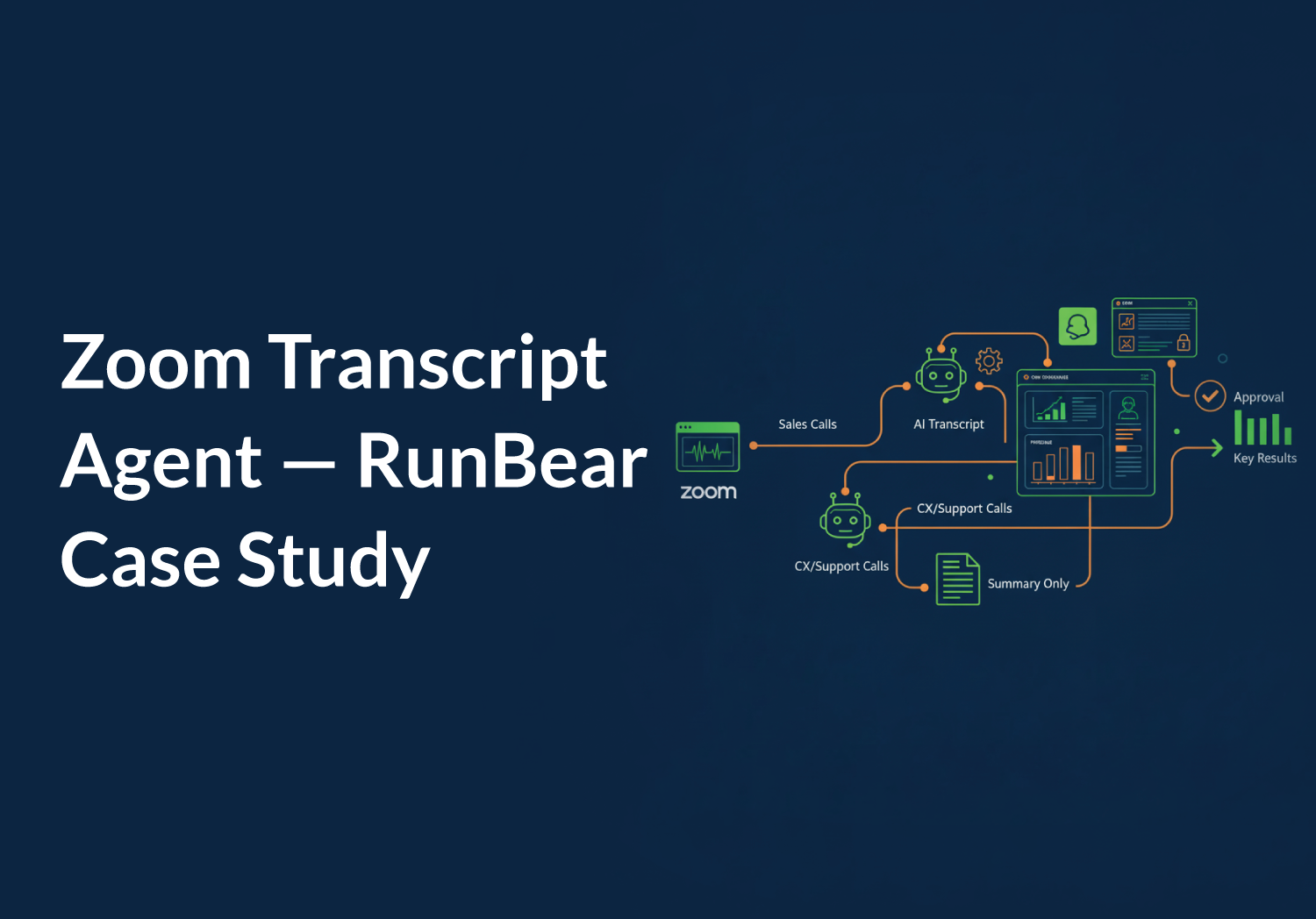
We built the Zoom Transcript Agent — an AI bot that processes every sales Zoom call and delivers a fully pre-filled CRM deal proposal in Slack, ready to approve with one emoji.
The rep's full experience: call ends → Slack message arrives with complete deal proposal → react with one emoji → done.
The approval flow:
The bot never creates or modifies a deal without an explicit ✅ from the rep. No exceptions.
What gets auto-filled from the transcript: deal name, pipeline, deal stage, amount (only if explicitly stated — never guessed), contract term, account type, deal owner, and a full call description with attendees, pain points, action items, and next steps — 8 fields, automatically.
Smart routing keeps things clean. Not every Zoom call should trigger a CRM action. Sales calls get the full deal flow. Customer Experience and Tech Support calls get a meeting summary only — no CRM activity.
Every call gets a meeting summary — date, host, attendees, AI-generated discussion narrative, action items, and next steps — regardless of team.
Results:
- Deal descriptions now consistently capture budget, timeline, pain points, and next steps — information that was rarely logged before
- All deals follow consistent naming, pipeline, and stage conventions — cleaner data for forecasting
- Reps running 5+ demos per day are fully covered — every call processed automatically
- Strong adoption: reps feel in control because the bot proposes and they decide
How We Did It
Zoom already summarizes your meetings — that's not the problem. The problem is what happens after: someone still has to translate that summary into a CRM record manually.
The difference is the custom prompt. Instead of answering "what was said?", it turns the transcript into a structured executive review of the opportunity — extracting pain points, budget signals, product fit, and next steps, then mapping them directly to CRM fields. Nothing assumed, nothing invented.
The Zoom Transcript Agent connects four systems — Zoom, AI transcript analysis, the CRM, and Slack — into a single automated pipeline triggered the moment a meeting ends.
End-to-end flow:
Key design decisions:
Human-in-the-loop always. The bot never writes to the CRM without rep approval. The ✏️ edit loop lets reps correct anything in plain English before committing.
AI extraction is conservative. Amount is only filled if explicitly stated on the call. Account type is auto-calculated from stated MRR. Nothing is guessed.
Built on RunBear, no custom code. Zoom and CRM connectors, team routing logic, and the Slack approval loop were all configured in RunBear's platform — no custom backend development required.
Examples
"Before this, logging a call was the last thing anyone wanted to do after a long day of demos. Now the bot sends me everything in Slack already filled in — I tap one emoji and it's done."
— Aloware Account Executive
.png)

Ruby Kootval is Head of Product Marketing at Aloware. She has 12 years in digital marketing, including 8 in B2B SaaS and 5 in telecom, and writes about AI voice agents, dialers, CRM integrations, and contact center operations.