TL;DR
An AI voice agent only earns its place in a CRM calling stack when it does three things reliably: handles the moments your team can't cover (missed inbound, after-hours, outbound retries), logs structured outcomes back to the right CRM record automatically, and hands off to a human with full context before the caller has to repeat themselves. The workflows with the clearest ROI are inbound qualification and speed-to-lead follow-up — both fix the same root problem: the first contact either doesn't happen or happens too late. Choosing the right channel matters: AI voice for clear-intent, time-sensitive calls; human reps for consultative or regulated conversations; SMS bots for simple confirmations. Underneath all of it are two non-negotiables — clean CRM data (identity, consent, ownership, lifecycle fields) and compliant outreach (A2P 10DLC for SMS, STIR/SHAKEN for calls, disclosed AI use, no sensitive data collection). Get those right and the AI handles volume. Your reps handle relationships.
A lead who calls and hits voicemail rarely waits around for your "quick callback." They call the next provider. That's the leak most CRM calling teams live with every day, and it shows up as missed appointments, messy attribution, and reps spending their best hours chasing people who already moved on.
An AI voice agent closes that gap by answering and acting in the moment: qualify the caller, handle common questions, book the next step, route to the right owner, and write the outcome back to the CRM as structured data. When it's done right, speed-to-lead improves without turning your call routing into a maze or your CRM into a pile of half-notes.
This matters most in the hours your team can't cover consistently. Real estate weekend inquiries, home services overflow, recruiters calling between shifts, legal intake after 5pm—buyers and candidates don't care why nobody picked up. They care that someone did.
This guide shows the workflows that actually move revenue, a simple way to choose between an AI voice agent, a human rep, or an SMS bot, and the compliance and data rules that prevent bad handoffs, spam labeling, and disconnected logging.
What Is an AI Voice Agent in a CRM-Native Contact Center?
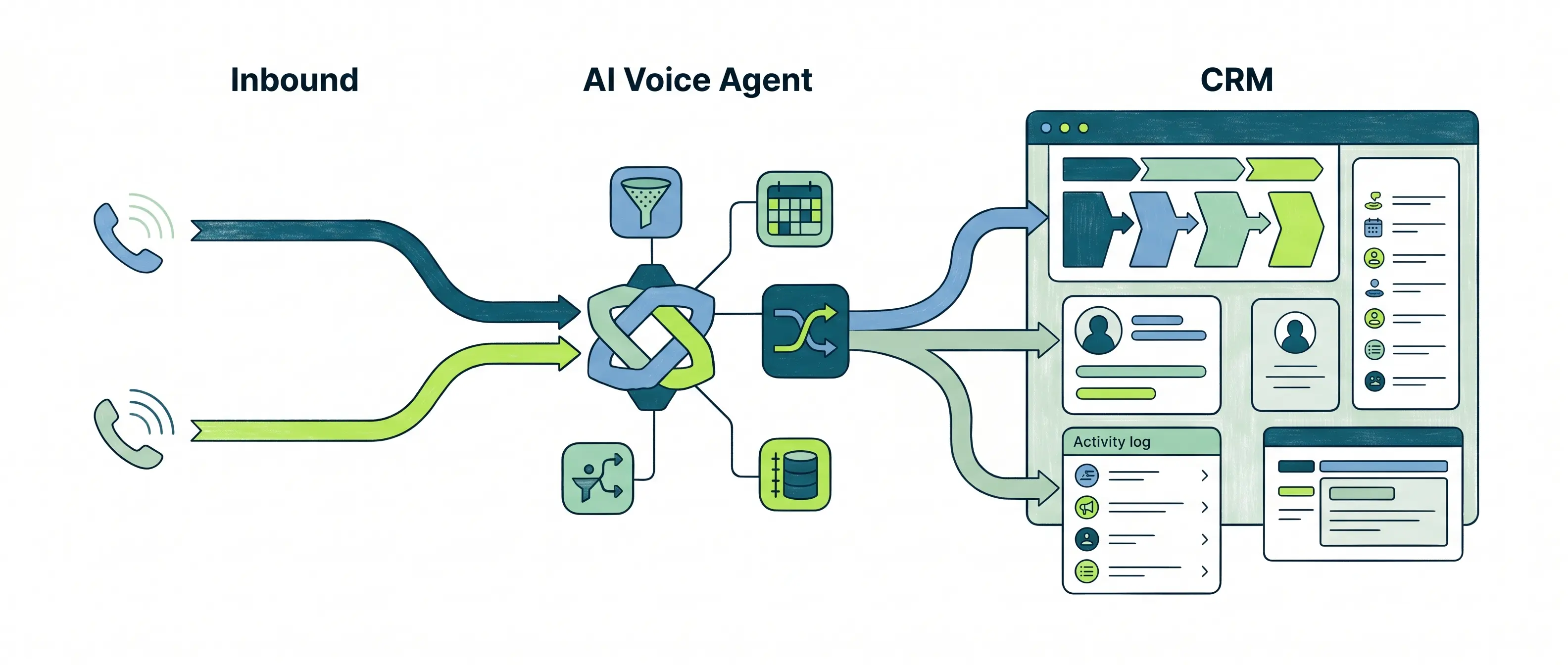
An AI voice agent in a CRM-native contact center is software that answers or places phone calls, understands what the caller wants, takes an action (qualify, schedule, route, collect details), and writes the result back to your CRM as structured data. The point is speed-to-lead without losing context: the conversation and the record stay connected.
In practice, an AI voice agent handles two jobs:
- Inbound: answer new lead calls, identify intent, ask qualifying questions, offer time slots, and warm-transfer to the right rep with a short summary.
- Outbound: call new form fills or missed calls, confirm interest, handle basic objections, retry at sensible intervals, and route qualified prospects to an owner.
"CRM-native" matters because the agent can read fields like lead source, lifecycle stage, owner, product interest, or last-touch timestamp, then log outcomes like "Qualified," "Appointment Set," "Call Back Requested," or "Wrong Number" automatically. In HubSpot or Salesforce, that means activities, notes, and field updates happen without reps typing while the next lead goes cold.
How An AI Voice Agent Differs From IVR And Basic Chatbots
An IVR is a menu tree: "Press 1 for sales." It routes calls, but it does not understand intent, ask follow-up questions, or update your CRM beyond a call log. IVR works for simple directory routing and after-hours messages. It fails when the caller says, "I need pricing for a 12 kW solar system and I want it installed next month."
A basic website chatbot (even a good one) lives in a browser session. It can capture a lead, but it cannot rescue missed calls, improve pickup rates, or handle voice-only customers like home services dispatch or automotive service bays.
A real AI voice agent sits in the calling stack: it can detect intent, confirm identity basics when needed, handle interruptions, and execute warm handoff rules. If it cannot solve the request, it transfers with context: who the caller is, why they called, what they already answered, and what the rep should do next.
Which AI Voice Agent Workflows Actually Move the Needle?
Warm handoff only matters if the AI voice agent handles the moments that cause revenue loss. The highest-ROI workflows share one trait: they convert "I tried once" into a logged outcome in your CRM, with a next step scheduled or routed.
- Inbound Lead Capture, Qualification, and Scheduling: Fixes missed first-contact and slow speed-to-lead. The AI voice agent answers, tags intent (pricing, availability, eligibility), asks 3-6 qualifying questions, then books a slot on a rep's calendar or routes to the right owner. Real estate teams can capture pre-approval status and move straight to showings. Solar teams can confirm roof type and utility provider before a consult.
- After-Hours and Overflow Coverage: Fixes the "we'll call you tomorrow" gap and protects SLAs. The agent collects details, sets expectations, and schedules the next step. Home services shops can capture the issue, address, and preferred arrival window at 9:30 pm. Legal intake can capture incident date and jurisdiction, then route urgent matters to an on-call attorney.
- Outbound Speed-to-Lead Follow-Up With Retry and Voicemail Logic: Fixes low connect rates and rep time wasted on repeated dialing. The agent calls new form fills in minutes, retries based on business rules, drops a voicemail when appropriate, then sends an SMS follow-up when consent allows. Recruitment teams can reach candidates between shifts. Automotive BDC teams can confirm trade-in and appointment interest, then transfer hot buyers.
- Support Triage With Ticketing and Escalation: Fixes long queues and missing context. The agent performs basic authentication (last name, email, order ID), categorizes the issue, creates or updates a ticket in systems like Zendesk or Salesforce Service Cloud, and escalates by priority. Financial services teams can route fraud keywords to a human immediately.
Common Failure Modes That Kill ROI
Teams lose trust fast when the agent transfers without context, asks for sensitive data it should never collect (full SSN, card numbers), or fails to log calls, dispositions, and field updates back to the CRM. Treat CRM logging and handoff notes as product requirements, not "nice to have."
When Should You Use an AI Voice Agent vs a Human Rep vs an SMS Bot?
Bad handoffs and sloppy logging usually come from a basic mistake: teams pick the wrong channel for the job. An AI voice agent works best when the caller's intent is clear enough to qualify and route, but the team cannot guarantee immediate pickup.
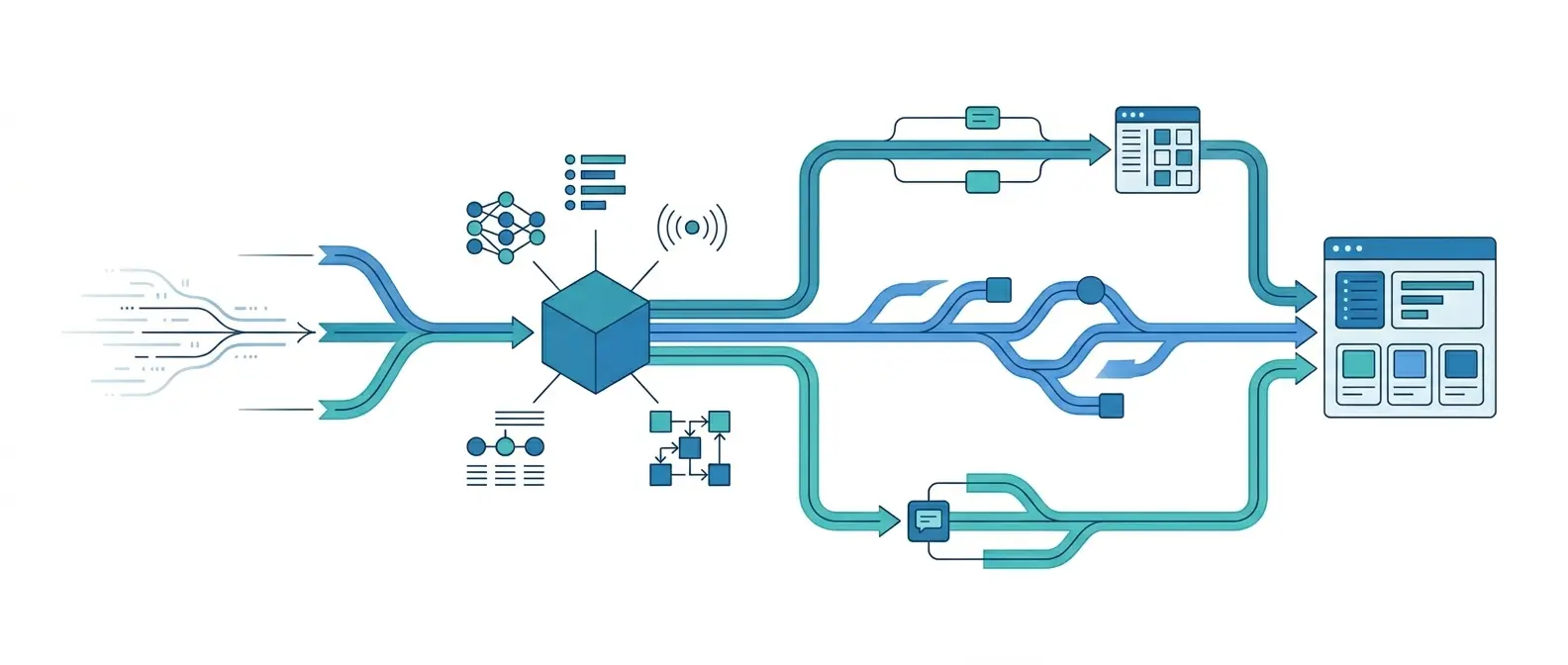
Use this decision framework to choose between an AI voice agent, a human rep, and an SMS bot:
- Intent clarity: Use an AI voice agent when you can ask 4 to 8 questions and reach a disposition (qualified, schedule, route, create ticket). Use a human rep when the goal is consultative selling (legal intake, financial products, complex B2B). Use an SMS bot when you mainly need simple confirmations (yes/no, preferred time, address).
- Urgency: Use an AI voice agent for "call me now" moments like missed inbound calls, real estate showings, home services dispatch, and automotive service status. Use SMS when the user is busy or silent, for example recruiting candidates on shift.
- Risk and compliance sensitivity: Use a human rep when the conversation involves regulated advice or high-stakes identity checks. Keep the AI voice agent on rails: collect contact details, case facts, and consent, then escalate. Do not collect payment card data or full SSNs.
- Data needed: Use an AI voice agent when CRM fields can personalize the call (owner, location, product interest, last-touch time) and when structured updates matter (lifecycle stage, appointment outcome, ticket reason).
Handoff Rules That Prevent Awkward Calls
Set hard rules so customers never repeat themselves.
- Trigger the transfer early when buying intent spikes (pricing request, "ready to book," "need today").
- Transfer with context: caller name, reason, key answers, and the next best action, then write it to the CRM note.
- Offer SMS fallback if no rep answers in 20 to 30 seconds: confirm a callback window and keep the same CRM thread.
- End cleanly: if the caller declines transfer, schedule and confirm the appointment details out loud.
Teams in solar and home improvement often win by pairing AI voice agent triage with SMS confirmations. Legal and financial services teams usually keep AI to intake and routing, then hand off fast.
CRM Data That Makes or Breaks AI Voice Agent Performance
Legal and financial services teams keep AI on a short leash for good reason: the AI voice agent can only be as trustworthy as the CRM record it reads and writes. If the agent cannot identify the caller, find the right owner, and log clean outcomes, you get awkward loops, bad handoffs, and dirty data that wrecks reporting.
The minimum CRM setup for solid CRM calling starts small. You need a handful of fields that the agent can rely on every time, across inbound calls, outbound follow-ups, and texting.
- Identity: first name, last name, phone (E.164), email, company (B2B), time zone.
- Ownership: record owner, team/queue, territory or branch, on-call schedule flag.
- Intent: product/service interest, reason for call, lead source, language preference.
- Timing: created date, last activity date, next activity date, last inbound call timestamp.
- Consent: SMS opt-in status, call consent status, consent source, consent timestamp.
Then lock in activity hygiene. Every call or text should auto-log as an activity with direction (inbound/outbound), disposition, summary, transcript link (if stored), and next step. If your CRM supports it, store structured outcomes like "Appointment Set" or "Call Back Requested" as fields, not free-text notes.
Routing Rules and Lifecycle Updates That Prevent Chaos
Routing rules decide whether the AI voice agent schedules, transfers, or follows up later. Keep the rules explicit:
- Route by stage + intent (new lead pricing inquiry goes to SDR queue, existing customer billing issue goes to support).
- Route by geo/territory (real estate zip code, home services service area).
- Route by risk keywords (fraud, chargeback, injury) to a human immediately.
Lifecycle automation should update the CRM the moment the agent learns something. Example triggers: set lifecycle stage to Qualified after required questions, create a task for the owner after a warm transfer fails, enroll a lead in an SMS sequence after voicemail when consent exists. Tools like HubSpot Workflows, Salesforce Flow, and Zapier handle these updates cleanly when the fields are consistent.
The Fastest Way to Get Labeled Spam: Compliance and Trust Basics
Lifecycle triggers are easy to automate. Trust is harder. An AI voice agent that calls and texts from your CRM can raise connect rates, or it can get your numbers labeled "Spam Likely" and your SMS blocked. Compliance is the difference, and it is mostly operational discipline.
Start with consent and disclosure. For texting, treat opt-in as a database field, not a vague idea. Store source (web form, inbound call, keyword), timestamp, and the specific number consented. When the AI voice agent initiates a call, disclose that the caller is interacting with an AI system when required by your policies, your industry, or the state you operate in. If you work legal intake, financial services, or healthcare-adjacent support, keep the agent on rails and escalate early.
Compliant Outreach Guardrails That Prevent Spam Flags
- A2P 10DLC (US SMS): Register your brand and campaign for application-to-person messaging. Unregistered traffic often gets filtered or throttled. Use The Campaign Registry as the reference point for what carriers expect.
- STIR/SHAKEN (US calls): Use providers that sign calls so carriers can verify caller ID. Unsigned traffic can trigger more spam labeling. The FCC explains the framework at fcc.gov.
- CNAM and Caller ID Consistency: Keep business name, number, and call purpose consistent. Mismatched CNAM, frequent number swapping, and generic labels raise suspicion.
- Deliverability Hygiene: Suppress wrong numbers and "stop" replies fast. Cap retry attempts, space them out, and stop calling after repeated no-answers. Carriers watch patterns, and so do recipients.
The failure modes are predictable: buying a fresh batch of numbers every month, blasting the same script across industries, ignoring opt-outs, and letting the AI voice agent ask for sensitive data like full SSNs or card numbers. Another common mistake is disconnected logging. If the CRM does not record consent status, opt-out, and disposition, your team will violate your own rules by accident.
Platforms that include managed A2P 10DLC, STIR/SHAKEN support, and protections like Aloware NumberGuard help, but they cannot fix sloppy list practices. Clean data and clear rules do.
How Aloware Fits These Workflows Inside Your CRM
Clean data and clear rules still need an execution layer. An AI voice agent only helps if it can answer, route, text, and log outcomes where your team already works, inside the CRM.
Aloware fits this model because it combines CRM calling, SMS, routing, and automation in one system, then adds AI handling on top. That matters for teams that are tired of stitching together a dialer, a texting tool, an IVR, and a transcription add-on, then wondering why attribution and compliance fall apart.
Where Aloware Maps Directly to The Workflows
- Inbound qualification and scheduling: Aloware AI voice agents can answer inbound calls, ask qualifying questions, detect intent, book meetings, and warm-transfer to the right rep with context. The call activity and outcome sync back to the CRM record so reps do not retype notes.
- After-hours and overflow coverage: The AI voice agent can capture the details you care about (service address, urgency, product interest), set expectations, then schedule a callback or route to an on-call queue. SMS confirmation keeps the thread alive when the caller goes quiet.
- Outbound speed-to-lead: Aloware supports power dialing and automated follow-up, plus AI-driven calling and SMS bots for fast retries, voicemail handling, and routing when a prospect is qualified. Teams can keep outreach tied to the same CRM owner and lifecycle stage rules you already use.
- Support triage: Aloware can route and categorize inbound calls, capture basic authentication details, then create or update records in CRM-connected systems. Escalation rules push high-risk keywords to a human fast.
Trust and deliverability sit underneath every workflow. Aloware includes NumberGuard to reduce spam labeling risk, Local Presence to improve pickup rates, and compliance support for managed A2P 10DLC registration, CNAM, and STIR/SHAKEN.
If you want a practical next step, pick one workflow with a hard metric, usually inbound missed calls or outbound speed-to-lead. Define the disposition fields you want written back to HubSpot or Salesforce, then pilot the AI voice agent with strict handoff rules for two weeks. The teams that win treat AI handling like routing and reporting infrastructure, not a novelty.
How Aloware Fits These Workflows Inside Your CRM
Clean data and clear rules still need an execution layer. An AI voice agent only helps if it can answer, route, text, and log outcomes where your team already works, inside the CRM.
Aloware fits this model because it combines CRM calling, SMS, routing, and automation in one system, then adds AI handling on top. That matters for teams that are tired of stitching together a dialer, a texting tool, an IVR, and a transcription add-on, then wondering why attribution and compliance fall apart.
Where Aloware Maps Directly to The Workflows
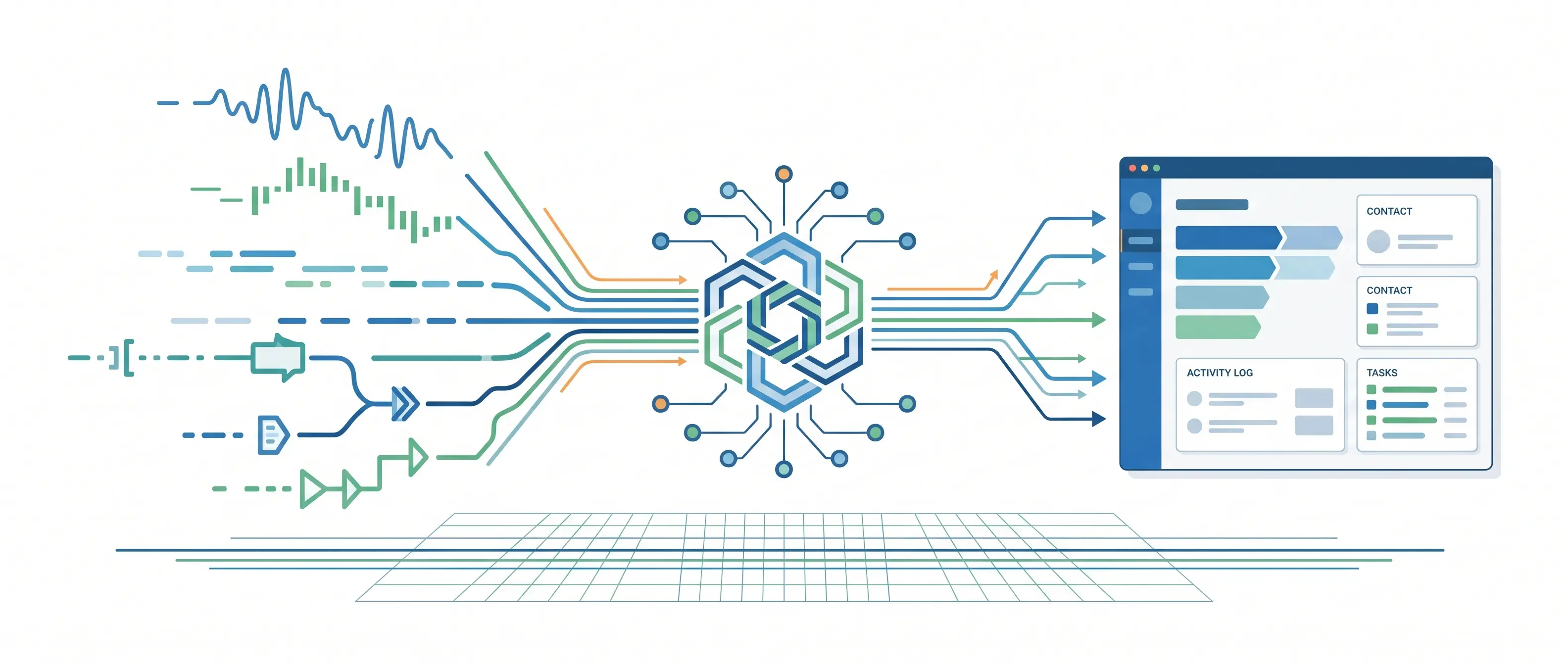
- Inbound qualification and scheduling: Aloware AI voice agents can answer inbound calls, ask qualifying questions, detect intent, book meetings, and warm-transfer to the right rep with context. The call activity and outcome sync back to the CRM record so reps do not retype notes.
- After-hours and overflow coverage: The AI voice agent can capture the details you care about (service address, urgency, product interest), set expectations, then schedule a callback or route to an on-call queue. SMS confirmation keeps the thread alive when the caller goes quiet.
- Outbound speed-to-lead: Aloware supports power dialing and automated follow-up, plus AI-driven calling and SMS bots for fast retries, voicemail handling, and routing when a prospect is qualified. Teams can keep outreach tied to the same CRM owner and lifecycle stage rules you already use.
- Support triage: Aloware can route and categorize inbound calls, capture basic authentication details, then create or update records in CRM-connected systems. Escalation rules push high-risk keywords to a human fast.
Trust and deliverability sit underneath every workflow. Aloware includes NumberGuard to reduce spam labeling risk, Local Presence to improve pickup rates, and compliance support for managed A2P 10DLC registration, CNAM, and STIR/SHAKEN.
If you want a practical next step, pick one workflow with a hard metric, usually inbound missed calls or outbound speed-to-lead. Define the disposition fields you want written back to HubSpot or Salesforce, then pilot the AI voice agent with strict handoff rules for two weeks. The teams that win treat AI handling like routing and reporting infrastructure, not a novelty.
Frequently Asked Questions
What is an AI voice agent in a CRM contact center?
t's software that answers or places calls, understands what the caller wants, takes a defined action — qualify, schedule, route, create a ticket — and writes the result back to your CRM as structured data. The key word is "structured": the outcome isn't a note, it's a field update, a logged activity, and a next task, all tied to the right contact record automatically.
How is an AI voice agent different from an IVR?
An IVR is a menu tree — "press 1 for sales." It routes calls but doesn't understand intent, ask follow-up questions, or update your CRM. An AI voice agent can detect what the caller actually wants, handle natural conversation, ask qualifying questions, book a time slot, and hand off with context. IVR routes. An AI voice agent qualifies and acts.
Which workflows have the clearest ROI?
Inbound lead capture and outbound speed-to-lead follow-up consistently move the needle most. Both fix the same problem: the first contact either misses or arrives too late. After-hours and overflow coverage is the next highest-impact use case, especially for real estate, home services, legal intake, and any team that receives leads outside business hours.
When should you use a human rep instead of an AI voice agent?
When the conversation involves regulated advice, complex B2B selling, high-stakes identity verification, or any situation where trust depends on relationship, not speed. Keep AI on intake and routing in legal, financial services, and healthcare. Hand off early — the moment the caller asks for pricing, wants to book, or uses a risk keyword like "cancel" or "fraud."
What CRM data does an AI voice agent need to work reliably?
At minimum: first name, last name, phone in E.164 format, record owner, team or queue, consent status, and a lifecycle field (lead status, pipeline stage, ticket state). Without ownership and consent, the agent cannot route correctly or comply with outreach rules. Without a lifecycle field, it cannot trigger the right next step after the call.
What compliance rules apply to outbound AI voice calls?
The FCC confirmed in February 2024 that AI-generated voices fall under TCPA's "artificial or prerecorded voice" rules — meaning prior express consent is required for outbound AI calls. You also need to disclose that the caller is interacting with AI when required by policy or state law, register SMS traffic under A2P 10DLC, and sign calls with STIR/SHAKEN so carriers can verify your caller ID. Violations carry fines of $500–$1,500 per call with no cap.
How does spam labeling happen and how do you prevent it?
Carriers flag numbers based on patterns: high retry volume, complaint rate, mismatched caller ID, and unregistered traffic. Prevention is operational: complete A2P 10DLC registration for SMS, use STIR/SHAKEN-signed providers for calls, cap retries, suppress opt-outs immediately, and monitor your number reputation with a tool like Aloware NumberGuard. Rotating numbers to escape labeling usually makes it worse — it resets reputation and confuses customers.
What should a warm handoff from AI to a human include?
Caller name, reason for the call, key answers already collected, the next best action, and the CRM record link. All of it should transfer automatically — not read out loud by the agent and retyped by the rep. If the rep has to ask "what's this about?" the handoff failed.
How does Aloware support AI voice agent workflows inside a CRM?
Aloware runs calling, SMS, routing, AI voice agents, and automation inside the same platform, with native sync to HubSpot, Salesforce, Zoho, and Pipedrive. Every call outcome — disposition, transcript, summary, next task — logs to the correct CRM record in real time. It also includes NumberGuard for spam label protection, Local Presence for pickup rates, and managed A2P 10DLC and STIR/SHAKEN compliance — so the trust infrastructure runs alongside the workflow.
.png)

Ruby Kootval is Head of Product Marketing at Aloware. She has 12 years in digital marketing, including 8 in B2B SaaS and 5 in telecom, and writes about AI voice agents, dialers, CRM integrations, and contact center operations.
%20(1).webp)