


TL;DR
If your reps make 80 calls a day and log 20, your CRM is missing 60 conversations worth of follow-up context, coaching signal, and compliance proof. Conversation intelligence fixes that by converting calls, voicemails, and SMS threads into transcripts, summaries, action items, and searchable topics, written back to the correct CRM record automatically. The result: faster speed-to-lead, more consistent follow-up, scalable rep coaching, and a compliance trail that doesn't depend on manual notes. This guide covers how it works in daily workflows, which teams benefit most, how to score calls against CRM outcomes, what to evaluate before you buy, and how to run a 30-day pilot that proves ROI.
If your reps make 80 calls a day and log 20, your CRM is lying to you. The missing 60 calls aren’t “just notes.” They’re lost context, missed follow-ups, and coaching blind spots that show up later as lower connect rates and messy pipeline.
Conversation intelligence fixes that when it’s built into CRM calling and texting. Calls, voicemails, and SMS threads become transcription, call summaries, action items, and searchable topics that write back to the lead, contact, or opportunity record. When the insight lives where reps already work, speed-to-lead improves, follow-up gets more consistent, and managers can spot what’s actually changing in conversations instead of guessing.
It also changes the compliance conversation from “hope the rep said the right thing” to “prove it on the record.” Consent language, opt-outs, and identity signals like STIR/SHAKEN and CNAM matter more now, especially with A2P 10DLC texting and carrier spam filtering. CRM-native platforms like Aloware can capture those signals during calling and SMS, then sync them back to the CRM timeline so teams act on what was said and what the system recorded.
What Is Conversation Intelligence in CRM-Native Calling and Texting?
Recording consent and identity signals only matters if teams can use what happened in the conversation. Conversation intelligence is the layer that turns raw calls and texts into structured data that lives on the CRM record, so follow-up, coaching, and compliance work from the same source of truth.
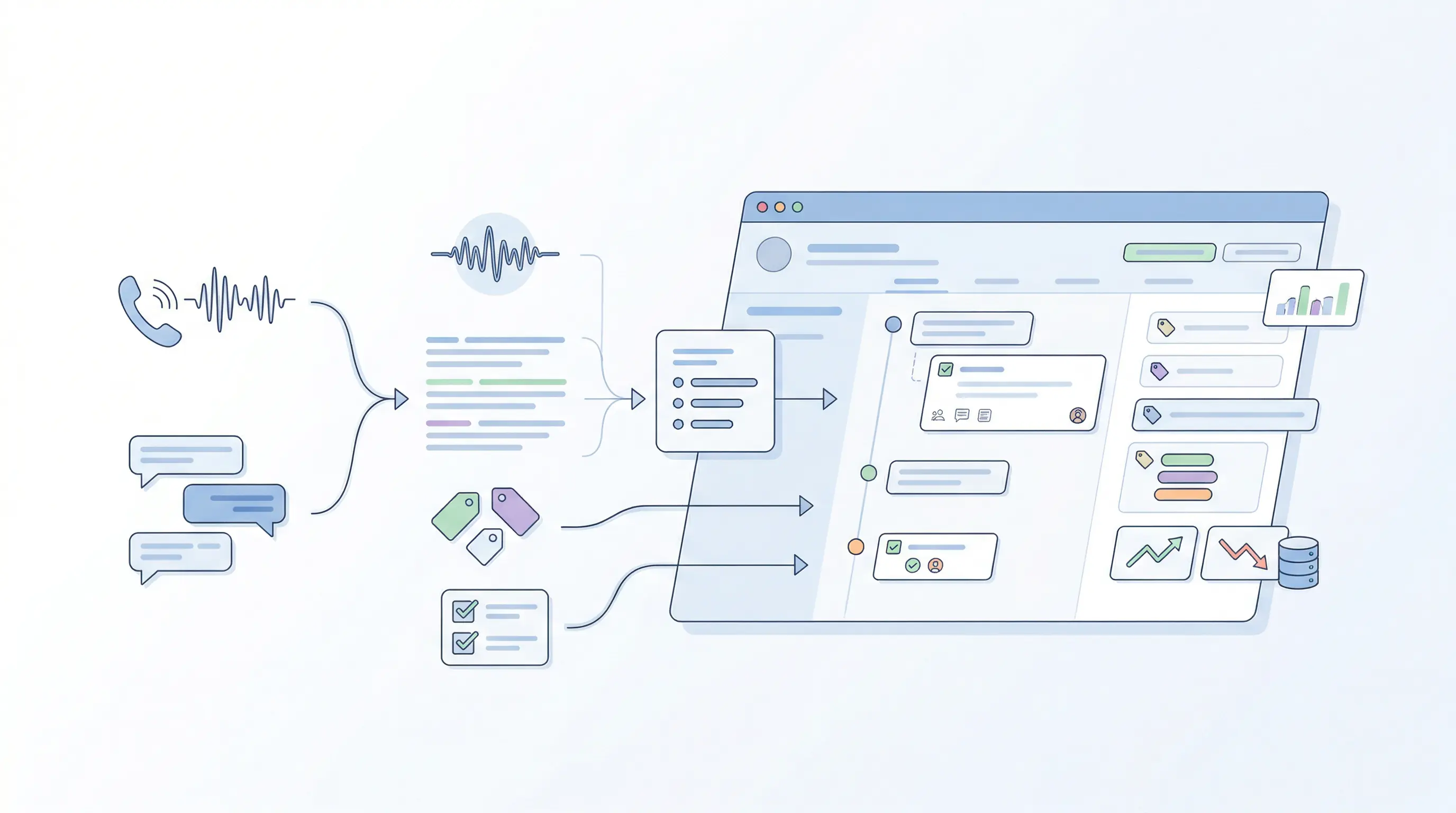
Conversation intelligence in CRM-native calling and texting means the system captures call audio and SMS threads, converts them into searchable text, extracts what matters, then writes those outputs back to the right lead, contact, account, or opportunity timeline. It is less about “AI insights” in a separate dashboard and more about making every interaction queryable and actionable inside Salesforce, HubSpot, Zoho, or similar CRMs.
In practice, the scope usually includes:
- Transcription: speaker-separated call transcripts with timestamps, plus full SMS thread capture.
- Call and SMS summaries: short recaps that state intent, context, and outcome (for example, “requested pricing,” “asked to call back Friday,” “opted out”).
- Topics and keywords: tracked phrases like competitor names, objections (“too expensive”), compliance language (“stop,” “unsubscribe”), and product terms.
- Action items and next steps: extracted tasks such as “send quote,” “book demo,” “add decision maker,” then logged as CRM tasks or notes.
- Searchable conversations: rep-level and team-level search across transcripts and SMS, filtered by account, stage, disposition, or keyword.
- Trend reporting: rollups that show what changed across hundreds of calls or texts, like rising “pricing” mentions in late-stage deals.
What “CRM-Native” Changes
CRM-native conversation intelligence writes outputs into fields and timelines that reporting already depends on: activity history, tasks, custom fields, and opportunity notes. That is where it connects to workflows such as routing, sequences, and QA. Platforms like Aloware focus on keeping calling, texting, and conversation insights in the daily rep view, so managers coach from the same records RevOps uses for pipeline hygiene.
How Does CRM-Native Conversation Intelligence Work in Daily Workflows?
Conversation intelligence only helps when it lands where work happens: the lead, contact, or opportunity timeline. In a CRM-native calling and texting setup, the platform captures the raw conversation (call audio, voicemails, SMS threads), converts it into structured outputs (transcription, call summaries, action items), then writes those outputs back into CRM objects that routing, sequences, and reporting already use.
The capture layer starts at the moment of interaction. Inbound calls hit an IVR or routing rule, outbound calls start from click-to-dial or a power dialer, and texts send from a 10DLC-registered brand and number pool. Platforms such as Aloware can also hand off to AI voice agents or AI SMS bots after hours, so the first touch still gets logged and summarized.
From Conversation To CRM Actions In Minutes
- Match the conversation to the right record. The system resolves identity using phone number, CRM ownership rules, and queue logic. If no match exists, it creates a new lead and attaches the call or SMS thread.
- Generate usable outputs. Speech-to-text creates a transcript with speaker separation, then an LLM-style layer produces a call summary, next-step suggestions, and extracted entities such as product name, competitor, pricing, or appointment time. For SMS, it summarizes the thread and flags intent (opt-out, buying timeline, complaint).
- Sync to fields and timelines. The platform logs the activity, stores the recording link, writes structured values into custom fields (for example, “Objection: Price” or “Next Meeting Date”), and creates tasks.
- Trigger automation. Keywords or outcomes can enroll a lead into a HubSpot sequence, create a Salesforce task, change a routing priority, or post an alert to Slack for urgent intent.
The best workflow feels boring. Reps see summaries and action items inside the CRM record before the next dial. Managers search across transcripts and SMS for coaching patterns, then tie findings to pipeline stages and QA checks without exporting data.
Which Teams Get the Biggest Lift From Conversation Intelligence?
The same “boring” workflow creates different wins depending on the job. Conversation intelligence turns call and SMS activity into searchable, structured CRM data, so each team can act faster without chasing notes, recordings, or screenshots.
Role-Based Outcomes From Conversation Intelligence
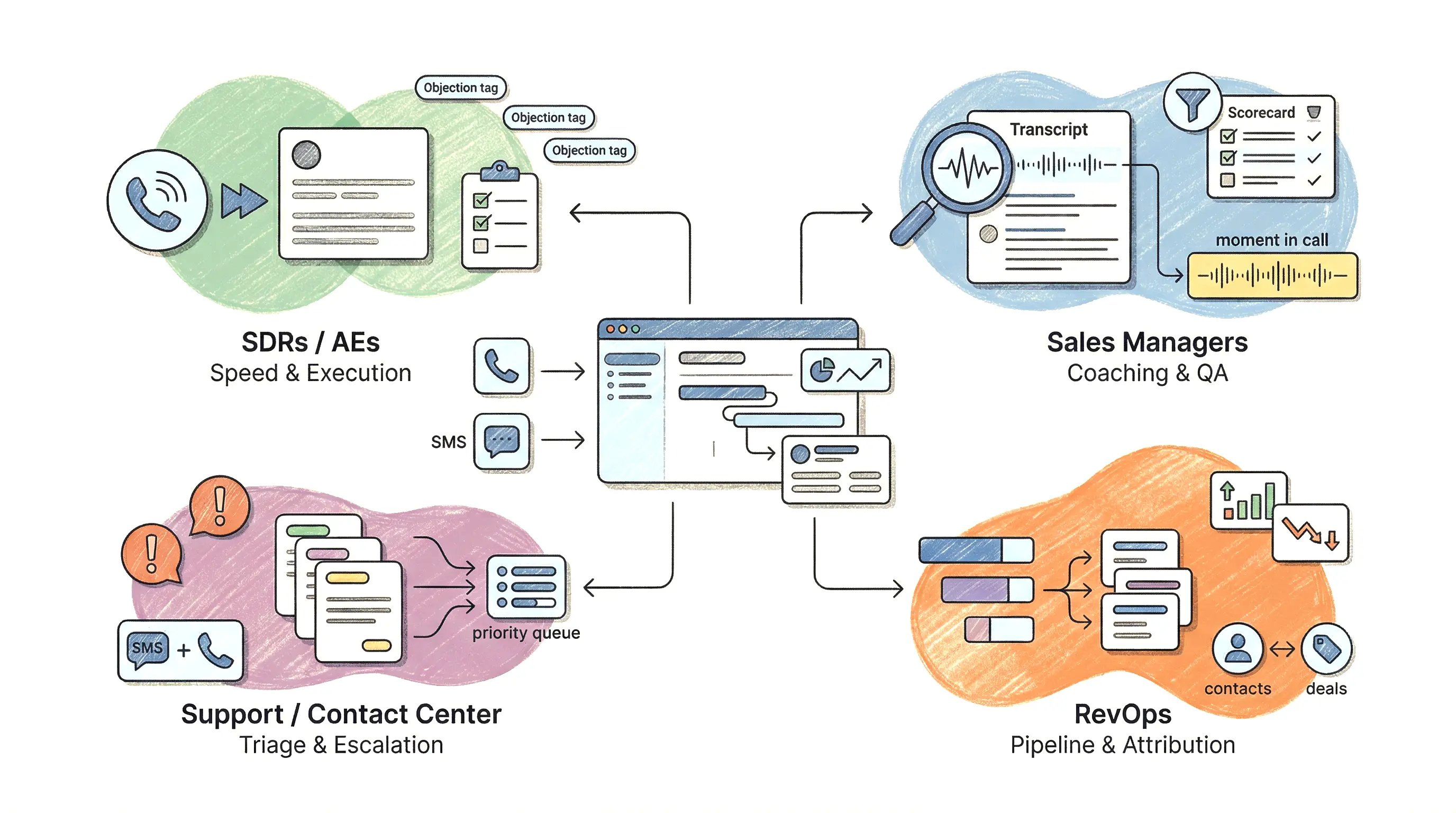
SDRs and AEs get speed and consistency. Auto-generated call summaries and action items reduce manual logging, so reps move to the next dial with the right context. Keyword tracking helps reps find proven talk tracks by searching transcripts for phrases like “too expensive,” “already using X,” or “send me pricing.” Teams often formalize this into an objection library inside the CRM, tied to stage and outcome, instead of a slide deck nobody updates.
Sales managers get coaching signal at scale. Instead of sampling a few recordings, managers filter conversations by topic, disposition, or competitor mention, then review the exact moments that changed outcomes. QA becomes repeatable when call scoring inputs pull from transcripts (for example: did the rep confirm next steps, capture a decision maker, and state required disclosures). Managers can also spot when new messaging breaks because topic trends shift across the whole team.
RevOps gets cleaner pipeline and better attribution. When conversation intelligence writes outcomes back to the CRM record (meeting booked, follow-up date, opt-out, pricing requested), activity completeness improves and stage changes rely less on rep memory. Signals from calls and texts also help forecasting hygiene, such as flagging late-stage deals with repeated “legal review” or “budget freeze” mentions.
Support teams and contact centers get faster triage and fewer escalations. Sentiment analysis can help prioritize callbacks, but it works best as a routing hint, not a final verdict. More reliable triggers come from explicit phrases (“cancel,” “chargeback,” “lawsuit,” “manager”) that create escalation tasks, update ticket fields, or route to a retention queue. In CRM-native platforms like Aloware, these triggers can run across both calls and SMS, so the customer’s full thread stays on the same record.
Conversation Intelligence Buying Checklist for CRM Calling and SMS
Escalation triggers like “chargeback” or “lawsuit” only work if the system hears them correctly and writes them to the right record. That is why a conversation intelligence purchase for CRM calling and SMS needs a checklist, not a demo vibe check. Evaluate it where it will live: inside Salesforce, HubSpot, Zoho, or your service CRM objects.
Conversation Intelligence Evaluation Checklist (CRM Calling and SMS)
- Transcription accuracy you can verify. Ask for side-by-side transcript comparisons on your own recordings (noisy mobile calls, accents, fast talkers). Check speaker separation, timestamps, and whether it captures numbers, dates, and product names reliably.
- SMS coverage is first-class. Confirm it captures full threads (inbound and outbound), handles opt-outs (“STOP”), and summarizes intent from multi-message exchanges, not just single texts.
- Summary and action-item quality. Require structured outputs: disposition, next step, follow-up date/time, key entities (competitor, pricing, decision maker). If it only produces a paragraph summary, managers cannot report on it.
- Search and topic tracking that matches your business. Validate keyword packs for compliance and risk (opt-out terms, harassment language) plus your revenue drivers (pricing, integration, cancellation). Test team-wide search across calls and texts.
- Automation triggers with guardrails. Look for workflow hooks that can create CRM tasks, update fields, enroll sequences, or route to retention queues. Demand admin controls, audit logs, and “human review” options for high-risk triggers.
- Omnichannel reporting. You should see call outcomes and SMS delivery outcomes together, by rep, queue, campaign, and lifecycle stage. If reporting lives in a separate portal, adoption drops.
- CRM sync depth and timing. Confirm real-time activity logging, correct association to lead/contact/opportunity, and field-level writes. Ask how it handles duplicates, reassignment, and shared numbers.
Compliance and trust features. For texting, verify A2P 10DLC support and opt-out handling per the CTIA Messaging Principles. For calling, confirm recording consent workflows and caller identity signals such as STIR/SHAKEN and CNAM support. Tools like Aloware also add spam-label reduction controls (for example, NumberGuard) that protect pickup rates.
How Do You Score Calls Against What Actually Happened in HubSpot?
Scoring calls against CRM outcomes means putting the AI's read of each call on the same record as the result, then checking which call behaviors show up before a signed deal and which show up before a no-show. Appointment-setting managers ask for exactly this. What share of leads who confirmed the day before actually showed up? What do the top setters say that the bottom ones skip?
The join is shorter than most vendors make it look. When Aloware logs a call to HubSpot, the rep's disposition (HubSpot's call outcome), the talk time (HubSpot stores it as call duration) and the recording link land on one call activity. Switch on AloAi Voice Analytics and the AI call summary lands there too. The outcome you care about, Signed or Attended or No-show, already lives on the deal. So the correlation runs as a custom HubSpot report, which needs a Professional or Enterprise hub.
Decide What the AI Should Look For
A canned rubric scores every team the same way. Write your own questions instead. With Automated Entity Mapping on the HubSpot integration, you define the fields and the only values the AI may choose from. After each qualifying call, it writes its answer into the HubSpot contact or deal properties you mapped.
- Solar: "Both homeowners on the appointment: yes / no."
- Insurance: "Current carrier named: yes / no."
- Real estate: "Pre-approval mentioned: yes / no."
Now "what share of confirmed leads showed up" is a deal report filtered on one property. One detail matters for the math: the property holds the answer from the most recent qualifying call, so read it as the state of the lead after its last conversation.
Stop Letting Reps Grade Their Own Calls
The weak point in every call-scoring project is the outcome label. The rep who picks "Appointment set" at wrap-up is the same rep the analysis is scoring, and nothing in the label itself can be checked. Treat the disposition like a self-reported timesheet: useful, and never the only evidence.
We hold our own benchmarks to that rule. In Aloware's call data, a connected call is one the phone system itself recorded as answered with at least 30 seconds of talk time; the rep's disposition plays no part. That definition covers 11,038,732 connected outbound calls from a sample of 1,079 accounts between September 1, 2025 and August 31, 2026. Half had 65.6 seconds of talk time or less. A quarter had 42.7 seconds or less.
That short head changes what the AI can score. AloAi Voice Analytics skips calls under 45 seconds of talk time by default (admins can change that floor), so at least a quarter of those connected calls never produce a transcript. On each of them, the rep's label is the only record. Pair every label a rep types with a field the rep did not type:
- Talk time: written to the HubSpot call by the phone system.
- The AI's answer: written to a mapped property after the call.
- The deal stage: set later by the closer who ran the meeting.
Where the three disagree, you have your coaching list. Supervisors can also scope a section of the nightly Voice Analytics Daily Digest email to one disposition, such as every call marked Appointment Set, and bring that summary into the next 1:1.
The Contrarian Trap: When Conversation Intelligence Makes Teams Slower
Conversation intelligence can slow teams down when it produces “insights” that reps cannot trust, find, or act on inside the CRM record. The failure is rarely the model. The failure is workflow design: bad definitions, weak data capture, and governance gaps that turn call summaries and transcription into extra review work.
Where CRM-Native Conversation Intelligence Breaks
- Insights live outside the CRM. If transcripts and call summaries sit in a separate portal, reps keep writing manual notes and managers keep asking for context. Fix it by requiring that every call and SMS thread writes back to the correct lead/contact/opportunity timeline, plus any fields your reports depend on (disposition, next step date, opt-out status).
- Sentiment overreach creates false urgency. Sentiment analysis is noisy across accents, crosstalk, and short calls. Treat sentiment as a sorting signal, not an escalation trigger. Use phrase-based triggers for routing and compliance, such as “unsubscribe,” “stop,” “chargeback,” “cancel,” or “lawsuit,” then confirm with a transcript snippet in the CRM.
- Bad definitions poison reporting. Teams label everything “connected” or “qualified,” then wonder why coaching and forecasting drift. Define outcomes in writing and bind them to automation. Example: “Meeting booked” requires a calendar link or a scheduled activity on the opportunity, not a rep checkbox.
- Privacy, consent, and retention gaps create rework. Recording and texting rules vary by jurisdiction and channel. If you cannot prove consent, store an audit trail, and apply retention policies, managers will pull back on using recordings and summaries. Use platform controls for consent capture, opt-out handling for SMS, and role-based access to recordings. For background on U.S. texting rules, see the CTIA Messaging Principles.
- Change management fails quietly. Reps ignore conversation intelligence when it adds clicks. Start with two automations that remove work, like auto-creating follow-up tasks from action items and auto-logging every SMS reply to the CRM. CRM-native tools like Aloware tend to win adoption when summaries, tasks, and keyword flags appear in the same view reps already use to dial and text.
A Lean Rollout Plan That Proves ROI in 30 Days
If reps see summaries and tasks in the same CRM view they dial from, a 30-day pilot can prove whether conversation intelligence saves time and improves outcomes. Keep the scope tight, measure a few KPIs daily, and treat the pilot like an operations experiment, not an AI demo.

30-Day Pilot Plan for CRM-Native Conversation Intelligence
- Days 1–3: Set the baseline and lock definitions. Pick one inbound queue and one outbound motion (for example, inbound demo requests plus SDR follow-up). Define dispositions and required fields in the CRM (connected, left voicemail, wrong number, opted out, meeting booked). Baseline current speed-to-lead, connect rate, pickup rate, SMS delivery rate, and average after-call work time from your CRM and telephony logs.
- Days 4–7: Turn on capture and CRM writes. Enable recording consent workflows, transcription, call summaries, and full SMS thread logging. Require record association rules (lead/contact/opportunity) and test duplicates. Confirm that action items create CRM tasks and that opt-out keywords update a suppression field.
- Days 8–14: Add two automations that remove work. Keep it simple: (1) auto-create follow-up tasks from extracted next steps, (2) auto-enroll missed inbound calls into an SMS follow-up sequence. If you use Aloware, configure routing plus AI summaries so reps see the next step before the next dial.
- Days 15–23: Run a coaching loop with call scoring inputs. Managers review a fixed sample (for example, 5 calls per rep per week) using transcript search for your top objections. Track adherence to required disclosures and next-step capture. Publish one updated talk track per week based on what shows up in topics and keywords.
- Days 24–30: Audit, quantify, decide. Compare pilot vs baseline for time saved and conversion. Check compliance artifacts: consent capture, opt-out handling, audit trails for call recordings and SMS.
Track ROI with a small scorecard: speed-to-lead (minutes), connect rate (%), pickup rate (%), SMS delivery rate (%), meeting set rate (%), and rep time saved (minutes per day from reduced manual notes and logging). If those numbers move and the data lands reliably on the CRM record, expand to more queues. If they do not, fix record association and workflow friction before you add more “insights.”
See how Aloware handles power dialer workflows and CRM prioritization that feed directly into this kind of pilot.
Frequently Asked Questions
What is conversation intelligence in CRM calling and texting?
It’s the layer that turns raw call audio and SMS threads into structured, searchable data — transcripts, summaries, action items, and keyword flags — stored directly on your CRM lead, contact, or opportunity record. The goal is making every interaction usable inside the tools reps and managers already work from, not in a separate analytics portal.
How is CRM-native conversation intelligence different from a standalone tool like Gong?
Standalone tools analyze conversations separately and require syncing data back to your CRM. CRM-native platforms write call and SMS outputs — summaries, dispositions, extracted next steps — directly into CRM fields and timelines in real time. That means routing, sequences, reporting, and QA all run from the same record without a middleware layer or manual export.
Which teams get the most value from conversation intelligence?
SDRs and AEs reduce manual logging and get pre-call context automatically. Sales managers gain coaching signal across all calls — not just sampled recordings. RevOps gets cleaner pipeline data and better attribution. Support and contact center teams can use phrase-based triggers to route and escalate without waiting for manual review.
What should I check before buying a conversation intelligence platform for CRM calling and SMS?
Verify transcription accuracy on your actual call types (mobile, accented, fast-paced), confirm SMS is fully supported including opt-out handling, require structured summary outputs (not just a paragraph), test keyword tracking for your compliance and revenue terms, and confirm real-time CRM sync to the correct lead, contact, or opportunity record. See the full evaluation checklist in the buying section above.
What makes conversation intelligence slow teams down?
The most common failure: insights that live outside the CRM, so reps keep writing manual notes and managers keep asking for context. Other friction points include overreliance on noisy sentiment scores as escalation triggers, vague outcome definitions that break reporting, and rollouts that add clicks instead of removing them.
How long does it take to prove ROI from conversation intelligence?
A focused 30-day pilot on one inbound queue and one outbound motion is enough to measure time saved on after-call work, changes in connect rate and speed-to-lead, and whether compliance artifacts (consent capture, opt-out handling, audit trails) are landing correctly on CRM records. Start with two automations that remove work before adding more reporting layers.
.png)

Ruby Kootval is Head of Product Marketing at Aloware. She has 12 years in digital marketing, including 8 in B2B SaaS and 5 in telecom, and writes about AI voice agents, dialers, CRM integrations, and contact center operations.
.png)