


TL;DR
SMS automation only works when the CRM is driving every decision — who gets messaged, what gets sent, when it stops, and who owns the handoff. The highest-impact workflows aren't about volume; they're about timing: a lead capture reply within 5 minutes, a no-show nudge at the right stage, a support update that kills the "any update?" call before it happens. Two things kill otherwise solid programs — deliverability (unregistered 10DLC numbers, dirty content patterns, rotating numbers) and compliance gaps (missing consent fields, opt-outs that don't cancel active sequences, no audit trail). Fix those before you scale. Then measure the right things: speed-to-lead, time-to-first-reply, opt-out rate per workflow, and conversation-to-stage conversion — not messages sent. When those metrics move, revenue and resolution rates follow.
A lead texts "Is this still available?" and five minutes later they've booked with someone else. A customer asks for an update and your team can't find the last message thread. These aren't "people problems." They're workflow problems—and they show up fastest in SMS, where customers expect a reply now.
CRM-driven SMS automation closes the gap between intent and response. Your CRM becomes the system that decides who gets messaged, what gets sent, who owns the conversation, and when the automation stops so a human can take over. When it's set up well, you get faster speed-to-lead, consistent follow-up across reps, and clean logging you can actually coach from.
This article breaks down the workflow patterns sales and support teams rely on, the design rules that keep automations from misfiring, and the two areas that decide whether your program works at scale: deliverability (including 10DLC trust signals) and compliance guardrails like consent, opt-outs, and audit trails. You'll also see which metrics predict ROI before you ramp volume, and what "CRM-native" needs to look like in practice for an Aloware-style setup.
Where SMS Automation Wins Across the Funnel (Use Cases by Stage)
Clean CRM logging and consent are the foundation. Once you have them, SMS automation becomes a stage-based system that reduces lead leakage and keeps customers informed without reps babysitting every follow-up.
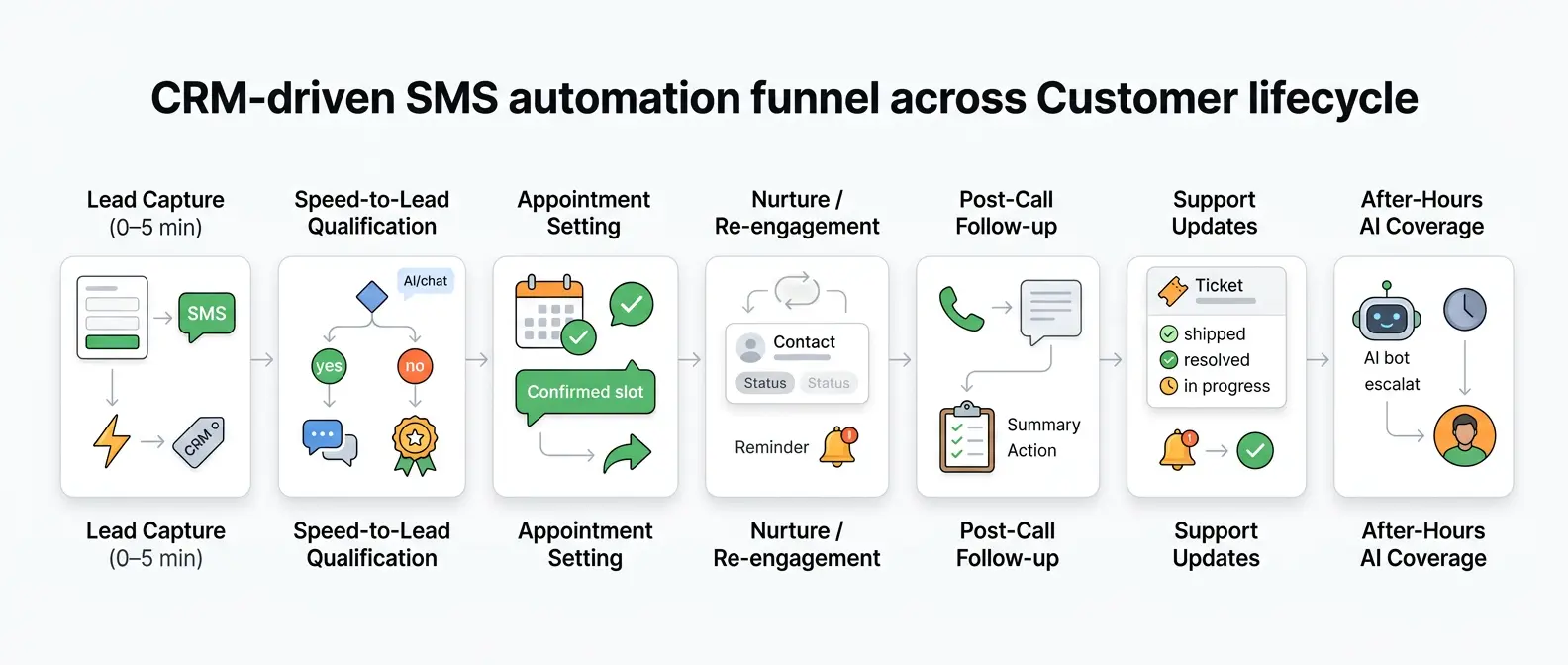
The highest-impact workflows map to the same funnel your CRM already tracks: new lead, working, booked, in progress, closed, and support states. The difference between "more texts" and better outcomes is simple: each stage gets a specific intent, a clear next step, and a handoff rule.
SMS Automation Use Cases by Funnel Stage
- Lead capture (0 to 5 minutes): Instant auto-reply after a form fill, Facebook Lead Ads submission, or inbound call missed. Confirm the request, ask one qualifying question, and offer two time slots. Route by territory, product line, or round-robin owner in HubSpot or Salesforce.
- Speed-to-lead qualification: A short branching conversation that tags intent in the CRM (budget, timeline, service type). If the lead answers "call me," trigger click-to-call for the assigned rep. If they go quiet, send one reminder, then stop.
- Appointment setting and show-up: Booking confirmations, address links, intake forms, and "reply 1 to confirm" messages. Add a reschedule path that updates the calendar and the CRM stage, instead of creating a support ticket.
- Nurture and re-engagement: Stage-based sequences for leads stuck in "Contacted" or "No show." Use CRM fields (name, last product viewed, last call outcome) so messages read like real follow-up. Suppress anyone with an open deal or recent opt-out.
- Post-call follow-up: After an outbound call or power dialer attempt, send a recap and a single CTA. Log outcomes on the contact record for coaching and attribution.
- Support updates and status notifications: Case received, technician en route, order shipped, payment link, and outage updates. These reduce "any update?" calls and keep CSAT stable during spikes.
- After-hours coverage: An AI SMS bot collects the reason, urgency, and best callback window, then creates the task for the morning queue. Escalate keywords like "cancel," "lawsuit," or "fraud" to an on-call human.
Teams that run Aloware inside a CRM usually start with lead capture and appointment flows, then add support notifications once opt-in and routing logic are stable.
How Do You Design CRM-Driven SMS Automations That Don't Break?
Once opt-in and routing logic work, most failures come from workflow design, not tools. SMS automation stays reliable when the CRM drives every decision: the trigger, the audience, the message, the owner, and the stop conditions.
Use this build framework for CRM-driven texting workflows:
- Define the trigger and the "why." Pick one event with a clear intent, such as form fill, inbound call missed, meeting booked, deal stage change, or ticket status update. Avoid stacking triggers until you can explain which event started the conversation in the CRM timeline.
- Confirm the minimum CRM data. Require a mobile number, consent status, owner/queue, and a lifecycle field (lead status, pipeline stage, ticket state). If any field is blank, route to a human task instead of sending a generic text.
- Personalize with fields, then validate. Use CRM fields like first name, appointment time, assigned rep, property address, or case number. Add guardrails: if a field contains "Unknown" or is missing, swap in a neutral phrase ("your appointment") or skip the message.
- Set timing, throttling, and quiet hours. Put a short delay after the trigger (often 30 to 120 seconds) to prevent duplicate sends from rapid CRM updates. Cap touches per contact per day and pause sequences when a contact replies. Respect local time zones for quiet hours.
- Write explicit bot-to-human handoff rules. Route to a rep when the contact asks for pricing, wants to schedule, uses escalation terms ("agent," "call me," "complaint"), or fails bot verification. Pass context: last message, CRM record link, and the reason for handoff.
- Handle opt-out like a state change. Treat STOP, UNSUBSCRIBE, and similar keywords as an immediate CRM update (do-not-text flag), cancel any active sequences, and send a single confirmation. Never re-enroll unless the contact re-consents and you log it.
Design For Observability, Not Hope
Every automated text should write back to the CRM: trigger source, workflow name, send time, delivery status, owner, and next step. When a lead says "I already booked," you should be able to see the exact stage change or duplicate trigger that caused the extra message and fix it in minutes.
Why Are Your Texts Getting Filtered? Deliverability, Trust, and 10DLC
A filtered text usually traces back to one thing: carriers do not trust the sender. SMS automation makes this visible because you send more consistently. If your CRM logs show "sent" but replies drop, delivery receipts show "undelivered," or customers say "I never got that," look at registration, consent, content, and number reputation before you rewrite workflows.
In the US, most business texting uses A2P 10DLC, the carrier program for application-to-person messaging on local 10-digit numbers. You register your brand and campaign, then carriers score your traffic based on identity, consent, and behavior. If you skip registration or mismatch use cases, filtering increases and throughput drops. The industry hub for registration is The Campaign Registry (TCR). See the program overview at The Campaign Registry.
Deliverability Levers That Reduce Spam Labeling
- Consent language: Capture explicit opt-in at the point of collection (web form, checkout, intake). Store timestamp, source URL, and the exact disclosure text in the CRM. Put "Reply STOP to opt out" in recurring sequences and support flows.
- Content patterns: Avoid link shorteners (bit.ly), heavy ALL CAPS, repeated punctuation, and copy-paste templates across many recipients. Use one clear intent per message and personalize with CRM fields that change (appointment time, ticket number, property address).
- Timing and cadence: When a trigger fires, throttle sends so a contact never receives multiple messages within minutes from different workflows. Quiet hours reduce complaints, and complaints damage reputation faster than low reply rates.
- Number strategy: Keep conversations on one number per relationship when possible. Rotating numbers to "fix" deliverability often resets reputation and confuses customers. Use a dedicated long code for 1:1 sales and support, and a separate number for higher-volume notifications when volume justifies it.
- Reputation signals: High opt-out rates, high complaint rates, and repeated "unknown sender" behavior hurt you. Carriers treat those as risk indicators. Monitor delivery and error codes from your messaging provider (Twilio, Sinch, Bandwidth) and tie them back to workflow names in the CRM.
If you run Aloware or any CRM-native dialer and texting tool, insist on per-message logging (delivery status, error code, campaign/sequence name). You cannot fix trust problems with copy edits alone.
Compliance Without Slowing Down: Guardrails for TCPA and Audits
Per-message logging tells you what happened. Compliance tells you what you were allowed to do. In SMS automation, the fastest teams stay fast because they treat consent, audit trails, and templates as workflow requirements, not legal paperwork.
The U.S. rule set most teams trip over is the Telephone Consumer Protection Act (TCPA). TCPA risk usually comes from four operational mistakes: texting without documented consent, texting the wrong person (recycled numbers), continuing after an opt-out, and using automated messaging in a way your consent language did not cover. The FCC maintains TCPA guidance and enforcement context at fcc.gov.
Guardrails That Keep SMS Automation Compliant
- Make consent a CRM field, not a note. Store opt-in status, timestamp, source (web form, IVR, keyword), and the specific disclosure text shown. Block sends when the field is missing.
- Treat opt-out as an immediate state change. When someone replies STOP, END, or UNSUBSCRIBE, update the do-not-text flag, cancel active sequences, and send one confirmation. Do not re-enroll without a new opt-in record.
- Control quiet hours by policy. Enforce send windows by the contact's local time zone. Apply stricter windows for sensitive categories (collections, legal intake, healthcare reminders).
- Use template governance. Keep approved templates in a shared library with owners, version history, and required tokens (company name, help language). Lock edits for high-risk templates such as payment links or identity verification.
- Keep an audit trail that survives staff turnover. Log message body, send time, delivery status, sender number, workflow name, agent who took over, and the CRM record link.
- Reduce wrong-party texting. Validate numbers at capture, and run periodic checks with a phone intelligence provider (for example, Twilio Lookup) when you re-engage older leads.
Regulated teams should also separate traffic by use case. Put support notifications, marketing nurture, and collections-style reminders on distinct numbers and workflows so a single bad campaign does not contaminate reputation, compliance review, and reporting.
The Counterintuitive Metrics That Predict SMS Automation ROI
Separating traffic by use case makes reporting honest. It also exposes a surprise: SMS automation ROI rarely comes from "sent volume." It comes from a few timing and trust metrics that predict whether conversations turn into appointments, payments, or resolved tickets.
Track these metrics per workflow name (lead capture, no-show, ticket updates) and per number. Otherwise, a high-performing support notification stream can mask a failing sales nurture sequence.
SMS Automation Metrics That Actually Predict Outcomes
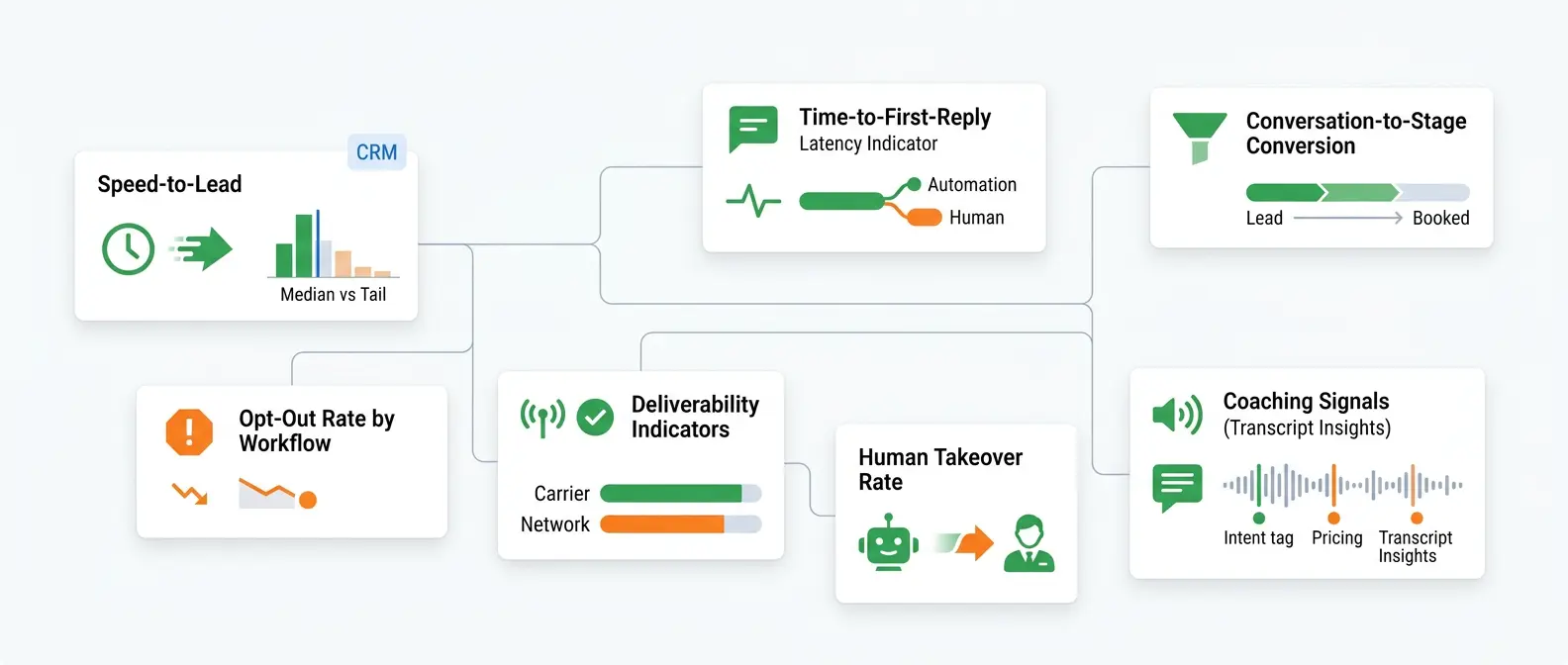
- Speed-to-lead (trigger to first outbound text): Measure median and 90th percentile. The 90th percentile tells you how many leads sit too long because of routing gaps, CRM field issues, or after-hours coverage.
- Time-to-first-reply (contact reply latency): Split by "automation started the conversation" versus "rep started it." Fast replies often correlate with intent. Slow replies usually need a different CTA, not more follow-ups.
- Conversation-to-stage conversion: Pick one stage change that matters (for example, New Lead to Booked, Open Ticket to Resolved). Attribute it to the last meaningful message thread, not the last message sent. CRM timelines make this auditable.
- Opt-out rate by workflow: STOP rate is a quality signal. If opt-outs spike on one sequence, fix targeting, timing, or disclosure. Do not spread the same message across more numbers.
- Deliverability indicators: Watch carrier errors and delivery receipts from your provider (Twilio, Sinch, Bandwidth). Tie error codes to workflow names so you can see whether filtering clusters around links, templates, or specific numbers.
- Human takeover rate and resolution time: For AI SMS bots and auto-triage, measure how often a human takes over and how long it takes to close the loop. A low takeover rate can mean the bot solved issues, or it can mean customers gave up.
- Coaching signals from transcripts: Use conversation analytics (Aloware, Gong, CallRail) to tag missed follow-up promises, pricing requests, and "call me" intents. These tags correlate with lost deals more reliably than message counts.
When these metrics move in the right direction, revenue and support outcomes usually follow. When they do not, adding more automated touches usually makes deliverability and opt-outs worse.
What to Look for in a CRM-Native SMS Automation Platform (Aloware Context)
When speed-to-lead improves but opt-outs and filtering rise, the issue is rarely "we need more texts." It is usually a platform fit problem: weak CRM syncing, unclear routing, poor controls, and limited visibility. A CRM-native SMS automation platform should make the right action easy and the wrong action hard.
Use this checklist when you evaluate tools (Aloware is one example of a CRM-native approach because it runs calling, texting, routing, and automation inside CRM records rather than in a disconnected inbox):
- Real CRM Sync, Not CSV Sync: Bi-directional contact and activity logging, per-message delivery status, owner, workflow name, and timestamps on the CRM timeline. If you cannot see why a text fired, you cannot fix duplicates.
- Routing That Matches How You Operate: Round robin, territory, pipeline owner, support queue, and after-hours rules. Look for conversation assignment that persists, so a customer does not bounce between numbers and agents.
- Automation With Guardrails: Stage-based sequences, throttling, quiet hours by local time zone, and stop conditions on reply, stage change, or opt-out. The best systems treat opt-out as a CRM state change that cancels every active workflow.
- 24/7 Handling With Clear Handoff: An AI SMS bot that can qualify, answer FAQs, and book appointments is useful only if it escalates cleanly. Require handoff triggers (pricing, complaint, cancel, fraud) and context transfer (last messages, CRM link, reason for escalation).
- Analytics You Can Coach From: Speed-to-lead, time-to-first-reply, reply rate by workflow, opt-out rate by template, and deliverability errors tied to your messaging provider (Twilio, Sinch, Bandwidth). Add conversation QA signals like sentiment and keyword flags when you manage a team.
- Deliverability and Compliance Support: A2P 10DLC registration workflow, template governance, consent capture fields, audit trails, and number management that protects reputation.
Make The Platform Prove It In A 2-Week Pilot
Pick one high-volume flow (missed call or web form). Run a controlled pilot with one team and one number. If the platform cannot show trigger source, delivery status, opt-outs, and handoff outcomes per conversation in your CRM, keep shopping.
Frequently Asked Questions
What is CRM-driven SMS automation?
It's a texting system where your CRM — not a standalone SMS app — controls the trigger, the audience, the message content, the sending owner, and the stop conditions. Every message fires from a CRM event (form fill, stage change, missed call, ticket update) and writes back to the contact record automatically. The result is clean logging, no duplicate outreach, and a conversation history reps and managers can actually coach from.
Which funnel stages benefit most from SMS automation?
Lead capture (0–5 minutes after form fill or missed call), speed-to-lead qualification, appointment confirmation and show-up reminders, post-call follow-up, and support status updates. These stages share a common trait: the customer expects a fast, specific response, and a delayed or generic one costs you either the deal or the relationship.
What is A2P 10DLC and do I need it?
A2P 10DLC (Application-to-Person, 10-Digit Long Code) is the US carrier program that requires businesses to register their brand and messaging campaigns before sending automated texts on standard 10-digit numbers. If you're sending any automated or bulk SMS in the US and haven't registered, your messages are being filtered or throttled by carriers right now. Registration happens through The Campaign Registry. It's not optional — it's table stakes for deliverability.
Why are my automated texts getting filtered as spam?
Usually one of four reasons: you haven't completed A2P 10DLC registration, your content triggers carrier filters (link shorteners, heavy caps, generic copy-paste templates), your sending volume or retry behavior looks like a bad actor, or your number reputation has been damaged by previous complaints or opt-outs. The fix isn't rewriting your copy — it's fixing registration, consent language, throttling rules, and number hygiene first.
What's the difference between opt-out handling that's compliant vs. one that just looks compliant?
Compliant opt-out handling treats STOP, UNSUBSCRIBE, and similar keywords as an immediate CRM state change — not just a list removal. That means the do-not-text flag updates instantly, every active sequence is cancelled, a single confirmation goes out, and no re-enrollment happens without a new documented opt-in. "Looks compliant" means the text stops eventually, but the record isn't updated, sequences keep queuing, and there's no audit trail if a TCPA complaint lands.
What metrics actually predict SMS automation ROI?
Not messages sent. The metrics that matter are speed-to-lead (time from trigger to first outbound text), time-to-first-reply (split by automation-started vs. rep-started), conversation-to-stage conversion (New Lead to Booked, Open Ticket to Resolved), opt-out rate per workflow, and deliverability error codes tied to specific templates or numbers. Track these per workflow name and per number — not in aggregate — or a strong support notification stream will mask a failing sales sequence.
When should the bot hand off to a human?
Immediately when the contact uses pricing language, asks to schedule, mentions a complaint, uses escalation terms ("agent," "call me," "cancel," "fraud"), or fails bot verification. The handoff should transfer context automatically — last message, CRM record link, reason for escalation — so the rep doesn't ask the customer to repeat themselves. A bot that escalates cleanly is a net positive. A bot that traps customers in loops kills CSAT.
What should I look for in a CRM-native SMS platform vs. a standalone texting tool?
A CRM-native platform logs every message — delivery status, error code, workflow name, timestamp, owner — directly to the contact record in real time. It treats opt-out as a CRM state change, not a list unsubscribe. It enforces quiet hours by local time zone, not a blanket schedule. And it can show you, per conversation, why a text fired and what happened next. A standalone tool connected by Zapier or a CSV export can't do any of that reliably. If you can't diagnose a duplicate send in under two minutes, the integration isn't tight enough.
.png)

Ruby Kootval is Head of Product Marketing at Aloware. She has 12 years in digital marketing, including 8 in B2B SaaS and 5 in telecom, and writes about AI voice agents, dialers, CRM integrations, and contact center operations.
.webp)
.webp)
