TL;DR
A CRM-connected AI voice agent earns its place at high-volume, time-sensitive funnel moments—lead capture, qualification, appointment setting, and support triage. To get ROI, you need clean routing rules, real-time CRM sync, controlled dispositions, and compliance guardrails (A2P 10DLC, STIR/SHAKEN, CNAM, NumberGuard) running underneath everything. Track speed-to-lead, contact rate, appointment rate, and deflection rate—not "AI usage." Start with after-hours inbound, run a holdout, and iterate weekly with transcript-driven coaching ops.
If your team takes five minutes to call a new lead, you might as well take five hours. In high-volume sales and support, the first contact attempt decides who you reach, what gets booked, and whether your number starts getting labeled as spam.
A CRM-connected AI voice agent changes that by turning speed-to-lead, follow-up, and after-hours coverage into a repeatable workflow. It can answer and place calls, send compliant texts, ask qualifying questions, book meetings, and write the outcome back to the right HubSpot or Salesforce record so reps see a real history instead of guesswork.
The catch is operational: where you place the agent in the funnel matters, the handoff has to be clean, and deliverability and consent controls have to hold up in real usage. This guide walks through what actually changes day to day, which KPIs prove ROI, and the trust controls that keep you reachable. You'll also see what to look for in a CRM-native platform—Aloware is one example—when you need calling, SMS automation, routing, logging, and coaching data to live in one place.
Where Do AI Voice Agents Fit in the Funnel?
These workflow shifts show up in specific funnel moments. An AI voice agent earns its keep where speed matters, volume is high, and the next action is predictable. Put it in the wrong spot and you create risk: bad qualification, compliance exposure, or a handoff that frustrates buyers.
Use three filters to decide placement: volume (how many touches per day), urgency (how fast you must respond), and risk (compliance, revenue impact, or brand sensitivity). High volume plus high urgency with low-to-medium risk is the sweet spot.
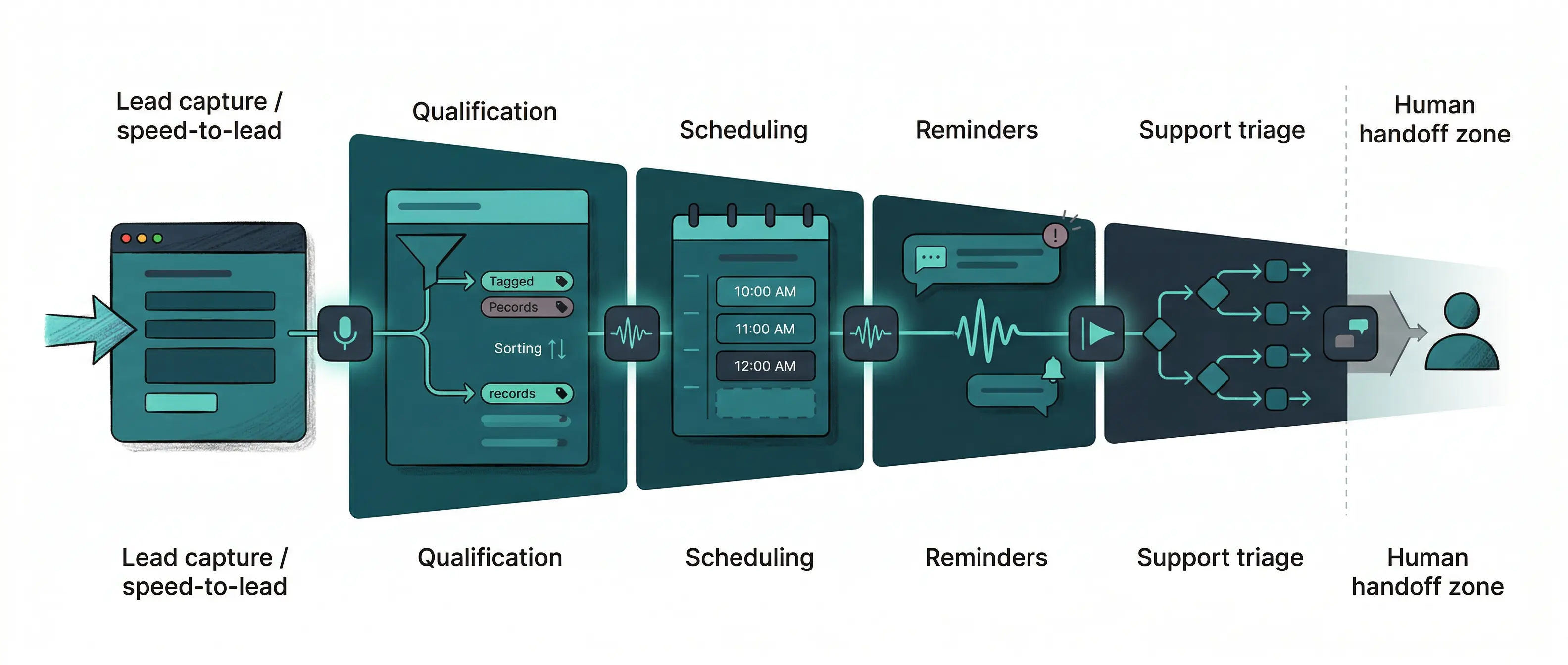
Lead capture and speed-to-lead: Inbound web leads, missed calls, and after-hours inquiries. The AI caller confirms intent, captures basics (name, need, timeframe), and books or routes. This is where teams stop bleeding opportunities to voicemail.
Qualification on cold or mixed-quality lists: Outbound re-engagement, event lists, old MQLs, and "request info" forms. The AI voice agent screens for fit, verifies contact details, and tags outcomes back to the CRM so reps stop dialing dead records.
Appointment setting and rescheduling: Booking, confirming, moving times, and collecting pre-call context. This works well when rules are clear (calendar availability, territory, product line) and the handoff includes a summary and disposition.
Reminders and no-show reduction: Voice plus SMS nudges before meetings, plus simple "press 1 to confirm" style flows. If you text, align with A2P 10DLC guidance from The Campaign Registry.
Support triage and deflection: Password resets, order status, scheduling, and basic troubleshooting. The AI collects identifiers, checks the right queue, and escalates when sentiment drops or the issue hits a policy boundary.
Where Human Reps Should Stay Primary
Keep humans on pricing negotiations, complex renewals, regulated disclosures, and escalations where a wrong answer creates legal or churn risk. In practice, teams use a CRM-connected platform such as Aloware to route these calls fast, log every activity, and pass a clean transcript and summary into HubSpot or Salesforce for the rep to take over.
How Does a CRM-Native AI Voice Agent Actually Work Day to Day?
A clean handoff only happens when the AI voice agent runs inside the same routing and record system your reps live in. If the agent answers in one tool and your CRM updates in another, reps inherit missing context, duplicate tasks, and reporting gaps.
Day to day, a CRM-native voice agent behaves like a disciplined first-line rep. It reads the contact record (owner, lifecycle stage, last activity, consent), follows a script tied to that stage, and writes back outcomes as structured fields your team already reports on.
CRM-Native AI Voice Agent Workflow: The Must-Haves
Routing rules that match your org chart. Route by lead owner, territory, language, product line, or pipeline stage. For inbound, use "ring human first, then AI" or "AI first, then ring human" depending on urgency and staffing.
Real-time CRM sync. The agent should pull the latest record before speaking (recent notes, open deals, last call result) and push updates immediately after the interaction so the next touch starts with facts.
Automatic activity logging. Every call and SMS needs a timestamp, direction, duration, recording link, transcript, and summary logged to the correct contact, company, and deal in HubSpot or Salesforce.
Dispositions that are reportable. Use a controlled list such as "Qualified," "Booked," "Wrong Number," "No Consent," "Support Escalation," or "Callback Requested." Free-text notes alone break dashboards.
Follow-up tasks created in the CRM. If the agent books a meeting, it should create the event, attach the call summary, and set a task for the rep with a due date and owner.
Handoff with context, not a transfer roulette. When escalation triggers (pricing, cancellation, medical or legal keywords, angry sentiment), the agent should pass a short brief: who the caller is, what they want, what was promised, and the next best action.
Platforms such as Aloware focus on this operational plumbing: call routing, CRM logging, and AI summaries that land on the record your team already uses for coaching and attribution.
Which KPIs Prove AI Voice Agent ROI in Sales and Support?
Clean routing and CRM logging make ROI measurable. An AI voice agent changes outcomes in the first minutes of the funnel, so you should track KPIs that capture speed, reach, and conversion—not "AI usage." Set a baseline for 2 to 4 weeks, then compare the same lead sources, hours, and territories after launch.
Speed-to-lead: median minutes from form fill or missed call to first live attempt (call or SMS). Measure from CRM timestamps (lead created) to first logged activity. Segment business hours vs after-hours.
Contact rate: % of leads that reach a live conversation within X attempts (common windows are 1 hour and 24 hours). Count "connected and spoke" dispositions, not ring time.
Pickup rate: answered calls divided by outbound attempts, split by local presence vs standard numbers, and by time of day. This isolates dialing strategy from list quality.
Appointment rate: booked meetings divided by unique leads worked. Track show rate separately, because reminder flows often move show rate more than booking rate.
Cost per booked meeting: (telephony + AI minutes + platform fees + rep time on escalations) divided by meetings booked. Use fully loaded rep hourly cost, not base salary.
SMS deliverability signals: % delivered, opt-out rate, and spam complaint proxies (sudden drops in delivery, rising "blocked" or "filtered" statuses). Pull carrier feedback where your messaging provider exposes it, and monitor registration status through The Campaign Registry if you run A2P 10DLC.
Support deflection rate: % of inbound support contacts resolved by automation without a human agent. Pair it with recontact rate within 7 days to catch "false deflection."
How To Measure AI Voice Agent Impact Without Fooling Yourself
Run a simple holdout test: keep 10 to 20% of similar leads on the human-only workflow for at least two weeks. Compare speed-to-lead, contact rate, and booked meetings by source and hour. If you use HubSpot or Salesforce, enforce identical disposition definitions across AI and humans so your dashboard does not mix "connected" with "left voicemail."
Platforms like Aloware help here because they log calls, texts, dispositions, and AI summaries to the CRM record, which gives RevOps a single source of truth for attribution and coaching.
What Compliance and Trust Controls Prevent Spam Labeling and Risk?
A single source of truth in the CRM is also your best compliance artifact. An AI voice agent touches regulated surfaces (calling, texting, recording, identity), so you need controls that prevent spam labeling, prove consent, and make every interaction auditable.
Start with two fundamentals: consent and identity. Consent determines whether you can text or auto-dial. Identity determines whether carriers and devices treat you as "likely spam." If either is weak, pickup rates and SMS deliverability drop fast, and investigations turn into guesswork.
Controls That Reduce Risk and Improve Deliverability
Consent capture and enforcement in CRM fields. Store opt-in source, timestamp, and channel (web form, inbound call, keyword). Block AI-driven SMS or outbound calls when the record lacks consent, and log "No Consent" as a disposition.
Call recording and disclosure rules. Configure the AI voice agent to announce recording where required, then store the recording link and disclosure outcome on the activity. If a caller objects, route to a human or stop recording based on policy.
Audit trails you can export. Keep immutable logs for call direction, numbers used, timestamps, agent or AI identity, transcript, and summary. This matters for complaint handling, carrier investigations, and internal QA.
A2P 10DLC registration for texting. Register your brand and campaigns through The Campaign Registry, then map message templates and opt-out language to each campaign type (support, reminders, marketing).
STIR/SHAKEN attestation for voice. Use providers that sign calls and support verification workflows defined by the FCC's STIR/SHAKEN framework. Start with the FCC overview at fcc.gov/call-authentication.
CNAM and number strategy. Set caller name where supported, keep consistent numbers per brand or region, and avoid rotating numbers so aggressively that carriers treat you as suspicious.
Spam-label monitoring and remediation. Track answer rates by number, watch for sudden drops after new campaigns, and quarantine numbers that trigger "Spam Likely." Tools such as Aloware's NumberGuard focus on this operational loop.
The Contrarian Truth: AI Voice Agents Fail Without Coaching Ops
Spam labeling and consent controls protect your reach. Coaching ops protects your outcomes. An AI voice agent can follow a script and still lose deals if managers cannot inspect what happened, find patterns, and tighten the playbook week over week.
The model matters less than the feedback loop. Teams that win treat the AI agent like a new team member with mandatory QA: transcripts for facts, summaries for speed, sentiment for risk, and topic search for root-cause analysis.
Coaching Ops for AI Voice Agent Performance
Transcripts are the audit trail for sales and support behavior. Managers use them to verify that the agent asked required questions, respected opt-out language, and did not promise what your policy forbids. If you cannot search transcripts by phrase (for example "guarantee," "refund," "stop texting"), you will miss the calls that create churn and compliance exposure.
Summaries and action items keep humans fast. The best handoff summary fits on one screen: intent, qualifiers captured, objections heard, next step booked, and any hard constraints (budget, timeline, product). If reps rewrite notes, your system adds labor and introduces drift.
Sentiment is an escalation trigger, not a vanity metric. Use it to route angry callers to a senior queue, flag calls for review, and detect when a script change increased friction. Pair sentiment with outcomes like "Booked" or "Escalated" to avoid coaching based on vibes.
Topic search turns hundreds of calls into a shortlist of fixable issues. Common examples: "pricing," "cancel," "invoice," "integration," and "competitor." When "pricing" spikes and appointment rate drops, you have a script problem, not a model problem.

Operationalize the loop with a simple cadence:
- Sample 20 to 30 AI calls per week by disposition and sentiment.
- Tag failures with a controlled list (bad routing, missing qualifier, policy boundary, unclear CTA).
- Update scripts and escalation rules, then A/B test for 1 to 2 weeks.
- Publish a one-page change log so reps and RevOps track what moved KPIs.
CRM-connected platforms such as Aloware make this workable because transcripts, summaries, and dispositions land on the HubSpot or Salesforce record managers already review.
Implementation Checklist: Launch, Test, Monitor, Iterate
Transcripts and dispositions only help if your rollout produces clean, repeatable data. Treat an AI voice agent launch like a contactability project first, then an automation project. Your goal is simple: every call and text should hit the right record, follow the right rules, and produce an outcome you can measure.
- Lock the data contract in your CRM. Define required fields the agent will read and write: consent status, lifecycle stage, owner, timezone, lead source, last activity, and a controlled disposition list. If those fields are messy, fix them before you automate.
- Choose the first two use cases. Start with after-hours inbound lead capture and one outbound re-engagement flow. Avoid complex support escalations until routing and logging are stable.
- Write intents and scripts as decision trees. For each intent, specify allowed promises, required questions, and exit criteria. Add hard stops for pricing negotiation, cancellations, legal or medical keywords, and "no consent."
- Define escalation rules that protect the rep experience. Decide when the AI transfers live, schedules a callback, or creates a task. Require a handoff brief: identity, reason for contact, what was confirmed, what was offered.
- Set your number and identity strategy. Assign consistent numbers per brand or region. Configure CNAM where supported. Use providers that support STIR/SHAKEN call authentication per the FCC guidance at fcc.gov/call-authentication. If you text, confirm A2P 10DLC registration status in The Campaign Registry.
- Run QA with real edge cases. Test wrong numbers, voicemail, heavy accents, interruptions, opt-outs, and angry callers. Verify recording disclosures, transcript quality, and that every interaction logs to the correct HubSpot or Salesforce object.
- Launch with a holdout and tight monitoring. Keep 10 to 20% of leads on the human-only path for two weeks. Watch speed-to-lead, pickup rate by number, opt-out rate, and "No Consent" dispositions daily.
- Iterate weekly, not constantly. Change one variable at a time (script branch, routing rule, number pool). Platforms like Aloware help because the coaching artifacts live on the CRM record, so managers can tie script edits to KPI movement.
If you want the fastest win, start after-hours inbound. It produces immediate speed-to-lead gains and gives you clean training data for every next workflow.
Frequently Asked Questions
What is a CRM-native AI voice agent?
A CRM-native AI voice agent answers and places calls, qualifies leads, books meetings, and writes structured outcomes directly to contact and deal records in your CRM—without requiring a separate tool or manual logging step.
Where in the funnel should I deploy an AI voice agent?
The highest-ROI placements are after-hours inbound lead capture and outbound speed-to-lead follow-up. Both fix the same problem: first contact that doesn't happen or happens too late. Avoid deploying AI on pricing negotiations, complex renewals, or regulated disclosures.
Which KPIs prove ROI for an AI voice agent?
Track speed-to-lead (median minutes to first contact), contact rate, pickup rate, appointment rate, cost per booked meeting, SMS deliverability signals, and support deflection rate. Set a 2–4 week baseline before launch and run a holdout of 10–20% of leads on the human-only path.
How do I prevent my numbers from being labeled as spam?
Register for A2P 10DLC through The Campaign Registry for texting, use providers that support STIR/SHAKEN call authentication, configure CNAM for caller name display, and use a tool like Aloware's NumberGuard to monitor and remediate flagged numbers proactively.
What compliance controls does an AI voice agent need?
At minimum: consent stored as a CRM field (source, timestamp, channel), recording disclosure configured and logged, an exportable audit trail of every interaction, A2P 10DLC campaign registration, and STIR/SHAKEN attestation on voice calls.
When should the AI hand off to a human rep?
Build hard escalation triggers for pricing negotiations, cancellations, legal or medical keywords, angry sentiment, and any interaction where a wrong answer creates legal or churn risk. The handoff should include a brief: who the caller is, what they want, what was confirmed, and the next best action.
How do I use AI voice agent transcripts for sales coaching?
Sample 20–30 AI calls per week by disposition and sentiment. Tag failures with a controlled list (bad routing, missing qualifier, unclear CTA). Search transcripts by phrase—"pricing," "cancel," "competitor"—to find script problems rather than model problems. Update scripts, A/B test for 1–2 weeks, and publish a change log so RevOps can tie edits to KPI movement.
.png)

Ruby Kootval is Head of Product Marketing at Aloware. She has 12 years in digital marketing, including 8 in B2B SaaS and 5 in telecom, and writes about AI voice agents, dialers, CRM integrations, and contact center operations.
%20(1).webp)