

%20(1).webp)
TL;DR:
An AI voice agent implementation lives or dies on scope, not software. Pick one high-volume, low-complexity call type, wire the AI into your CRM and contact center so it has context, design a clean hand-off to a human, prove it on real calls, then expand to the next use case. Most failed projects skip straight to "automate everything" and collapse under their own ambition.
- Start with ONE use case. The winning first target is high-volume and low-complexity: appointment booking, order status, lead intake, business hours. Not angry escalations or complex billing.
- Context is the whole game. An AI that can't see who's calling or their history is a fancier phone tree. It needs live CRM and contact-center access before it says hello.
- The hand-off is the make-or-break feature. When the AI reaches its limit, it must pass the call to a human with full context so the customer never repeats themselves.
- Measure containment, task completion, and CSAT on that one use case before you scale. A 40-60% containment rate is a strong start.
- Deploy with a beta, not a big bang. Route 10% of live calls to the agent, compare the numbers against your human baseline, then widen.
Businesses rush to add AI voice agents because the old "Press 1 for sales" phone tree and long hold queues push customers straight to a competitor. The technology to answer instantly, 24/7, now exists and works. The failure rate is high anyway, and it is almost never a technology problem. It is a planning problem.
This is the blueprint that fixes that. Below is the exact 5-phase sequence to take an AI voice agent from concept to a system that carries real call volume.
What is an AI Voice Agent, and why is it now mission-critical?
An AI voice agent is software that uses natural language processing to understand what a caller means, resolve the request, or route the call to the right human with full context. It is not a traditional "Press 1 for sales" IVR.
A phone tree matches key presses to branches. An AI voice agent listens to natural speech, understands intent, takes real actions (booking an appointment, updating a record, qualifying a lead), and hands off cleanly when it hits its limit. That last part is what separates it from the IVR jail your customers already hate.
Key takeaway: an AI voice agent is not IVR 2.0. It holds a two-way conversation, takes real actions, and connects to your CRM, which makes it a fundamentally different tool than a touch-tone menu.
What is the real ROI of an AI voice agent?
The value is not a magic percentage. It comes from three mechanics that compound as call volume rises.
The mechanism matters more than any headline number. Shorter calls are not the win. A resolved call is the win, and a good agent lowers your cost per resolution while raising your answer rate. That is why the phased approach below beats a rip-and-replace.
Key takeaway: the ROI is not a single percentage. It is high-volume calls resolved without extra headcount, answered instantly, at a falling cost per resolution.
The 5-Phase Blueprint: how to implement an AI voice agent
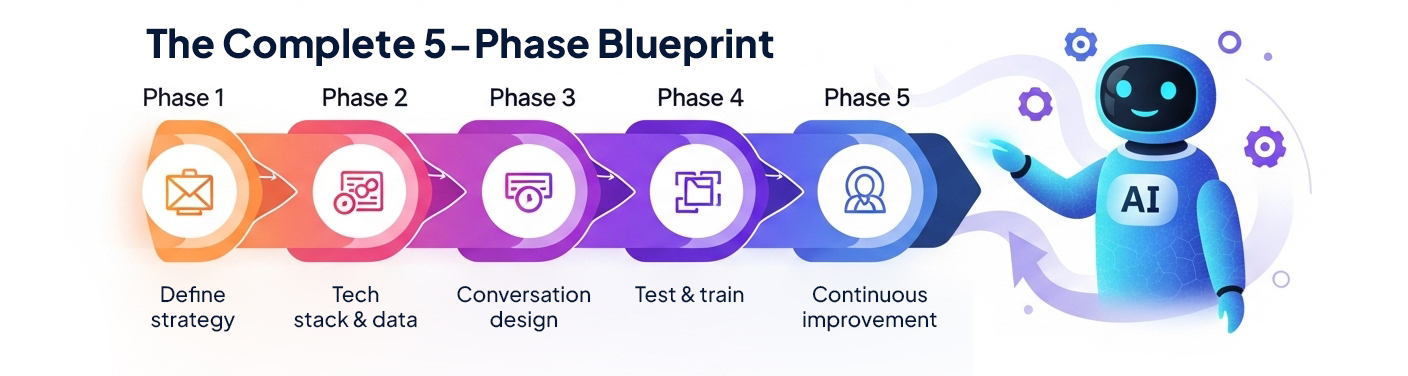
A successful voice AI rollout is a project, not a product. Here is the 5-phase sequence from concept to continuous improvement.
Phase 1: How do I define a winning AI voice strategy?
This discovery phase is the most important one. You cannot build a solution until you have precisely defined the problem.
- Stakeholder alignment: get buy-in from the entire business. Your Head of Support, Head of Sales, and Head of IT all need to be in the room. Name one Project Owner who is accountable for the outcome.
- Identify your "why": pick the single metric you most want to move. Be specific.
- Cost-driven: "cut the cost per call for order-status inquiries."
- CSAT-driven: "eliminate wait times for password-reset calls."
- Efficiency-driven: "free 200 agent-hours a week by automating appointment scheduling."
- Find your first use case (the beachhead):
- Do not try to boil the ocean. Your first agent should not try to do everything.
- How to find it: analyze your call logs. What is your single highest-volume, lowest-complexity (HVLC) query?
- Good first use cases by industry: a real estate team automates "is this listing still available?" and books showings. A solar or HVAC contractor qualifies inbound "how much does a system cost?" leads and books site visits. A law firm runs first-touch legal intake, capturing case details before a paralegal ever picks up. An insurance agency handles "what's my policy status?" and routes claims.
- Bad first use cases: "my order arrived broken and I'm furious," "debug my software," "explain my complex bill."
- Define success metrics (KPIs):
- Containment rate: the percentage of calls for that one use case the AI resolves without a human. A 40-60% target is a strong start.
- Task completion rate: did the AI actually book the appointment or capture the intake?
- CSAT: run a one-question "was this helpful?" survey right after the AI call.
Key takeaway: the secret is a narrow first use case. One high-volume, low-complexity query, one clear metric, one owner. Prove it there before you expand anywhere else.
Phase 2: What tech stack and data does a voice agent need?
Your AI is a brain, but it needs a body. It is useless on an island, disconnected from your systems.
- The integration audit (mandatory): your AI must have real-time API access and integration to your core systems.
- CRM (Salesforce, HubSpot): for context. The AI needs to know who is calling and their history before it says hello.
- Helpdesk (Zendesk, Gorgias): for knowledge. This is where the AI pulls its answers.
- Contact center (CCaaS): for action. This is the plumbing that lets the AI transfer a call to a human without dropping context.
- Prep the brain, your knowledge base:
- An AI is only as smart as the data you feed it.
- Action: build a single source of truth. Go through your FAQs, help articles, agent macros, and saved replies. Find every contradiction and fix it. The AI needs one clean, correct answer per question.
Key takeaway: an AI with no CRM access is a phone tree with a better voice. Context and a clean knowledge base are the difference between resolution and frustration.
Phase 3: How do I design a conversation that doesn't frustrate customers?
This is user-experience design for voice, and it is where most projects fail.
- Design a persona: give your AI a name and a defined tone. Is "Alex" friendly and casual, or formal and precise? That keeps your brand voice consistent.
- Map the conversation flow:
- The happy path: the ideal, simple conversation for your use case.
- The repair paths: what happens when the caller gives the wrong order number, mumbles, or asks something off-topic?
- The escape hatch: how does a caller reach a human? It must be easy and honored every time.
- Design the graceful hand-off (the most critical feature):
- The AI will hit its limit. The hand-off to a human has to be seamless.
- ❌ Bad hand-off: (AI fails) "Transferring you now." (Agent) "Hello, how can I help?" (Customer) "I already explained all of this…"
- ✅ Good hand-off: (AI fails) "I can't solve this one, connecting you to a specialist." (Agent) "Hi Jane, I see you're calling about order #12345 and I have your notes right here."
- That context hand-off is only possible when the AI is native to your contact center.
How to Prompt Your AI Voice Agent: A Guide to 100% Accurate Responses
Key takeaway: the escape hatch and the context-rich hand-off are features, not admissions of failure. Trapping a caller in an AI loop is worse than a long hold.
Phase 4: What is the right way to test and train the agent?
You have built the agent. Now make it smart.
- Intent training: an intent is the caller's goal. Train the AI on the many ways people phrase the same one.
- Intent: check_order_status
- Utterances: "where's my order," "track my package," "my order hasn't shipped," "when will my stuff arrive."
- Internal testing (alpha): let your own team try to break it. Hand them scenarios and have them red-team the agent with every weird question they can invent.
- Agent training: train your human agents on what the AI does and how the hand-off works, so they pick up the conversation cleanly.
- A/B testing (beta rollout):
- Do not go 100% live. Route 10% of real calls for your one chosen use case to the AI and 90% to humans as usual.
- Compare the KPIs. Is the AI's CSAT matching the human group? Is task completion high? Now you have real proof before you scale.
Key takeaway: deploy with a beta, not a big bang. Ten percent of live traffic gives you real-world proof and a safe rollback.
Phase 5: The agent is live. How do I make it smarter?
An AI voice agent is not "set it and forget it." It is a continuous improvement loop.
- Monitor your dashboards: watch containment, CSAT, and task completion like a hawk.
- Study the failure log (this is gold):
- Your platform should log every call that failed or escalated to a human. Review these transcripts weekly.
- Why did it fail? A new question you never trained? An unclear answer? An already-angry caller?
- Run the improvement loop: analyze the top failure reason, refine the knowledge base or add the missing intent, retrain, and redeploy. Watch that failure rate drop.
- Scale: once the agent handles its first use case at 80%+ containment, go back to Phase 1 and pick use case number two.
Key takeaway: the failure log is your roadmap. The calls the AI can't handle today are the exact training data that make it handle them next month.
What are the 3 biggest mistakes to avoid?
- Boiling the ocean: trying to automate everything at once guarantees a 12-month project that fails. Start with ONE high-volume, low-complexity query, get a fast win, prove the ROI, then expand.
- Building an IVR jail: trapping a caller in an AI loop with no way out is worse than a long wait. The escape hatch to a human is a core feature, not a defect.
- Forgetting integration: a "cool" AI tool that doesn't connect to your CRM or contact center is a useless silo. It has to be part of your central communication platform to work.
Key takeaway: every one of these is a scope-and-integration failure, not a technology one. Narrow the scope, protect the escape hatch, and never buy a standalone silo.
How to simplify the whole process
The 5-phase blueprint is the proven path. It gets complex fast when you are stitching together three or four separate vendors for the CRM, the knowledge base, the contact center, and the AI.
Aloware's AloAi Voice Agent collapses that stack. The AI is a native part of the all-in-one contact center platform, not a bolted-on tool, which removes the integration project that sinks most rollouts.
- Built-in graceful hand-off: because the agent lives inside the phone system, Phase 3's context-rich transfer is automatic. AloAi Actions can transfer the call warm or cold, or route it straight to the HubSpot deal or contact owner, with the caller's history attached.
- No-code builder: you define the goal ("book an appointment," "qualify this lead") and the agent works out the steps. No data-science team required to build or train it.
- Live CRM context: AloAi reads contact info, full communication history, and live HubSpot deal data at call time, so the agent knows who it is talking to before it speaks.
- Miss nothing while you roll out: AI Call Rescue can answer every missed inbound call during your beta, capture intent and contact details, and log a transcript, so no lead falls through while you tune the main agent.
AloAi voice calls bill per AI talk-minute by model tier: $0.10/minute on the Basic tier, $0.20 on Premium, and $0.50 on Ultra Premium, with unanswered or voicemail calls costing only a $0.02 connection fee. You pay for conversations that actually happen.
Key takeaway: the fastest implementation is the one where the AI, the CRM context, and the hand-off already live in one platform, so Phase 2 and Phase 3 are configuration, not a build.
Stop planning and start building
Book a demo with an Aloware expert, and the team will help you build your first AI voice agent live in the call. Bring your beachhead use case and walk out with a working agent.

Frequently Asked Questions
How long does an AI voice agent implementation take?
It depends entirely on scope. A single high-volume, low-complexity use case like appointment booking or lead intake can go live in a few weeks when the AI is native to your contact center and already has CRM access. Multi-vendor builds that stitch together a separate AI tool, CRM, and phone system take months because the integration work dominates. The fastest path is to pick one beachhead use case, prove it, then expand, instead of launching everything at once.
What is the best first use case for an AI voice agent?
Pick your highest-volume, lowest-complexity call type. Strong beachheads include order or appointment status, appointment booking, business-hours questions, and first-touch lead qualification. A real estate team can automate "is this listing still available?", a solar contractor can qualify inbound pricing leads, and a law firm can capture case details before a paralegal picks up. Avoid starting with angry escalations, complex billing disputes, or technical troubleshooting; those calls need a human and will tank your early numbers.
Do AI voice agents replace human agents?
No. A well-designed AI voice agent contains high-volume, routine calls and hands the complex ones to a human with full context, so your best reps spend their time on high-value problems instead of password resets. The goal is a higher answer rate and a lower cost per resolution, not a headcount cut. The projects that try to replace agents wholesale are the ones that build an "IVR jail" and drive customers away.
What systems does an AI voice agent need to integrate with?
Three, at minimum. A CRM like HubSpot or Salesforce gives the agent context: who is calling and their history. A knowledge base or helpdesk gives it correct answers. And the contact center platform lets it take action and transfer calls to a human without dropping context. An AI voice agent with no CRM access is just a phone tree with a better voice; the integration is what makes it resolve calls instead of frustrate callers.
How much do AI voice agent calls cost?
With Aloware's AloAi Voice Agent, calls are billed per AI talk-minute by model tier: $0.10 per minute on the Basic tier, $0.20 on Premium, and $0.50 on Ultra Premium. Unanswered or voicemail calls are not billed beyond a $0.02 connection cost, and billing rounds up to the next minute with a 60-second minimum. You pay for conversations that actually happen, not for enrollment or idle capacity.
How do you measure whether an AI voice agent is working?
Track three metrics on your one chosen use case. Containment rate is the share of those calls the AI resolves without a human, and 40-60% is a strong start. Task completion rate confirms the AI actually did the job, like booking the appointment or capturing the intake. And a one-question CSAT survey right after the call tells you whether callers were satisfied. Compare all three against your human-only baseline during a beta before you scale.
Can an AI voice agent book appointments and transfer calls?
Yes. Through AloAi Actions, a voice agent can create, update, or cancel appointments with admin-set durations and duplicate-booking prevention, transfer a call warm or cold to a user or ring group, route it to the HubSpot deal or contact owner, capture and sync contact data, and leave a voicemail. Because the agent is native to the contact center, those transfers carry the caller's context, so the human who picks up already knows why they are calling.
.png)

Ruby Kootval is Head of Product Marketing at Aloware. She has 12 years in digital marketing, including 8 in B2B SaaS and 5 in telecom, and writes about AI voice agents, dialers, CRM integrations, and contact center operations.