TL;DR:
An AI answering service is software that answers your inbound calls live, or catches them the instant they're missed, so a high-intent lead never disappears into voicemail. The version that actually protects revenue does three things a callback bot can't: it answers live, it catches missed calls across every line at the account level, and it logs the whole conversation to your CRM. Here's how to build that as a system, not bolt on a single bot.
- A missed inbound call from a high-intent caller is usually a lost deal, and it's invisible, because it never became a CRM record.
- Contacting a lead within five minutes makes you 21x more likely to qualify it than waiting 30 minutes (MIT/InsideSales).
- Missed-call text-back tools work on one line at a time and stop at a text. They leave ring-group calls uncovered and never reach your system of record.
- Aloware's approach is a three-layer system: live answer, account-level AI Call Rescue, and warm transfer plus CRM logging.
- AI Call Rescue and the AI Voice Agent bill at $0.10/min on the Basic model, per AI talk-minute, not a bundled minute pool.
If you've run a high-volume inbound team, you know the failure mode: it's 6:42 p.m., two reps are already on calls, a third line rings, and nobody picks up. The caller doesn't leave a voicemail. They don't call back tomorrow. They call the next number on their list. And the worst part isn't even the lost deal. It's that no one on your team will ever know it happened, because that call never became a record anyone can see.
Most "AI answering service" content sells you a single bot that calls a missed number back or fires a "sorry we missed you" text. That's a patch on one line. In the inbound deployments we've helped set up, the teams that actually stop the leak treat capture as a layered system, one that ends in a CRM record every single time, not a callback and a prayer.
This is the how-to. By the end you'll know what an AI answering service actually is, how the mechanics work for inbound, the three layers that guarantee zero missed leads, exactly how to turn it on in Aloware, and what it honestly costs. New to the category? Start with our complete guide to AI voice agents for SMBs for the broader landscape, then come back here for the inbound build.
What is an AI answering service?
An AI answering service is software that automatically answers your inbound calls with a conversational AI voice agent, or catches them the moment they go unanswered, so the caller's intent and contact details are captured and the lead is never lost. (When it focuses on catching calls no one picked up, it's also called an AI missed call handler.)
That's the clean definition. The reality is that most tools wearing this label do far less than the name implies. The common version is a missed-call text-back: one line misses a call, the system sends an SMS, and that's the whole product. It's reactive, it's single-line, and it dead-ends in a text thread the lead may never open.
A real AI answering service is conversational and connected. It can pick up the phone and talk, qualifying the caller, answering questions, and booking time, and when it can't reach a human, it writes the contact, the intent, and a call summary straight into your system of record. The difference is the difference between "we noticed you called" and "we answered, captured what you needed, and logged it."
Key takeaway: An AI answering service isn't a text-back bot. It's the layer that answers (or catches) an inbound call and turns it into a captured, logged lead instead of a missed-call notification.
Why do missed inbound calls cost more than teams think?
Because inbound is where your highest-intent leads live, and in 2026 those callers don't try twice. A missed inbound call isn't just a missed call. It's a lost deal that's also invisible, because it never became a record anyone can follow up on.
The lead-response data is brutal and it hasn't softened. Per a Harvard Business Review study of 2.24 million sales leads, firms that contacted a lead within an hour were nearly seven times as likely to qualify it. Tighten the window and it gets starker: companies that contact leads within five minutes are 21 times more likely to qualify them than those who wait 30 minutes (MIT/InsideSales). If speed-to-lead matters that much when you do reach a caller, the cost of never reaching them at all is the entire deal. (For the broader math, here's what missed calls actually cost you.)
This isn't abstract. Picture it by vertical:
- Legal intake: a personal-injury caller hangs up on voicemail and dials the next firm on the search results page. That's a signed case gone.
- Insurance: a prospect calling for a quote during open enrollment won't leave a message. They'll bind a policy with whoever answers.
- Home services: a homeowner with a burst pipe is calling three contractors at once. First answer wins the job.
- Real estate: a buyer calling about a listing after hours moves on if the office is dark.
- Healthcare intake: a new-patient call that hits a full queue at 5:05 p.m. becomes a competitor's appointment.
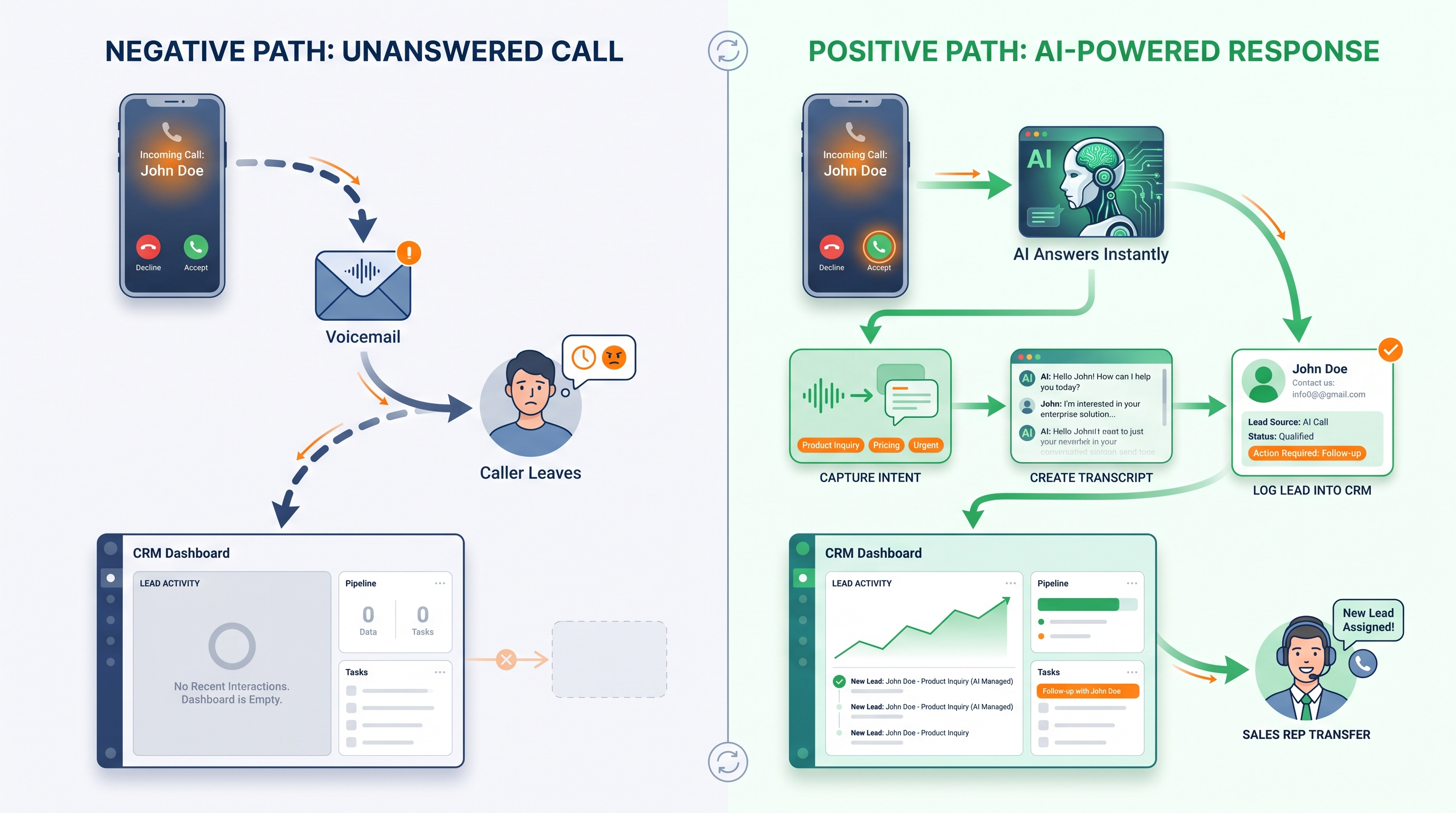
Here's the contrast that defines the problem:
❌ The bad path: Call rings → no one free → caller hits voicemail → caller hangs up → no record, no follow-up, no idea it happened.
✅ The good path: Call rings → AI answers live (or catches it instantly) → intent and contact captured → transcript logged to the CRM → warm transfer to a rep, or a follow-up workflow fires.
Key takeaway: A missed inbound call from a high-intent lead is usually a lost deal, and because it never becomes a CRM record, it's a loss your team can't even see, let alone recover.
How does an AI answering service actually work?
Mechanically, there are two ways to keep an inbound call from being lost, and a good system uses both. The first is to answer it live so it's never "missed" at all. The second is to catch it the moment it goes unanswered and respond before the caller is gone.
Note that this is all inbound. The AI is answering calls that come to you, not originating outbound calls. (Worth saying plainly because the telecom mechanics differ: signing and attestation are an outbound-origination concern, not something that happens when you answer an incoming call.)
Here's what happens on a well-built handler, step by step:
- An inbound call comes in and either no human is available or the call is about to go unanswered.
- A conversational AI voice agent picks up, live, in a natural two-way conversation, not a "press 1" menu.
- The agent captures the caller's intent and contact details, and answers from a knowledge base where it can.
- It records and transcribes the call automatically.
- When a human is available, it warm-transfers the hot caller to a rep.
- It writes the contact, the disposition, and a call summary into the CRM, and can fire a follow-up workflow.
Before: the caller gets dead air or voicemail, and your CRM shows nothing.
After: the caller has a real conversation, a rep gets a warm hand-off when possible, and the timeline shows a logged note instead of a "missed" flag. That last part, the CRM write-back, is what separates capture from a callback. A callback bot might dial the number again; it doesn't tell your team what the caller wanted or that the conversation ever happened.
Key takeaway: The mechanics are live answer plus instant catch, both ending in a transcribed CRM record, not a callback that leaves your system of record blank.
The three layers of zero-missed-lead inbound capture
Capturing every inbound lead isn't one feature. It's a three-layer system, and each layer covers what the one before it can't. This is the structure most missed-call tools never get to. They stop at layer zero.
Layer 1: Answer live with an inbound AI voice agent. The best way to handle a missed call is to never miss it. An inbound AloAi Voice Agent attaches to a line and answers in real time, qualifying the caller and taking actions. This is also the difference between a conversational agent and a legacy phone tree: it understands intent instead of routing by keypress. (If you want the version that just answers, qualifies, books, and logs, that's the AI receptionist that answers inbound calls.)
Layer 2: Catch everything that slips, at the account level. Live answer covers the lines you've configured. But spikes happen, ring groups get busy, and after-hours calls hit lines you didn't think to cover. This is where AI Call Rescue sits: an account-level safety net that catches every missed inbound call, from any line or ring group, and routes it to a system-managed AloAi voice agent that greets the caller, captures intent and contact info, and logs a transcript note. The key word is account-level. A per-line text-back tool can't see the ring group two departments over. This net can.
Layer 3: Warm transfer and CRM entity logging. Capture only counts if it lands somewhere your team works. The agent can warm- or cold-transfer to a user, ring group, or line, or route straight to the HubSpot deal or contact owner. Then it writes back: Update Contact Property (syncing to HubSpot, Salesforce, Pipedrive, Zoho, HighLevel, or Guesty where the integration allows), Add Call Disposition, and Summarize Conversation as a Note on the contact's timeline. The conversation becomes an entity in your CRM, not a line item in a missed-call log.
Put it together with a vertical. Take insurance intake. Here's an insurance-intake example of the same pattern in practice: an inbound quote call during a spike gets answered live (Layer 1); a second simultaneous call that the first agent can't take gets caught by AI Call Rescue (Layer 2); both callers' details, intents, and summaries land on their contact records, and the qualified one gets warm-transferred to a licensed agent (Layer 3). No caller hit voicemail. No lead is invisible. Real estate teams run the identical play after hours. See how a real estate team stopped missing inbound leads.
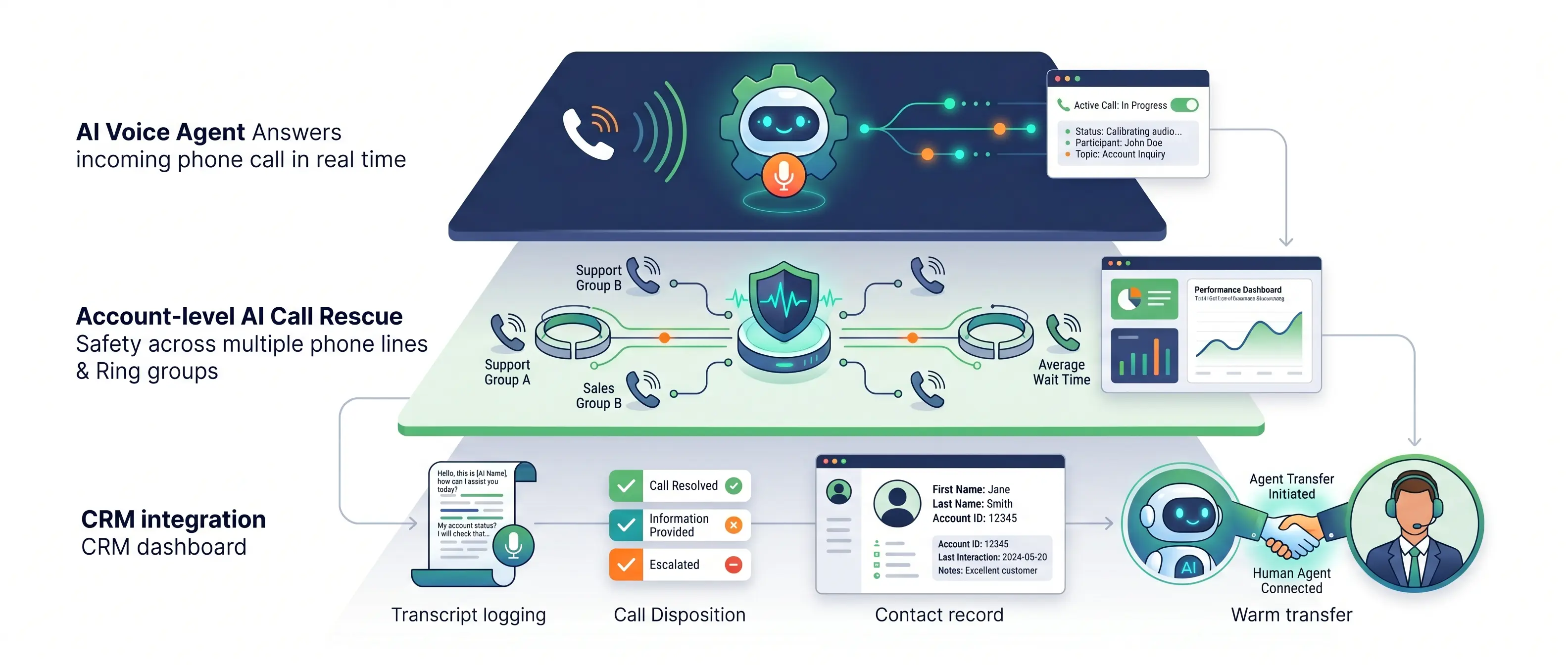
Key takeaway: Zero-missed-lead capture is three layers: live answer, account-level catch, and warm transfer with CRM logging, and no single missed-call bot replicates all three.
How to set up AI Call Rescue and an inbound voice agent in Aloware
This is the build. Four steps, all from the real product, no invented menus. AI Call Rescue and the IVR-to-IVA wizard are available in eligible Pro+AI accounts.
Step 1: Turn on AI Call Rescue (account level)
Go to Account → Calling Settings → AI Call Rescue. Accept the one-time admin consent dialog disclosing the $0.10/min Basic voice rate, then enable it. The result: every missed inbound call across every line and ring group now routes to a pre-built, system-managed AloAi voice agent. Your lines will show "Managed at account level by AloAi," and a rescued call stops being marked "missed." The timeline reads "AI Call Rescue answered the call."
Common mistake: assuming you have to configure a bot per line. You don't. That's the whole point of the account-level toggle. One enable covers the account.
Step 2: Attach an inbound AloAi Voice Agent to a line
Create an inbound voice agent in the AloAi Agents tab → "+ New Agent" (select Type: Voice, Direction: Inbound). Then attach it in Line Settings → Routing & IVR by selecting "An AloAi Agent." Now that line answers live instead of relying on the account-level net. Layer 1 and Layer 2 are now both in place.
Common mistake: treating AI Call Rescue as a replacement for live answer. It's the backstop. Live answer is the front line. Use both.
Step 3: Configure Actions for transfer and CRM write-back
In the agent's Instructions tab → Add Action, set up the moves that turn a conversation into a record: Transfer Call (warm or cold) or Route to HubSpot Deal/Contact Owner for the hand-off, plus Update Contact Property, Add Call Disposition, and Summarize Conversation as Note for the logging. This is Layer 3, wired in.
Common mistake: skipping the logging Actions. Without Update Contact Property and Summarize Conversation as Note, you've built a nice answering experience that still leaves your CRM blank, the exact problem you started with.
Step 4: Turn on the post-call email summary
First enable AloAi Voice Analytics and disable the On-Demand option (so summaries generate automatically). Then in the voice agent's Post-Call Actions tab, turn the email summary on and pick recipients: all users, the contact owner, specific users, or external addresses. Each summary includes the contact, line, direction, duration, a transcription link, the call summary, and outcomes.
Key takeaway: The full inbound build is four steps: enable AI Call Rescue, attach an inbound agent, wire transfer plus CRM Actions, and turn on the post-call summary, and none of them require configuring a bot line by line.
See AloAi Voice Agent answer a real lead in under 60 seconds. Book a 20-minute AloAi Voice Agent demo. We'll customize it to your vertical.

What does it cost to never miss an inbound call?
AI Call Rescue and the AI Voice Agent bill per AI talk-minute on the Basic model: $0.10/min. Enabling the feature is free. You pay only for actual usage.
The mechanics matter, so here's the honest breakdown. Billing is on actual AI conversation time, rounded up to the next minute, with a 60-second minimum. Unanswered or voicemail calls aren't billed beyond a $0.02 connection cost, so you're not paying full minutes for calls the AI never really had. And to kill a common confusion: there is no "1,000 included minutes" for the Voice Agent. That minute pool belongs to AI Voice Analytics, which is a separate product. Conflating the two is the single most common pricing mistake in this category.
Here's the side-by-side that usually clears it up:
One more thing to keep separate: answer rate on outbound calls is a different problem solved by the Pickup Stack (NumberGuard + Branded Calling + Local Presence), which is an add-on priced separately and isn't part of this inbound math. Mentioning it only so the two don't blur. This post is about catching calls coming to you.
Key takeaway: Never-miss inbound capture costs $0.10/min on actual AI talk time, with a 60-second minimum and no charge beyond $0.02 for unanswered calls, and the Voice Agent has no bundled minute pool, so don't confuse it with AI Voice Analytics.
Common mistakes that still let inbound leads slip
Even teams that "have something" for missed calls leak leads. Here are the four patterns that do it, and the fix for each.
- Relying on voicemail.
❌ The caller hits voicemail and hangs up; you never know they called.
✅ Answer live or catch the call instantly so the conversation happens, not a recording no one leaves. - Per-line bots that leave ring groups uncovered.
❌ You set up a text-back on your main line and assume you're covered; the calls that spill into a ring group during a spike vanish.
✅ Use an account-level catch so every line and ring group is netted, not just the one you remembered. - Callbacks that never reach the CRM.
❌ A bot calls the number back, maybe connects, and your system of record still shows nothing, so no rep follows up and the lead goes cold.
✅ Wire in entity logging (Update Contact Property, disposition, Summarize Conversation as Note) so every call becomes a trackable record. - No warm transfer, so hot leads bounce.
❌ The AI handles the call but can't hand a ready-to-buy caller to a human, so the caller loses momentum and leaves.
✅ Configure Transfer Call or Route to HubSpot Owner so a hot lead reaches a live rep the moment one's free.
Key takeaway: Leads slip when capture is single-line, voicemail-dependent, or disconnected from the CRM. Fix it with account-level catch, live answer, warm transfer, and entity logging.
Bottom line: capture is a system, not a callback
An AI answering service isn't a callback bot. It's the layer that turns every missed inbound call into a CRM record and a real conversation. The teams that stop the leak don't bolt one more tool onto one more line. They engineer inbound capture as a system: answer live, catch everything that slips at the account level, then warm-transfer to a human and log the whole thing to the CRM.
Stop patching missed calls one line at a time. Build the three layers, and the next high-intent caller at 6:42 p.m. becomes a record your team can act on instead of a deal no one ever sees.
See AloAi Voice Agent and AI Call Rescue catch a live inbound lead. Book a 20-minute AloAi Voice Agent demo.
Frequently Asked Questions
What is an AI missed call handler?
An AI missed call handler is software that responds to an unanswered inbound call automatically — either by answering it live with a conversational AI voice agent, or by catching the call the moment it's missed and following up. The goal is to capture the caller's intent and contact details so a high-intent lead never disappears into voicemail. The better systems don't stop at a callback or a "sorry we missed you" text. They log the conversation to your CRM and hand off to a human when one's available, so the lead becomes a trackable record instead of a guess.
What is AI Call Rescue?
AI Call Rescue is an account-level Aloware setting that routes every missed inbound call — from any line or ring group — to a pre-built, system-managed AloAi voice agent. The agent greets the caller, captures intent and contact info, logs a transcript note, and can trigger follow-up workflows. It always records and transcribes the call, preserves each line's previous missed-call settings, and can be reverted instantly. Activating it requires a one-time admin consent to the $0.10/min Basic voice rate. It's available in eligible Pro+AI accounts.
How is AI Call Rescue different from a missed-call text-back tool?
A text-back tool fires an SMS after one line misses a call. AI Call Rescue works at the account level — it catches missed calls across every line and ring group — and it answers with a conversational voice agent that captures intent, logs a transcript note, and can route follow-up, rather than sending a one-line text and hoping the lead replies. It's a safety net for the whole account, not a patch on one number.
Can an AI voice agent answer inbound calls live so they're never missed?
Yes. An inbound AloAi Voice Agent attaches to a line in Line Settings → Routing & IVR by selecting "An AloAi Agent," and it answers calls live with a natural conversation — qualifying the caller, answering from a knowledge base, and taking actions. Answering live is the first layer of capture. AI Call Rescue is the second-layer net for anything that still slips through during call spikes or after hours, so the two work together rather than competing.
Does the AI log the call to my CRM?
Yes. Through Actions, the voice agent can Update Contact Property (syncing to HubSpot, Salesforce, Pipedrive, Zoho, HighLevel, or Guesty where the integration allows), set a disposition, and Summarize Conversation as a Note on the contact's timeline. It can also route to a HubSpot deal or contact owner and create a HubSpot ticket. That's the difference between a callback bot and real inbound capture — the conversation becomes a CRM record you can act on.
Can the AI transfer the caller to a human?
Yes. The voice agent can do a warm or cold Transfer Call to a specific user, ring group, or line, route the caller to an extension, or route to the HubSpot deal or contact owner. So a hot inbound lead can reach a live rep when one's available, with the AI handling the moments no one can pick up. The point isn't to replace your team — it's to answer the right calls when a human can't.
How much does an AI missed call handler cost with Aloware?
AI Call Rescue and the AI Voice Agent bill per AI talk-minute. The Basic voice model is $0.10/min, charged on actual conversation time, rounded up to the next minute with a 60-second minimum. Unanswered or voicemail calls aren't billed beyond a $0.02 connection cost. There's no bundled "1,000 included minutes" for the Voice Agent — those minutes belong to AI Voice Analytics, a separate product. Enabling the feature itself is free; you pay for usage.
Does AI Call Rescue work without call recording or voice analytics enabled?
Yes. AI Call Rescue always records and transcribes every call it handles through its voice stack, even if Inbound Call Recordings and AI Voice Analytics aren't enabled. You'll find the playback and transcript on the call's Communication Info page. One thing to note: the automatic post-call email summary is a separate feature that does require AI Voice Analytics enabled with the On-Demand option turned off.
Will turning on AI Call Rescue change my existing line settings?
It's reversible. When enabled, your lines and ring groups show "Managed at account level by AloAi" and their previous missed-call settings are preserved. Toggling it off atomically restores them, and re-enabling later doesn't require new consent. The system bot it uses can't be deleted — only disabled — but nothing about your prior routing is lost.
Can I turn my old phone menu into a conversational AI?
Yes. The AloAi IVA Inbound Answer Conversion Wizard in Line Settings → Routing & IVR transcribes your existing IVR, detects the language and voice, maps each menu option to an equivalent AI routing action, and generates an editable conversational agent. It runs on the Basic tier ($0.10/min) and is non-destructive — your old IVR is turned off, not deleted, and a "Revert to IVR" button restores it. It requires a Pro+AI plan.
.png)

Ruby Kootval is Head of Product Marketing at Aloware. She has 12 years in digital marketing, including 8 in B2B SaaS and 5 in telecom, and writes about AI voice agents, dialers, CRM integrations, and contact center operations.