TL;DR:
Call automation software automates the repetitive work that surrounds a sales call — sequencing through a list, logging the call to your CRM, writing the after-call summary, and triggering follow-up — so reps spend their day talking to people instead of doing data entry. It is not a robo-dialer. The best call automation removes the busywork around the conversation; the worst kind just blasts more numbers and gets your phone flagged as spam.
Key facts:
- Call automation = automating the admin around calls (dialing, logging, summarizing, following up), not automating the human conversation.
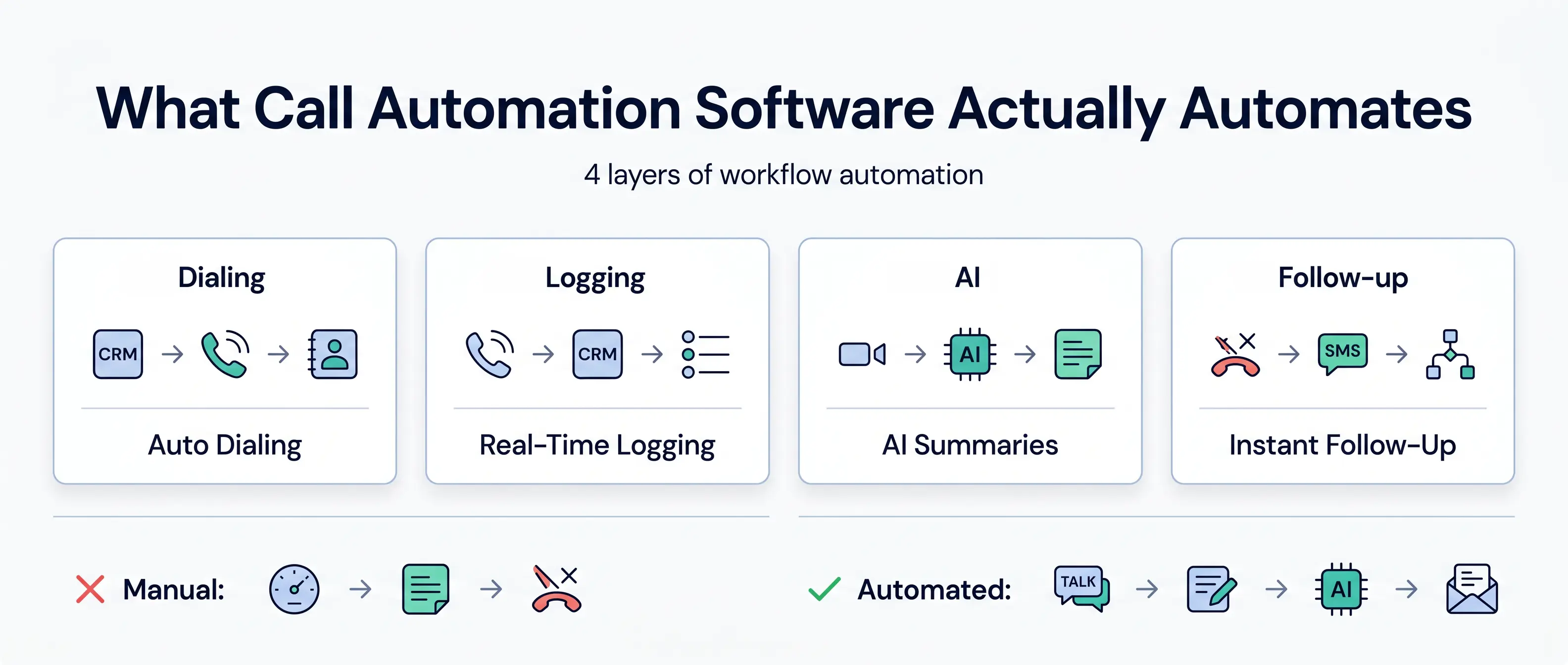
- Four layers get automated: the dialing sequence, CRM logging, after-call notes/AI summaries, and follow-up.
- Parallel and predictive auto-dialing create dead air and abandoned calls — the exact pattern carriers flag as "Spam Likely."
- CRM-native call automation logs every call, text, and AI summary to the right record automatically — no tab-switching, no manual notes.
- Look for: human-paced dialing, automatic CRM logging, AI after-call work, connect-rate tooling, and transparent pricing.
Most teams shopping for "call automation software" are really shopping for a way to make more dials. That's the wrong thing to automate.
The dialing was never the expensive part. The expensive part is everything wrapped around it — copying the number, logging the call, typing the notes, remembering the follow-up, updating the deal stage. That's where your reps' hours actually go. Automate that, and a rep gets their selling time back. Automate the dialing the wrong way, and you torch your connect rate instead.
We built Aloware around one stubborn problem: reps spend most of their day on everything except talking to people. Our tagline is "dial less, talk more" for a reason. So this guide draws a hard line between the two kinds of call automation: the kind that removes admin, and the kind that just makes noise. Then it shows you what to actually look for.
What is call automation software?
Call automation software is a tool that automates the repetitive tasks around outbound and inbound calls — dialing through a contact list, logging each call to your CRM, generating the after-call summary, and triggering the next follow-up step — so sales reps spend more time in live conversations and less time on manual data entry.
The key word is around. Good call automation does not script the human conversation. It removes the logistics on either side of it: the setup before the call and the paperwork after it. A rep clicks once and the system dials the next lead, surfaces the CRM context, records and transcribes the call, writes the summary back to the contact record, and queues the follow-up text — all without the rep touching a keyboard.
That's the opposite of a robocaller, which is what most people picture when they hear "automated calling." A robocaller replaces the human. Real call automation frees the human up.
Key takeaway: Call automation software automates the admin around the call — dialing, logging, summarizing, follow-up — not the conversation itself.
If you're calling 100+ leads a day, our power dialer guide covers how to pick a stack that won't burn your numbers.
What does call automation software actually automate?
Strip away the marketing and there are four layers worth automating. A real platform handles all four; a point tool handles one.
1. The dialing sequence. Instead of a rep copying numbers and dialing by hand, a power dialer built into your CRM works through a list one call at a time. The rep talks; the tool tees up the next contact. No tabs, no copy-paste.
2. The logging. This is the layer most teams underestimate. Every call, voicemail, and text gets written to the right CRM record automatically (the contact, the deal, the activity timeline) in real time. A solar installer's rep finishes a consultation call and the disposition, recording, and notes are already on the deal before they dial the next homeowner.
3. The after-call work. AI transcribes the call and writes a summary back to the record. Aloware's AloAi Voice Analytics auto-transcribes recorded calls and voicemails, then drops an AI-generated summary into the CRM as a note — so a sales manager reviewing an insurance agency's pipeline reads a two-line summary instead of relistening to a 12-minute call.
4. The follow-up. Sequences fire the next step — a text, a voicemail drop, a scheduled callback — so a real-estate lead who didn't pick up gets a follow-up SMS in seconds instead of three days later, if ever.
Here's the contrast that matters:
Key takeaway: Real call automation covers four layers — dialing, logging, after-call summaries, and follow-up. A tool that only speeds up dialing leaves the expensive admin untouched.
Why call automation is really about the admin tax, not dialing faster
Reps spend the majority of their working day not selling. The hours leak into research, CRM updates, logging, and chasing follow-ups. That's the admin tax, and it's the real reason quota feels harder than it should.
So do the math on your own team. Say a rep makes 80 dials a day and spends two minutes per call on the wrap-up — copying notes, logging the disposition, setting a reminder. That's over two and a half hours a day on paperwork, before a single follow-up goes out. Across a small team, that's most of a full-time role spent on data entry nobody enjoys and nobody checks.
Automating the dialing alone barely touches that number. The rep still logs by hand. Automating the admin — the logging, the summaries, the follow-up — is what gives the hours back. That's the whole game.
Key takeaway: The cost of manual calling isn't slow dialing — it's the admin wrapped around every call. Automate the busywork, not just the dial.
Does automating calls hurt your connect rate?
It can — if you automate the wrong layer.
Parallel dialers and predictive dialers call multiple numbers at once and only connect a rep when someone says "hello." That creates a 1–3 second silence gap at the start of the call, plus abandoned calls when no rep is free. Consumers hear the dead air and hang up. Worse, carriers detect that exact signature — high volume, dead air, abandoned calls — and flag the number as a likely robocaller. Once a number gets tagged "Spam Likely," your pickup rate collapses no matter how fast you dial. Predictive dialing also carries TCPA abandoned-call exposure.
This is why Aloware deliberately doesn't offer parallel or predictive dialing. We use a single-line, human-paced power dialer — one quality call at a time. It's a stance, not a missing feature: volume on flagged numbers is wasted motion. For the full picture on why legitimate calls get flagged and how to fix it, read why your calls land in spam.
One mechanics note people get wrong: branded calling (your name on the screen) and spam labeling are two separate carrier systems. Putting your brand on the call doesn't override a bad reputation — a flagged number with a logo is still a flagged number. Connect rate is managed continuously, not bought once.
Key takeaway: Auto-dialing that blasts numbers in parallel trains carriers to flag you. Human-paced power dialing protects the connect rate that volume depends on.
What should you look for in call automation software?
Use this checklist when you evaluate a tool:
- CRM-native logging. The call, text, and summary should land on the right record automatically. If "integration" means a call logs as a generic activity, that's a checkbox, not automation.
- AI after-call work. Transcription and an AI summary written back to the CRM — so reviewing a pipeline doesn't mean relistening to calls.
- Human-paced dialing. A power dialer, not a parallel/predictive blaster. Protects your numbers.
- Connect-rate tooling. Number-reputation monitoring and branded calling, so the calls you automate actually get answered.
- Transparent pricing. You should be able to read what it costs without a procurement cycle.
If you're newer to the category, what a CRM dialer is is a good companion read before you shortlist tools.
Key takeaway: The best call automation software is judged by what it removes from the rep's day — logging, after-call work, follow-up — not by how many numbers it can dial at once.
The Aloware approach to call automation
Aloware automates all four layers in one place, inside your CRM.
Power Dialer: works through your CRM lists one human-paced call at a time — no parallel blasting, no dead air.
Automatic CRM logging: every call, voicemail, and text logs to the right contact and deal in HubSpot, Salesforce, Pipedrive, Zoho, or HighLevel in real time — no manual entry.
AloAi Voice Analytics: auto-transcribes recorded calls and voicemails and writes an AI summary back to the CRM as a note (English summaries; calls over 45 seconds of talk time).
Sequences and follow-up: the next text, voicemail drop, or callback fires automatically, so no lead goes cold while a rep is on another call.
The honest consideration: a platform that does this much has a learning curve — there's more to configure than a single-purpose dialer. Aloware mitigates it with a free onboarding webinar for every team, with additional agent training sessions included for larger teams and available to buy for smaller ones. You trade a week of setup for reps who stop doing data entry.
Key takeaway: Aloware runs all four automation layers — dialing, logging, AI summaries, and follow-up — inside the CRM, on human-paced dialing that protects connect rate.
The bottom line
Call automation isn't about dialing more. It's about deleting the admin tax that sits on either side of every call. Automate the dialing the wrong way and you'll dial faster into voicemail and spam folders. Automate the busywork — the logging, the summaries, the follow-up — and your reps get their day back for the only thing that actually closes deals: the conversation.
Dial less. Talk more.
See it run in your own CRM. Book a 20-minute demo — we'll show the Power Dialer, automatic CRM logging, and AI call summaries working together on a live call.
Frequently Asked Questions
What is call automation software?
Call automation software automates the repetitive work around outbound and inbound calls — dialing through a contact list, logging each call to your CRM, generating the after-call summary, and triggering follow-up — so reps spend more time in live conversations and less time on manual data entry. It is not a robocaller; it automates the admin around the call, not the human conversation.
What does call automation software automate?
Four layers: the dialing sequence (working through a list one call at a time), call logging (writing each call, text, and voicemail to the right CRM record automatically), after-call work (AI transcription and summaries written back to the record), and follow-up (sequences that fire the next text, voicemail drop, or callback). A full platform automates all four; a point tool usually handles only the dialing.
Is call automation software the same as an auto-dialer or robocaller?
No. A robocaller plays a recorded message and replaces the human. Call automation removes the admin around a live human conversation. There's also an important difference within dialers: parallel and predictive auto-dialers blast many numbers at once and create dead air and abandoned calls, which carriers flag as spam. Human-paced power dialing automates the sequence without that risk.
Does call automation software work with my CRM?
CRM-native call automation does. With Aloware, every call, text, voicemail, and AI call summary logs automatically to the right contact and deal in HubSpot, Salesforce, Pipedrive, Zoho, or HighLevel in real time — no tab-switching or manual notes. If a tool only logs a generic call activity, that's a basic sync, not true automation.
Can call automation hurt my pickup or connect rate?
It can if it relies on parallel or predictive dialing. Those create a silence gap and abandoned calls, the exact pattern carriers use to flag a number 'Spam Likely' — after which pickup rate collapses regardless of dial speed. Human-paced power dialing plus continuous number-reputation management avoids that. Branded calling and spam labeling are separate carrier systems, so branding alone won't override a bad reputation.
How much does call automation software cost?
Pricing varies by tool. Aloware's Power Dialer is included on the uPro + AI plan ($60/user/month billed quarterly), and agent calling and texting to the US and Canada are unlimited with no per-minute charges. Connect-rate add-ons like NumberGuard, Branded Calling, and Local Presence are priced separately. Check current pricing at aloware.com/pricing.
Does call automation software replace sales reps?
No. It removes the admin around calls so reps have more live conversations, not fewer reps. AI handles transcription, summaries, and follow-up, and AI voice agents answer only when a human isn't available. The human still runs the conversation; automation handles the logistics.
What's the difference between call automation and sales automation?
Call automation is the calling slice — automating the dialing, logging, summarizing, and follow-up around phone calls. Sales automation is broader: multi-channel sequences that combine calls, texts, voicemail drops, and scheduled steps across the whole outreach motion. Call automation is one component of a sales automation stack.
Can call automation software transcribe and summarize calls?
Yes, if it includes AI voice analytics. Aloware's AloAi Voice Analytics auto-transcribes recorded calls and voicemails and writes an AI-generated summary back to the CRM record as a note. Summaries are generated for English calls over 45 seconds of talk time, so managers can review a pipeline by reading summaries instead of relistening to calls.
.png)

Ruby Kootval is Head of Product Marketing at Aloware. She has 12 years in digital marketing, including 8 in B2B SaaS and 5 in telecom, and writes about AI voice agents, dialers, CRM integrations, and contact center operations.

.png)