Why seamless call logging matters for sales teams
When your team lives in HubSpot, every passing second counts for lead follow up. Missed calls, incomplete logs, and duplicate records can cripple reporting accuracy and slow down response times. That’s why HubSpot call logging and contact syncing aren’t just nice-to-haves—they’re mission critical for speed-to-lead and clean CRM data.
Aloware’s HubSpot phone integration was built from the ground up to reduce manual work, automate call and SMS logging, and give sales managers complete visibility into rep performance.
Bi-directional HubSpot call logging and automatic contact creation
Aloware supports two‑way call sync with HubSpot, ensuring every call and text flows between systems without data gaps. You can configure:
- Bi‑directional syncing for full visibility across HubSpot and Aloware
- Inbound‑only syncing to keep HubSpot records clean.
- Automatic contact creation from both systems or inbound-only calls to avoid duplicate entries.
This flexibility lets RevOps teams control exactly how HubSpot contact sync behaves based on their workflow.

Full support for HubSpot contacts, companies, deals & tickets
Unlike many integrations that only log at the contact level, Aloware syncs calls and SMS across Contacts, Companies, Deals, and Tickets. This means:
- Every activity is attached to the right HubSpot object.
- Calls show up with mapped owners, lifecycle stages, and deal context.
- Support teams can manage conversations in ticket workflows without switching tools.
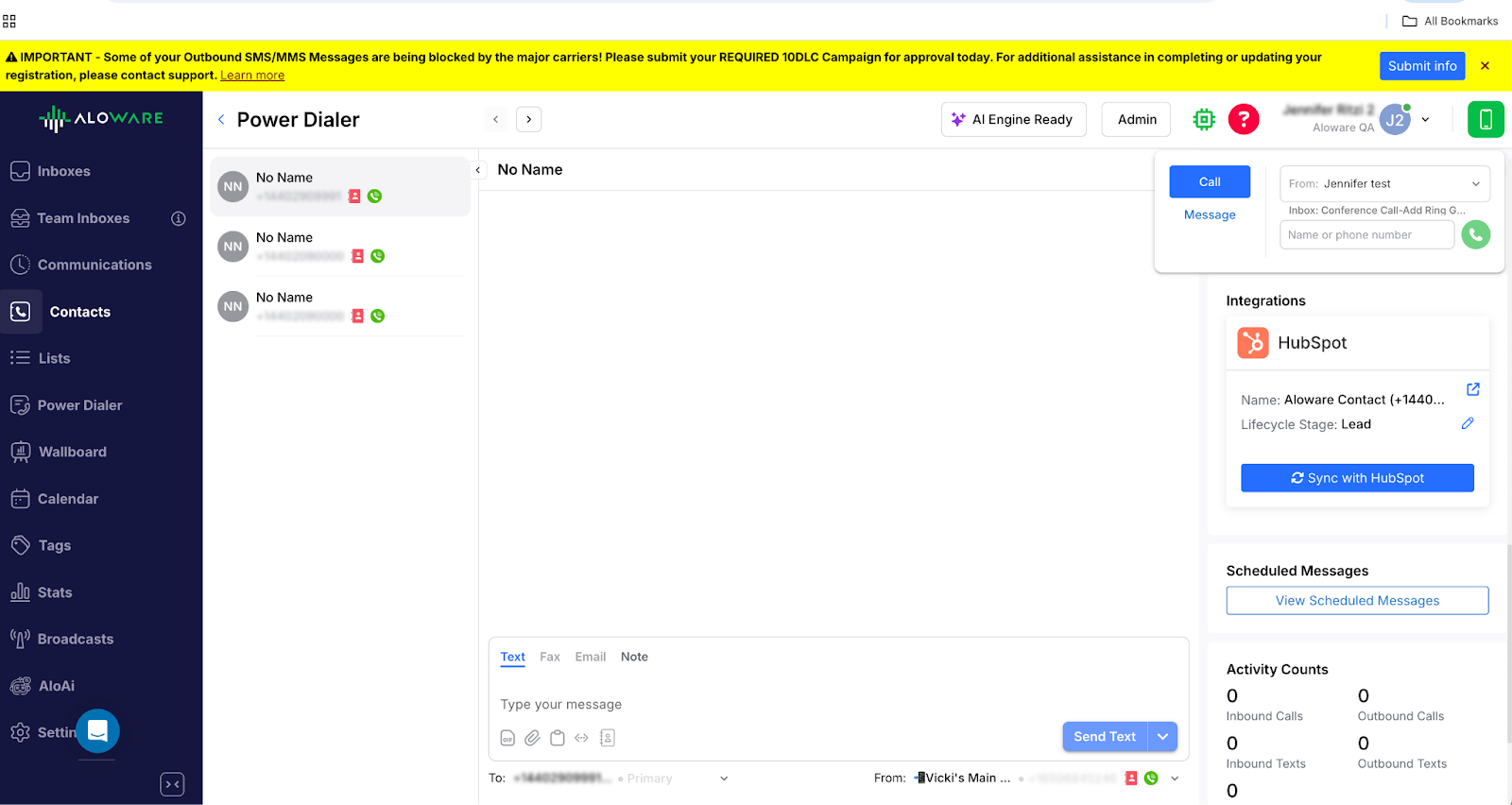
The native HubSpot integration card inside Aloware’s Power Dialer pulls in company and deal context in real time, so agents never lose visibility.
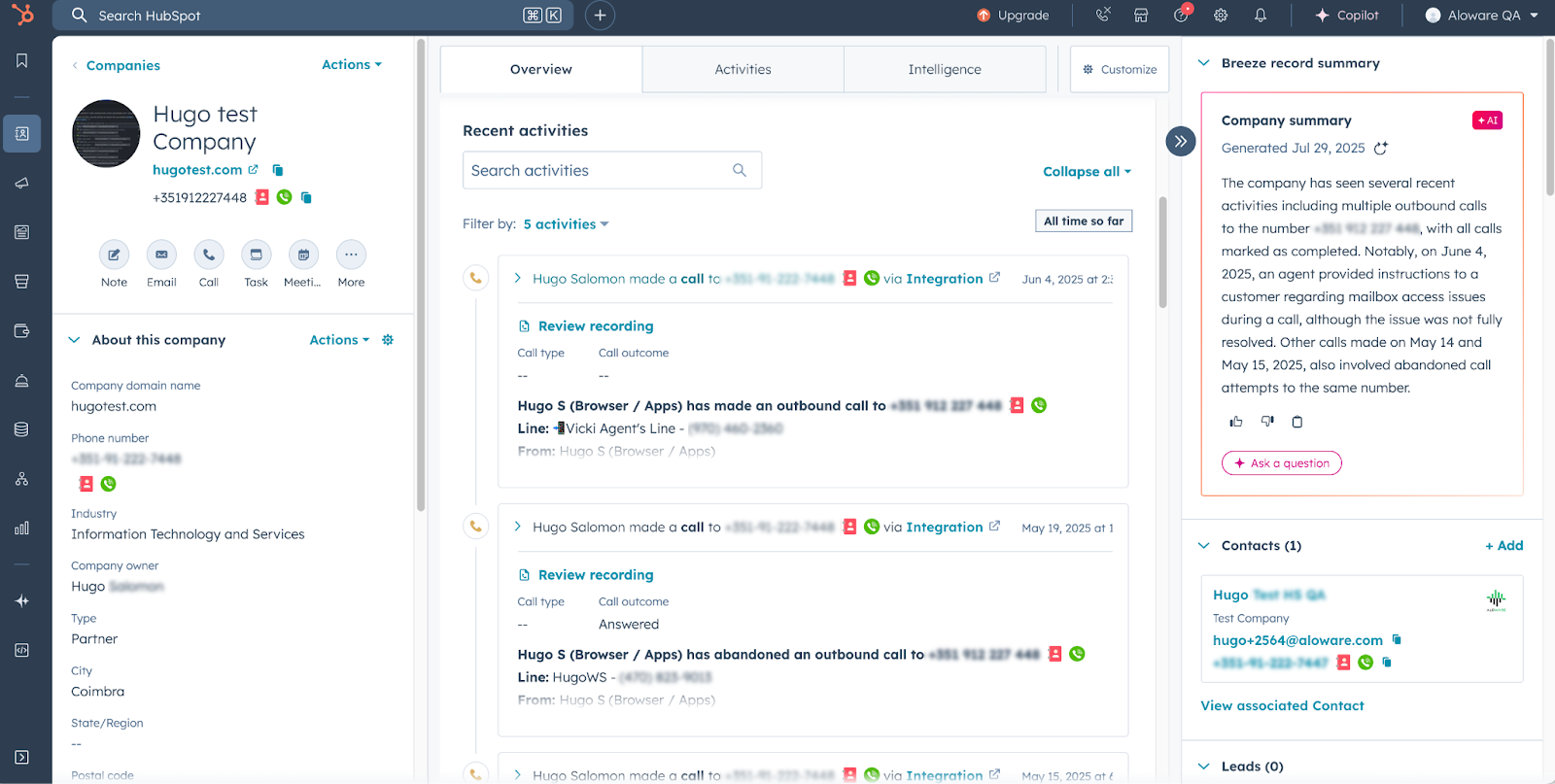
Company-level call logging without duplicate contacts
Shared numbers are common in B2B sales, and Aloware solves a problem most integrations ignore: company call logging without creating dummy contacts.
- Calls are recorded on the Company record even if no matching contact exists.
- If a matching contact is present, Aloware applies the activity to both the Contact and Company automatically.
This feature keeps CRM data clean and provides managers with a true view of account-level engagement.
Native HubSpot Power Dialer & click-to-call
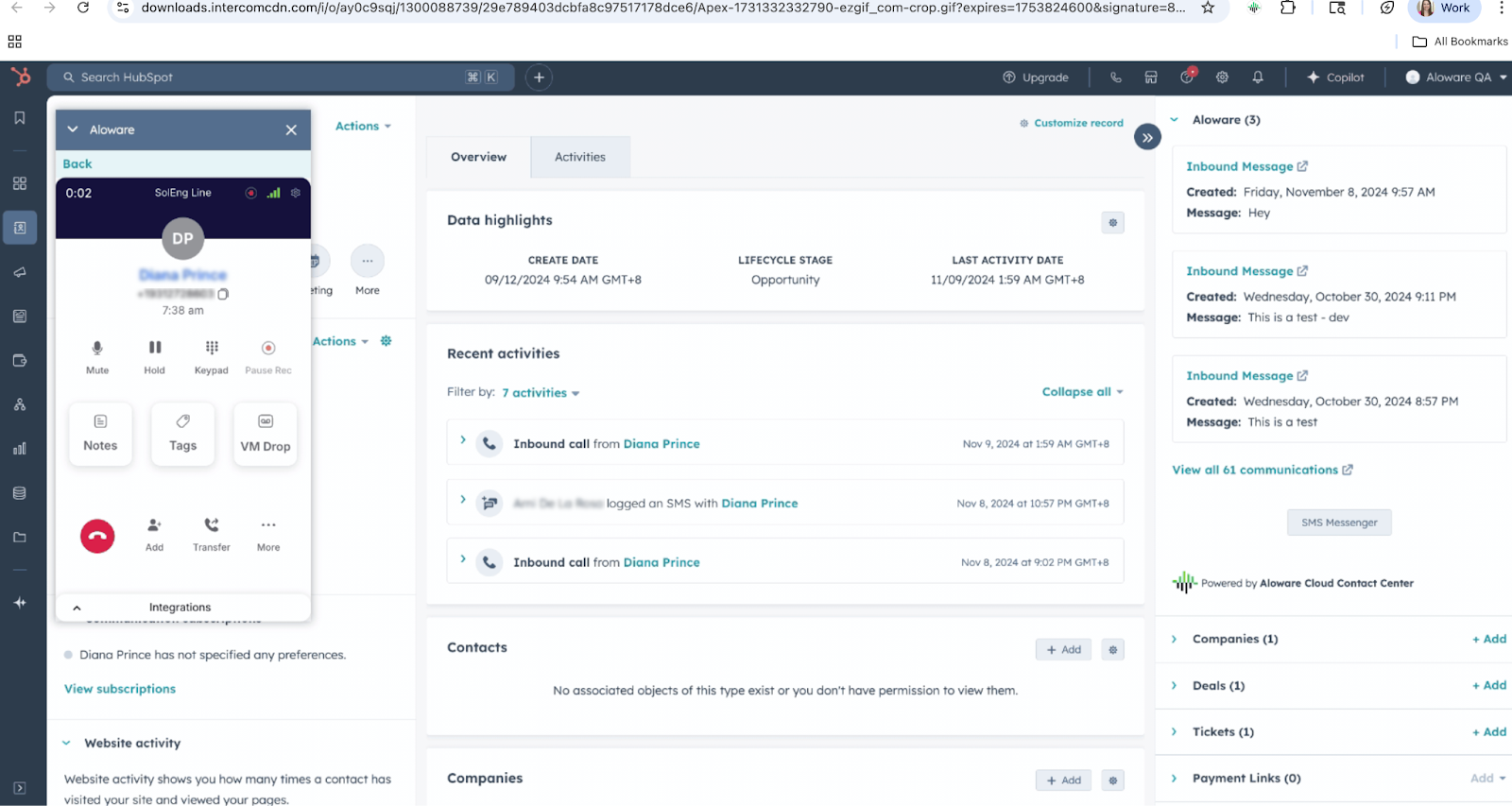
Aloware embeds its Power Dialer in HubSpot, so reps can:
- Call directly from contact, company, or deal pages.
- Use click-to-call across HubSpot lists and saved filters.
- See live contact and deal data while on the call, with automatic call logging post‑wrap‑up.
This seamless workflow eliminates tab-switching and boosts call volume without losing context.
Automatic call dispositions, outcomes, and SMS logging
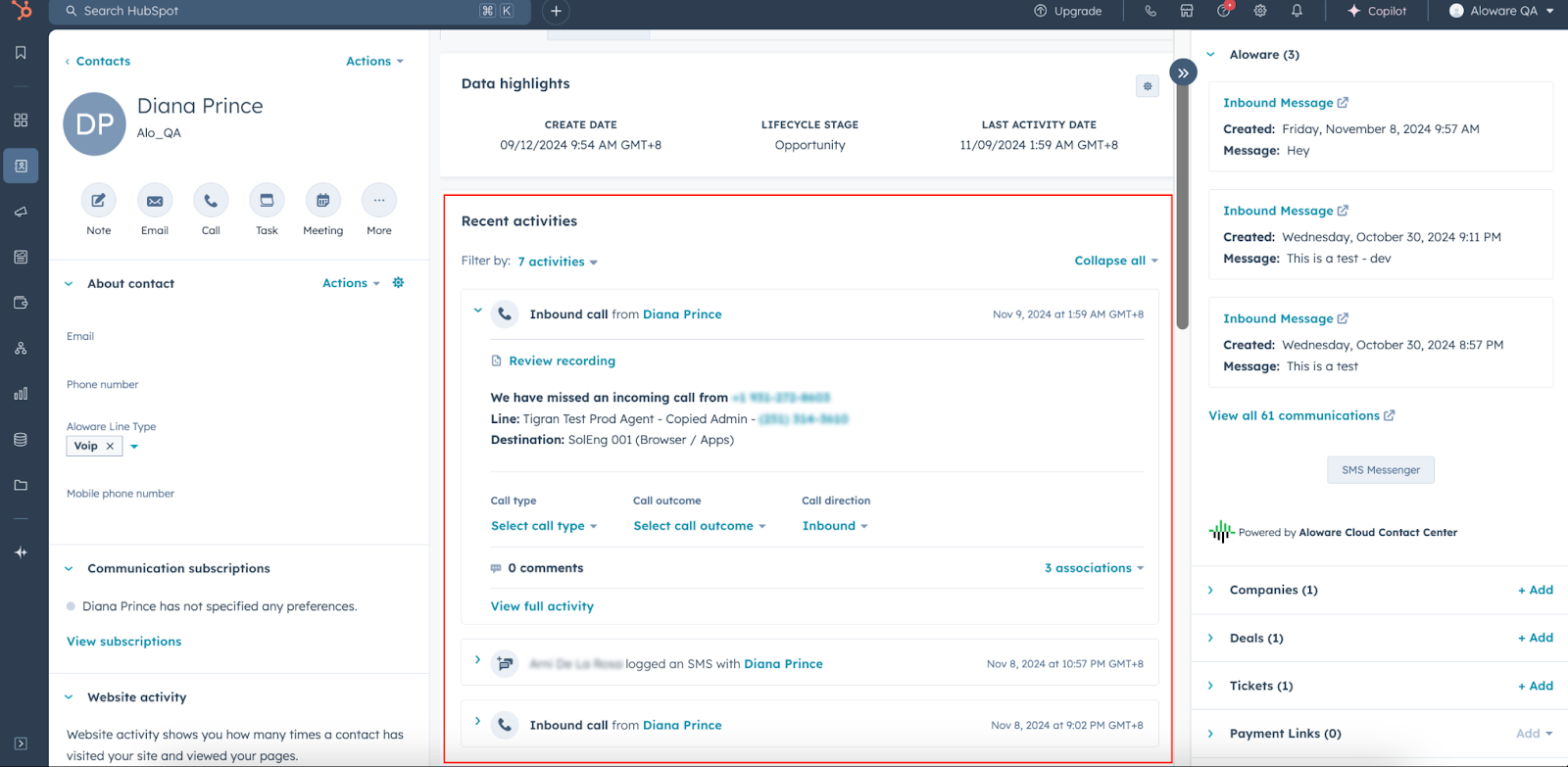
Every call and SMS is automatically logged into HubSpot with:
- Call direction, duration, and recordings.
- Synced HubSpot call outcomes and custom call types pulled into Aloware’s wrap‑up screens.
- Automatic SMS logging linked to the right contact, company, and deal.
This ensures clean activity data for reporting and removes the need for manual follow-up notes.
Workflow automations: HubSpot sequences and Aloware actions
Aloware extends HubSpot workflow automation with custom actions, including:
- Send SMS directly from HubSpot workflows.
- Enroll contact in Aloware Sequence for multi-step call/SMS follow-ups.
- Start Power Dialer campaigns when deals move to a new stage.
- Disenroll from all sequences when tickets close or deals are won.
Combined with HubSpot triggers like form submissions or ticket updates, these actions enable fully automated lead engagement.

AI-powered call routing and compliance
Speed-to-lead is only as good as the rep answering. Aloware uses AI call routing logic tied to:
- HubSpot contact owner assignments.
- Deal stage and account priority.
All calls and SMS are delivered through compliant channels with STIR/SHAKEN attestation and A2P 10DLC registration, so you see higher answer rates and better deliverability.
Advanced HubSpot reporting and call analytics
With Aloware, managers get instant visibility into team performance with:
- HubSpot call reporting dashboards that track talk time, missed calls, and rep activity.
- HubSpot call analytics showing call outcomes, response times, and conversion rates.
This level of insight allows managers to enforce SLAs, optimize outreach timing, and train reps based on real performance data.

Conclusion: The most seamless HubSpot call Integration
For sales and support leaders, clean data and fast response times are non‑negotiable. Aloware’s HubSpot integration goes beyond basic call logging to deliver:
- Complete coverage across Contacts, Companies, Deals, and Tickets.
- True company-level call logging without duplicate records.
- AI-powered routing, automation, and advanced analytics that turn activity data into contact center insights.
Ready to log call data seamlessly in HubSpot? Schedule a meeting with us today.

Frequently Asked Questions
How does Aloware log calls and SMS into HubSpot CRM?
Aloware automatically logs all calls and SMS to HubSpot Contacts, Companies, Deals, and Tickets with direction, duration, and outcomes synced in real time.
Can Aloware sync call outcomes and custom call types with HubSpot?
Yes. Aloware pulls HubSpot call outcomes and custom call types into agent wrap‑up screens, ensuring accurate reporting and workflow triggers.
Does Aloware support logging calls to company records without contacts?
Yes. Aloware uniquely supports company-level call logging even when no matching contact exists, avoiding duplicate records and improving account-based tracking.
How can I automate SMS and Power Dialer workflows in HubSpot?
Aloware adds custom HubSpot workflow actions to send SMS, enroll contacts in Sequences, or trigger Power Dialer campaigns based on HubSpot events.
What reporting features does Aloware provide for HubSpot call analytics?
Aloware provides real-time HubSpot call reporting, speed-to-lead metrics, and a Voice Activity Heatmap for actionable performance insights.
.png)

Ruby Kootval is Head of Product Marketing at Aloware. She has 12 years in digital marketing, including 8 in B2B SaaS and 5 in telecom, and writes about AI voice agents, dialers, CRM integrations, and contact center operations.