.jpeg)


.webp)
TL;DR: "Virtual receptionist services" is one label stretched over five different coverage models, from a shared human answering pool to a software AI voice agent, and the right pick depends on which calls you keep missing. Low-volume, high-empathy intake (medical triage, legal, distressed customers) fits a human receptionist; steady after-hours and overflow volume that keeps hitting voicemail fits an AI voice agent; a mix of both fits a hybrid, with AI answering first and a person taking the calls that need one. The model you buy sets both your monthly cost and how many calls you still miss. The question every comparison skips is what happens to the call after it is answered, because that is where the hidden cost lives.
Key facts
- "Virtual receptionist services" covers five distinct coverage models: a shared human pool, a dedicated human receptionist, onshore vs offshore teams, after-hours/overflow-only cover, and a software AI voice agent.
- Human services commonly bill $0.75–$2.00 per minute or $0.75–$2.50 per basic call, landing most businesses at roughly $100–$1,000 a month; AI voice agents bill per minute from $0.10/min, model-tier based.
- Only about 37.8% of inbound calls reach a live person, and 86% of calls from unknown numbers go unanswered, so most "coverage" is really about the calls no one is catching.
- Where a human still wins: complex, sensitive, low-volume, or brand-voice-critical calls. Where AI pulls ahead: 24/7 answering, unlimited overflow, and consistent qualification.
- The deciding factor is what happens after the answer: a message in an email you re-key, or a transcribed call written straight into your CRM.
Why your inbound coverage gap is bigger than it looks
Most teams shopping for a virtual receptionist think they are buying a nicer greeting. What they are actually buying is coverage for the calls that already slip through, and that pile is larger than it feels from the front desk. An analysis of 85 businesses across 58 industries found only 37.8% of inbound calls are answered by a live person (411 Locals, 2016), which means nearly two-thirds go unanswered. Hiya's research puts it more bluntly: 86% of calls from unknown numbers go unanswered (State of the Call 2026).
The reason that math matters is what happens next. In a recent CallRail survey of 1,000 U.S. consumers, 78% said they have abandoned a business after an unanswered call, so a missed call is rarely a call you get a second shot at. It is a lead deciding, in the moment, to try the next name on the list. When you frame coverage as "answer more calls," you underprice the problem. The real job is catching the roughly two-thirds of calls nobody is catching today: after-hours, lunch-hour, and the overflow that hits when every rep is already on a line.
Before you compare options, get clear on what a virtual receptionist even is, because the label hides a lot. If you want the definitional breakdown of virtual receptionists and the AI-vs-human basics, start there, then come back for the coverage-model decision. This piece is about which model fits, what each costs, and the step every comparison skips.
What "virtual receptionist services" actually means: the 5 coverage models under one label
Here is the part no comparison page decodes. "Virtual receptionist services" is not one product. It is at least five different coverage models, and they differ most on who actually answers, what hours they cover, and how they bill. Pick the wrong model and you either overpay for cover you do not need or leave the exact calls you are losing still uncovered.
Read that as a menu, not a ranking. A dedicated human receptionist and an after-hours AI agent are not competing for the same job. One protects a high-touch brand experience; the other stops you leaking the calls that arrive when the lights are off. The decision starts by naming which model your problem actually calls for.

How much does each coverage model really cost?
Cost tracks the model, and the two ends of the spectrum are not priced the same way. Human services scale with volume: per-minute rates run about $0.75–$2.00 and per-call rates about $0.75–$2.50 for basic handling, which lands most businesses somewhere between $100 and $1,000 a month (answering365, 2026). A busy month is an expensive month, and true around-the-clock staffing costs more than business hours.
A software AI voice agent bills per minute of AI talk time instead of per staffed seat. Aloware's AloAi Voice Agent, for example, starts at $0.10/min on the Basic model tier and rises by tier up to $0.50/min for Ultra Premium, so you pay for AI minutes only and never a flat monthly receptionist seat. At the same call volume that difference is usually several-fold. Treat all of these as order-of-magnitude ranges, not quotes, and if you want the deep per-provider breakdown, that is its own exercise. The point here is directional: the model sets the pricing shape before any single vendor's number enters the picture.
Weigh either cost against what one answered call is worth to you. When most missed callers never come back, the expensive line item is not the coverage. It is the pipeline walking to a competitor while your phone rings out.
Where do human answering services still win?
AI is not the answer for every call, and it is worth being direct about where a human still belongs on the front line. Lean human when the call itself carries risk or nuance:
- Complex or sensitive intake: medical triage, legal matters, or a distressed customer, where a wrong turn in the conversation has real consequences.
- Low, irregular volume: a handful of calls a week rarely justifies configuring an AI agent, and per-minute human billing stays cheap at that scale.
- Relationship- or compliance-sensitive calls: accounts where a named person and a consistent human voice are part of the product.
- Highly variable conversations: calls that rarely follow the same path and depend on reading tone and improvising.
None of that is a knock on automation. It is the boundary. If your calls are mostly high-empathy edge cases, buy the human, and buy the model (dedicated or onshore) that protects the experience.
Where does an AI voice agent pull ahead?
The moment your problem is volume rather than nuance, the advantages flip. A software AI voice agent covers the exact gap the missed-call math exposed, and it does it in ways a staffed team structurally cannot match at the same cost:
- 24/7 with no night-shift premium: it answers at 2 a.m. the same way it answers at 2 p.m.
- Unlimited simultaneous calls: a human team answers one call per agent, so overflow spikes go to voicemail; an AI agent picks up concurrent calls, so the spike does not.
- Sub-5-second pickup, every time: no hold queue, no "please stay on the line."
- Consistent qualification: the same questions, the same routing logic, the same data captured on every call.
This is exactly the pattern behind how high-volume teams capture every inbound lead without expanding the front desk. And it sets up the advantage that the price-first comparisons never get to, which is what the agent does with the call once it has answered.
What happens to the call after someone answers it?
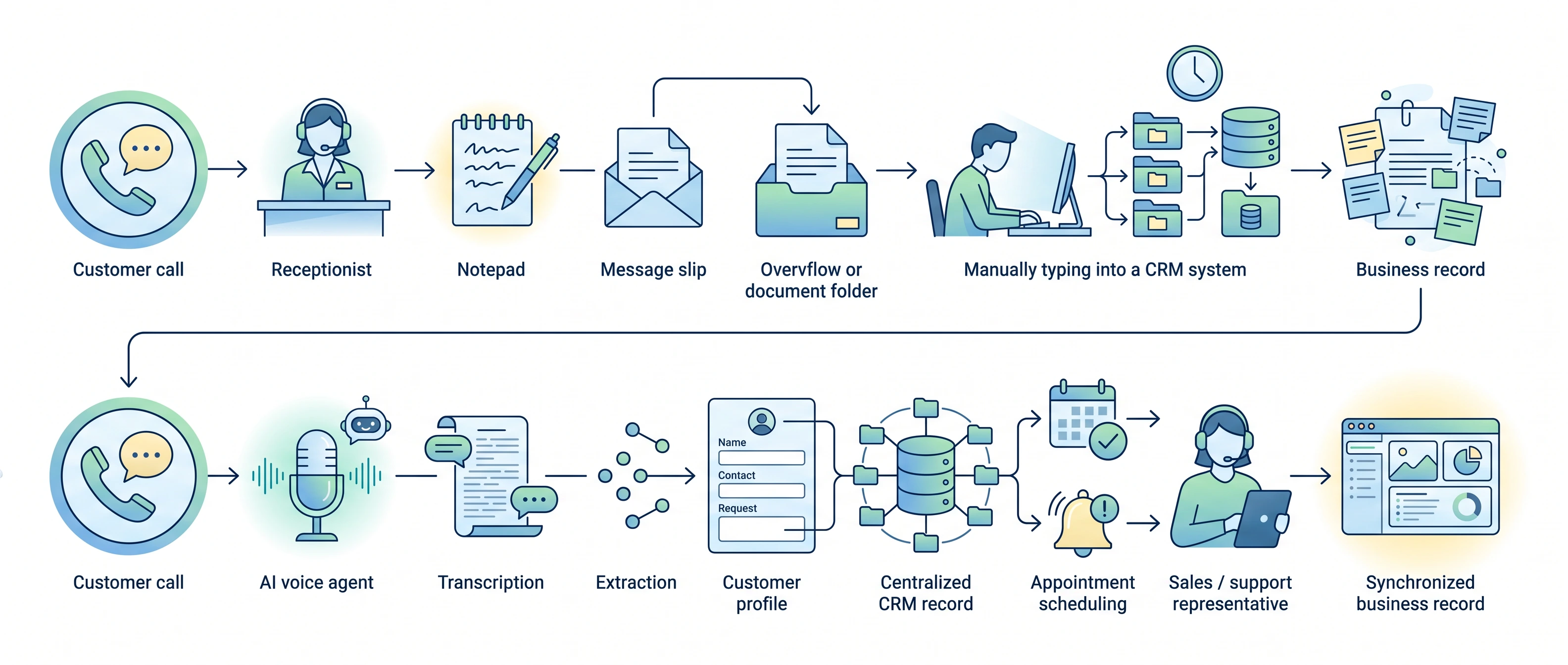
This is the step every comparison skips, and it is where the real cost hides. Answering the call is table stakes. What happens to the conversation next is what decides whether coverage builds your pipeline or quietly leaks it. Walk the options past the greeting:
- Human answering service: an agent takes a message and emails or texts you a summary. Accurate, and now sitting in an inbox waiting for someone to read it and re-key it into your CRM. One vendor analysis pegs that manual entry at roughly 12+ hours of admin a month for 150 calls (ClearSignal, directional).
- Bolt-on AI receptionist: answers fast, then hands you a transcript you still have to read and re-enter yourself.
- CRM-native AI voice agent: answers, then writes the conversation straight into your system of record.
That last option is the one a standalone service or a point tool cannot match, because for them the receptionist and the record are two different systems. With Aloware they are the same system. AloAi Voice Analytics transcribes every handled call and logs the summary into the CRM as a call note, and AI-extracted entities are written into the contact and deal record, so the next rep opens a warm, populated record instead of a sticky note. AI Call Rescue, an account-level setting, routes every missed inbound call from any line or ring group to a system-managed AI voice agent that greets the caller, captures intent and contact details, and logs a follow-up note. Mid-call, the agent can book, reschedule, or cancel an appointment, warm-transfer the caller to a specific person or ring group, and update contact properties that sync into HubSpot, Salesforce, Pipedrive, Zoho, and HighLevel. That is the difference between an AI voice agent for inbound coverage and a tool that answers and forgets.
Put the two aftermaths side by side:
- ❌ Answered in isolation: the call is handled, but the details live in a transcript or a message someone still has to re-enter, and half the time nobody does.
- ✅ Answered and synced: the call is handled and the record updates itself, so the follow-up starts warm and nothing falls through.
Want to see it write a live call into your CRM? Book an AloAi Voice Agent demo and watch it answer an inbound call, book the appointment, and log the whole conversation with no re-keying.
How do you choose? A fit framework by volume, complexity, and hours
Three inputs settle most of this decision: how many calls you get, how complex they are, and which hours you keep leaking. Run your situation through these threshold rules:
- If volume is low and every call is high-empathy: start with a human service, and pick a dedicated or onshore model to protect the experience. Per-minute billing keeps it cheap at that scale.
- If you answer fine in-hours but leak nights, weekends, and overflow: start with after-hours/overflow-only cover, and use an AI voice agent for it so a volume spike never routes to voicemail.
- If steady inbound volume outruns the people available to answer: put an AI voice agent on the main line for first contact, and route the calls that need a person to your team.
- If your calls span both easy and hard: do not force one model. Let AI take the routine, high-frequency calls and hand the rest to a human.
Volume and hours point you at a model; complexity decides how much human you keep in the loop. The same logic holds whether you run an insurance agency, a home-services shop, or a healthcare front office. For a concrete look at the AI end in one vertical, see how AI voice agents handle inbound calls in a real industry. The common thread is never company size; it is inbound call volume the front desk cannot reliably catch live.
Can you run both? The hybrid model
For a lot of teams the best answer is not a choice at all. Run the AI voice agent as first contact and for overflow and after-hours, so no call is missed, and route the conversations that genuinely need a person (complex, sensitive, or high-value) to your human team with a clean transfer. The stance to hold onto: AI answers the right calls, and a person goes first when it actually matters. That way you stop missing calls without pulling the human off the conversations where a human is the whole point.
Do this next: list a normal week of inbound calls, sort them into "routine" and "needs a person," and note which hours you lose the most. If the routine pile is large and the leak is after-hours or overflow, point an AI voice agent at that gap first, watch a week of transcripts and CRM records, then widen the routing once you trust what it captures.
Want to watch one work on your own calls? Book an AloAi Voice Agent demo and see it answer a live inbound call, capture the intent, and write the whole conversation into your CRM.
Frequently Asked Questions
What is a virtual receptionist service?
A virtual receptionist service answers your inbound calls when your own team cannot: screening, routing, taking messages, and sometimes booking appointments. The label covers several different setups, including a shared pool of remote agents, a dedicated human receptionist, onshore or offshore teams, after-hours or overflow-only cover, and software AI voice agents. They differ most on who actually answers, what hours they cover, and how they bill (per minute, per call, or per month).
What's the difference between a virtual receptionist and an answering service?
In practice the terms overlap. "Answering service" usually implies a shared team working from scripts to take messages and route urgent calls, often billed per minute or per call. "Virtual receptionist" is often pitched as more personalized, such as a named or dedicated agent handling your calls in your brand's voice. The line that matters more than the label is the coverage model: shared vs dedicated, human vs AI, business-hours vs 24/7.
How much do virtual receptionist services cost?
Human services commonly run about $0.75–$2.00 per minute or $0.75–$2.50 per basic call, landing most businesses between roughly $100 and $1,000 a month depending on volume and whether you want 24/7 or dedicated cover. Software AI voice agents are typically billed per minute from as little as $0.10/min, varying by AI model tier, with no per-agent salary, which is why AI coverage is usually several times cheaper at the same volume. Treat these as order-of-magnitude ranges, not quotes.
Is an AI voice agent as good as a human receptionist?
For standard, high-frequency calls (hours, directions, qualifying a lead, booking an appointment, routing to the right person), a modern AI voice agent answers instantly, 24/7, on unlimited simultaneous lines, and most callers cannot tell. For complex, sensitive, or highly variable conversations, a human still handles nuance better. The strongest setups use AI for first contact and overflow and route the calls that genuinely need a person to a human.
When should I use a human answering service instead of AI?
Lean human when your calls are complex, sensitive, or highly variable (medical triage, legal intake, distressed customers), when your volume is low enough that per-minute human billing stays cheap, or when your brand or industry expects a human voice for relationship or compliance reasons. If your problem is mostly missed after-hours and overflow calls at volume, that is the case AI covers best.
What happens to the call after the receptionist answers it?
This is the part most comparisons skip, and it is where costs hide. A human answering service typically emails or texts you a message summary that someone on your team then re-keys into your CRM, which one estimate puts at 12+ hours of admin a month for 150 calls. An AI voice agent built into a contact center can transcribe the call and write the captured details straight into the right contact and deal record automatically, so the answered call becomes an actionable record instead of a note you retype.
Can an AI receptionist book appointments and transfer calls?
Yes. An AloAi Voice Agent can book, reschedule, or cancel appointments, transfer calls (warm or cold) to a specific person or ring group, route a caller to the deal or contact owner, capture and update contact details, and send a follow-up text mid-call. It can also hand off cleanly to a human when the conversation needs one.
How does an AI voice agent handle calls I'm currently missing?
Aloware's AI Call Rescue is an account-level setting that routes every missed inbound call, from any line or ring group, to a system-managed AI voice agent that greets the caller, captures intent and contact info, logs a transcript note, and can trigger follow-up. So the overflow and after-hours calls that used to hit voicemail get answered and captured instead of lost.
How many calls can an AI receptionist handle at once?
Unlike a human team that answers one call per agent, an AI voice agent answers multiple calls at the same time, so overflow and after-hours spikes do not go to voicemail. Aloware's current system supports up to 40 concurrent AI calls account-wide, a limit noted as increasing.
Can I use AI and a human team together?
Yes, and for many businesses it is the best answer. Run the AI voice agent as first contact and for overflow and after-hours coverage so no call is missed, and route the calls that genuinely need a person (complex, sensitive, or high-value conversations) to your human team with a clean transfer.
.png)

Brandi Rice is the VP of Revenue at Aloware, focused on the operational side of running a contact center: SDR onboarding, connection-rate diagnostics, A2P 10DLC and STIR/SHAKEN compliance, healthy calling behavior, and the KPIs that predict revenue. She writes for sales managers, RevOps leaders, and ops practitioners.
.webp)