.jpeg)


TL;DR
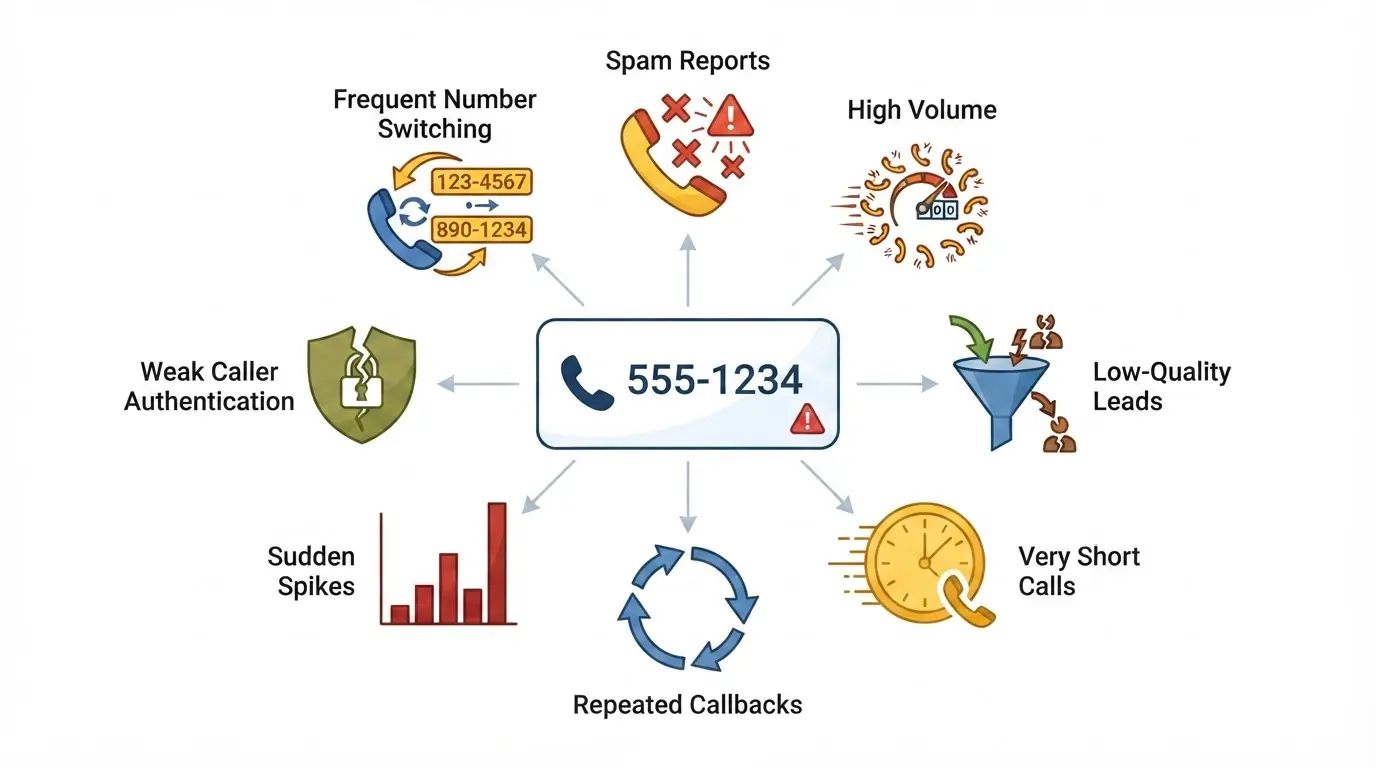
Your business number is marked as spam because the carriers scored what the number did, not what your agents said. The label attaches to the number, and no single product removes it. Eight causes account for almost every flag we trace:
- Lead reports. Recipients tap "report spam" or "block," and the reports accumulate until the flag appears.
- Too many calls from one number. The ceiling we see is about 100 calls per number per day.
- Lead quality. Bought or non-opted-in lists generate the reports. This is the biggest driver of all.
- Short calls. A high share of calls under 30 seconds reads as cold calling to the carrier.
- Aggressive callbacks. Six attempts a day, back-to-back redials, or the same lead every day.
- Sudden volume spikes. A quiet number that jumps to 100 calls a day, and every brand-new number in its first two weeks.
- Weak STIR/SHAKEN attestation. Numbers added after account setup that were never submitted sign at B instead of A and get filtered more.
- Number churn. Swapping numbers to escape labels is itself a detected pattern.
The fix starts with what your agents do on every dial, and all of it is free:
- Keep every number under 100 dials a day. Divide tomorrow's planned dials by the numbers you have. If the answer is anywhere near 100, spread the load across more numbers before anyone picks up a phone.
- Never hang up on an unanswered call before leaving a voicemail. A 15 to 30 second message that names your company and gives a callback number turns a two-second dial into a real contact, on the carrier's books and on the lead's phone. If agents will not record live, use a voicemail drop.
- One double dial, then wait. Six to eight hours before the next attempt that day, then 24 hours, then 48. Never six attempts in a day, never the same lead every day.
- Text opted-in leads before you call, so the number is already on their phone when it rings. Never text a lead who did not consent.
- Submit every number for STIR/SHAKEN and register its CNAM the day you add it, and scan new numbers before they go into service, because some arrive already labelled.
- Do not swap numbers to escape a label. Rest the number for a week, fix the pattern, and bring it back slowly.
Once those are running, add the tools in this order: NumberGuard to find and clear labels, Branded Calling to put your name on the screen, Local Presence to keep the load spread. Bought before the practices, none of them holds.
Last updated: September 7, 2026
Three questions reach my team every single day: why is my number marked as spam, why is my pickup rate low, and why is NumberGuard not working. The answer is the same each time. Only the wording changes. I have given it to insurance agencies calling purchased Medicare leads, to real estate teams working expired listings, to recruiters calling candidates, and to lead-gen agencies running outbound for a dozen clients at once. What follows is that answer, in the order we apply it on a customer call. One thing up front: under current carrier rules no outbound team avoids spam labelling entirely, and no product is a fix on its own.
Why do carriers mark a business number as spam?
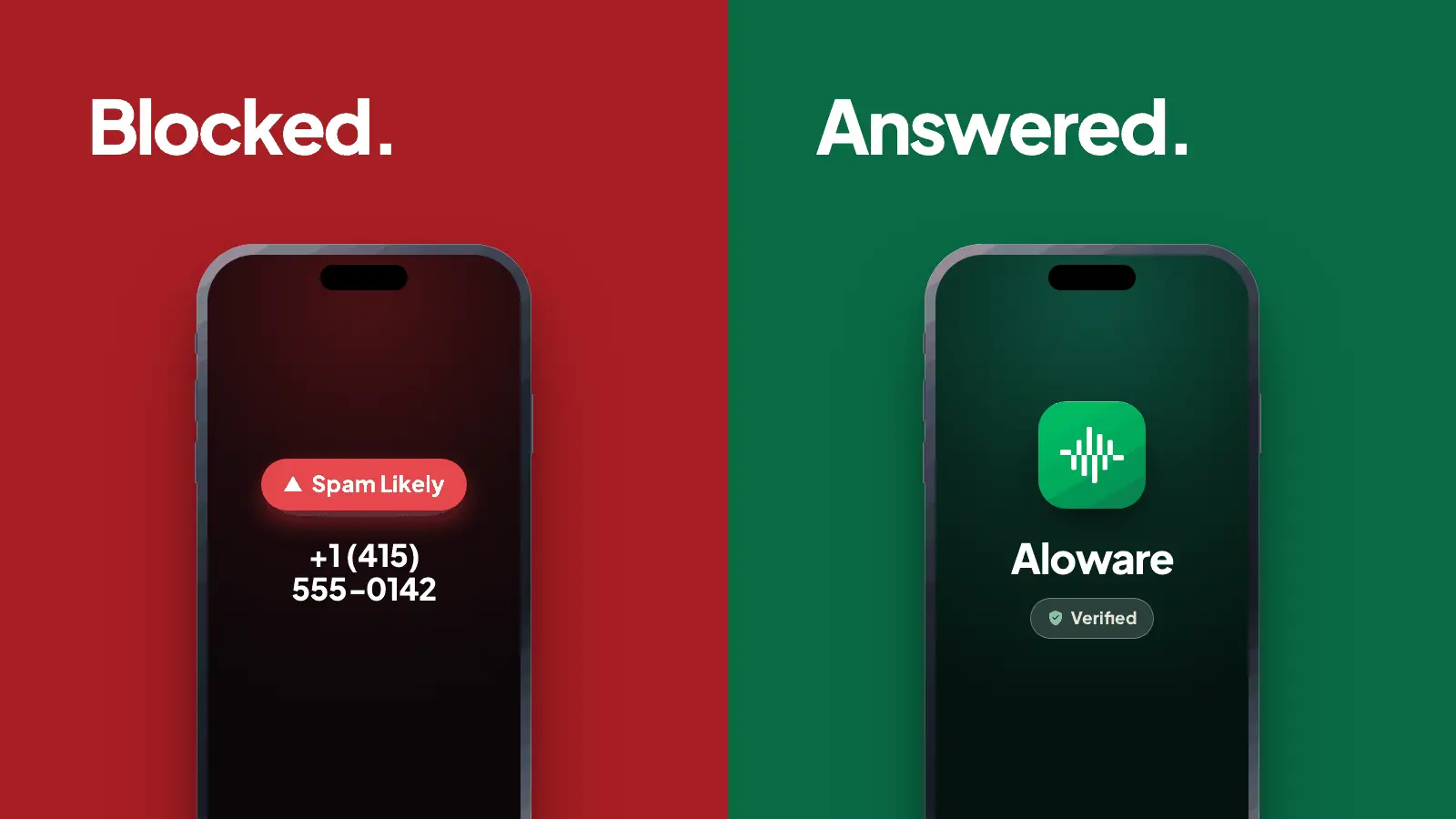
Carriers mark a business number as spam when their analytics partners score the number's calling pattern and recipient feedback as unwanted. Verizon, T-Mobile and AT&T each hand that scoring to an analytics vendor (TNS, First Orion and Hiya respectively, per Aloware's Voice Integrity registration), and the score is built from two inputs: what your leads do when you call, and what your traffic looks like from the network side. The eight causes below are the ones we trace flags back to, roughly in the order we find them.
1. Lead reports
Recipients tap "report spam" or "block this number." Carriers do not publish how many reports trigger a label, and the vendors say the decision is "not based on a single call or a fixed timeframe" (First Orion). Reports accumulate, then the flag appears. A brand-new number can even arrive already scored: Numeracle told the FCC that on a never-used block, Hiya rated 32% of the numbers as spam before a single call was placed.
2. Call volume on a single number
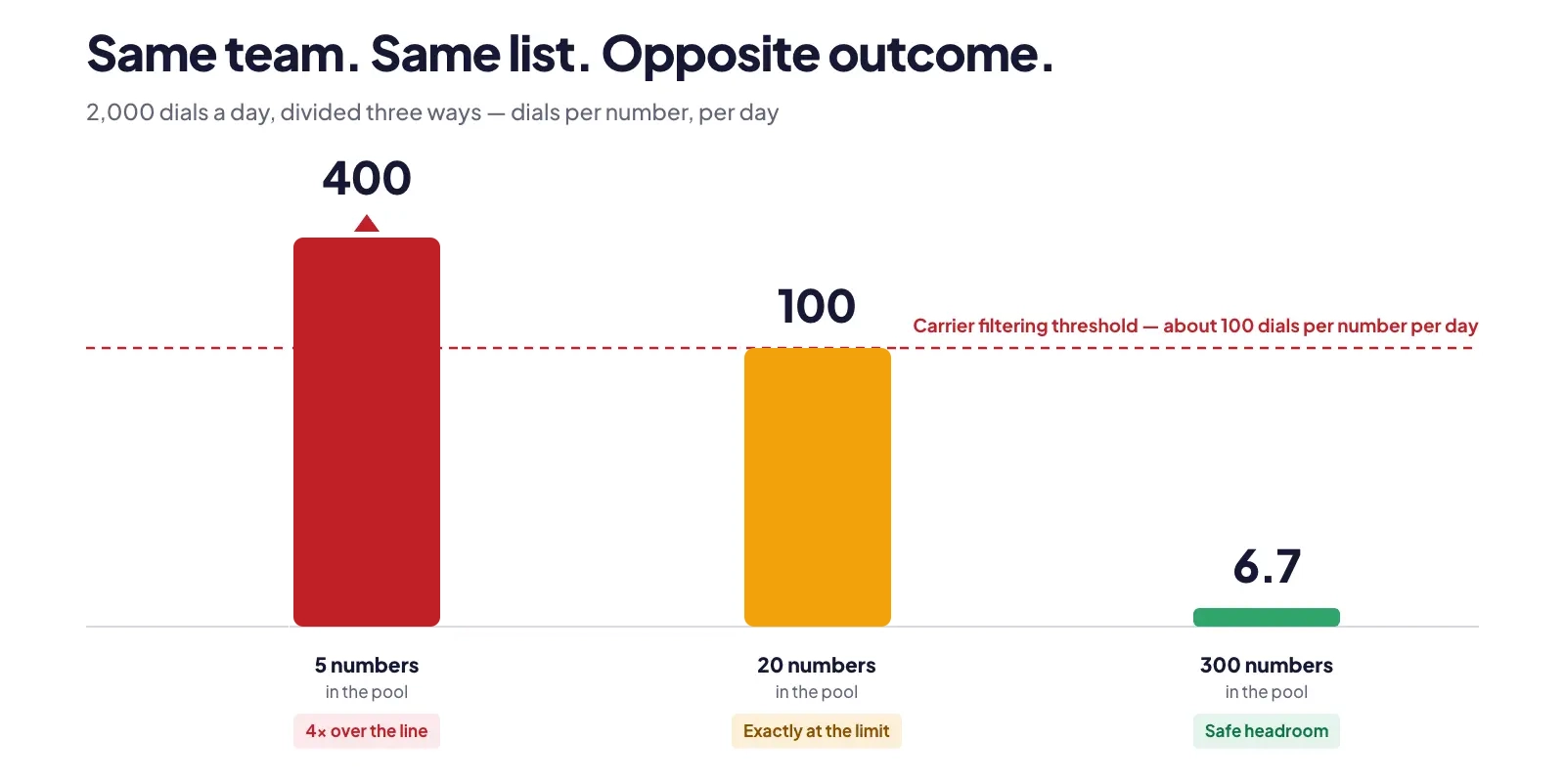
The threshold we work to is around 100 calls per number per day. Anything at or near that reads as unsolicited dialling, and the carrier starts filtering. The math is simple. Twenty agents at 100 calls a day is 2,000 calls. Push that through five numbers and each one carries 400 calls, four times the ceiling. Spread it across a 300-number pool and each number carries six or seven. Same team, same list, opposite outcome. In an account we pulled data on this month, one agent's number peaked at 255 dials in a single day while a 306-number pool on the same account sat at 1.3 dials per number. Guess which numbers were labelled.
3. Lead quality
Purchased lists and leads who never opted in are the single biggest driver, and they sit upstream of every tool on the market. Do not call them. A lead who does not remember asking for your call reports it. A lead who did not consent to texts replies STOP, and enough of those get your messaging campaign throttled too (see how to stop SMS spam reports). Leads who genuinely opted in and want the call do not generate reports. That is the whole test. Dead numbers count against you too: a run of dials to disconnected lines tells the analytics engines the list was bought, not built, so scrub disconnected numbers before they ever reach the dialer.
4. Short calls
A high share of calls under 30 seconds is the pattern the carrier reacts to most. The FCC lists "low average call duration" as a blocking signal, and Bandwidth's guidance names "a high percentage of short calls (six seconds or less)" as a classic robocall signature. A run of unanswered dials, hang-ups and abandoned voicemails all look identical from the network: short, repeated, unwanted.
5. Aggressive callback patterns
Six calls to the same lead in a day. Three dials back to back. The same lead two or three times every day for a week. First Orion's own guidance says users tolerate "two calls per day" but that at "three or more per day, user tolerance drops significantly." No tool compensates for this. In Florida and Oklahoma it is also illegal: both cap commercial solicitation at three calls in 24 hours on the same subject, "regardless of the phone number used" (Fla. Stat. 501.616).
6. Sudden peaks in usage
A number with no traffic that jumps to 100 calls a day looks like a fresh line spun up by a spam operation. We see it after a number comes off Do Not Use, and on every brand-new line and pool. Expect elevated flagging in the first two weeks of any new number. Twilio's guidance goes further for numbers that changed hands: rest a repurposed number "at least 45 days" before dialling from it.
7. Weak STIR/SHAKEN attestation
Every call carries an attestation level signed by the originating carrier:
A. when the carrier has verified you own the number
B. when it knows the account but the number is not assigned to your STIR/SHAKEN profile
C. when it only knows the call passed through its gateway.
Attestation is one input to the carrier's analytics, not an automatic reject, but lower attestation gets filtered more often and shows up as busy tones or calls that never connect. On Aloware, attestation is set up at account creation. The gap is numbers added later, which frequently sit unassigned and sign at B until someone submits them. The mechanics are in our CNAM and STIR/SHAKEN explainer.
8. Number churn
Constantly swapping numbers to escape labels, sometimes called snowshoeing, is itself a detected pattern. Hiya says its maturity modelling "defeats number rotation" and that 18% of all reported spam calls come from numbers with minimal calling history (Hiya, January 2025). A rotated-in number can be tagged within a handful of calls. The state laws above count attempts "regardless of the phone number used" for the same reason.
Key takeaway: a spam label is a score on the number's behaviour, built from lead reports and network patterns. Volume per number, short calls, bought lists and rotation are the four inputs you control directly.
What does carrier filtering look like when there is no label?
Filtering does not always show as "Spam Likely" on the lead's screen. It can present as a busy tone, a call that rings out and never connects, or a call the recipient never sees at all. The FCC gave carriers a safe harbor to block calls "based on reasonable analytics" back in 2020 (FCC 20-96), naming "large bursts of calls in a short time frame; low average call duration; a large volume of complaints" as the signals, and the carriers use it. The label is only half the damage anyway: 86% of calls from unknown numbers go unanswered, according to Hiya's State of the Call 2026, a survey of more than 12,000 consumers across six countries. T-Mobile's Scam Block "automatically blocks all Scam Likely calls before they ever reach your phone." Verizon's Call Filter sends flagged calls to voicemail or terminates them.
The tell is in your own call log. If a growing share of dials end in a few seconds with no voicemail and no ring on the lead's side, you are being blocked, not ignored. Aloware labels those calls "Blocked by Carrier" in the Call Log and Activity Feed using the carriers' SIP response codes, so you can separate a list problem from a reputation problem before you touch either. For the full carrier mechanics, start with why legitimate sales calls get flagged as spam.
Key takeaway: a busy tone, a call that never connects and a call the lead never sees are all carrier filtering. Check the call log for short, silent dials before you blame the list or the script.
How do you keep a number from being flagged?
Every step below is free except the last two products in the next section. Work through the free ones first. They fix the causes, and they prove their value before you spend anything. Do not add NumberGuard before these are in place, because a number cleaned on Tuesday is flagged again by Friday when the agent keeps pushing 200 calls a day through it. The account in the next section had NumberGuard running the whole time it was being flagged.
Sizing and setup
- Do the discovery before you buy numbers. Use case, size of the sales team, daily call goal per agent. Those three numbers decide how big the pool has to be. Inbound-heavy teams do not need Local Presence. Outbound-heavy teams do.
- Size the pool against the traffic. Divide expected daily calls by pool size and keep the result well below 100. On Aloware, a Major Cities pool tops out around 88 to 90 numbers and a Nationwide pool at up to 300, typically 260 to 270 delivered depending on carrier inventory.
- Weight the pool toward the states you actually call. Pull the last one to three months of call volume by state. Put more numbers in the heavy states and one number per state everywhere else so an occasional call still gets a local area code. Same number count, same price, higher pickup, lower spam exposure. See Local Presence for how the pool works.
- Scan and register every number before it goes into service. Numbers can arrive already labelled, and a number that sits idle loses standing with the reputation vendors over time, so a fresh pool is not a clean pool by default. Run a scan first, register each number with the Free Caller Registry and the carriers' own free forms (Verizon's voice spam feedback form, T-Mobile's call transparency site, AT&T through Hiya), and re-register after any port, because reputation vendors key off routing changes. None of these forms tell you when a number gets flagged later; that is what monitoring is for.
- Check STIR/SHAKEN on every number, especially after adding numbers to an existing account. Open your compliance settings, look for numbers not yet submitted, select and submit them. Do this first whenever a client reports busy tones or calls that disconnect.
- Set the CNAM at line setup. It is free and takes minutes (registering CNAM in Aloware). Be honest that display is not guaranteed. T-Mobile includes name caller ID for all postpaid customers. Verizon shows it only on Call Filter Plus, and AT&T only on ActiveArmor Advanced, so a large share of leads never see it at all.
Calling behaviour to teach every agent
- Always leave a voicemail. Non-negotiable. It pushes the call past the short-call pattern, and it trains the iOS and Android filters: a lead who has a voicemail or a text from you gets a "Maybe: [name]" prompt instead of a silently filtered call. Keep it to 15 to 30 seconds, and always name your company and leave a callback number. Federal telemarketing rules require both on outbound sales calls (47 CFR 64.1200), and a generic message without them helps nobody.
- Use voicemail drops where agents will not record live. A voicemail drop plays into the lead's mailbox during the connected call, so the network still registers duration even though the agent shows no talk time. Drops go only to leads with written consent.
- Send a compliant text before the call. It builds recognition before the phone rings. On Aloware plans, agent calls and texts on US and Canada local numbers are unlimited, so it costs nothing beyond the carrier's per-segment pass-through fee. Opted-in leads only, always, and watch the automated volume too: the account above was sending five texts for every call it placed, 96% of them from CRM workflows, and opt-outs on that volume feed the same brand reputation the calls trade on.
- Space out the callbacks. At most a double dial, then six to eight hours before the next attempt that day, then 24 hours, then 48. Never six attempts in a day. Never two or three every day.
- Watch call duration as a health metric. Track the share of calls under 30 seconds and under two minutes, plus average talk time. When the short-call share climbs, the carrier is already reacting.
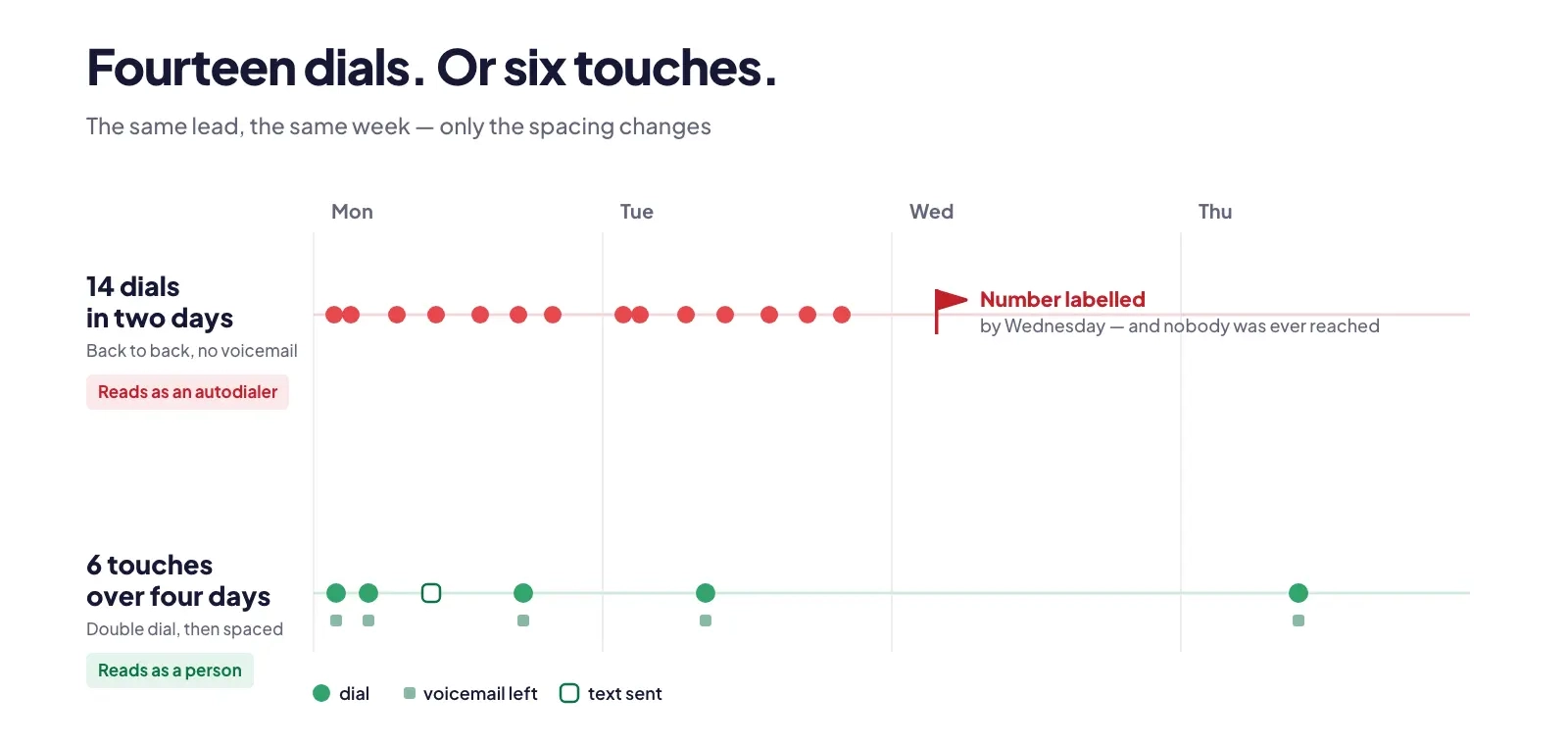
❌ Monday: lead does not answer. Agent redials immediately, then again at 10:15, 11:40, 2:00, 3:30 and 4:45. No voicemail on any of them. Tuesday, same thing. By Wednesday the number is labelled and the agent has never spoken to anyone.
✅ Monday 9:30: lead does not answer. Agent double dials, leaves a 20-second voicemail naming the company and a callback number, and sends one text. Next attempt 4:00 pm. Then Tuesday. Then Thursday. Six touches over four days, every one of them a real contact from the network's point of view.
Key takeaway: pool sizing, STIR/SHAKEN checks, CNAM, voicemails, a text before the call and spaced callbacks all cost nothing. They remove the causes. The paid tools only work once these are in place.
Which tool fixes which problem?
Every tool in this space fixes one thing and gets sold as if it fixes everything. Here is what each one does and does not do.
The three paid layers, NumberGuard, Branded Calling and Local Presence, are what we call the Pickup Stack. They are add-ons, priced separately from the seat, and if you run real outbound volume they are not optional: without them a clean number stays clean for a few weeks and then decays. The order you add them in matters.
- NumberGuard, once the practices are in place. Never before. Review the weekly scan and escalate for remediation any number flagged three weeks running. In our experience T-Mobile and AT&T clear a number in two to three days. Verizon takes two to three weeks, because it holds the number in a probation state and it keeps appearing on scans during that period. That is not the tool failing. It is Verizon's process.
- Do Not Use, as a second step. Rest a persistently flagged number for a week. The Do Not Use setting in your line's phone-number list keeps the number on the account and it still receives inbound calls. Bringing it back creates exactly the usage peak the carriers watch for, so on an individual line ramp it back gradually: 10 to 20 calls a day, then 40 to 60, then normal. Inside a Local Presence pool you cannot control that ramp, so use Do Not Use more sparingly there.
- Branded Calling, for brands their leads already recognise. It does not remove or override a label, but a registered brand carries more credibility and is harder to label. It displays on T-Mobile and Verizon only, and even there display is not guaranteed on every device. AT&T is not available. It is billed per call, not per minute, and the per-call rates are on the pricing page. Run it alongside NumberGuard, because with branding alone you have no way to see whether numbers are being flagged.
- Changing numbers, last. Only after two remediation cycles and two to three months of a number still being flagged despite good practices. Never a wholesale pool replacement every month. That is the rotation pattern the carriers penalise, and you will have taught them to distrust the whole account.
Where the dials come from matters as much as how many. A parallel dialer that rings several leads at once and drops the ones who answer second generates exactly the short-call, dead-air pattern in cause four. That is why we run one-to-one power dialing and nothing else. The sales dialer comparison covers the trade-off.
Key takeaway: Local Presence spreads the load, NumberGuard finds and clears labels, Branded Calling adds identity, STIR/SHAKEN and CNAM are the foundation. Add them in that order, and only after the free practices are running.
Why did my numbers get flagged this month when nothing changed?
Something did change, and it is usually one of two things. The first is the lead source. A batch of leads who do not remember opting in, or never did, generates reports within days, and the reports land on whichever numbers called them. If the flags started the same week a new list went into the dialer, that list is the cause, and no amount of remediation fixes it while the list is still being called. The second is carrier skew. If more of this month's leads happen to be on AT&T, the reports and the flags concentrate on AT&T, because each carrier scores you separately. That looks like your numbers suddenly got worse. It is the distribution of the people you called.
Expect a label at some point on any real outbound volume. What decides whether it sticks is the calling pattern behind it. The account we audited in the first week of September is the clearest example I have. They had both remediation tools running, NumberGuard and Branded Calling, and their numbers were still flagged. The tools were not failing. The calling pattern underneath them was, in exactly the ways carriers score. Thirty days of data:
- 34,089 outbound dials. A 306-number Local Presence pool, sized right and weighted sensibly by state, carried only a quarter of them, about 1.3 dials per number per day.
- The other three quarters ran through a handful of personal agent lines. Four agents each spent an entire month dialling from a single number: 11,643 dials on four numbers, peaking at 208 to 255 dials on one number in one day. That is two to two and a half times the level at which carriers start filtering, and it happened on 61 separate number-days.
- 58.2% of all dials lasted under 30 seconds. Only 6.8% produced 60 seconds or more of talk time. Voicemail drops: 304 in the month, under 1% of dials, and zero on eight of the days.
- 29.8% of all dials were a third or later attempt on the same lead on the same day. 1,008 leads were dialled ten or more times in the month. One lead was dialled 68 times.
- Five of the six flagged agent numbers were labelled on AT&T, the one carrier where Branded Calling does not display.
Nothing on that list is a product problem, and nothing on it is a list-quality problem either. Four numbers were behaving like an autodialer in front of every carrier watching. The fix cost nothing: move the four agents onto the pool they were already paying for, cap dials per number at 50 a day, turn voicemail drops on for every unanswered dial, pull the 1,008 over-dialled leads out of active cadences, and only then give NumberGuard two clean remediation cycles. Rotation was the last item on the list, because under the same pattern the new numbers would be flagged again inside a fortnight.
Key takeaway: frame the label as carrier skew and calling patterns, never as an accusation. Set the expectation that labelling happens, and that practices decide whether it sticks.
The pickup-rate audit: run this before you buy anything
- Divide yesterday's total dials by the number of active outbound numbers. If the answer is anywhere near 100, the pool is too small.
- Pull the share of calls under 30 seconds for the last two weeks. If it is climbing, the carrier already noticed.
- Count callbacks per lead per day. Anything above two is a pattern the vendors score against you.
- Check that every number on the account is submitted for STIR/SHAKEN, including the ones added last month.
- Check that every line has a CNAM registered and approved.
- Listen to five random voicemails. Every one should name the company and give a callback number in under 30 seconds.
- Confirm that the list being dialled came from opt-in, and that texts go only to leads who consented.
- Look at the call log for short, silent dials with no voicemail. Those are blocks, not ignores.
- Pull volume by state for the last 90 days and compare it against how the Local Presence pool is weighted.
- Only now decide whether the account needs NumberGuard, Branded Calling, or a rested number.
The bottom line
Your number is marked as spam because of what the number did, and no product undoes behaviour. Size the pool, submit every number for attestation, register the CNAM, leave a voicemail every time, text before you call, space the callbacks. Those cost nothing and they fix the causes. Then add NumberGuard to see and clear the labels, Branded Calling to put a name on the screen, and Local Presence to keep the load spread. Do it in that order and the same three questions stop arriving every morning.
See the Pickup Stack on your own numbers
Bring your call log and your current pool. Book a 20-minute demo and we will run the audit above live, show you which numbers are flagged today, and size the pool against your real volume.
Frequently Asked Questions
Why is my business phone number marked as spam?
Carriers mark a business number as spam when their analytics partners score the number's behaviour as unwanted calling. The inputs are recipient reports and blocks, call volume from a single number, a high share of very short calls, repeated calls to the same person, sudden spikes in volume, weak STIR/SHAKEN attestation, and frequent number swapping. Verizon, T-Mobile and AT&T each rely on an analytics vendor for that score, and none of them publishes a threshold. The label attaches to the number itself, so changing the script does nothing. The fix is to change what the number does: spread volume across a properly sized pool, leave a voicemail on every unanswered call, space out callbacks, and call only leads who opted in.
How many calls per day can one phone number make before it gets flagged?
No carrier or analytics vendor publishes a number. The FCC's blocking rules only name the signals carriers may use, including large bursts of calls in a short time frame and low average call duration. Across Aloware accounts, the working ceiling we see is about 100 calls per number per day. At or near that level, carriers start filtering, whether as a label, a busy tone, or a call that never connects. Size your number pool so that daily dials divided by active numbers stays well below 100. Twenty agents making 100 calls each is 2,000 calls; across a 300-number pool that is fewer than seven per number.
Does leaving a voicemail help stop spam labels?
Yes. A voicemail pushes the call past the short-call pattern that carriers score against a number, because the network registers a connected call with real duration instead of a hang-up. It also trains the iOS and Android filters: a lead who has received a voicemail or a text from your number is more likely to see a suggested name on the next call rather than a silently filtered one. Keep it to 15 to 30 seconds, and always name your company and leave a callback number, which federal telemarketing rules require on outbound sales calls. If agents will not record live, a voicemail drop played during the connected call registers duration the same way.
Does STIR/SHAKEN stop my calls from being marked as spam?
No. STIR/SHAKEN is an authentication framework. It tells the receiving carrier how confident the originating carrier is that you own the number you are calling from, at level A, B or C. Carriers use that attestation as one input to their spam analytics, alongside call patterns and recipient reports, so a fully attested number can still be labelled if its behaviour looks like spam. The reverse also matters: a number with weak attestation gets filtered more often and shows up as busy tones or calls that never connect. Check that every number on your account is submitted for attestation, especially numbers added after the account was created, because those often sit unassigned.
Does branded caller ID remove a spam label?
No. Branded calling and spam labelling run on separate carrier systems. Registering a brand puts your verified business name, and on enhanced tiers your logo and call reason, on the recipient's screen on T-Mobile and Verizon. It does not clear an existing label and it does not repair a damaged number reputation. On Verizon, a risk label takes precedence and the brand does not display at all. A registered brand is harder to label going forward and carries more credibility, which is why it belongs in the stack. Pair it with reputation monitoring, because with branding alone you have no way to see whether your numbers are being flagged.
How long does it take to remove a spam label from a phone number?
It depends on the carrier. In our experience with NumberGuard remediation, T-Mobile and AT&T clear a number in about two to three days. Verizon takes two to three weeks, because it holds the number in a probation state and the number keeps appearing on scans during that period. No carrier publishes a guaranteed timeline, and the Free Caller Registry states plainly that registration does not guarantee redress. The bigger factor is what happens after remediation. If the number goes straight back to 100-plus calls a day with no voicemails, it is flagged again within days. Fix the calling practices first, then remediate.
Should I change my phone number if it is marked as spam?
Only as a last resort. Constantly swapping numbers to escape labels is a pattern the analytics vendors detect and penalise. Hiya's maturity model specifically targets number rotation, and a freshly rotated-in number can be tagged within a handful of calls. Florida and Oklahoma law also count call attempts regardless of the phone number used. Change a number only after two remediation cycles and two to three months of continued flagging despite good calling practices. Never replace a whole pool every month. Rest a persistently flagged number instead, then bring it back gradually at 10 to 20 calls a day before ramping to normal volume.
Why does my CNAM caller ID name not show on cell phones?
CNAM display on mobile depends on the recipient's carrier and plan, not on your registration. T-Mobile includes name caller ID for all postpaid customers through Scam Shield. Verizon shows caller names only on the paid Call Filter Plus add-on, and AT&T only on ActiveArmor Advanced, so a large share of mobile recipients never see the name at all. Registration also takes time: approval within about 48 hours, then 30 to 45 days for carrier databases to fully update. Register the CNAM anyway. It is free, it helps on landlines and on the carriers that display it, and it costs you nothing when it does not appear.
Is it legal to call the same lead several times a day?
Federal rules set no numeric cap but ban calling repeatedly or continuously with intent to annoy, abuse or harass. Several states go further. Florida and Oklahoma both prohibit more than three commercial solicitation calls to a person in a 24-hour period on the same subject, regardless of the phone number used. Carrier analytics vendors score the same behaviour: First Orion says recipients tolerate two calls a day, and that tolerance drops sharply at three or more. The practical cadence is at most a double dial, then six to eight hours before the next attempt that day, then 24 hours, then 48.
What does the Do Not Use setting do on a phone number?
Do Not Use marks a phone number as unavailable for outbound calling without removing it from your account. In Aloware it sits in the line's phone-number list next to transfer and unrent. The number stays rented and still receives inbound calls, so leads who saved it can still reach you. Use it to rest a persistently flagged number for about a week after remediation. When you bring it back, ramp the traffic gradually, 10 to 20 calls a day and then 40 to 60, because a jump from zero to full volume is exactly the spike carriers watch for. Inside a Local Presence pool you cannot control that ramp, so rest pool numbers more sparingly.
.png)

Brandi Rice is the VP of Revenue at Aloware, focused on the operational side of running a contact center: SDR onboarding, connection-rate diagnostics, A2P 10DLC and STIR/SHAKEN compliance, healthy calling behavior, and the KPIs that predict revenue. She writes for sales managers, RevOps leaders, and ops practitioners.