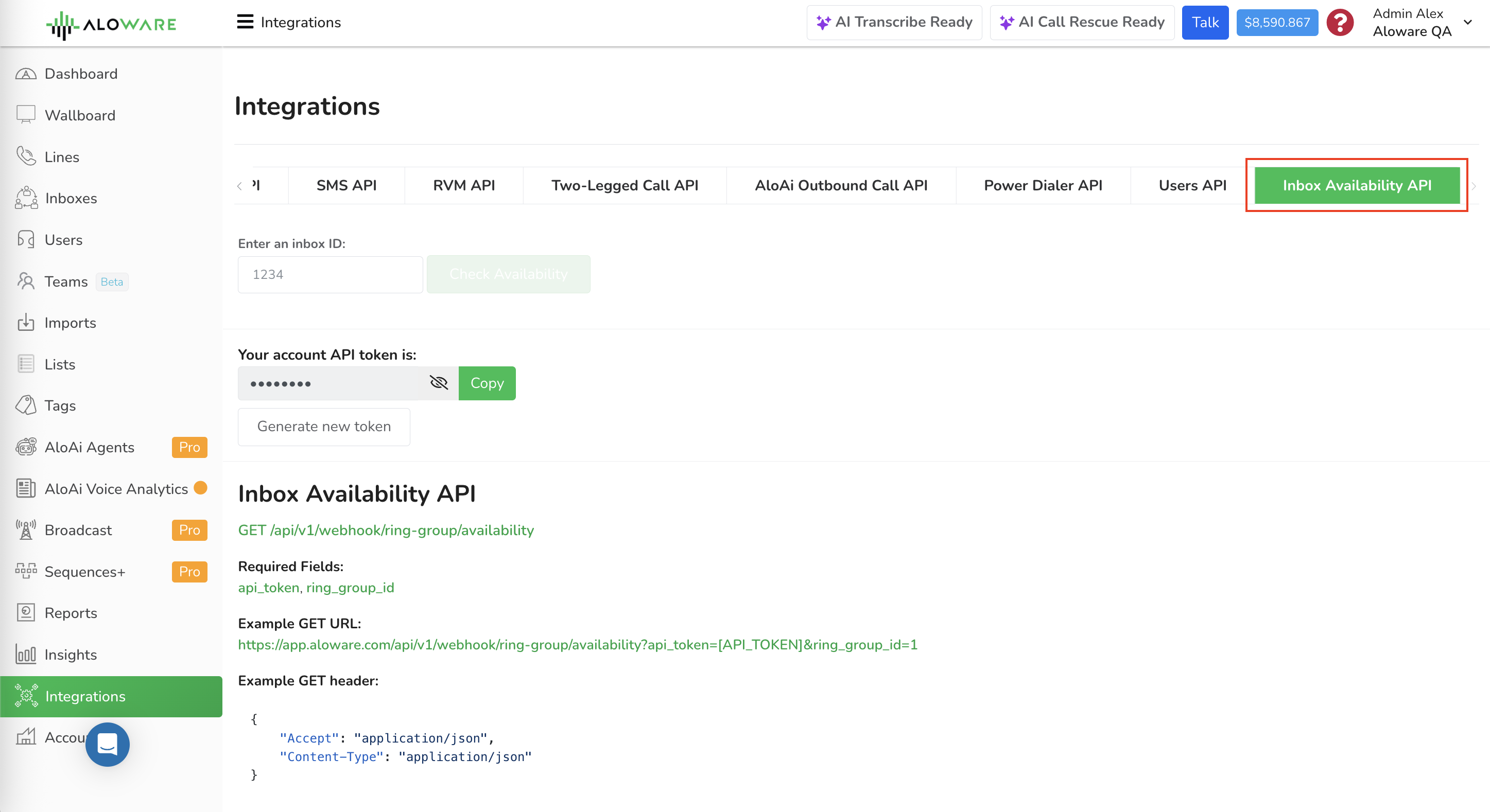
Ask Aloware which agents in an inbox can take a call right now. Send a GET request with your API token and the inbox ID, and you get back every agent in that inbox, whether calls can be routed to them, and the result of each check behind that answer.
Typical uses: watching routing readiness, feeding a custom dashboard, or letting another system decide whether to send a caller to the inbox.
Method: GETAuth: your account API token, in the query string as api_tokenInbox: the inbox (ring group) ID, as ring_group_idFormat: JSON outEndpoint One endpoint covers it:
GET /api/v1/webhook/ring-group/availabilityFields Both parameters are required.
api_token Your Aloware account API token. ring_group_id The ID of the inbox (ring group) that you want to check.
Request example Put both values in the query string:
https://app.aloware.io/api/v1/webhook/ring-group/availability?api_token=[API_TOKEN]&ring_group_id=1Send these headers with it:
{
  "Accept": "application/json",
  "Content-Type": "application/json"
}
Responses 200: success You get a JSON object listing the inbox's users with their availability results, plus counts.
{
  "test_results": [
    {
      "id": 2,
      "failed_to_route": false,
      "order": 0,
      "name": "John Agent",
      "email": "john.agent@company.com",
      "reasons": {
        "is_active": true,
        "takes_task_from_area_code": true,
        "takes_task_in_state": true,
        "takes_task_in_operating_hours": true,
        "takes_call_within_concurrency_limit": true,
        "takes_call_within_quota_limit": true,
        "takes_call_within_duplication_period_limit": true,
        "agent_answers_call": true,
        "agent_accepts_call": true
      },
      "answer_by": "Browser / Apps",
      "agent_status": "Accepting Calls"
    },
    {
      "id": 3,
      "failed_to_route": true,
      "order": 1,
      "name": "Jane Agent",
      "email": "jane.agent@company.com",
      "reasons": {
        "is_active": true,
        "takes_task_from_area_code": true,
        "takes_task_in_state": true,
        "takes_task_in_operating_hours": false,
        "takes_call_within_concurrency_limit": true,
        "takes_call_within_quota_limit": true,
        "takes_call_within_duplication_period_limit": true,
        "agent_answers_call": true,
        "agent_accepts_call": true
      },
      "answer_by": "Phone Number",
      "agent_status": "On Break"
    }
  ],
  "available_users_count": 1,
  "unavailable_users_count": 1,
  "total_users_count": 2
}
What each field means test_results An array of user objects containing the availability test results for each user in the inbox. available_users_count The number of users currently able to receive calls. unavailable_users_count The number of users who cannot receive calls. total_users_count The total number of users configured in the inbox. failed_to_route Boolean value indicating whether the system can route calls to the user. agent_status A human-readable description of the agent's current status (for example: Accepting Calls , On Break , Offline , or On Call ). reasons An object containing the results of the individual availability checks performed for the user.
The checks run on each agent Aloware runs several tests on every user in the inbox to decide whether a call can reach them.
No. Rule Field Description 1 Agent active status is_activeChecks whether the agent's account is active and not paused. 2 Area code coverage takes_task_from_area_codeVerifies whether the agent is configured to handle calls from the caller's area code. 3 Geographic coverage takes_task_in_stateChecks whether the agent is configured to handle calls from the caller's country and state. 4 Operating hours takes_task_in_operating_hoursValidates whether the current time falls within the agent's configured working hours. 5 Device capability agent_answers_callEnsures that the agent's configured device or setup can receive calls. 6 Agent availability status agent_accepts_callChecks whether the agent's current status allows them to accept incoming calls. 7 Concurrency limits takes_call_within_concurrency_limitVerifies that the agent has not exceeded the allowed number of simultaneous calls.
How availability is decided An agent counts as available only if every test that applies passes . One failed check is enough to make them unavailable, and the response then shows:
The inbox won't route calls to an unavailable agent.
400: missing parameter Leave out a required field and you get a validation error like this one:
{
  "message": "The given data was invalid.",
  "errors": {
    "ring_group_id": [
      "The inbox id field is required."
    ]
  }
}
404: no such inbox An inbox ID that doesn't exist returns:
{
  "error": "Inbox not found."
}
cURL example curl --location --request GET \ 'https://app.aloware.io/api/v1/webhook/ring-group/availability?api_token=[API_TOKEN]&ring_group_id=1'Put your own Aloware API token where [API_TOKEN] appears.