Webhooks

Get events in real time and sync them to your tools.

Webhooks let Aloware notify your other systems the moment something happens, so you don't have to poll the API. This page covers setup, authentication, delays, events, filters, saving and testing, with sample payloads at the end.

What a webhook does

An Aloware webhook integration sends event data straight to an outside system such as HubSpot, Zapier, or custom endpoints. Scheduled API checks look for changes on a timer; a webhook fires as soon as the event happens in Aloware.

Example:

  • A contact is created, and its details are posted to your CRM.
  • A call gets summarized, and the summary goes to your analytics tool.

You can add authentication, filter what gets sent, and test before you go live.

Why push beats polling

Polling the API over and over to catch new data is slow, wastes resources and can miss updates.

A webhook delivers data when the event occurs instead. Contacts sync right away, call logs stay current and downstream workflows start on their own.

The result: less manual work, more accurate data, and systems that stay in step.

Common uses

Admins typically set up webhooks to automate workflows and keep other platforms current, for example to:

  • Send every new Aloware contact to HubSpot.
  • Pass only outbound calls over two minutes to an analytics tool.
  • Deliver call transcriptions to a documentation system for quality review.

Open webhook settings

Step 1. Sign in to your Aloware admin account.

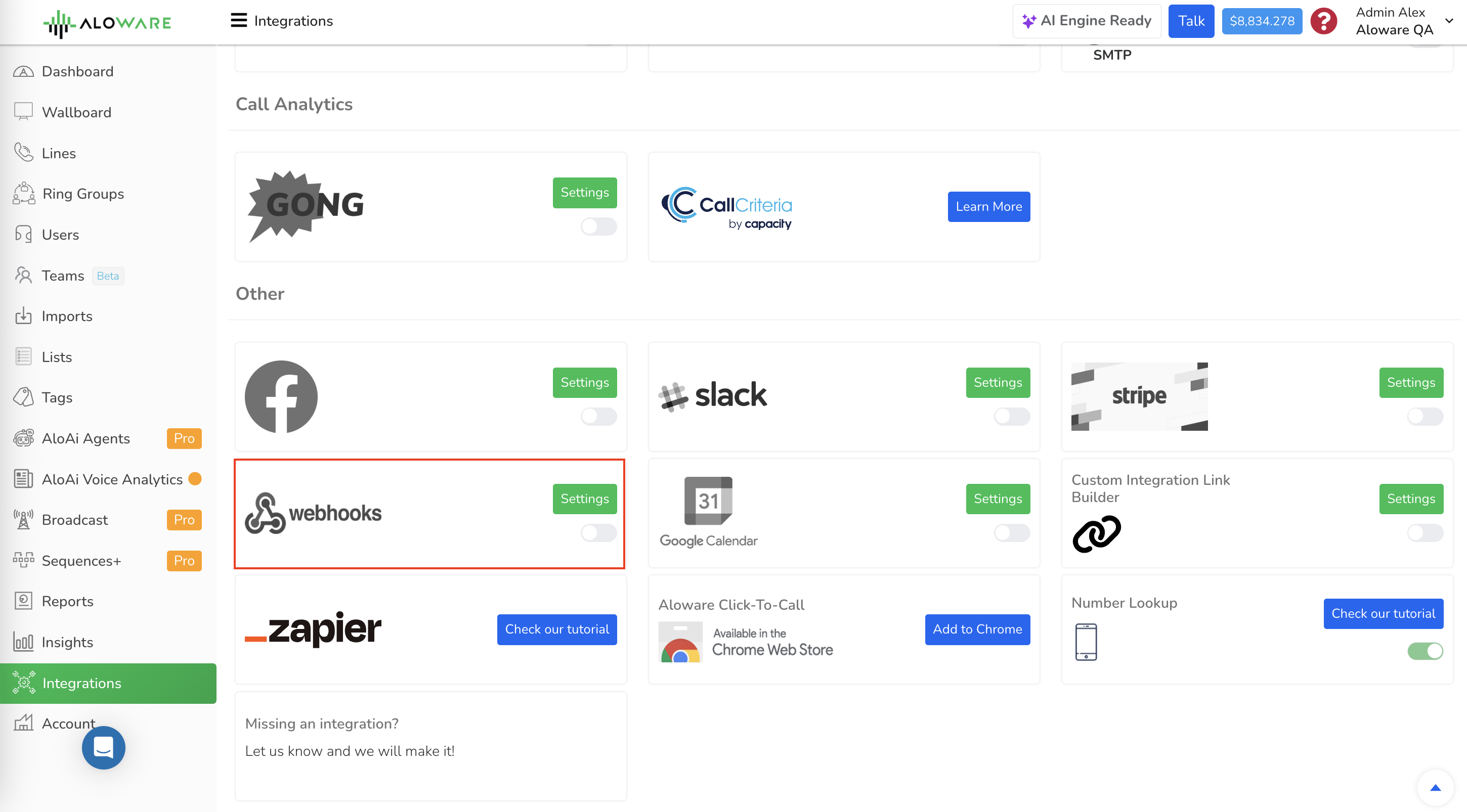
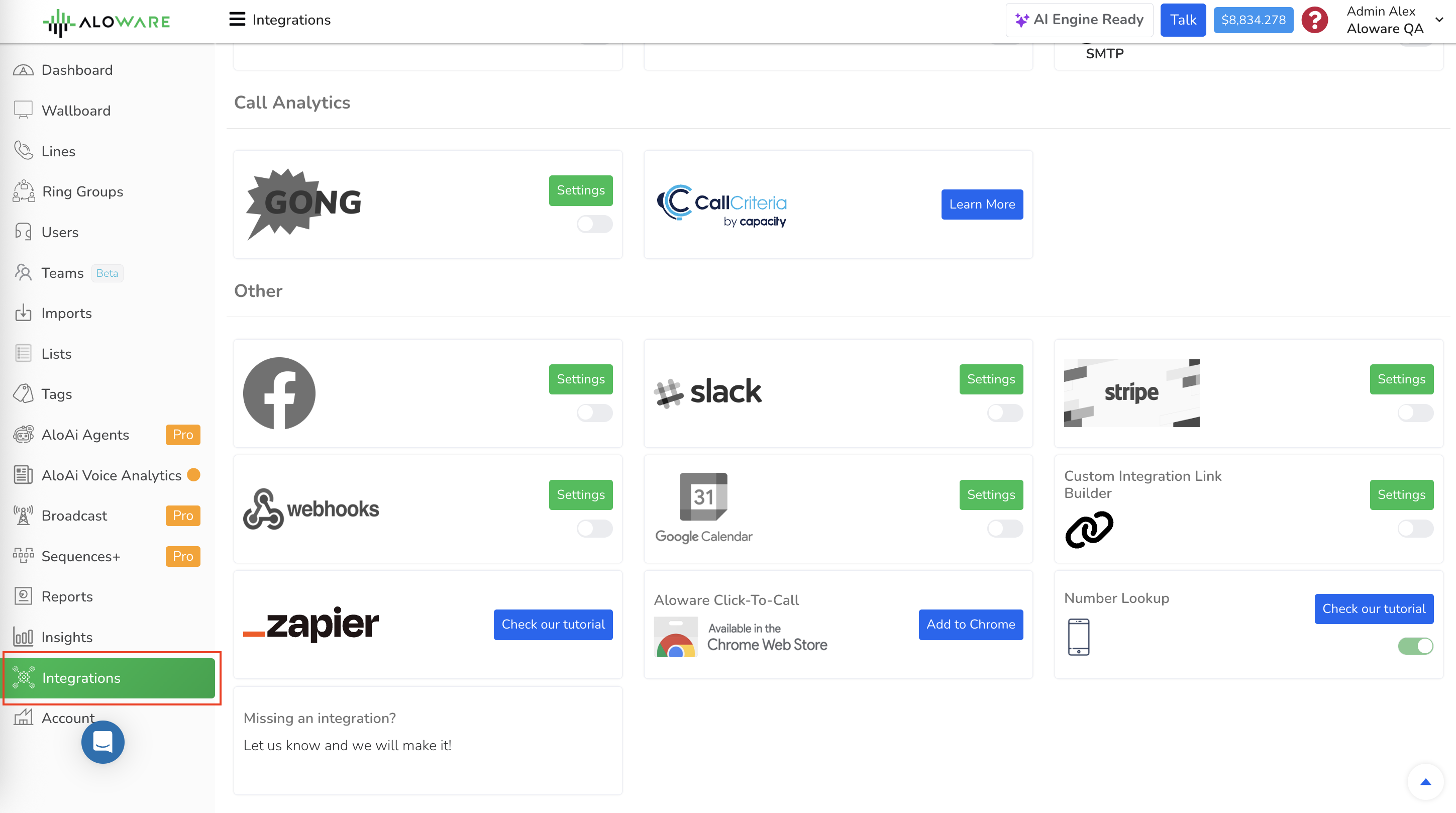
Step 2. Open the Integrations menu.

Webhooks screenshot

Step 3. Choose Webhook Integration.

Webhooks screenshot

Step 4. Click + Add Webhook, or open an existing webhook to edit it.

The form that opens holds authentication, delay, event and filter settings.

Authentication

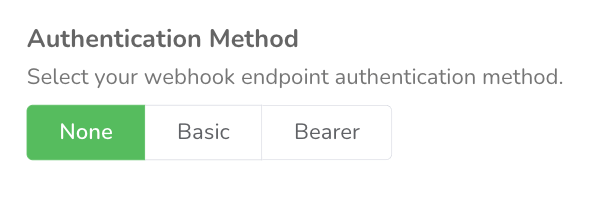
Authentication controls whether your endpoint accepts Aloware's requests. Pick None, Basic, or Bearer Token to match what the endpoint expects:

  1. None : requests go out with no credentials and no authentication mechanism.
  2. Basic : each request includes a username and password, usually base64-encoded in the Authorization header.
  3. Bearer : each request includes a bearer token in the Authorization header.
Webhooks screenshot

Delay

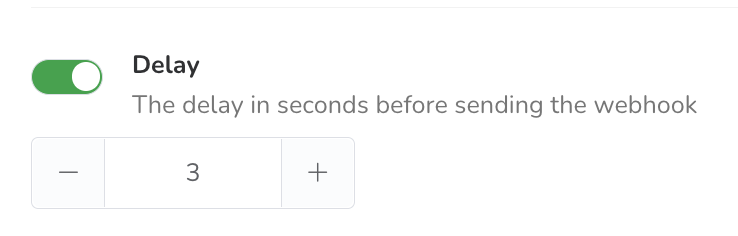
Use Delay to wait a set number of seconds before Aloware sends the request to the external service.

Add a delay when you need to:

  • Let other workflows finish before the webhook fires.
  • Avoid race conditions or actions that overlap.
  • Keep data arriving in the right order.
Webhooks screenshot

Events

Pick the activities that should send data. In the event list, tick each one you want.

Recommendation: set up a separate webhook for each event type. It's easier to manage and keeps payloads from piling up.

  1. Contact events
    1. Contact created: fires when a contact is added in Aloware and sends its data, so outside systems have it right away.
    2. Contact updated: fires whenever a contact's details change, keeping external records in sync.
    3. Contact disposed: fires when a contact's disposition changes, so you can follow status changes and act fast.
    4. Contact DNC updated: fires as soon as a contact is marked Do Not Contact (DNC) in Aloware.
  2. Communication events
    1. Communication initiated: fires when a communication with a contact starts, so you see new interactions at once.
    2. Communication disposed: fires when a communication's disposition changes, so you can follow outcomes and progress.
  3. Appointment events
    1. Appointment saved: fires once an appointment is saved in Aloware, for calendar updates, follow-ups and planning in other tools.
  4. Call events
    1. Call disposed: fires after a call ends and sends its disposition, useful for analysis and improving strategy.
    2. Voicemail saved: fires when a voicemail is saved, so teams can track it, reply and manage related tasks.
  5. Recording and transcription events
    1. Recording saved: fires when a call recording is saved, giving outside systems the full record for QA, training or compliance.
    2. Transcription saved: fires when a call or communication has been transcribed and the text saved, ready for external processing.
    3. Call summarized: fires when a transcription is summarized and sends the summary content, timestamps and contact details for real-time processing.

Filters

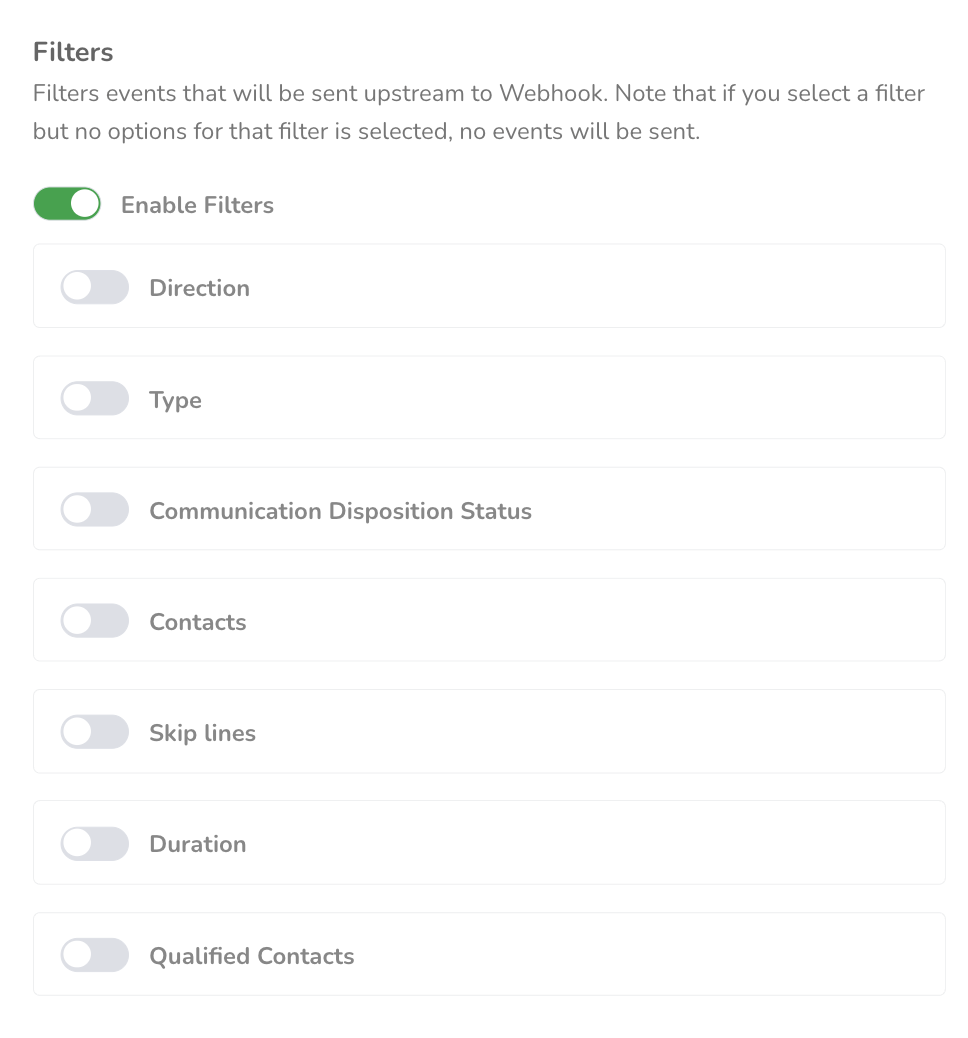
Filters narrow the data down to what you need.

  1. Direction: inbound or outbound communication
  2. Type: calls, SMS, emails, notes, reminders
  3. Disposition status: completed, missed, failed, abandoned
  4. Call duration: a minimum or maximum talk time
  5. Qualified contacts: send only when the conditions are met
  6. Skip lines: ignore events from selected phone lines
Webhooks screenshot

Well-chosen filters mean connected platforms get only structured, relevant data, which keeps workflows lean and free of errors.

Saving

There are two ways to save: Save and test webhook or Save without testing.

Webhooks screenshot

Save and test webhook

  1. Click Save and test webhook.
  2. Aloware then:
    • Stores the configuration (URL and selected event type).
    • Sends a test payload right away to the target system (e.g., HubSpot, Zapier). It holds sample data, never real customer data.
  3. Use the result to check that:
    • The webhook URL works.
    • The receiving system accepts the connection.
    • The integration shows Valid & Active.

Note: some platforms, HubSpot among them, may receive a test payload without the full set of attributes, sometimes only a true/false value. That can break field mapping, which is why Save Without Testing exists.

Save without testing

  1. Click Save Without Testing.
  2. Aloware then:
    • Stores the configuration (URL and selected event type).
    • Sends no test payload.
    • Waits for a real event in Aloware (e.g., a new contact is created, a call transcription is saved) and sends the complete payload to the target system at that point.
  3. Why this helps:
    • The first real payload has every attribute (IDs, names, contact data, etc.), so you can map fields properly in HubSpot and Zapier.
    • You avoid the issues that simplified test payloads (like true/false values) cause.
    • Your workflows run on accurate, real data from the first event.

Note: the webhook reads Untested until its first real event, but it is already active and will trigger workflows.

What users get from it

Admins do the setup, but everyday users feel the benefit. An agent in a contact center no longer updates the CRM by hand after each call, because the details show up on their own. A marketing manager can count on Zapier workflows to send follow-ups without jumping between platforms.

For users, it means information that's always current and in sync.

Checking that a webhook works

  1. Do something ordinary in Aloware, such as editing a contact or saving a call transcription.
  2. Wait for the connected system (HubSpot, Zapier, etc.) to receive the event.
  3. Confirm the workflow or automation there ran as expected.
  4. Confirm the mapped fields (contact details, transcription text, call IDs) look right.

Running through this confirms the integration works, and it needs no technical setup knowledge.

Sample payloads

These examples show the kind of data each webhook sends:

Outbound call made

{
"body": {
"id": "54363660",
"company_id": "47",
"campaign_id": "2803",
"ring_group_id": "",
"owner_id": "42",
"user_id": "42",
"workflow_id": "",
"broadcast_id": "",
"incoming_number_id": "6648",
"incoming_number": "+18186006750",
"contact_id": "6896898",
"call_disposition_id": "",
"lead_number": "+18552562001",
"target_users": "",
"attempt": "",
"attempting_users": "",
"destination_number": "client:agent42",
"transfer_prior_user_ids": "",
"transfer_target_user_ids": "",
"in_cold_transfer": "",
"direction": "2",
"type": "1",
"is_read": "",
"recorded_file_is_migrated": "",
"voicemail_is_migrated": "",
"legc_uuid": "",
"legc_status": "",
"first_time_caller": "0",
"body": "",
"attachments": "",
"conference_status2": "10",
"current_status": "completed",
"current_status2": "9",
"disposition_status": "completed",
"disposition_status2": "4",
"resolution2": "1",
"callback_status": "",
"transfer_type": "",
"rejected_by_app": "0",
"duration": "14",
"talk_time": "12",
"wait_time": "4",
"csat_score": "0",
"notes": "",
"country": "US",
"state": "US",
"city": "tollfree",
"engagement_data": "",
"created_at": "2021-04-23 00:22:28",
"updated_at": "2021-04-23 00:22:45",
"has_recording": "",
"has_voicemail": "",
"direct_voicemail_url": "",
"direct_recording_url": "",
"call_disposition": "",
"contact": {
"id": "6896898",
"company_id": "47",
"user_id": "2603",
"initial_campaign_id": "",
"disposition_status_id": "7327",
"lead_source_id": "",
"intake_source": "hubspot",
"phone_number": "+18552562001",
"company_name": "Aloware",
"email": "",
"first_name": "Aloware",
"last_name": "Main line",
"timezone": "America/Chicago",
"external_data": "",
"csf1": "",
"csf2": "",
"unread_count": "2",
"cnam_source": "",
"cnam_city": "tollfree",
"cnam_state": "US",
"cnam_zipcode": "",
"cnam_country": "US",
"address": "",
"website": "",
"notes": "",
"date_of_birth": "",
"last_engagement_at": "2021-04-23 00:22:28",
"last_engagement_text": "↗ (Anoosh R) Call.",
"nb_communications": "108",
"inbound_call_count": "65",
"outbound_call_count": "52",
"inbound_sms_count": "3",
"outbound_sms_count": "2",
"unread_voicemail_count": "0",
"unread_missed_call_count": "1",
"lrn_type": "3",
"is_blocked": "",
"is_dnc": "",
"uuid_v4": "1ddc5d62-bbeb-44ef-814f-b728ad649449",
"text_authorized": "0",
"text_authorized_at": "",
"thread_status": "0",
"workflow_id": "",
"created_at": "2020-04-20 04:21:40",
"updated_at": "2021-04-23 00:22:45",
"name": "Aloware Main line",
"first_communication_campaign_id": "2174",
"last_communication_campaign_id": "2803",
"lead_source": "",
"job_title": "",
"product_id": "",
"disposition_status": "Converted"
}
},
"event": "OutboundPhoneCall-DispositionCompleted"
}

Abandoned inbound call

{
"body": {
"id": "54363661",
"company_id": "47",
"campaign_id": "47",
"ring_group_id": "",
"owner_id": "2618",
"user_id": "",
"workflow_id": "",
"broadcast_id": "",
"incoming_number_id": "46",
"incoming_number": "+18552562001",
"contact_id": "6897588",
"call_disposition_id": "",
"lead_number": "+18186006750",
"target_users": "",
"attempt": "",
"attempting_users": "",
"destination_number": "",
"transfer_prior_user_ids": "",
"transfer_target_user_ids": "",
"in_cold_transfer": "",
"direction": "1",
"type": "1",
"is_read": "",
"recorded_file_is_migrated": "",
"voicemail_is_migrated": "",
"legc_uuid": "",
"legc_status": "",
"first_time_caller": "0",
"body": "",
"attachments": "",
"conference_status2": "",
"current_status": "completed",
"current_status2": "9",
"disposition_status": "abandoned",
"disposition_status2": "2",
"resolution2": "1",
"callback_status": "",
"transfer_type": "",
"rejected_by_app": "0",
"duration": "14",
"talk_time": "0",
"wait_time": "14",
"csat_score": "0",
"notes": "System: line was closed and redirected to terminate.\n",
"country": "US",
"state": "CA",
"city": "LOS ANGELES",
"engagement_data": "",
"created_at": "2021-04-23 00:22:31",
"updated_at": "2021-04-23 00:22:46",
"has_recording": "",
"has_voicemail": "",
"direct_voicemail_url": "",
"direct_recording_url": "",
"call_disposition": "",
"contact": {
"id": "6897588",
"company_id": "47",
"user_id": "2618",
"initial_campaign_id": "",
"disposition_status_id": "",
"lead_source_id": "",
"intake_source": "hubspot",
"phone_number": "+18186006750",
"company_name": "",
"email": "",
"first_name": "Aloware Contact",
"last_name": "(+18186006750)",
"timezone": "America/Los_Angeles",
"external_data": "",
"csf1": "",
"csf2": "",
"unread_count": "1",
"cnam_source": "",
"cnam_city": "Los Angeles",
"cnam_state": "CA",
"cnam_zipcode": "90013",
"cnam_country": "US",
"address": "",
"website": "",
"notes": "",
"date_of_birth": "",
"last_engagement_at": "2021-04-23 00:22:31",
"last_engagement_text": "↙ Call.",
"nb_communications": "14",
"inbound_call_count": "14",
"outbound_call_count": "2",
"inbound_sms_count": "1",
"outbound_sms_count": "0",
"unread_voicemail_count": "0",
"unread_missed_call_count": "0",
"lrn_type": "0",
"is_blocked": "",
"is_dnc": "",
"uuid_v4": "0304c414-b908-4b11-9dd7-135a4fe810a4",
"text_authorized": "0",
"text_authorized_at": "",
"thread_status": "3",
"workflow_id": "",
"created_at": "2020-04-20 04:22:16",
"updated_at": "2021-04-23 00:22:33",
"name": "Aloware Contact (+18186006750)",
"first_communication_campaign_id": "47",
"last_communication_campaign_id": "47",
"lead_source": "",
"job_title": "",
"product_id": "",
"disposition_status": ""
}
},
"event": "InboundPhoneCall-DispositionAbandoned"
}

Outbound SMS

{ 
"body": { 
"id": "45486", 
"company_id": "7", 
"campaign_id": "497", 
"ring_group_id": "", 
"owner_id": "547", 
"workflow_id": "", 
"broadcast_id": "", 
"incoming_number_id": "508", 
"incoming_number": "+12058592382", 
"contact_id": "182948", 
"call_disposition_id": "", 
"lead_number": "+14243942058", 
"target_users": "", 
"attempt": "", 
"attempting_users": "", 
"user_id": "547", 
"destination_number": "", 
"transfer_prior_user_ids": "", 
"transfer_target_user_ids": "", 
"in_cold_transfer": "", 
"direction": "2", 
"type": "2", 
"is_read": "1", 
"recorded_file_is_migrated": "", 
"voicemail_is_migrated": "", 
"legc_uuid": "", 
"legc_status": "", 
"first_time_caller": "0", 
"body": "test 2", 
"attachments": "", 
"conference_status2": "", 
"current_status": "delivered", 
"current_status2": "13", 
"disposition_status": "completed", 
"disposition_status2": "4", 
"resolution2": "1", 
"callback_status": "", 
"transfer_type": "", 
"rejected_by_app": "0", 
"duration": "1", 
"talk_time": "0", 
"wait_time": "0", 
"csat_score": "0", 
"notes": "", 
"country": "US", 
"state": "CA", 
"city": "Alhambra", 
"engagement_data": "", 
"created_at": "2021-07-19 16:00:34", 
"updated_at": "2021-07-19 16:00:36", 
"has_recording": "", 
"has_voicemail": "", 
"direct_voicemail_url": "", 
"direct_recording_url": "", 
"call_disposition": "", 
"contact": { 
"id": "182948", 
"company_id": "7", 
"user_id": "547", 
"initial_campaign_id": "10", 
"disposition_status_id": "181", 
"lead_source_id": "", 
"intake_source": "hubspot-webhook", 
"phone_number": "+14243942058", 
"company_name": "Aloware", 
"email": "sohrab@aloware.io", 
"first_name": "Sohrab", 
"last_name": "Cell", 
"timezone": "America/Los_Angeles", 
"external_data": "", 
"csf1": "", 
"csf2": "", 
"unread_count": "0", 
"cnam_source": "", 
"cnam_city": "Alhambra", 
"cnam_state": "CA", 
"cnam_zipcode": "", 
"cnam_country": "US", 
"address": "", 
"website": "", 
"notes": "", 
"date_of_birth": "", 
"last_engagement_at": "2021-07-19 16:00:34", 
"last_engagement_text": "↗ (Sohrab Sheikhani) test 2.", 
"nb_communications": "56", 
"inbound_call_count": "6", 
"outbound_call_count": "44", 
"inbound_sms_count": "2", 
"outbound_sms_count": "4", 
"unread_voicemail_count": "0", 
"unread_missed_call_count": "0", 
"lrn_type": "1", 
"is_blocked": "", 
"is_dnc": "", 
"uuid_v4": "ee5650db-f1ac-4373-a78c-ba9ad3bd9a35", 
"text_authorized": "0", 
"text_authorized_at": "", 
"thread_status": "0", 
"workflow_id": "", 
"created_at": "2021-06-14 21:38:10", 
"updated_at": "2021-07-19 16:00:37", 
"sequence_id": "", 
"name": "Sohrab Cell", 
"first_communication_campaign_id": "10", 
"last_communication_campaign_id": "497", 
"lead_source": "", 
"year": "", 
"make": "", 
"model": "", 
"price": "", 
"stock": "", 
"vin": "", 
"handsome_level": "", 
"weight": "", 
"disposition_status": "Open" 
}
}, 
"event": "OutboundSMS-DispositionCompleted" 
}

Related Aloware tools

Webhooks work together with other parts of Aloware:

  • HubSpot integration: workflows fire with the full event data.
  • Zapier automation: real event payloads sidestep the limits of simplified test data.
  • CRM sync: contacts and communication history match across platforms.

They also extend the APIs, call tracking and SMS tools by carrying data outside Aloware.

Need a hand?

Our support team can help you set this up.

Contact support