Two-legged call API

Connect an agent and a contact in one call.

Connect an agent and a contact on one phone call, started by your own software. Aloware dials both sides (the two legs) and joins them, so nobody has to dial by hand.

  • Method: POST
  • Auth: your account API token, sent in the body as api_token
  • Format: JSON in, JSON out
  • Agent side: a user (user_id plus user_phone_number) or an inbox (ring_group_id)
  • Contact side: contact_phone_number or contact_id
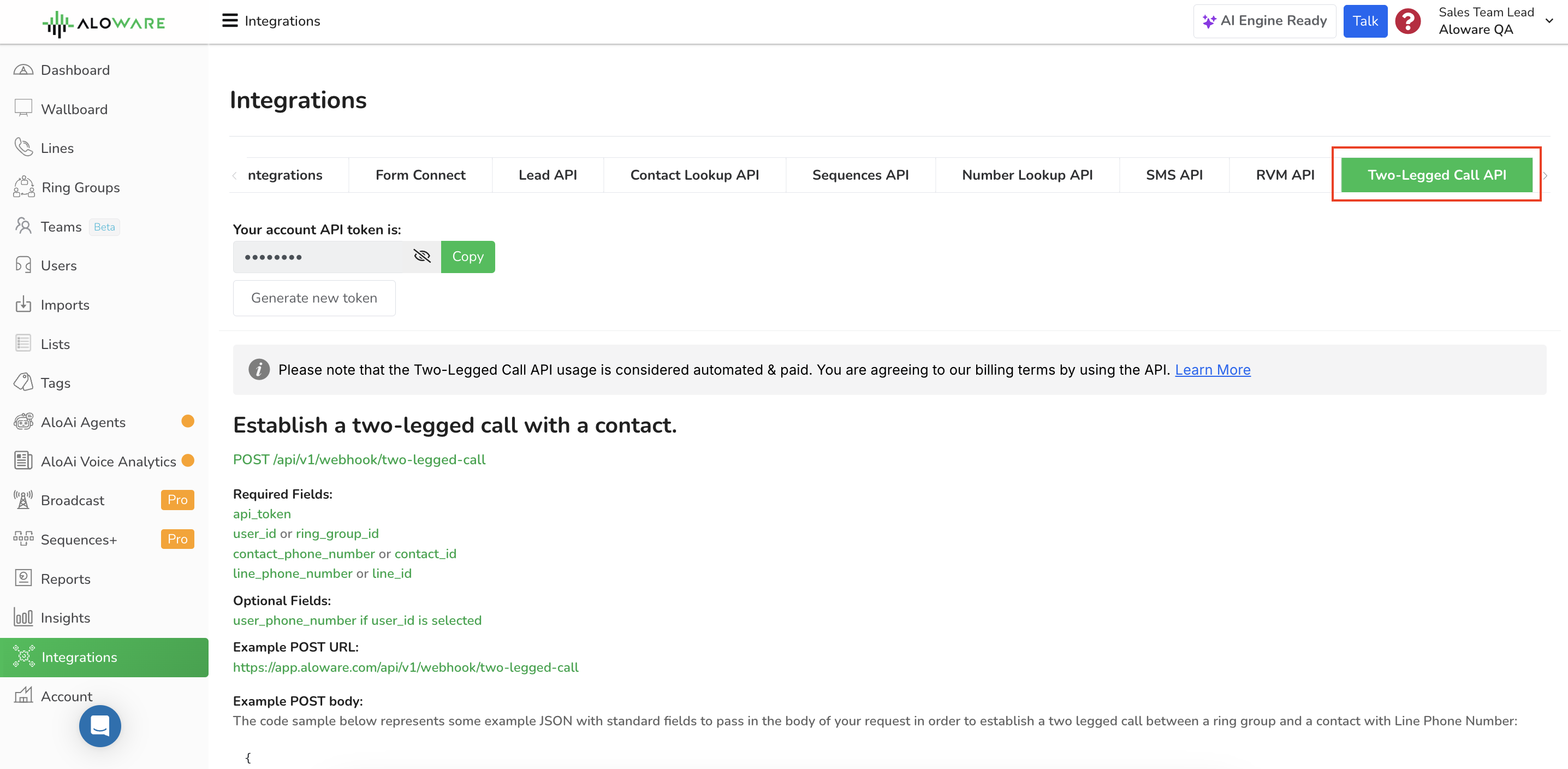
Two-legged call API screenshot
Billed: Calls started through the API count as automated, paid usage under Aloware's billing terms.

Where teams use it

Automated outbound calling in a call center

Hook the API into your call center software and let it place the calls. Agents get connected to customers without dialing, which saves time on every call, and you can still track call data such as duration and outcome for reporting.

Appointment reminders

Businesses that run on bookings, such as medical clinics or salons, can link the API to their scheduling software and call customers as an appointment gets close. A pre-recorded message plays, so fewer people miss appointments and staff stop making reminder calls themselves.

Those are two examples. The Two-Legged Call API fits any workflow where an agent and a contact need to be put on a direct call automatically.

Endpoint

POST /api/v1/webhook/two-legged-call

Fields

Required

api_tokenYour Aloware account API token.
user_id or ring_group_idEither the ID of the user or the inbox involved in the call.
contact_phone_number or contact_idThe phone number or ID of the contact you want to establish the call with.
line_phone_number or line_idThe phone number or ID of the Aloware line to initiate the call from.

Optional

user_phone_numberThe phone number of the user if user_id is selected.

Request examples

Full URL:

https://app.aloware.io/api/v1/webhook/two-legged-call

Inbox and contact number, from a line's phone number

Use this to ring an inbox and call the contact at a number you supply.

{
"api_token": "[API_TOKEN]",
"ring_group_id": "1",
"contact_phone_number": "+18181276543",
"line_phone_number": "+18552562001"
}

Inbox and contact ID, by line

Use contact_id when the contact is already in Aloware.

{
"api_token": "[API_TOKEN]",
"ring_group_id": "1",
"contact_id": "1234",
"line_phone_number": "+18552562001"
}

A specific user and contact number, from a line's phone number

Use user_id with user_phone_number to call one agent on their own phone instead of an inbox.

{
"api_token": "[API_TOKEN]",
"user_id": "1",
"user_phone_number": "+18181234567",
"contact_phone_number": "+18181276543",
"line_phone_number": "+18552562001"
}

A specific user and contact ID, by line

The same user-first call, with the contact picked by ID.

{
"api_token": "[API_TOKEN]",
"user_id": "1",
"user_phone_number": "+18181234567",
"contact_id": "1234",
"line_phone_number": "+18552562001"
}

Headers

Accept: application/json
Content-Type: application/json

Responses

202: call started

Aloware has set up the two-legged call.

{
"message": "Two-legged call established."
}

422: invalid request

The call couldn't start. The errors object lists each field that is missing or wrong.

{
"message": "The given data was invalid.",
"errors": {
"contact_phone_number": [
"The contact_phone_number field is required when contact_id is empty."
],
"contact_id": [
"The contact_id field is required when contact_phone_number is empty."
],
"line_phone_number": [
"The line_phone_number field is required when line_id is empty."
],
"line_id": [
"The line_id field is required when line_phone_number is empty."
],
"user_id": [
"The user_id field is required."
]
}
}
cURL examples

By contact phone number

curl -X POST \
https://app.aloware.io/api/v1/webhook/two-legged-call \
-H 'Accept: application/json' \
-H 'Content-Type: application/json' \
-d '{
"api_token": "[API_TOKEN]",
"ring_group_id": "1",
"contact_phone_number": "+18181276543",
"line_phone_number": "+18552562001"
}'

By contact ID

curl -X POST \
https://app.aloware.io/api/v1/webhook/two-legged-call \
-H 'Accept: application/json' \
-H 'Content-Type: application/json' \
-d '{
"api_token": "[API_TOKEN]",
"ring_group_id": "1",
"contact_id": "1234",
"line_phone_number": "+18552562001"
}'

A user and their phone number

curl -X POST \
https://app.aloware.io/api/v1/webhook/two-legged-call \
-H 'Accept: application/json' \
-H 'Content-Type: application/json' \
-d '{
"api_token": "[API_TOKEN]",
"user_id": "1",
"user_phone_number": "+18181234567",
"contact_phone_number": "+18181276543",
"line_phone_number": "+18552562001"
}'

Need another endpoint?

For other API functions or any question, email support@aloware.com and tell us what you need.

Need a hand?

Our support team can help you set this up.

Contact support